
Introduction
Thank you for choosing the WINGBO 64-inch ABS DC Ceiling Fan with Lights. This manual provides essential information for the safe installation, operation, and maintenance of your new ceiling fan. Please read these instructions thoroughly before beginning installation and retain them for future reference.
Important Safety Instructions
- Always disconnect power at the main circuit breaker before installation or servicing.
- Ensure all electrical connections comply with local codes and ordinances. If you are unsure, consult a qualified electrician.
- The mounting bracket must be securely fastened to a building structure capable of supporting the fan's weight.
- Do not bend the blade holders during installation or cleaning.
- Ensure there is adequate clearance between the fan blades and any obstacles.
- This fan is designed for indoor use and damp locations.
Package Contents
Verify that all components are present before beginning installation:
- Ceiling Fan Motor Assembly
- 5 ABS Wood Grain Blades
- Mounting Bracket
- Downrods (4.5-inch and 12-inch options)
- Canopy and Coupling Cover
- LED Light Kit
- Remote Control with Receiver
- Hardware Pack (screws, washers, wire nuts)
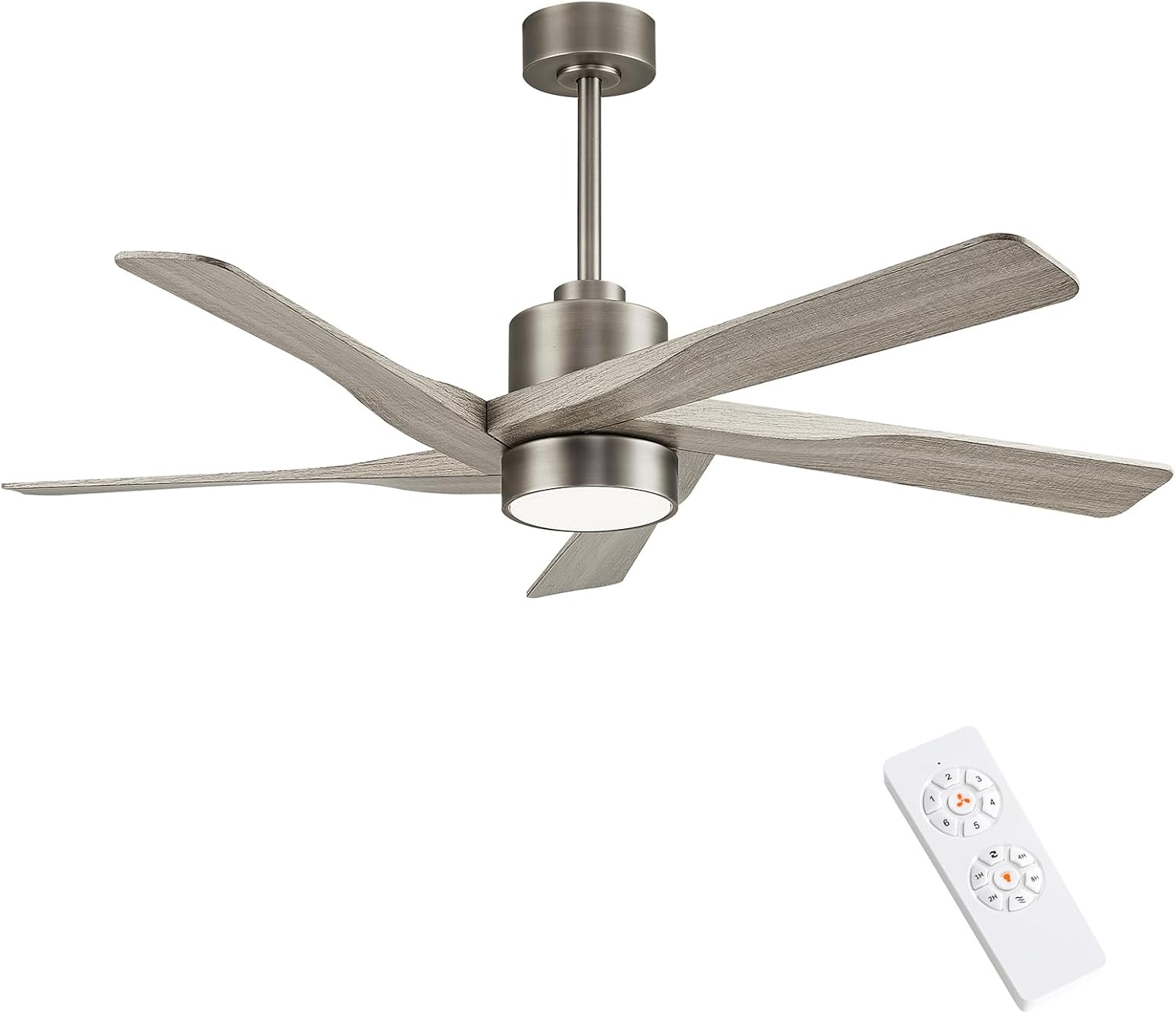
The WINGBO 64-inch ceiling fan with five wood-grain ABS blades, integrated LED light, and remote control.

The included remote control allows adjustment of 6 fan speeds, 3 light colors, timer settings, and reversible motor direction.
Setup and Installation
Follow these steps carefully to install your WINGBO ceiling fan. It is recommended to have two people for installation.
Pre-Installation Steps
- Turn off power at the circuit breaker.
- Ensure the mounting location is suitable and can support the fan's weight.
- Gather necessary tools: screwdriver, wire strippers, ladder.
Mounting the Bracket
Secure the mounting bracket to the ceiling junction box using the provided screws. Ensure it is firmly attached and stable.
Assembling the Fan Motor and Blades
Attach the five ABS wood-grain blades to the fan motor assembly using the provided screws. Ensure each blade is securely fastened.

Key features include compatibility with sloped ceilings up to 15 degrees, a 24W CCT LED light kit, and durable ABS plastic blades.

The fan's blades are made from high-grade, weather-resistant ABS plastic with a luxurious grey wood-grain finish, offering durability and quiet operation.
Wiring the Fan
Connect the fan's electrical wires to the household wiring according to the wiring diagram in the separate installation guide. Ensure all connections are secure with wire nuts. Install the receiver for the remote control within the canopy.
Attaching the Downrod and Canopy
Insert the chosen downrod (4.5-inch or 12-inch) through the canopy and coupling cover, then secure it to the fan motor. Carefully lift the fan assembly and hang it on the mounting bracket. Connect the safety cable.

Detailed dimensions of the fan, including the 64-inch blade span and the 21-inch total height with the 12-inch downrod. Also shows 4.5-inch downrod option.

The fan can be installed on sloped ceilings up to 15 degrees, offering flexible mounting options.
Installing the LED Light Kit
Connect the LED light kit wires to the fan motor's light wires. Secure the LED light kit to the bottom of the fan motor. Finally, attach the light shade by twisting it into place.

The integrated LED light kit offers three color temperature options: Warm Light (3000K), Natural Light (4500K), and Cool Light (6000K).
Installation Videos
This video provides a step-by-step guide for installing the WINGBO ABS Ceiling Fan with Lights, covering assembly, wiring, and mounting procedures.
Watch this video for instructions on how to replace an existing ceiling fan with a WINGBO 64-inch ceiling fan, detailing the removal of the old unit and installation of the new one.
Operating Instructions
Your WINGBO ceiling fan is operated using the included remote control.
Remote Control Functions
- Power Button: Turns the fan and light ON/OFF.
- Fan Speed: Select from 6 different fan speeds (1-6).
- Light Control: Adjust the LED light brightness and switch between Warm (3000K), Natural (4500K), and Cool (6000K) light temperatures.
- Timer Function: Set the fan to turn off automatically after 1, 2, 4, or 8 hours.
- Reverse Function: Change the direction of the fan blades for summer (downdraft) or winter (updraft) operation.
The included remote control allows adjustment of 6 fan speeds, 3 light colors, timer settings, and reversible motor direction.
The integrated LED light kit offers three color temperature options: Warm Light (3000K), Natural Light (4500K), and Cool Light (6000K).
The fan features a reversible DC motor for year-round comfort. In summer, it creates a downdraft for cooling, and in winter, an updraft to circulate warm air.
Fan Operation Video
This video showcases the WINGBO ABS Ceiling Fan with Lights in Nickel and Grey finish, demonstrating its quiet operation, light features, and airflow.
Maintenance
Care and Cleaning
- Always turn off the power before cleaning your fan.
- Use a soft brush or lint-free cloth to avoid scratching the finish.
- Do not use water or harsh detergents, as this could damage the motor or blades.
- Periodically check all connections and screws for tightness.
Troubleshooting
If you experience issues with your fan, refer to the following table for common problems and solutions:
| Problem | Possible Cause | Solution |
|---|---|---|
| Fan does not start | No power to the fan; Loose wire connections; Remote control battery low. | Check circuit breaker; Verify all wiring connections; Replace remote control battery. |
| Fan is noisy | Loose screws on fan blades or mounting bracket; Fan blades are unbalanced. | Tighten all screws; Use a balancing kit (not included) to balance blades. |
| Light does not work | Loose wire connection to light kit; Faulty LED light kit. | Check light kit wiring; Contact customer support for replacement. |
| Remote control not working | Battery low or incorrectly installed; Receiver not paired with remote. | Replace battery, ensure correct polarity; Refer to remote pairing instructions in the full manual. |
Specifications
Key technical details for your WINGBO ceiling fan:
| Feature | Detail |
|---|---|
| Brand | WINGBO |
| Model Name | 1 |
| Size | 64 inches |
| Color | Antique Nickel and Grey |
| Motor Type | DC (6-Speed, Reversible) |
| Number of Blades | 5 |
| Blade Material | ABS Wood Grain |
| Light Kit | 24W CCT LED (3000K, 4500K, 6000K) |
| Control Method | Remote |
| Product Dimensions | 64"D x 64"W x 21"H |
| Item Weight | 23.6 pounds |
| Installation Type | Downrod Mount (Sloped Ceiling up to 15°) |
| Indoor/Outdoor Usage | Indoor (Damp Locations) |
Warranty and Support
Warranty Information
Your WINGBO ceiling fan is covered by a manufacturer's warranty against defects in materials and workmanship. Please refer to the product packaging or original purchase documentation for specific warranty terms and duration. Keep your proof of purchase for warranty claims.
Customer Support
For technical assistance, troubleshooting not covered in this manual, or warranty inquiries, please contact WINGBO customer support. Contact information can typically be found on the product packaging or the official WINGBO website.