
1. Introduction
The HOCO EQ3 True Wireless Earbuds are designed to provide a high-quality audio experience with seamless connectivity and convenient features. This manual provides essential information for setting up, operating, maintaining, and troubleshooting your earbuds.
2. What's in the Box
Upon opening your HOCO EQ3 package, you should find the following items:
- HOCO EQ3 True Wireless Earbuds
- Charging Case
- USB-C Charging Cable
- Ear Cushions (various sizes)
- Protective Case
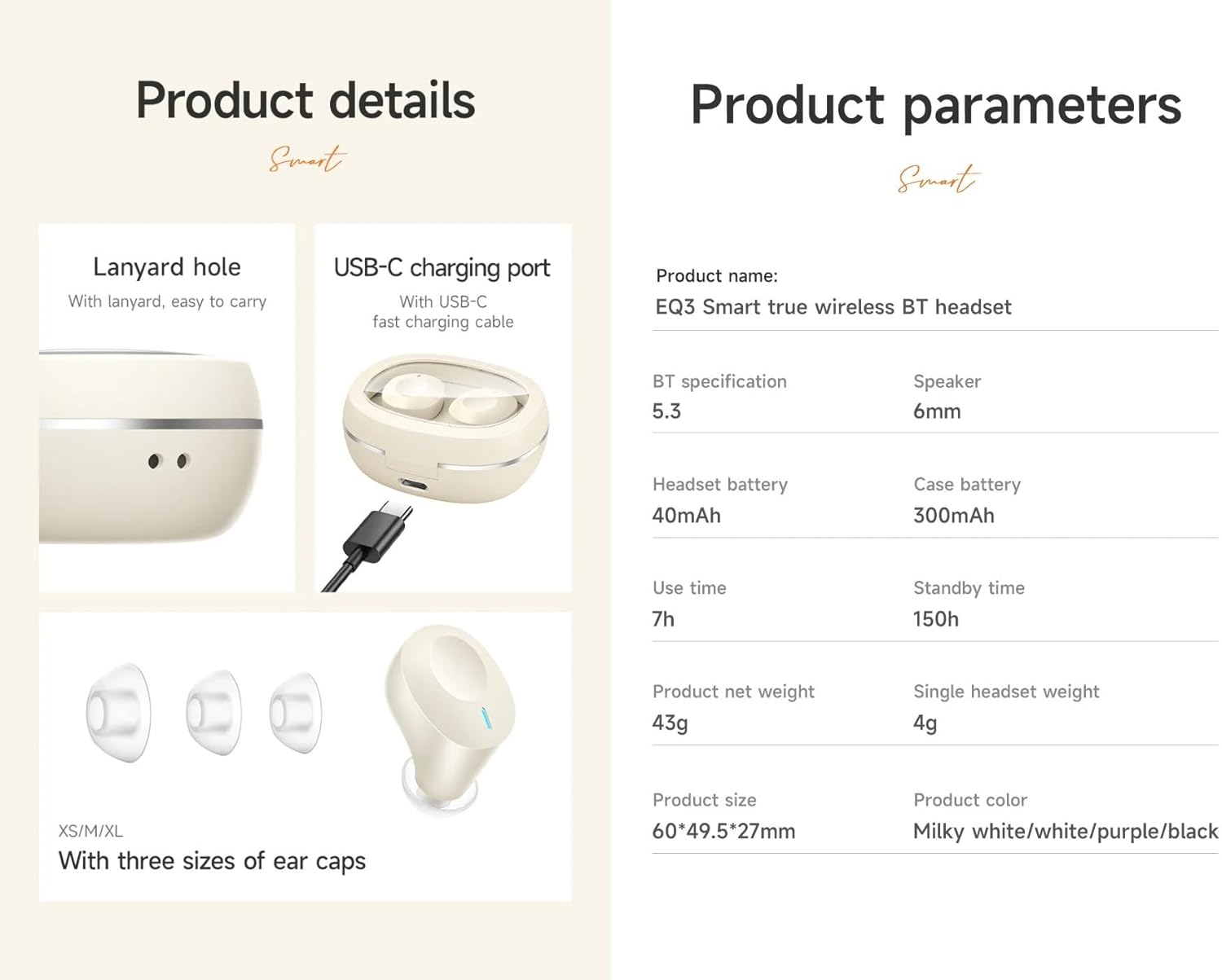
Detailed view of the HOCO EQ3 earbuds and charging case, showing the USB-C charging port, lanyard hole, and three sizes of ear caps (XS/M/XL).
3. Initial Setup
3.1 Charging the Earbuds and Case
Before first use, fully charge the earbuds and charging case. Connect the provided USB-C cable to the charging port on the case and to a compatible USB power source. The LED digital display on the case will indicate the charging status.

An image showcasing the transparent design of the HOCO EQ3 charging case with an intelligent digital display, and emphasizing the 7-hour battery life of a single earbud for extended music enjoyment.
3.2 Pairing with Your Device
- Ensure the earbuds are charged and placed inside the charging case.
- Open the charging case. The earbuds will automatically enter pairing mode.
- On your device (smartphone, tablet, laptop), enable Bluetooth.
- Search for available Bluetooth devices and select "HOCO EQ3" from the list.
- Once connected, you will hear a confirmation tone, and the earbuds will be ready for use.

An infographic showing the HOCO EQ3 earbuds and charging case, highlighting features like 7-hour single headset battery, 28-hour total working time, transparent capsule, Hi-Fi sound quality, Bluetooth 5.3, LED digital display, magnetic switch, lightweight design, TWS stereo, and touch control.
4. Operating Instructions
4.1 Power On/Off
- Power On: Open the charging case, and the earbuds will automatically power on and connect to the last paired device.
- Power Off: Place the earbuds back into the charging case and close the lid. They will automatically disconnect and power off.
4.2 Touch Controls
The HOCO EQ3 earbuds feature intuitive touch controls on each earbud:
- Play/Pause: Single tap the touch area on either earbud.
- Next Track: Double tap the touch area on the right earbud.
- Previous Track: Triple tap the touch area on the left earbud.
- Answer/End Call: Single tap the touch area on either earbud.
- Reject Call: Long press the touch area on either earbud for 2 seconds.
- Activate Voice Assistant (Siri/Google Assistant): Long press the touch area on either earbud for 2 seconds (when not on a call).

This image illustrates the Bluetooth 5.3 high-speed connection with a smartphone and details the touch control functions: single tap for play/pause, double tap for next track, triple tap for previous track, and long press for voice assistant activation.
4.3 Master-Slave Switching
The earbuds support master-slave switching, allowing you to use either earbud independently for calls or music. Simply remove one earbud from the case, and it will automatically connect. If you wish to switch to both, remove the second earbud.
5. Key Features
- Bluetooth 5.3: Ensures quick, stable, and low-latency connectivity with reduced power consumption.
- High-Fidelity Sound: Equipped with a 6mm dynamic coil unit, delivering solid and stable bass with translucent treble.
- Water Resistant: Designed to withstand splashes and sweat, making them suitable for various activities.
- Transparent Charging Case: Features an intelligent digital power display for easy monitoring of battery levels.
- Lightweight Design: Each earbud weighs approximately 4g, providing a comfortable semi-in-ear fit for extended wear.
- Automatic Pairing: Earbuds connect instantly to your device when the case is opened.

This image highlights the magnetic absorption feature for instant connection when opening the case, and illustrates the high-fidelity dynamic coil unit responsible for solid bass and translucent treble.
6. Battery and Charging
- Earbud Battery Capacity: 40mAh (each earbud)
- Charging Case Battery Capacity: 300mAh
- Single Earbud Use Time: Approximately 7 hours
- Total Working Time (with charging case): Up to 28 hours
- Standby Time: Up to 150 hours
- Charging Port: USB-C

An image detailing the 28-hour total battery life with the 300mAh charging case, and the light, comfortable semi-in-ear design of the earbuds, weighing just 4g each, for pain-free long-term wear.
7. Technical Specifications
| Feature | Specification |
|---|---|
| Brand | HOCO |
| Model Number | EQ3 |
| Bluetooth Version | 5.3 (Chip: JL AC6983D2) |
| Earbud Battery | 40mAh |
| Charging Case Battery | 300mAh |
| Use Time | 15 hours (Note: Product description states 15 hours, feature bullets state 15 hours, but images state 7 hours single headset battery and 28 hours total working time. We will use the more detailed breakdown from images/feature bullets for clarity.) |
| Single Headset Use Time | 7 hours |
| Total Working Time (with case) | 28 hours |
| Standby Time | 150 hours |
| Dimensions (Case) | 60*49.5*27mm |
| Total Weight | 43g |
| Single Headset Weight | 4g |
| Material | Plastic |
| Water Resistance Level | Water Resistant |
| Control Method | Touch |
| Compatible Devices | Cellphones, Laptops, Smart Speaker |
8. Maintenance and Care
- Cleaning: Use a soft, dry cloth to clean the earbuds and charging case. Avoid using abrasive materials or harsh chemicals.
- Storage: Store the earbuds in their charging case when not in use to protect them and keep them charged.
- Water Exposure: While water-resistant, avoid submerging the earbuds in water. Dry them thoroughly if they get wet.
- Temperature: Avoid exposing the earbuds to extreme temperatures (hot or cold) to prevent damage to the battery and internal components.
9. Troubleshooting
- Earbuds not pairing:
- Ensure both earbuds are charged. Place them back in the case, close the lid, then open it again to re-enter pairing mode. Check your device's Bluetooth settings and try reconnecting.
- Only one earbud working:
- Ensure both earbuds are charged. Try placing both earbuds back in the case, closing the lid, and then taking them out together. This often re-establishes the connection between them (master-slave switching).
- No sound or low volume:
- Check the volume levels on both your device and the earbuds. Ensure the earbuds are properly seated in your ears. Try disconnecting and reconnecting the Bluetooth connection.
- Charging issues:
- Verify the USB-C cable is securely connected to both the case and the power source. Ensure the charging contacts on the earbuds and inside the case are clean and free of debris.
10. Warranty and Support
The HOCO EQ3 True Wireless Earbuds come with a 1-year warranty. For warranty claims, technical support, or further assistance, please refer to the contact information provided with your purchase or visit the official HOCO website.
11. Product Overview Video
An official product video showcasing the key features and design of the HOCO EQ3 True Wireless Earbuds, including connectivity, sound quality, battery life, and touch controls.


