
HOCO EQ1_EARBUDS
HOCO EQ1 Wireless Earbuds User Manual
Model: EQ1_EARBUDS
Introduction
The HOCO EQ1 Wireless Earbuds are designed to provide a superior audio experience with powerful deep bass and crystal-clear highs. Featuring Bluetooth 5.3 connectivity, intuitive touch controls, and a water-resistant design, these earbuds are suitable for various activities, from daily commutes to intense workouts. This manual provides detailed instructions for setup, operation, maintenance, and troubleshooting to ensure optimal performance of your EQ1 earbuds.
What's in the Box
- HOCO EQ1 Wireless Earbuds (Left and Right)
- Charging Case
- USB Charging Cable
- Ear Cushions (various sizes)
- User Manual (this document)
Product Overview
Familiarize yourself with the components and features of your HOCO EQ1 Earbuds.
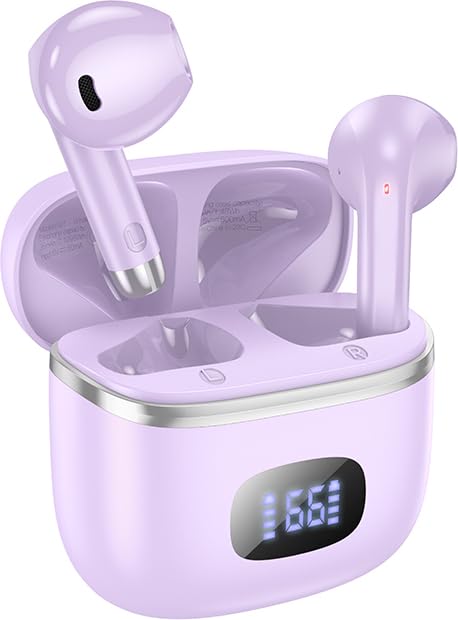
Image: The HOCO EQ1 purple earbuds are shown inside their matching charging case, which features a digital LED display indicating battery levels. The earbuds are partially visible, showcasing their sleek design.

Image: This graphic highlights the lightweight and rounded design of the earbuds for comfortable wear, alongside a close-up of the charging case's LED digital display, which shows the visible power level.
Key Features:
- Wireless Bluetooth 5.3 Connectivity: Ensures stable and efficient connection with all Bluetooth-enabled devices.
- Deep Bass: Delivers rich and powerful audio for an immersive listening experience.
- Touch Controls: Intuitive touch-sensitive areas on the earbuds for easy management of music and calls.
- Water Resistant: Designed to withstand sweat and light splashes, suitable for workouts and outdoor use.
- Long Playback Time: Up to 50 hours of total playback with the charging case.
- Compact and Lightweight Design: Comfortable in-ear fit, weighing only 34g.
- TWS (True Wireless Stereo): Independent earbuds for true wireless freedom.
- Gaming Mode: Low latency mode for enhanced gaming performance.
- LED Digital Display: Shows battery status of the charging case and individual earbuds.
- Magnetic Switch: Automatic pairing upon opening the case.
- Composite Diaphragm: 13mm moving coil unit for balanced three-band sound quality.
Setup
1. Initial Charging
Before first use, fully charge the HOCO EQ1 earbuds and their charging case.
- Place both earbuds into the charging case.
- Connect the USB charging cable to the charging port on the case and plug the other end into a USB power adapter (not included) or a computer's USB port.
- The LED digital display on the case will show the charging progress. Once fully charged, the display will indicate 100% or a full battery icon.
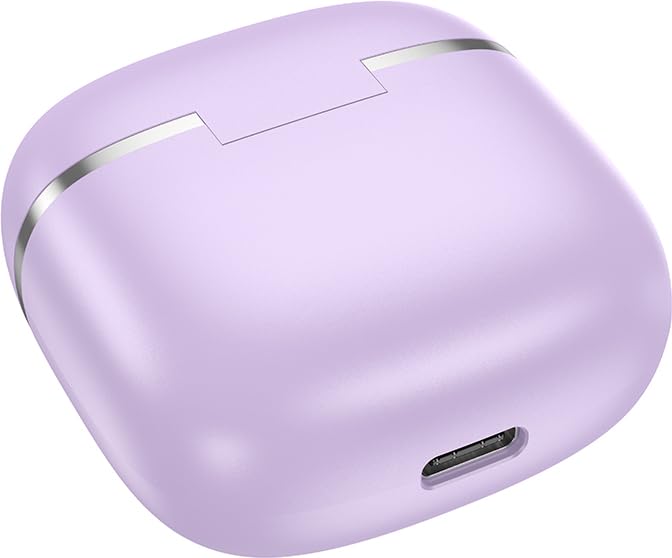
Image: A close-up view of the bottom of the HOCO EQ1 charging case, showing the USB charging port. This port is used to recharge the case and the earbuds.

Image: An infographic detailing the battery life of the HOCO EQ1 earbuds. It shows 35 hours of total working time with the charging case, 7 hours of single headset battery life, and 180 hours of standby time.
2. Bluetooth Pairing
The earbuds will automatically enter pairing mode when removed from the charging case.
- Open the charging case. The earbuds will automatically power on and enter pairing mode.
- On your device (smartphone, tablet, etc.), enable Bluetooth and search for available devices.
- Select "HOCO EQ1" from the list of found devices.
- Once connected, you will hear a confirmation tone, and the earbuds will be ready for use.
- The earbuds support automatic re-connection to the last paired device when removed from the case.

Image: This graphic illustrates the automatic pairing feature of the HOCO EQ1 earbuds, which activate upon opening the case. It also details the various touch controls for music playback and voice assistant activation.
Operating Instructions
Touch Controls:
The HOCO EQ1 earbuds feature intuitive touch controls on both the left (L) and right (R) earbuds.
| Action | Function |
|---|---|
| Tap the touch area (L/R) | Play/Pause music |
| Double tap the touch area (L/R) | Next track |
| Triple tap the touch area (L/R) | Previous track |
| Long press the touch area for 2 seconds (L/R) | Activate Voice Assistant |
| Tap the touch area (L/R) during incoming call | Answer/End call |
| Long press the touch area for 2 seconds (L/R) during incoming call | Reject call |
Gaming Mode:
The HOCO EQ1 earbuds feature a low latency gaming mode for an enhanced gaming experience. Refer to the product packaging or manufacturer's website for specific activation instructions, as this may vary.
Maintenance
Cleaning:
- Regularly clean the earbuds and charging case with a soft, dry, lint-free cloth.
- Do not use abrasive cleaners, alcohol, or chemical solvents.
- Gently remove any earwax or debris from the ear tips and speaker mesh using a small, soft brush or cotton swab.
Storage:
- When not in use, always store the earbuds in their charging case to protect them and ensure they remain charged.
- Store in a cool, dry place away from direct sunlight and extreme temperatures.
Water Resistance:
The HOCO EQ1 earbuds are water-resistant and sweat-proof, making them suitable for workouts and light rain. However, they are not designed for submersion in water. Avoid exposing them to heavy rain, showering, swimming, or prolonged contact with water.
Troubleshooting
| Problem | Possible Cause | Solution |
|---|---|---|
| Earbuds not pairing | Low battery; not in pairing mode; device Bluetooth off; interference. | Charge earbuds and case. Ensure earbuds are out of case. Turn device Bluetooth off/on. Move closer to device. |
| Only one earbud working | One earbud not charged; not properly connected to each other. | Place both earbuds back in case, close, then reopen. Ensure both are charged. |
| No sound or low volume | Device volume too low; earbud volume too low; earbud dirty; not connected. | Increase volume on device and earbuds. Clean earbud speaker mesh. Re-pair earbuds. |
| Charging case not charging | Faulty cable/adapter; dirty charging port. | Try a different USB cable and power adapter. Clean the charging port gently. |
| Connection drops frequently | Too far from device; interference; low battery. | Stay within 10 meters of your device. Avoid strong electromagnetic interference. Charge earbuds. |
Specifications
| Feature | Detail |
|---|---|
| Model Name | EQ1_EARBUDS |
| Connectivity Technology | Wireless (Bluetooth 5.3) |
| Wireless Communication Technology | Bluetooth |
| Headphones Jack | USB (for charging case) |
| Control Type | Touch, Volume Control |
| Microphone Format | Hands-Free |
| Water Resistance Level | Water Resistant |
| Item Weight | 50 Grams (total) |
| Product Dimensions | 11 x 11 x 5 cm |
| Material | Plastic |
| Ear Placement | In Ear |
| Impedance | 140 Ohm |
| Battery Life (Single Headset) | Up to 7 hours |
| Total Playback Time (with case) | Up to 35-50 hours (depending on usage) |
| Standby Time | Up to 180 hours |
Warranty and Support
The HOCO EQ1 Wireless Earbuds come with a 1 Year Warranty from the date of purchase. This warranty covers manufacturing defects. Please retain your proof of purchase for warranty claims.
For technical support, warranty claims, or further assistance, please contact HOCO customer service through their official website or the retailer from whom you purchased the product. Refer to the product packaging for specific contact details.
Note: The warranty does not cover damage caused by misuse, accidents, unauthorized modifications, or normal wear and tear.
Related documentsEQ1_EARBUDS

Ask a question about this manual
Ask about setup, troubleshooting, compatibility, parts, safety, or missing instructions. Manuals+ will review the question and use this page’s manual context to help answer it.