
Introduction
Thank you for choosing the Hoco Y7 Smart Sport Watch. This manual provides essential information for setting up, operating, and maintaining your device. Please read it thoroughly before use to ensure optimal performance and longevity of your watch.
Package Contents
Verify that all items are present in your package:
- Hoco Y7 Smart Sport Watch
- Charging Cable
- User Manual (this document)

Image: The Hoco Y7 Smart Sport Watch packaging, showing the watch and its box.
Product Overview
The Hoco Y7 Smart Sport Watch features a 1.32-inch TFT OGS capacitive touch screen and a durable design. Key components include:
- Display: 1.32-inch TFT OGS capacitive touch screen with 360x360 resolution.
- Side Buttons: For power, menu navigation, and quick access functions.
- Sensors: Located on the back for heart rate detection and other health monitoring.
- Charging Contacts: Magnetic contacts on the back for charging.
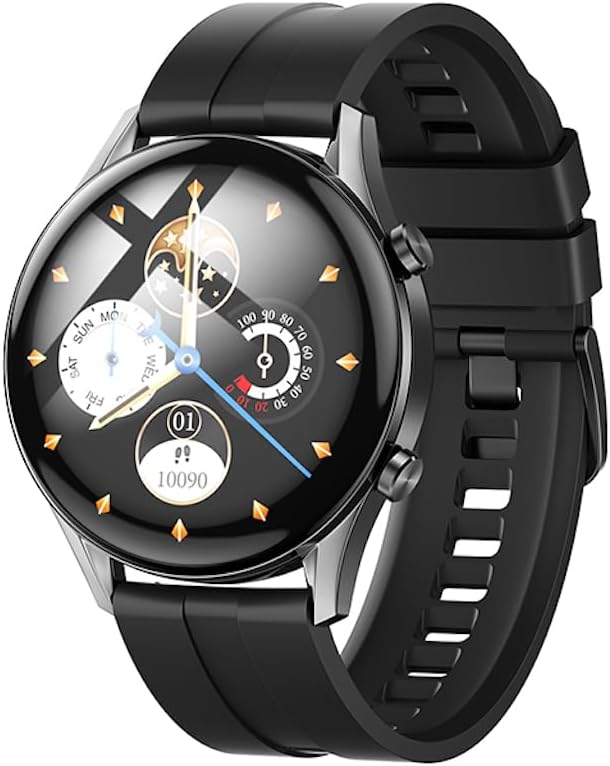
Image: Front view of the Hoco Y7 Smart Sport Watch, displaying a detailed watch face with time, date, and activity tracking.
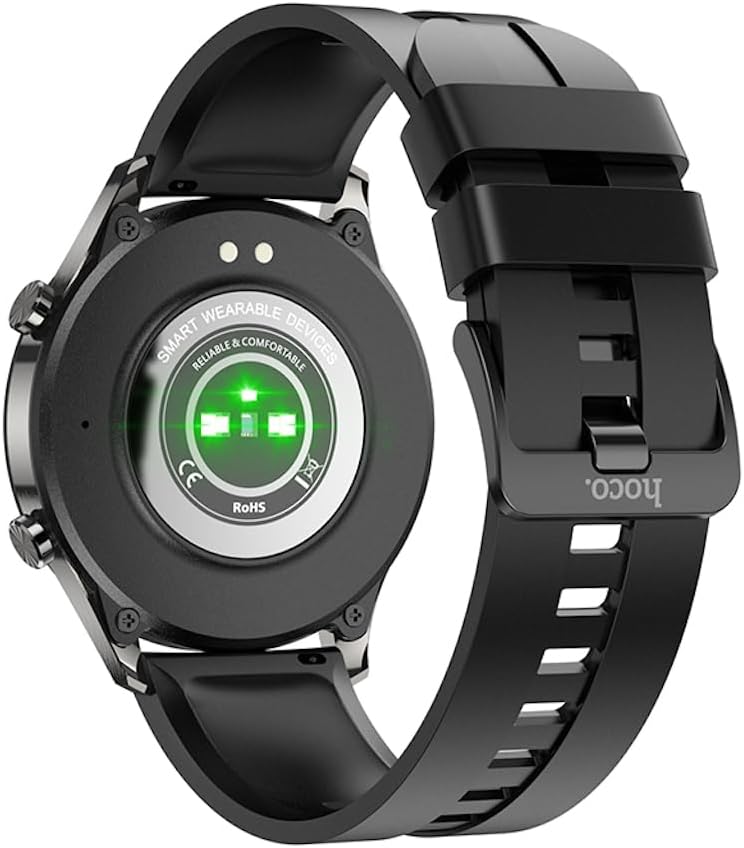
Image: Back view of the Hoco Y7 Smart Sport Watch, showing the optical heart rate sensors and charging contacts.
Setup
1. Charging the Device
Before first use, fully charge your Hoco Y7 Smart Sport Watch. Connect the magnetic charging cable to the charging contacts on the back of the watch and plug the USB end into a standard USB power adapter (not included) or a computer's USB port.
- A full charge typically takes approximately 2 hours.
- The watch display will indicate charging status.
2. Powering On/Off
- Power On: Press and hold the side button until the Hoco logo appears.
- Power Off: From the watch face, swipe down to access quick settings, or navigate to the settings menu. Select the power off option and confirm. Alternatively, press and hold the side button and select "Power Off" when prompted.
3. Pairing with Your Smartphone
To unlock the full features of your Hoco Y7 Smart Sport Watch, pair it with your smartphone via Bluetooth 5.0. The watch does not support direct calls, but connects for data synchronization and notifications.
- Download the Companion App: Search for the official Hoco Smart Watch app on your smartphone's app store (e.g., Google Play Store for Android or Apple App Store for iOS). Install the app.
- Enable Bluetooth: Ensure Bluetooth is enabled on your smartphone.
- Open the App: Launch the Hoco Smart Watch app and follow the on-screen instructions to create an account or log in.
- Add Device: In the app, navigate to the "Add Device" or "Pair Device" section. The app will search for nearby Hoco Y7 watches.
- Select Your Watch: Once your watch appears in the app's list, select it to initiate the pairing process.
- Confirm Pairing: A pairing request may appear on both your watch and smartphone. Confirm the pairing on both devices.
Once paired, the watch will synchronize data with the app, and you can customize settings, receive notifications, and view detailed health and activity data.

Image: The Hoco Y7 Smart Sport Watch positioned next to a smartphone and laptop, illustrating its connectivity with other devices.
Operating Instructions
1. Basic Navigation
- Touch Screen: Tap to select, swipe left/right/up/down to navigate through menus and screens.
- Side Button: Press to return to the watch face, or to access the main menu from the watch face. A long press may activate power options.
2. Changing Watch Faces
From the main watch face, press and hold the screen. Swipe left or right to browse available watch faces. Tap to select and apply a new watch face. More watch faces can be downloaded and customized via the companion app.

Image: The Hoco Y7 Smart Sport Watch showing a watch face focused on health metrics like heart rate and battery percentage.
3. Health Monitoring
The Hoco Y7 supports various health monitoring functions:
- Heart Rate Detection: Swipe to the heart rate interface or select it from the menu. The watch will automatically measure your heart rate. Ensure the watch is snug on your wrist for accurate readings.
- Activity Tracking: Tracks steps, distance, and calories burned throughout the day. View daily summaries on the watch or detailed reports in the app.
- Sleep Monitoring: Automatically monitors your sleep patterns when worn during sleep. Provides data on deep sleep, light sleep, and awake times.
4. Sport Modes
The watch supports multiple sport modes, including running, walking, climbing, and yoga. To start a workout:
- From the main menu, select the "Sport" or "Workout" icon.
- Choose your desired activity (e.g., Running, Walking, Climbing, Yoga).
- Tap to start the activity. The watch will begin tracking relevant metrics like duration, heart rate, and calories.
- To pause or end a workout, swipe or press the side button as indicated on screen.
5. Notifications
Once paired with your smartphone, the Hoco Y7 can display notifications for calls, messages, and app alerts. Ensure notification permissions are enabled in both your phone's settings and the Hoco Smart Watch app.
6. Language Settings
The watch supports 19 languages. To change the language:
- Navigate to the "Settings" menu on your watch.
- Find and select "Language".
- Choose your preferred language from the list.
Maintenance
1. Cleaning Your Watch
Regular cleaning helps maintain the watch's appearance and functionality:
- Wipe the screen and body with a soft, lint-free cloth.
- For stubborn spots, dampen the cloth slightly with water. Avoid using harsh chemicals or abrasive materials.
- Clean the charging contacts periodically with a dry cloth to ensure good connection.
2. Water Resistance (IP68)
The Hoco Y7 Smart Sport Watch is IP68 waterproof, meaning it is resistant to dust and can withstand immersion in water up to 1.5 meters for up to 30 minutes. It is suitable for daily use, hand washing, and light rain. However, it is not recommended for hot showers, saunas, or diving, as steam and high water pressure can compromise the seal.

Image: The Hoco Y7 Smart Sport Watch partially submerged in water, demonstrating its IP68 waterproof capability.
3. Battery Care
- Avoid extreme temperatures, which can degrade battery life.
- Charge the watch regularly, but avoid leaving it fully discharged for extended periods.
- The typical battery life is up to 6 days, depending on usage.
Troubleshooting
| Problem | Possible Cause | Solution |
|---|---|---|
| Watch does not power on. | Low battery. | Charge the watch for at least 30 minutes before attempting to power on. |
| Cannot pair with smartphone. | Bluetooth is off; watch is out of range; app issue. | Ensure Bluetooth is enabled on your phone. Keep watch close to phone. Restart both watch and phone. Reinstall the companion app. |
| Notifications not received. | Permissions not granted; app not running in background. | Check notification permissions in phone settings and the Hoco app. Ensure the app is running in the background. |
| Inaccurate heart rate readings. | Watch too loose or too tight; sensor dirty. | Adjust watch strap for a snug fit. Clean the heart rate sensor on the back of the watch. |
Specifications
| Feature | Detail |
|---|---|
| Model | Hoco Y7 |
| Main Screen | TFT 1.32 inch OGS capacitive touch screen |
| Resolution | 360 x 360 pixels |
| CPU | Realtek 8762D |
| Memory | RAM192KB + ROM128MB + FLASH 128MB |
| Bluetooth Version | 5.0 (does not support calls) |
| Battery Capacity | 330mAh |
| Battery Life | Up to 6 days (typical usage) |
| Waterproof Rating | IP68 |
| Sensors | Heart Rate Detection |
| Supported Sports Modes | Running, Walking, Climbing, Yoga, etc. |
| Supported Languages | 19 languages (English, Simplified Chinese, Russian, Arabic, Vietnamese, Thai, Polish, Spanish, Malay, Greek, French, Italian, German, Portuguese, Indonesian, Turkish, Japanese, Korean, Ukrainian) |
| Operating System (Companion App) | Android (as per product specifications, likely refers to app compatibility) |
| Item Weight | 173 g |
Warranty and Support
For product support, technical assistance, or warranty inquiries, please contact your retailer or the official HOCO customer service. Refer to the product packaging or the HOCO official website for contact information.
Please note that while extended warranty options may be available from third-party providers, any standard manufacturer's warranty terms are typically provided at the point of purchase or through official HOCO channels.

