
Introduction
This manual provides comprehensive instructions for the HOCO Y1 Pro Smart Sports Watch. Please read this manual carefully before using the device to ensure proper operation and to maximize its features. Keep this manual for future reference.
Package Contents
Upon opening the package, verify that all items are present:
- HOCO Y1 Pro Smart Sports Watch
- Charging Cable
- User Manual
Product Overview
The HOCO Y1 Pro Smart Sports Watch features a 1.91-inch TFT display and a durable design suitable for sports and daily wear.

Figure 1: Front view of the HOCO Y1 Pro Smart Watch, showing the main watch face with time, date, battery level, and activity data.

Figure 2: Side view illustrating the digital crown and the side button for navigation and control.
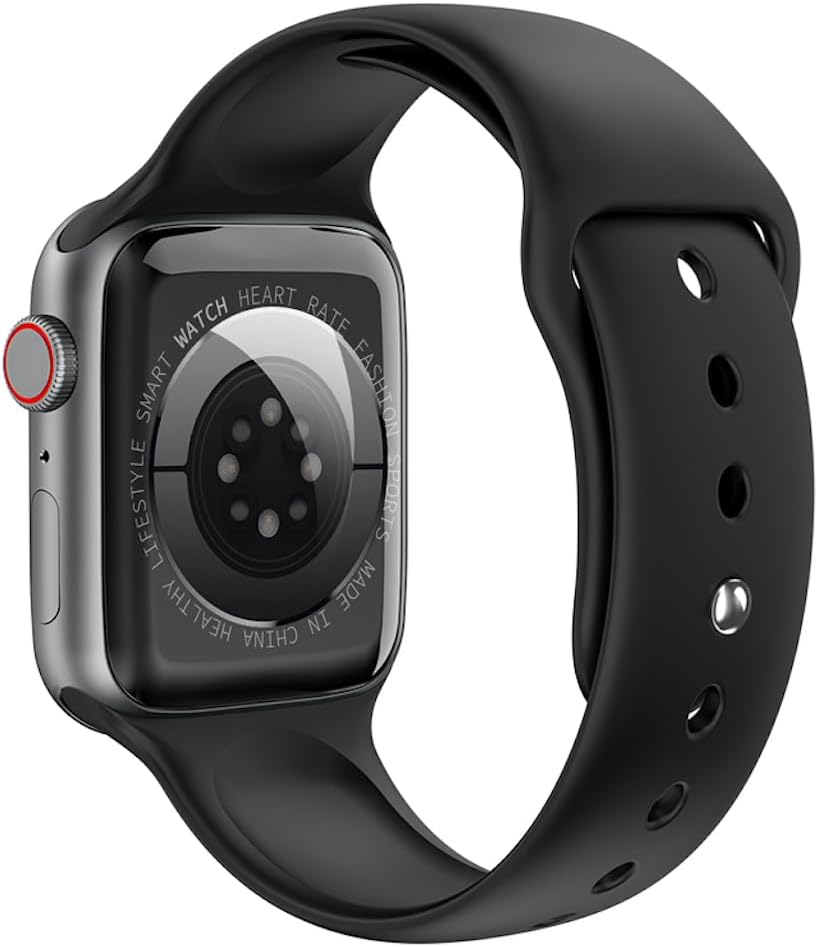
Figure 3: Rear view of the watch, highlighting the optical heart rate sensors and charging contacts.
Components:
- Display: 1.91-inch TFT color touchscreen.
- Digital Crown: Used for navigating menus and adjusting settings.
- Side Button: Typically used for power on/off, returning to the home screen, or accessing specific functions.
- Heart Rate Sensor: Located on the back for continuous heart rate monitoring.
- Charging Contacts: Magnetic contacts on the back for connecting the charging cable.
Setup
1. Charging the Device
Before initial use, fully charge your HOCO Y1 Pro Smart Watch. Connect the magnetic charging cable to the charging contacts on the back of the watch and plug the USB end into a power adapter (not included) or a computer's USB port.
- A full charge typically takes approximately 2 hours.
- The battery capacity is 280mAh.
- Expected battery life: 3 days with dual Bluetooth enabled, 5-7 days with calls turned off.
2. Power On/Off
- Power On: Press and hold the side button until the HOCO logo appears.
- Power Off: Press and hold the side button, then select "Power Off" on the screen.
3. App Installation and Pairing
To unlock the full functionality of your HOCO Y1 Pro, download and install the companion application on your smartphone. Search for the official HOCO smartwatch app in your device's app store (e.g., Google Play Store or Apple App Store).
- Ensure your watch is powered on and fully charged.
- Enable Bluetooth on your smartphone.
- Open the HOCO companion app and follow the on-screen instructions to create an account or log in.
- Within the app, select "Add Device" or "Pair New Device" and choose "HOCO Y1 Pro" from the list of available devices.
- Confirm the pairing request on both your smartphone and the watch.
- The watch supports dual Bluetooth for calls and data synchronization.
Operating Instructions
Basic Navigation
- Swipe Up/Down: Scroll through menus or notifications.
- Swipe Left/Right: Access quick functions or different watch faces.
- Tap: Select an item or confirm an action.
- Digital Crown: Rotate to scroll, press to return to the home screen or open the app list.
- Side Button: Short press to return to the previous screen or home screen. Long press for power options.
Call Function
With dual Bluetooth enabled and paired to your smartphone, the HOCO Y1 Pro supports making and receiving calls directly from your wrist.
- Making Calls: Access the dialer or contacts list on the watch to initiate a call.
- Receiving Calls: When a call comes in, you can answer or reject it from the watch screen.
Health Monitoring
- Heart Rate Detection: The watch continuously monitors your heart rate. View real-time data on the watch or detailed trends in the app.
- Sleep Monitoring: Wear the watch to bed to track your sleep patterns, including deep sleep, light sleep, and wake times.
- Exercise Pedometer: Tracks your daily steps, distance, and calories burned.
Sports Modes and GPS Track
The watch offers various sports modes to track your workouts. When connected to your phone's GPS, it can record your outdoor activity routes.
- Select a sports mode (e.g., running, walking) from the watch menu.
- Ensure GPS tracking is enabled in the app for outdoor activities.
Notifications
Receive notifications for calls, messages, and app alerts directly on your watch. Configure notification settings within the companion app.
Additional Functions
- Remote Music: Control music playback on your smartphone from the watch.
- Real-time Weather: View current weather conditions and forecasts (requires app connection).
- Mobile Phone Search: Use the watch to locate your paired smartphone by making it ring.
Maintenance
Cleaning
Regularly clean your watch to ensure optimal performance and hygiene.
- Wipe the screen and strap with a soft, damp cloth.
- Avoid using harsh chemicals or abrasive materials.
- Ensure charging contacts are clean and dry before charging.
Water Resistance (IP68)
The HOCO Y1 Pro is IP68 waterproof, meaning it is resistant to dust and can withstand immersion in water up to 1.5 meters for up to 30 minutes. While it is suitable for daily use and light water activities, it is not recommended for diving, hot showers, or prolonged submersion.
- Do not operate buttons underwater.
- Dry the watch thoroughly after exposure to water.
Troubleshooting
| Issue | Possible Solution |
|---|---|
| Watch does not power on. | Ensure the watch is fully charged. Connect it to the charger for at least 30 minutes. |
| Cannot pair with smartphone. |
|
| Inaccurate heart rate or activity data. |
|
| Notifications not received. |
|
| Screen is unresponsive. | Try restarting the watch by long-pressing the side button. If unresponsive, allow the battery to drain completely and then recharge. |
Specifications
| Feature | Detail |
|---|---|
| Model Name | Y1 Pro |
| Main Screen | TFT 1.91 inches; Resolution: 240*285 pixel |
| CPU | Realtek 8762CW |
| Memory | RAM 192KB + ROM 64MB |
| Connectivity | Dual Bluetooth (supports calls) |
| Water Resistance | IP68 waterproof |
| Battery Capacity | 280mAh Lithium Ion |
| Battery Life | 3 days (dual Bluetooth on), 5-7 days (calls off) |
| Special Functions | GPS track support, Information push, Heart rate detection, Sleep monitoring, Exercise pedometer, Remote music, Real-time weather, Mobile phone search |
| Supported Languages | 22 language packs including Chinese, English, Russian, Arabic, Vietnamese, Danish, Thai, Polish, Persian, Spanish, Malay, Greek, French, Italian, German, Portuguese, Turkish, Latin, Romanian, Hebrew, Burmese, Ukrainian. |
| Package Dimensions | 21.9 x 6.9 x 3.2 cm |
| Item Weight | 176 g |
Safety Information
- Do not attempt to disassemble or modify the device.
- Keep the device away from extreme temperatures, direct sunlight, and open flames.
- Avoid exposing the device to strong magnetic fields.
- Use only the provided charging cable.
- Consult a medical professional before starting any new exercise regimen, especially if you have pre-existing health conditions. The heart rate data is for reference only and should not be used for medical diagnosis.
- Dispose of the device and its battery responsibly according to local regulations.
Warranty and Support
For warranty information and technical support, please refer to the documentation included with your purchase or visit the official HOCO website. Keep your proof of purchase for warranty claims.
Manufacturer: Hoco
ASIN: B0CBVTSX1V
UPC/EAN: 6931474766106


