
1. Introduction
This manual provides instructions for the safe and efficient use of your LEDVANCE LINEAR LED SWIVEL Under Cabinet Light. This product is designed to provide warm white illumination with integrated motion and daylight sensing capabilities, ideal for various indoor applications.

Figure 1: The LEDVANCE LINEAR LED SWIVEL Under Cabinet Light. This image shows the overall design of the light fixture.
2. Safety Instructions
- Read all instructions carefully before installation and use.
- Keep this manual for future reference.
- This product is for indoor use only (IP20 protection class). Do not expose to water or high humidity.
- Ensure the power source is disconnected before installation or maintenance.
- Do not attempt to modify or repair the product yourself. Contact qualified personnel for service.
- Keep out of reach of children.
- Do not stare directly into the LED light source.
3. Package Contents
Verify that all components are present in the package:
- 1x LEDVANCE LINEAR LED SWIVEL Under Cabinet Light (Model: LINEAR LED SWIVEL MOB SEN35CM830USB)
- 1x USB cable (length: 0.5 m)
- Mounting accessories (e.g., magnetic attachments)
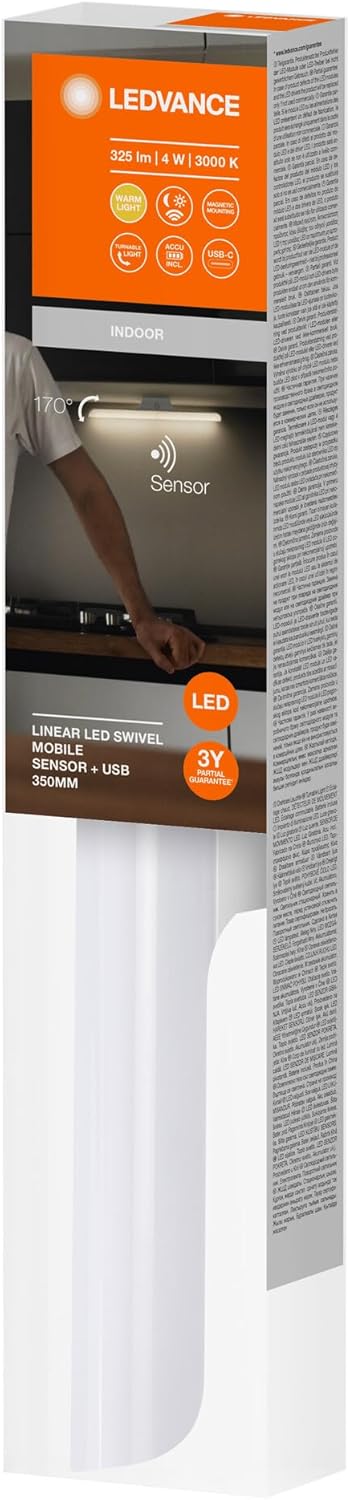
Figure 2: Product packaging. The packaging indicates the product's features and specifications.
4. Setup and Installation
The LEDVANCE LINEAR LED SWIVEL Under Cabinet Light is designed for easy installation, primarily using its magnetic attachment system.
- Choose Location: Select a suitable indoor location under a cabinet, shelf, or similar surface. Ensure the surface is clean and dry.
- Attach Mounting: The light features magnetic attachment for easy removal and installation. Secure the corresponding magnetic mounting plates (if separate) to your desired surface using screws or adhesive (not specified if included, assume standard mounting).
- Mount Light: Align the light fixture with the mounted magnetic plates. The light will securely attach magnetically.
- Connect Power: Connect the provided 0.5m USB cable to the light fixture and to a compatible 5V USB power source (e.g., USB wall adapter, power bank, or computer USB port).
- Adjust Swivel: The light body can swivel up and down at an angle of 170° to direct illumination as needed.

Figure 3: Example of the under cabinet light installed in a kitchen environment. The image demonstrates typical placement and illumination.
5. Operating Instructions
This light features a PIR motion and daylight sensor for efficient and automatic operation.
- Automatic Activation: The integrated PIR motion sensor detects movement within its range. The light will automatically turn on when motion is detected in low light conditions (daylight sensor).
- Daylight Sensor: The daylight sensor ensures the light only activates when ambient light levels are insufficient, conserving energy during daylight hours.
- Deactivation: The light will automatically turn off after a period of no motion detection, provided sufficient ambient light is present or the set delay time has passed.
- Swivel Function: The light body can be manually swiveled up or down by up to 170 degrees to adjust the direction of the light output.
- Dimmable: The product description indicates it is dimmable. Specific dimming controls are not detailed in the provided information, but typically this would be via a button on the unit or a connected remote (if applicable). Refer to the product's physical controls for dimming functionality.

Figure 4: Close-up view of the light fixture, highlighting the integrated motion and daylight sensor. The power button is also visible.
6. Maintenance
To ensure the longevity and optimal performance of your LEDVANCE LINEAR LED SWIVEL Under Cabinet Light, follow these simple maintenance guidelines:
- Cleaning: Disconnect power before cleaning. Wipe the surface with a soft, dry, or slightly damp cloth. Do not use abrasive cleaners, solvents, or harsh chemicals, as these can damage the finish or electronic components.
- Inspection: Periodically check the USB cable for any signs of damage. Ensure the magnetic attachment remains secure.
- LED Module: The LED module is permanently installed and not user-replaceable.
7. Troubleshooting
If you encounter issues with your light, refer to the following common problems and solutions:
| Problem | Possible Cause | Solution |
|---|---|---|
| Light does not turn on. | No power, faulty USB connection, sufficient ambient light, sensor obstructed. | Check USB cable connection and power source. Ensure ambient light is low enough for the daylight sensor to activate. Clear any obstructions from the sensor. |
| Light turns on unexpectedly or stays on. | Constant motion detected, sensor malfunction, incorrect placement. | Ensure no continuous motion is within the sensor's range. Reposition the light if necessary to avoid false triggers. |
| Light flickers. | Unstable power supply, loose connection. | Ensure the USB power source is stable. Check all connections. |
If the problem persists after trying these solutions, please contact customer support.
8. Specifications
Detailed technical specifications for the LEDVANCE LINEAR LED SWIVEL Under Cabinet Light:
| Feature | Detail |
|---|---|
| Model Number | 4099854096556 |
| Brand | LEDVANCE |
| Power | 4 W |
| Luminous Flux | 325 lm |
| Color Temperature | 3000 K (Warm White) |
| Voltage | 5 Volts (USB Powered) |
| Light Source | Integrated LED |
| Control Method | Motion Sensor, Daylight Sensor |
| Swivel Angle | Up to 170° |
| Material | Polycarbonate, Plastic |
| Color | White |
| Protection Class | IP20 (Indoor Use Only) |
| Service Life | Up to 30,000 hours |
| Product Dimensions (L x W x H) | Approx. 350mm x 36mm x 49.2mm (Refer to Figure 5) |
| Item Weight | 163 Grams |

Figure 5: Dimensional drawing of the LEDVANCE LINEAR LED SWIVEL light. Dimensions are approximately 350mm (length), 49.2mm (height), and 36mm (width).
9. Warranty and Support
Warranty Information: This product comes with a manufacturer's warranty. Please refer to the warranty card included with your purchase or visit the official LEDVANCE website for detailed warranty terms and conditions.
Customer Support: For technical assistance, troubleshooting beyond this manual, or warranty claims, please contact LEDVANCE customer support through their official website or the contact information provided on the product packaging.

