
1. Introduction
The OWON CM2100B is a compact, smart, and portable digital AC/DC clamp meter designed for precise electrical measurements. Featuring 20000 counts and True RMS capabilities, it accurately measures AC/DC current, AC/DC voltage, resistance, capacitance, diode, and frequency. Its Bluetooth communication function allows for remote data viewing and instrument control via Android and Apple phones, supporting data recording and analysis.
2. Safety Information
WARNING:
- To avoid electrical shock, do not remove the test leads before replacing the battery.
- Always ensure the meter is set to the correct function and range before making measurements.
- Do not exceed the maximum input values for any range.
- Inspect the test leads for damage before each use. Do not use if insulation is compromised.
- Adhere to all local and national safety codes.
This device is designed for use by qualified personnel. Read and understand all instructions before operation.
3. Setup
3.1 Package Contents

Image: The CM2100B clamp meter and its accessories laid out, including the multimeter leads, a small screwdriver, the quick guide, and a soft carrying bag.
Verify that all items are present in the package:
- 1 x OWON CM2100B Digital AC/DC Clamp Meter
- 1 x Multimeter Test Leads (Red and Black)
- 1 x Bolt Driver (Screwdriver)
- 1 x Quick Guide / User Manual
- 1 x Soft Carrying Bag
3.2 Product Overview

Image: A clear front view of the Owon CM2100B clamp meter, showing the clamp jaws, rotary dial, display screen, and function buttons.
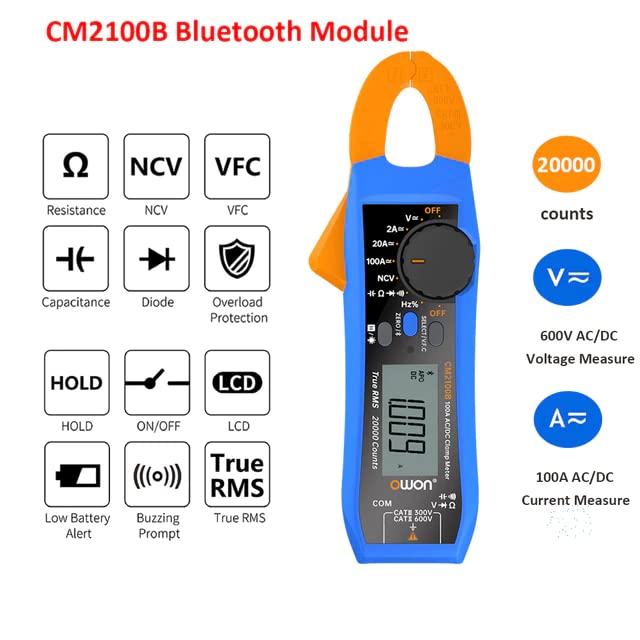
Image: An infographic detailing the CM2100B's capabilities such as Resistance, NCV, VFC, Capacitance, Diode, Overload Protection, Data Hold, On/Off, LCD, Low Battery Alert, Buzzing Prompt, True RMS, 20000 counts, 600V AC/DC Voltage, and 100A AC/DC Current.
The CM2100B features a compact design with an intuitive rotary dial for function selection and a clear LCD display. Key components include:
- Clamp Jaws: For non-contact AC/DC current measurement.
- Rotary Dial: Selects measurement functions (Voltage, Current, Resistance, etc.).
- LCD Display: Shows measurement readings, units, and indicators.
- Function Buttons: Include ZERO/℃/℉, SELECT/VFC, HOLD, and NCV.
- Input Jacks: For connecting test leads for voltage, resistance, capacitance, and diode measurements.
3.3 Battery Installation

Image: The rear of the CM2100B meter, displaying the battery compartment cover and a warning label regarding battery replacement.
The CM2100B requires 2 x AAA 3V Lithium Metal batteries (included). To install or replace batteries:
- Ensure the meter is turned OFF and disconnect all test leads from the meter and the circuit being measured.
- Locate the battery compartment cover on the back of the meter.
- Use the provided bolt driver (screwdriver) to loosen the screw securing the battery cover.
- Remove the battery cover.
- Insert the 2 x AAA batteries, observing the correct polarity (+/-) as indicated inside the compartment.
- Replace the battery cover and tighten the screw.
4. Operating Instructions
4.1 Power On/Off and Function Selection
To power on the meter, rotate the central dial from the 'OFF' position to the desired measurement function. To power off, rotate the dial back to 'OFF'.
4.2 Measurement Functions

Image: A visual representation of the CM2100B's capabilities, including Resistance, NCV, VFC, HOLD, ON/OFF, LCD, Capacitance, Diode, Overload Protection, Low Battery Alert, Buzzing Prompt, and True RMS.

Image: Four practical application scenarios for the CM2100B: Capacitance measurement, NCV (Non-Contact Voltage) inductive measurement, Circuit board resistance measurement, and Diode measurement.
The CM2100B offers a wide range of measurement capabilities:
- AC/DC Current (A): Use the clamp jaws to measure current without breaking the circuit. Ensure the conductor is centered within the jaws. Max 100A.
- AC/DC Voltage (V): Connect test leads to the appropriate input jacks and across the circuit. Max 600V.
- Resistance (Ω): Connect test leads across the component.
- Capacitance (F): Connect test leads across the capacitor.
- Diode Test: Connect test leads across the diode to check forward voltage drop.
- Non-Contact Voltage (NCV): Detect AC voltage without physical contact by bringing the meter's NCV sensor close to the conductor.
- VFC (Variable Frequency Control): For accurate measurements on variable frequency drives.
- Frequency (Hz): Measure the frequency of AC signals.
- True RMS: Provides accurate readings for non-sinusoidal waveforms.
- HOLD Function: Press the 'HOLD' button to freeze the current reading on the display. Press again to release.
4.3 Bluetooth Connectivity and Data Recording
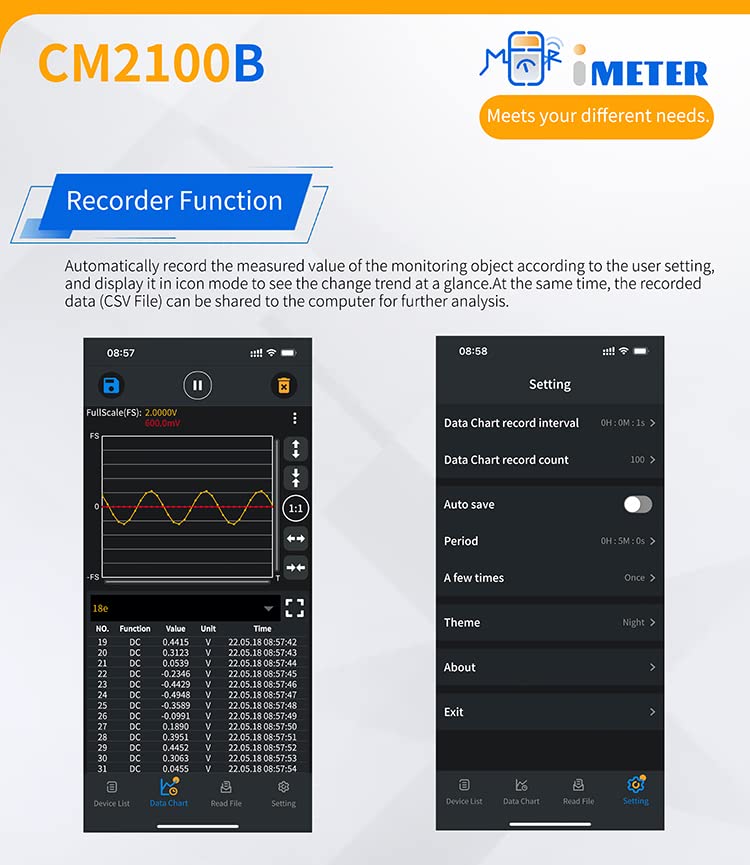
Image: A split image showing the CM2100B's recorder function interface on a mobile app, with a data chart on the left and settings for data chart interval, count, auto save, and theme on the right.
The CM2100B features Bluetooth connectivity for enhanced functionality:
- Download the App: Scan the QR code in the quick guide or visit https://files.owon.com.cn/i-meter/ to download the official OWON i-Meter app for Android or Apple devices.
- Pairing: Enable Bluetooth on your mobile device and open the i-Meter app. Follow the in-app instructions to connect to your CM2100B meter.
- Remote Control & Viewing: Once connected, you can view real-time measurements, change settings, and control the meter remotely from your phone.
- Data Recording: The app supports a recording function, allowing you to log measured values over time. This data can be analyzed within the app or exported (e.g., as a CSV file) for further analysis on a computer.
- Data Sharing: Share recorded data with colleagues or for documentation purposes directly from the app.
5. Maintenance
- Cleaning: Wipe the meter's casing with a damp cloth and mild detergent. Do not use abrasives or solvents. Ensure the meter is dry before use.
- Storage: If the meter is not used for an extended period, remove the batteries to prevent leakage. Store in a cool, dry place away from direct sunlight.
- Calibration: For professional use, periodic calibration by a qualified service center is recommended to ensure accuracy.
6. Troubleshooting
| Problem | Possible Cause | Solution |
|---|---|---|
| Meter does not power on. | Dead or incorrectly installed batteries. | Check battery polarity. Replace batteries if necessary. |
| No reading or unstable reading. | Incorrect function selected; poor test lead connection; out of range. | Ensure correct function is selected. Check test lead connections. Verify measurement is within meter's range. |
| Bluetooth connection issues. | Bluetooth not enabled on device; app not installed; meter too far from device. | Ensure Bluetooth is on. Download and install the i-Meter app. Keep meter and device within Bluetooth range. |
| Low battery indicator. | Batteries are low. | Replace batteries immediately to ensure accurate readings. |
7. Specifications
| Feature | Specification |
|---|---|
| Model Number | QD-CM2100B |
| Display Counts | 20000 |
| Measurement Type | True RMS |
| AC/DC Current Range | Up to 100A |
| AC/DC Voltage Range | Up to 600V |
| AC Frequency Response | Up to 1000Hz |
| Connectivity | Bluetooth (Android & Apple support) |
| Power Source | 2 x AAA 3V Lithium Metal batteries (included) |
| Product Dimensions | 9.84 x 5.91 x 7.09 inches |
| Item Weight | 0.5 Kilograms (1.1 Pounds) |
| Color | Multicolored |
| Manufacturer | OWON |
| Date First Available | July 14, 2023 |
8. Warranty and Support
For warranty information and technical support, please refer to the official OWON website or contact your authorized dealer. Keep your purchase receipt as proof of purchase for any warranty claims.
For the latest software updates and additional resources, visit the OWON support page or the i-Meter app download link provided in Section 4.3.


