
Introduction
The Edifier Portable Bluetooth Speaker, Model ED-MF200, is designed to deliver high-quality stereo sound with rich bass in a compact and durable aluminum housing. Its versatile connectivity options and touch controls make it ideal for various environments, including home, travel, and work. This manual provides essential information for setting up, operating, and maintaining your speaker.
What's in the Box
- Edifier Portable Bluetooth Speaker (ED-MF200)
- Power Adapter
- USB-C to USB-C Cable
- Carrying Sleeve

Image: The contents of the product packaging, showing the speaker, power adapter, USB-C cable, and carrying sleeve.
Setup
Charging the Speaker
Before initial use, fully charge the speaker. Connect the provided USB-C cable to the speaker's USB-C port and the other end to a power adapter. The built-in 2200 mAh rechargeable battery provides up to 10 hours of playtime on a single charge.

Image: A visual representation of the speaker's 10-hour battery life, indicating its portability and extended use.
Power On/Off
To power on the speaker, press and hold the power button located on the side. The indicator light will illuminate. To power off, press and hold the power button again until the light turns off.
Operating Instructions
Connectivity Options
The Edifier ED-MF200 offers versatile connectivity:
- Bluetooth V5.0: For wireless audio streaming. Ensures stable connection up to 66 feet away.
- 3.5mm AUX Input: For connecting devices via an auxiliary cable.
- USB-C Soundcard Input: For direct audio streaming and charging from devices like PCs, Macs, and laptops.

Image: The speaker demonstrating its Bluetooth V5.0 wireless connection capability with a laptop.

Image: A detailed view of the speaker's input ports, highlighting the AUX and USB-C connections for broad compatibility.
Controls
The speaker features intuitive touch controls for easy operation:
- Power Button: Press and hold to turn on/off.
- Volume Control: Touch-sensitive buttons to adjust volume up or down.
- Play/Pause: Touch-sensitive button to control audio playback.

Image: A collage showcasing the speaker's design features, including its touch controls and aluminum construction.
Sound Performance
The ED-MF200 delivers superior sound quality with its 4W+4W driver unit and two independently designed bass diaphragm units, ensuring clear audio and rich bass. High-quality 36mm drivers provide crisp and mesmerizing music.

Image: An internal view highlighting the 36mm drivers responsible for the speaker's powerful and clear audio output.
Product Overview Video
Video: An official product video from the seller demonstrating the Edifier Portable Bluetooth Speaker's features and design.
Design and Portability
The ED-MF200 features a sleek and compact design, measuring 11.52 x 1.74 x 2.07 inches, making it ideal for desktop use or travel. Its aluminum extrusion housing provides durability while maintaining a lightweight profile. The speaker also includes a cushioned and non-slip foot mat for stability.

Image: The main product image of the Edifier MF200 speaker, showcasing its sleek aluminum design.
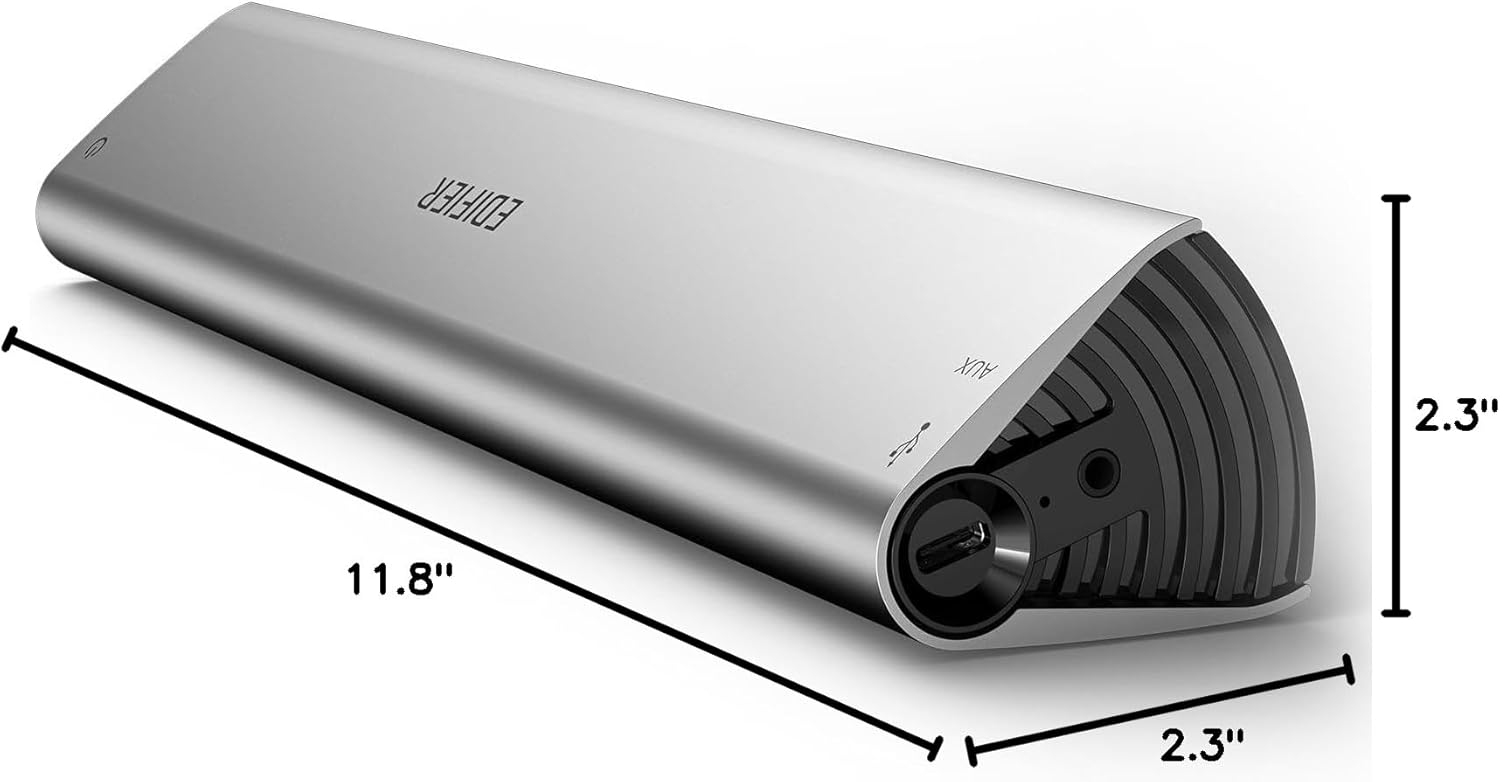
Image: A diagram illustrating the compact dimensions of the Edifier MF200 speaker.

Image: The speaker positioned on a desk, demonstrating its space-saving design when used with a laptop or computer.
Specifications
| Feature | Detail |
|---|---|
| Model Name | ED-MF200 |
| Mounting Type | Tabletop Mount |
| Material | Aluminum extrusion housing |
| Speaker Type | Portable Bluetooth |
| Special Feature | Portable |
| Compatible Devices | Smartphone, Tablet, MP3 Player, Desktop, Television, Projector, Laptop |
| Controller Type | Button, Touch |
| Surround Sound Channel Configuration | 2.0 |
| Color | Space Grey |
| Battery Life | 10 Hours |
| Battery Capacity | 2200 mAh |
| Product Dimensions | 2.3"D x 11.8"W x 2.3"H |
| Wireless Communication Technology | Bluetooth |
| Speaker Size | 36 Millimeters |
| Power Source | Battery Powered |
| Speaker Maximum Output Power | 4 Watts |
| Connectivity Technology | Bluetooth, Auxiliary, USB |
Troubleshooting
If you encounter any issues with your Edifier ED-MF200 speaker, please refer to the following common solutions:
- No Power: Ensure the speaker is fully charged. Connect it to a power source using the provided USB-C cable.
- No Sound: Check the volume levels on both the speaker and your connected device. Ensure the correct input source (Bluetooth, AUX, USB-C) is selected.
- Bluetooth Pairing Issues: Make sure the speaker is in pairing mode (indicator light blinking). Disable and re-enable Bluetooth on your device, then try pairing again. Ensure your device is within the 66-foot range.
- Distorted Sound: Reduce the volume on both the speaker and the connected device. Ensure the audio source is of good quality.
- Intermittent Connection: Move the speaker closer to your device and away from potential interference sources (e.g., other wireless devices, microwaves).
For more detailed troubleshooting or persistent issues, please contact Edifier customer support.
Maintenance
To ensure the longevity and optimal performance of your Edifier ED-MF200 speaker, follow these maintenance guidelines:
- Cleaning: Use a soft, dry cloth to clean the speaker's surface. Avoid using abrasive cleaners, solvents, or strong chemicals.
- Storage: Store the speaker in a cool, dry place away from direct sunlight and extreme temperatures. When not in use for extended periods, it is recommended to store it in its provided carrying sleeve.
- Water Exposure: The speaker is not waterproof. Avoid exposing it to water or high humidity to prevent damage.
- Handling: Handle the speaker with care to prevent drops or impacts that could damage the aluminum housing or internal components.
Warranty and Support
Edifier provides timely after-sales support for long-term assistance with your product. If you have any questions or require further assistance, please contact Edifier customer service. You can also refer to the official User Guide (PDF) for comprehensive information:


