
Introduction
Welcome to the user manual for your Protmex S42 Wireless Earbuds. These earbuds are designed to provide a superior audio experience with advanced features such as Bluetooth 5.3 connectivity, Environmental Noise Cancellation (ENC) for clear calls, IPX7 water resistance, and an extended battery life of up to 56 hours with the charging case. Please read this manual carefully to ensure proper use and maintenance of your device.
Package Contents
Please check the package contents to ensure all items are present:
- 2 x Protmex S42 Wireless Earbuds (Left and Right)
- 1 x Charging Case
- 3 x Pairs of Eartips (Small, Medium, Large)
- 1 x USB-C Charging Cable
- 1 x User Manual
Product Overview
Familiarize yourself with the components and key features of your Protmex S42 Wireless Earbuds.

Protmex S42 Wireless Earbuds in their charging case, displaying the LED battery indicator for both earbuds and the case.

Digital LED display on the charging case showing battery levels for the case and individual earbuds, indicating the 300mAh battery capacity.
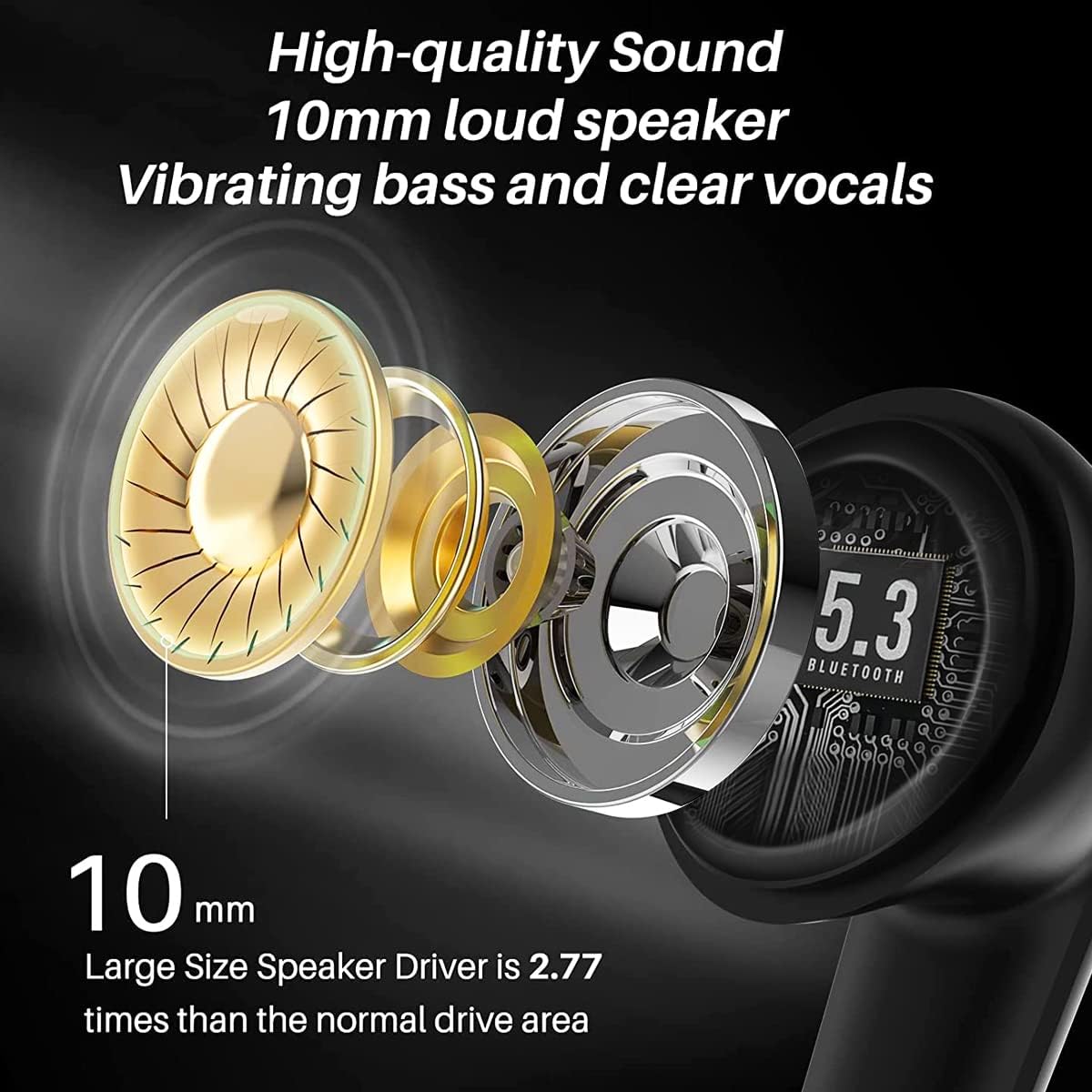
Diagram illustrating the 10mm speaker driver for high-quality sound and deep bass, highlighting the advanced audio technology.

Overview of earbud features including digital power display, smart-touch control, charging case, and stable connection.

Image of a woman wearing the earbuds, highlighting their secure and comfortable fit, sound quality, and lightweight design.
Setup
Initial Charging
Before first use, fully charge the earbuds and the charging case. Connect the USB-C charging cable to the charging port on the case and a 5V power adapter. The LED display on the case will show the charging progress. Earbuds fully charge in approximately 1 hour, providing 8 hours of playtime, and the case provides multiple charges for a total of 56 hours.

Diagram illustrating how to charge the earbuds and charging case using a USB-C cable and a 5V adapter. Ensure a 5V adapter is used to prevent damage.
Bluetooth Pairing
- Open the charging case. The earbuds will automatically power on and enter pairing mode.
- Enable Bluetooth on your device (smartphone, tablet, laptop).
- Search for "S42" in the list of available Bluetooth devices and select it to connect.
- Once connected, you will hear a confirmation tone, and the earbuds will be ready for use.
The advanced Bluetooth 5.3 chip ensures a stable connection up to 15 meters.

Image showing the earbuds connecting via Bluetooth 5.3 to a smartphone, indicating stable and fast connection.
Wearing the Earbuds
For optimal sound quality and comfort, choose the ear tips that best fit your ears. Gently insert the earbuds into your ear canal and twist slightly to secure them.

Illustrations demonstrating the correct way to wear the earbuds and select the appropriate ear tip size for a secure fit.

Image of a person wearing the Protmex S42 earbuds, highlighting their comfortable and secure fit and crystal clear sound.
Operating Instructions
The Protmex S42 earbuds feature intuitive smart touch controls. The following table outlines the various functions:

Diagram illustrating the various smart touch controls on the earbuds for music playback, calls, and voice assistant activation.

Visual guide to touch control gestures for power, calls, music playback, and volume adjustment.
| Action | Function |
|---|---|
| Long press 3s (L/R) | Power On/Off |
| Long press 2s (L/R) | Reject Call |
| Single tap (L/R) | Answer/End Call |
| Double tap (L/R) | Play/Pause Music |
| Double tap (R) | Next Track |
| Double tap (L) | Previous Track |
| Triple tap (L/R) | Activate Voice Assistant (Siri, Google Assistant) |
| Hold R | Volume Up |
| Hold L | Volume Down |
Maintenance and Care
- Cleaning: Regularly clean the charging contacts on both the earbuds and the case, as well as the ear tips, using a dry, soft cloth or cotton swab. Avoid using liquids directly on the earbuds.
- Water Resistance: The earbuds are IPX7 waterproof, meaning they can withstand splashes, sweat, and rain. Do not submerge them in water for extended periods or use them while swimming. The charging case is not waterproof.
- Storage: When not in use, store the earbuds in their charging case to protect them and keep them charged. Store in a cool, dry place away from extreme temperatures.
- Battery Care: To prolong battery life, avoid fully discharging the earbuds and case frequently. Charge them regularly, even if not in constant use.
Troubleshooting
If you encounter any issues with your Protmex S42 earbuds, please refer to the following common solutions:
| Problem | Solution |
|---|---|
| Earbuds not pairing/connecting |
|
| No sound or low volume |
|
| Charging issues |
|
| Touch controls unresponsive |
|

Diagrams providing solutions for common issues such as low volume or charging problems, including cleaning contacts and using a 5V adapter.
Specifications
| Feature | Detail |
|---|---|
| Model Number | S42 |
| Brand | Protmex |
| Bluetooth Version | 5.3 |
| Earbud Battery Life | Up to 8 hours |
| Total Playtime (with case) | Up to 56 hours |
| Charging Time (Earbuds) | Approx. 1 hour (10 min charge for 1 hour playtime) |
| Water Resistance Rating | IPX7 |
| Microphones | 4 (with ENC Noise Cancellation) |
| Speaker Driver Size | 10mm |
| Earbud Weight | Approx. 3.97 grams |
| Connectivity | Wireless Bluetooth |
| Compatibility | iOS, Android, Tablets, Laptops (Bluetooth-enabled devices) |
| Material | Plastic |

Image showing the compact size of the charging case, easily fitting into a pocket, with dimensions for reference.
Warranty and Support
For any questions, technical support, or warranty inquiries, please contact Protmex customer service through the platform where you purchased the product. Please have your model number (S42) and purchase details ready when contacting support.