
CLEANmaxx CLEANmaxx
CLEANmaxx Anti-Mite Vacuum Cleaner User Manual
Model: CLEANmaxx
1. Introduction
The CLEANmaxx Anti-Mite Vacuum Cleaner is designed for effective cleaning and sterilization of mattresses, upholstered furniture, and pillows. It combines powerful vacuuming with UV-C light technology to combat mites, bacteria, and fungal spores without the use of chemicals. Its fine dust filter system ensures thorough removal of even small airborne particles, making it ideal for allergy sufferers.

Image 1.1: The CLEANmaxx Anti-Mite Vacuum Cleaner, showing the main unit, its packaging, and the included fine dust filters.
2. Safety Instructions
Please read all safety instructions carefully before using the appliance. Failure to follow these instructions may result in electric shock, fire, or serious injury.
- Electrical Safety: Ensure the voltage indicated on the appliance matches your local mains voltage before connecting. Do not operate the appliance with a damaged cord or plug.
- UV-C Light Safety: The powerful UV-C light activates only when the appliance is in contact with a surface, ensuring user safety. Avoid direct exposure to the UV-C light. Do not look directly into the UV-C lamp when it is active.
- Usage Environment: Use the appliance only on dry surfaces. Do not use it to vacuum liquids, flammable materials, or sharp objects.
- Children and Pets: Keep the appliance out of reach of children and pets. This appliance is not a toy.
- Maintenance: Always unplug the appliance before cleaning or performing any maintenance.
3. Package Contents
Carefully unpack the box and ensure all items are present and in good condition:
- 1 x Motor Unit (CLEANmaxx Anti-Mite Vacuum Cleaner)
- 1 x Dust Bin
- 1 x Dust Filter (pre-installed)
- 3 x Fine Dust Filters (2 additional, 1 pre-installed)
- 1 x UV-C Lamp (pre-installed)
4. Product Overview
Familiarize yourself with the main components of your CLEANmaxx Anti-Mite Vacuum Cleaner:

Image 4.1: Underside view of the vacuum cleaner, highlighting the UV-C lamp area and the filter compartment.
- Handle: Ergonomically designed for comfortable grip during operation.
- Power Button: Located on the handle for easy on/off control.
- Dust Bin: Removable compartment for collecting vacuumed dust and debris.
- Fine Dust Filter: Located within the dust bin, responsible for trapping fine particles.
- UV-C Lamp: Located on the underside, emits UV-C light for sterilization.
- Safety Wheels/Sensors: On the underside, these activate the UV-C lamp only when pressed against a surface.
5. Setup
Follow these steps to prepare your vacuum cleaner for first use:
- Unpack: Remove all packaging materials from the appliance.
- Check Filters: Ensure the dust bin and fine dust filter are correctly installed. The appliance comes with one fine dust filter pre-installed.
- Power Connection: Plug the power cord into a suitable electrical outlet (220 Volts).
6. Operating Instructions
The CLEANmaxx Anti-Mite Vacuum Cleaner offers a 2-in-1 function for cleaning and sterilization.
- Power On: Press the power button on the handle to turn on the appliance.
- Surface Contact: Place the underside of the vacuum cleaner firmly onto the surface you wish to clean (e.g., mattress, sofa). The UV-C lamp will automatically activate when the safety wheels/sensors are pressed.
- Vacuuming and Sterilization: Move the vacuum cleaner slowly and evenly across the surface. The appliance will simultaneously vacuum dust and debris while the UV-C light sterilizes the area, effectively combating mites, bacteria, and spores.
- Recommended Use: For best results, use the vacuum cleaner regularly on bedding, mattresses, pillows, and upholstered furniture.
- Power Off: Press the power button again to turn off the appliance when finished. Unplug from the power outlet.

Image 6.1: The vacuum cleaner being used on a mattress (left) and upholstered sofa (right), demonstrating its versatility.
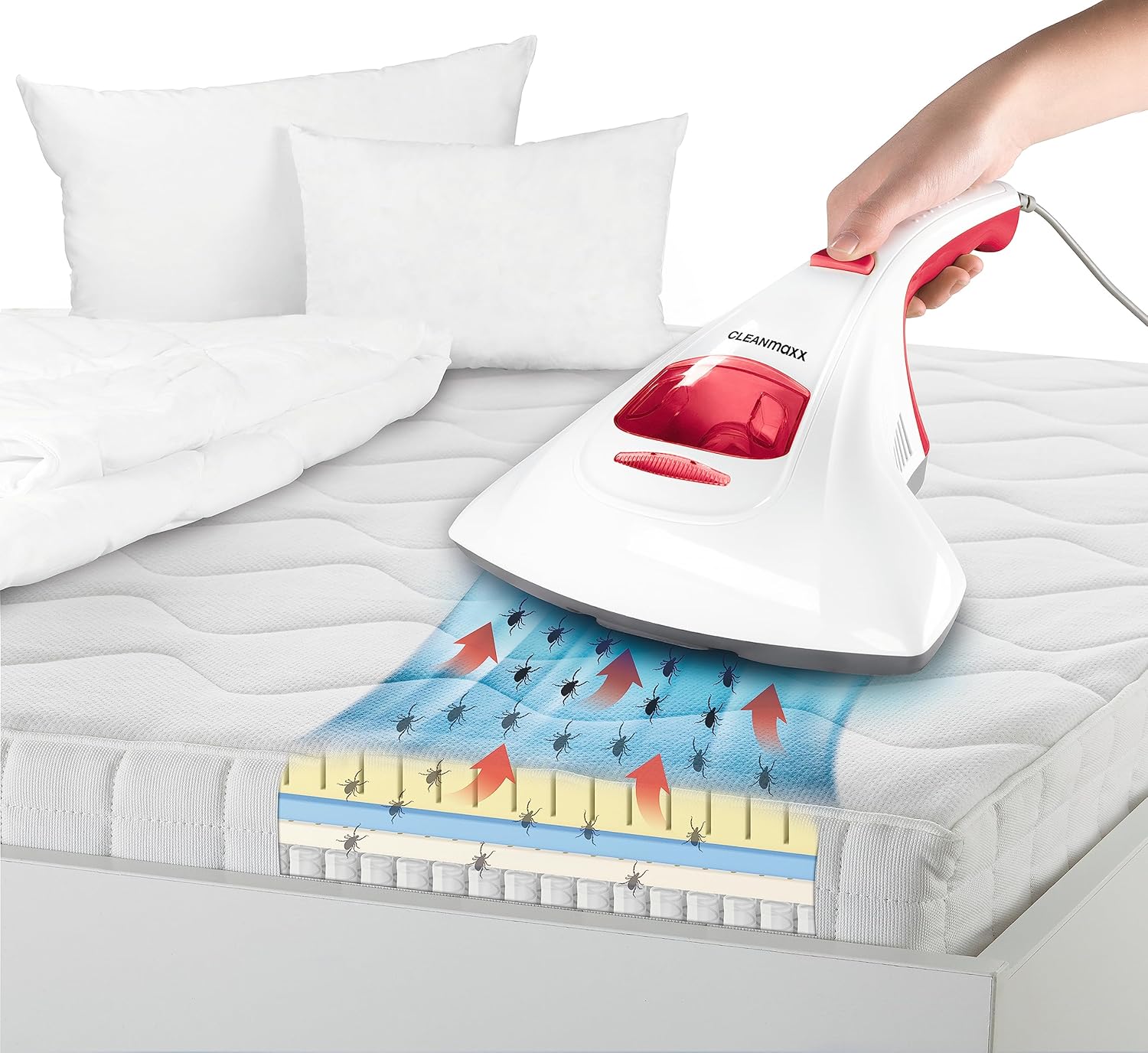
Image 6.2: A visual representation of how the vacuum cleaner's suction and UV-C light work together to remove mites from deep within mattress layers.
7. Maintenance
Regular maintenance ensures optimal performance and extends the lifespan of your appliance.
- Emptying the Dust Bin: After each use, or when the dust bin is full, remove it from the appliance and empty its contents into a waste bin.
- Cleaning the Fine Dust Filters: The fine dust filters are washable. Remove the filter from the dust bin and rinse it under running water until clean. Allow the filter to air dry completely before reinserting it into the dust bin. Do not use the appliance with a wet filter.
- Filter Replacement: The appliance comes with 2 additional washable fine dust filters. Replace filters as needed to maintain suction power and filtration efficiency.
- Appliance Cleaning: Wipe the exterior of the appliance with a soft, damp cloth. Do not use abrasive cleaners or solvents.

Image 7.1: A detailed view of the fine dust filter, which is washable and reusable.
8. Troubleshooting
If you encounter issues with your CLEANmaxx Anti-Mite Vacuum Cleaner, refer to the following table for common problems and solutions:
| Problem | Possible Cause | Solution |
|---|---|---|
| Appliance does not turn on. | Not plugged in correctly; Power outlet malfunction; Damaged power cord. | Ensure plug is fully inserted. Test outlet with another device. Do not use if cord is damaged; contact support. |
| Poor suction power. | Dust bin is full; Filter is clogged; Obstruction in suction nozzle. | Empty dust bin. Clean or replace fine dust filter. Check for and remove any obstructions. |
| UV-C lamp not activating. | Appliance not in firm contact with surface; UV-C lamp is faulty. | Ensure the appliance is pressed firmly against the surface so the safety wheels/sensors are engaged. If problem persists, contact support. |
| Unusual noise during operation. | Obstruction in the fan or motor area; Loose part. | Turn off and unplug the appliance. Check for any visible obstructions. If noise continues, contact support. |
9. Specifications
| Feature | Specification |
|---|---|
| Brand | CLEANmaxx |
| Model Number | CLEANmaxx |
| Color | Red/White |
| Dimensions (L x W x H) | 32.2 x 25 x 12 cm |
| Weight | 1.3 Kilograms |
| Power | 600 Watts |
| Voltage | 220 Volts |
| Material | ABS Plastic |
| Special Feature | HEPA (Fine Dust Filter) |
| Filter Type | Fine Dust Filter |
| Surface Recommendation | Upholstery |
| Power Source | Corded Electric |
| Wireless | No |
| Country of Origin | China |
10. Warranty and Support
For warranty information or technical support, please refer to the documentation included with your purchase or contact the manufacturer directly. Keep your proof of purchase for any warranty claims.
Ask a question about this manual
Ask about setup, troubleshooting, compatibility, parts, safety, or missing instructions. Manuals+ will review the question and use this page’s manual context to help answer it.