
1. Product Overview
The NVIDIA MMA4Z00-NS is an advanced InfiniBand and Ethernet 800Gb/s Twin-port OSFP transceiver. This module is designed for high-speed data communication, supporting two 400Gb/s channels using multimode SR8 technology. It features 8-channels of 100G-PAM4 electrical modulation and two ports of 4-channel 100G-PAM4 optical modulation.
Key features include:
- Supports two straight 400Gb/s or two 1:2 splitter fiber cables for 200Gb/s connections.
- Available in finned-top OSFP for air-cooled switches (e.g., Quantum-2, Spectrum-4) and flat-top OSFP for DGX-H100 or liquid-cooled systems.
- Utilizes 850nm VCSEL technology.
- Maximum fiber reach of 50 meters using OM4 fiber (30 meters with OM3 fiber).
- Equipped with two MPO-12/APC optical connectors.
- Low power consumption: 17 Watts max, with a 2.0 Watt low-power sleep mode.
- Single 3.3V power supply.
- Class 1 laser safety, hot pluggable, and RoHS compliant.
- OSFPmsa.org and CMIS 4.0 compliant.
- Operating case temperature range: 0°C to +70°C.
This transceiver is optimized for NVIDIA end-to-end systems, ensuring robust performance and durability.
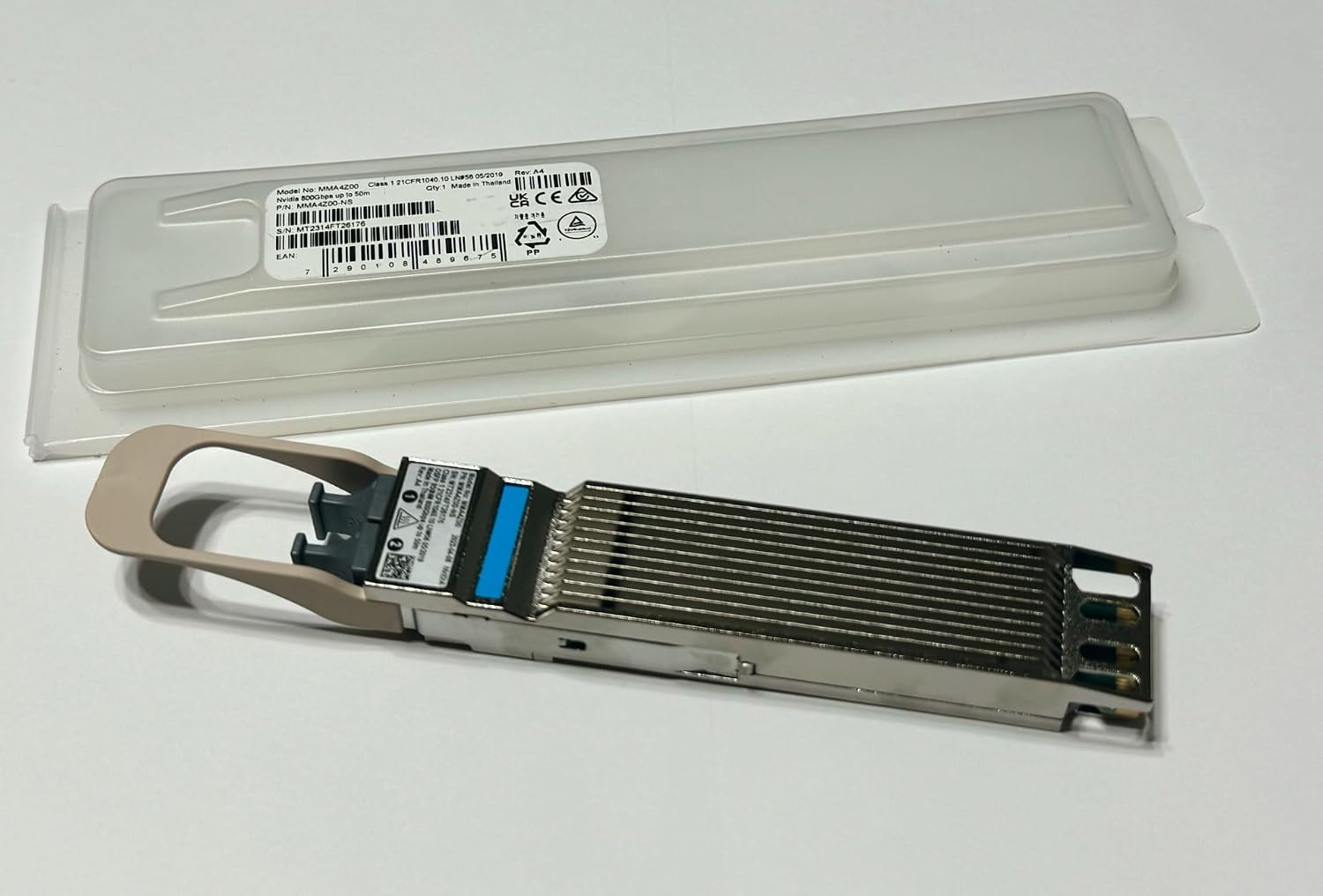
Figure 1: The NVIDIA MMA4Z00-NS OSFP transceiver shown alongside its clear plastic protective packaging. The transceiver features a metallic body with cooling fins and a beige pull tab. The packaging displays product information including model number MMA4Z00-NS and EAN 7290108489675.
2. Setup and Installation
This section provides instructions for the proper installation of the MMA4Z00-NS transceiver into compatible networking equipment.
2.1 Safety Precautions
- Ensure the host system is powered off or in a safe state before handling the transceiver.
- Always handle the transceiver by its edges to avoid touching the electrical contacts or optical interfaces.
- Observe proper electrostatic discharge (ESD) precautions. Use an ESD wrist strap and work on an ESD-safe surface.
- Do not look directly into the optical ports when the transceiver is active, as it emits invisible laser radiation (Class 1 laser product).
2.2 Installation Steps
- Prepare the Host Port: Identify the OSFP port on your switch or network adapter where the transceiver will be installed. Ensure the port is clean and free of debris.
- Orient the Transceiver: Hold the MMA4Z00-NS transceiver with the pull tab facing upwards.
- Insert the Transceiver: Gently slide the transceiver into the OSFP port until it clicks into place. Ensure it is fully seated. Do not force the transceiver.
- Connect Optical Cables: Remove the dust caps from the transceiver's MPO-12/APC optical connectors and the corresponding fiber optic cables. Connect the MPO-12/APC fiber optic cables to the transceiver's ports. Ensure the connectors are clean and properly aligned.
- Verify Connection: Once installed, the host system should detect the transceiver. Refer to your host system's documentation for verifying transceiver status.

Figure 2: A detailed view of the NVIDIA MMA4Z00-NS OSFP transceiver, highlighting its metallic finned top for heat dissipation and the blue optical interface. This view emphasizes the robust construction designed for high-performance networking environments.
3. Operating Instructions
The MMA4Z00-NS transceiver operates automatically once properly installed in a compatible host system. It supports both InfiniBand and Ethernet protocols, which are automatically detected and enabled based on the switch protocol.
3.1 Protocol Auto-Detection
The transceiver firmware is designed to automatically detect whether the connected switch or network adapter is operating in InfiniBand or Ethernet mode. No manual configuration is typically required for protocol selection.
3.2 Power Management
The transceiver features a low-power sleep mode (2.0 Watts) to conserve energy when not actively transmitting data. Normal operation consumes up to 17 Watts. Ensure your host system provides adequate power (single 3.3V supply) to the OSFP port.
3.3 Data Rate and Reach
The MMA4Z00-NS supports 800Gb/s aggregate bandwidth, configured as two 400Gb/s channels. It can also support two 1:2 splitter fiber cables for 200Gb/s connections. Optimal performance is achieved with OM4 fiber for distances up to 50 meters, or OM3 fiber for up to 30 meters.
4. Maintenance and Care
Proper maintenance ensures the longevity and optimal performance of your MMA4Z00-NS transceiver.
4.1 Cleaning Optical Connectors
Dust and contaminants on optical connectors are a primary cause of signal degradation. Always clean fiber optic connectors and transceiver ports before making connections. Use only approved fiber optic cleaning tools and methods.
- Use lint-free wipes and isopropyl alcohol for general cleaning.
- For MPO connectors, use specialized MPO cleaning tools.
- Always replace dust caps on unused transceiver ports and fiber optic cables.
4.2 Environmental Considerations
Operate the transceiver within its specified case temperature range of 0°C to +70°C. Ensure adequate airflow around the host system, especially for finned-top transceivers in air-cooled switches, to prevent overheating.
4.3 Storage
When not in use, store the transceiver in its original anti-static packaging in a cool, dry environment, away from direct sunlight and extreme temperatures.
5. Troubleshooting
This section provides solutions to common issues you might encounter with the MMA4Z00-NS transceiver.
| Problem | Possible Cause | Solution |
|---|---|---|
| No Link Light / Link Down |
|
|
| Poor Performance / High Error Rate |
|
|
| Transceiver Not Detected |
|
|
6. Technical Specifications
| Feature | Detail |
|---|---|
| Model Number | MMA4Z00-NS |
| Data Rate | 800Gb/s (2x400Gb/s) |
| Modulation | 100G-PAM4 (electrical and optical) |
| Optical Interface | Multimode SR8 |
| Wavelength | 850nm VCSEL |
| Fiber Connectors | Two MPO-12/APC |
| Max Reach (OM3) | 30 meters |
| Max Reach (OM4) | 50 meters |
| Power Consumption | 17 Watts (max), 2.0 Watts (sleep mode) |
| Power Supply | Single 3.3V |
| Operating Temperature | 0°C to +70°C (case) |
| Compliance | Class 1 Laser Safety, RoHS, OSFPmsa.org, CMIS 4.0 |
| Form Factor | OSFP (Finned-top or Flat-top options) |
| Contents | Transceiver Only |
7. Warranty and Support
For information regarding product warranty, please refer to the official NVIDIA warranty policy available on their website or contact NVIDIA customer support directly. Keep your purchase receipt as proof of purchase.
7.1 Customer Support
If you encounter issues not covered in this manual or require further assistance, please contact NVIDIA customer support through their official website. Provide your product model number (MMA4Z00-NS) and a detailed description of the issue for efficient support.
NVIDIA Official Website: www.nvidia.com


