
Peaktech P 8005
PeakTech 8005 Sound Level Meter
Instruction Manual
Model: P 8005 | Brand: Peaktech
1. Introduction
The PeakTech 8005 Digital Sound Level Meter is a professional instrument designed for precise noise measurement in various environments, including factories, schools, offices, traffic areas, and households. It features a 4-digit 20 mm LCD multifunction display with a bargraph and backlight, and an internal data logger capable of storing up to 32,000 measurement points. The device supports long-term duration measurements via its USB interface and can be powered by a 9V battery or an AC adapter. It offers selectable fast and slow response times, as well as A- and C-weighting for different measurement needs. The PeakTech 8005 complies with IEC-61672-1 Type 2 and ANSI S1.4 Type 2 standards.
2. Package Contents
Upon unpacking, please verify that all items listed below are present and in good condition:
- PeakTech 8005 Sound Level Meter
- 3m Microphone Extension Cable
- Protective Carrying Case
- USB Interface Cable
- Software for Windows
- Mini Tripod
- 9V AC Adapter
- 9V Battery
- Instruction Manual
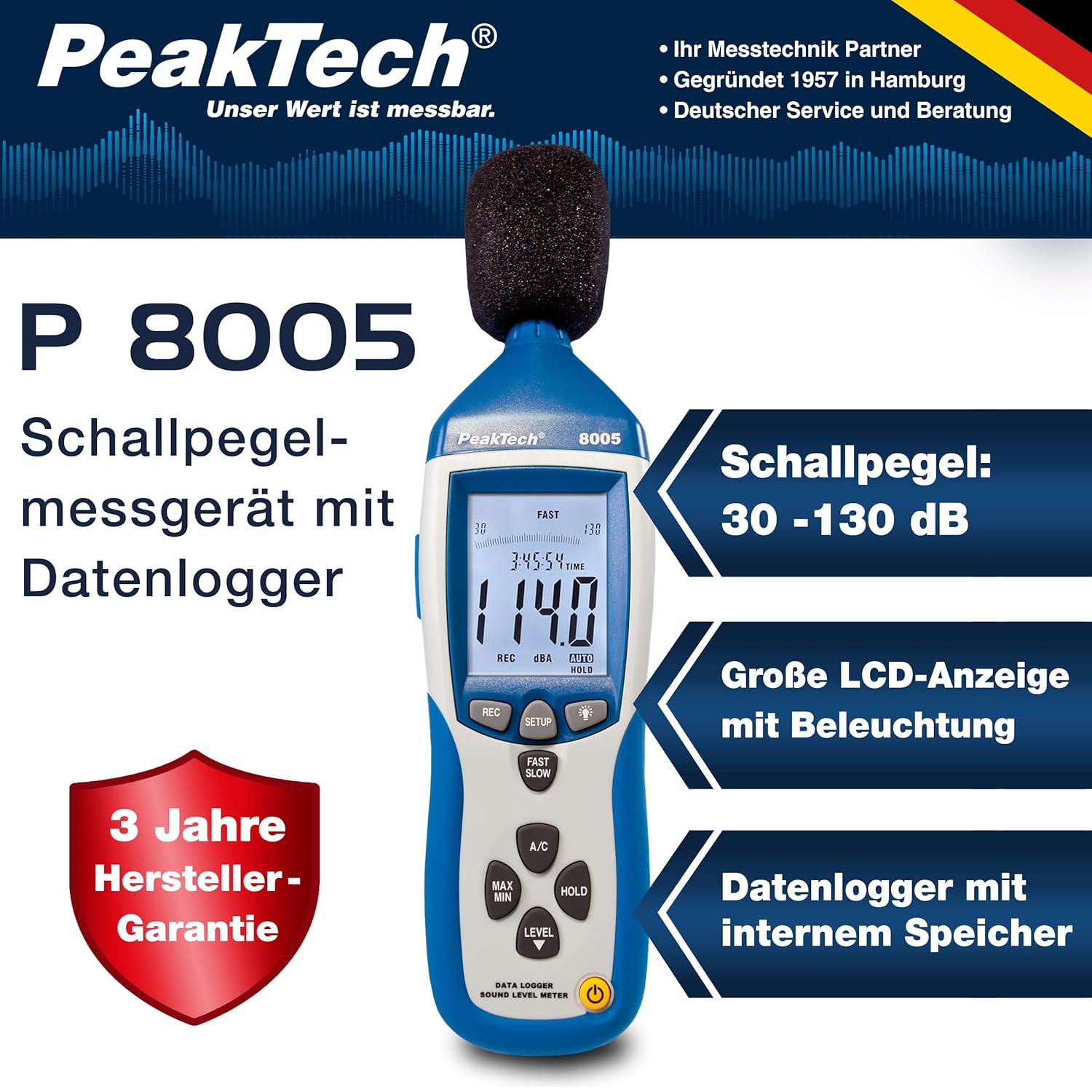
Image: The PeakTech 8005 Sound Level Meter shown with its complete set of accessories, including the carrying case, microphone extension cable, USB cable, software disc, tripod, AC adapter, and 9V battery.
3. Product Overview
The PeakTech 8005 features a robust design with intuitive controls and a clear display for easy operation.

Image: A detailed view of the PeakTech 8005 Sound Level Meter, highlighting its large LCD display, microphone, and various control buttons for measurement, setup, and data logging.
Key Components:
- Microphone: ½-inch electret condenser microphone for sound capture.
- LCD Display: 4-digit, 20 mm LCD with bargraph and backlight for clear readings.
- Control Buttons:
- REC: Initiates data logging.
- SETUP: Accesses configuration settings.
- LIGHT: Activates/deactivates display backlight.
- FAST/SLOW: Toggles between fast (125 ms) and slow (1s) response times.
- A/C: Selects A-weighting (human ear response) or C-weighting (flat response).
- MAX/MIN: Displays maximum or minimum measured values.
- HOLD: Freezes the current display reading.
- LEVEL: Adjusts measurement range.
- Power Button: Turns the device on/off.
- USB Interface: For connecting to a computer for data transfer and long-term measurements.
- AC/DC Outputs: Analog outputs for connection to frequency analyzers or X-Y shaft recorders.
- Tripod Mount: For stable measurements using the included mini tripod.

Image: This image illustrates the illuminated display of the PeakTech 8005, the device mounted on its mini tripod for stable positioning, and a close-up of the side panel revealing the USB port and analog AC/DC output jacks.
4. Setup
4.1. Power Supply
The PeakTech 8005 can be powered by a 9V battery or the included 9V AC adapter.
- Battery Installation: Open the battery compartment cover on the back of the device. Insert a 9V battery, ensuring correct polarity. Close the cover securely.
- AC Adapter Connection: For extended use or data logging, connect the 9V AC adapter to the DC input jack on the side of the device and plug it into a standard power outlet.
4.2. Tripod Mounting
For stable and consistent measurements, especially during long-term data logging, attach the device to the mini tripod using the threaded mount at the bottom of the unit.
4.3. Software Installation (for Data Logging)
To utilize the data logging features and transfer data to a computer, install the provided Windows software:
- Insert the software CD into your computer's CD-ROM drive. If no CD drive is available, download the software from the manufacturer's official website.
- Follow the on-screen instructions to complete the installation.
- Connect the sound level meter to your computer using the supplied USB interface cable.
- Launch the installed software to establish communication with the device.

Image: A user interacting with the PeakTech 8005 software on a laptop, showing a graph of recorded sound level data, with the sound level meter connected via USB.
5. Operating Instructions
5.1. Basic Measurement
- Press the Power button to turn on the device.
- Select the desired weighting:
- Press A/C to toggle between A-weighting (dBA, for general noise measurement simulating human hearing) and C-weighting (dBC, for measuring mechanical noise or peak sound pressure).
- Select the desired response time:
- Press FAST/SLOW to toggle between Fast (125 ms, for capturing sudden noise changes) and Slow (1s, for average noise levels).
- Choose the appropriate level range using the LEVEL button. The device offers ranges: Lo (30-80 dB), Med (50-100 dB), Hi (80-130 dB), and Auto (30-130 dB). Auto mode automatically selects the best range.
- Position the microphone towards the sound source. The current sound level will be displayed on the LCD.
5.2. Data Logging
The PeakTech 8005 can store up to 32,000 measurement points in its internal memory.
- Ensure the device is connected to a power source (AC adapter recommended for long logging periods).
- Press the REC button to start data logging. The REC indicator will appear on the display.
- To stop logging, press the REC button again.
- Connect the device to your computer via USB and use the provided software to download and analyze the recorded data.
5.3. Special Functions
- MAX/MIN Measurement: Press the MAX/MIN button to display the maximum or minimum sound level recorded since the function was activated. Press again to cycle through MAX, MIN, and current readings.
- Data Hold: Press the HOLD button to freeze the current reading on the display. Press again to release.
- Backlight: Press the LIGHT button to turn the display backlight on or off for improved visibility in low-light conditions.
6. Maintenance
- Cleaning: Use a soft, dry cloth to clean the device. Do not use abrasive cleaners or solvents.
- Storage: When not in use for extended periods, remove the battery to prevent leakage. Store the device in its protective carrying case in a cool, dry place, away from direct sunlight and extreme temperatures.
- Microphone Care: Protect the microphone from dust, moisture, and physical impact.
7. Troubleshooting
| Problem | Possible Cause | Solution |
|---|---|---|
| Device does not power on. | Low or dead battery; incorrect battery installation; AC adapter not connected/faulty. | Replace battery; check battery polarity; ensure AC adapter is properly connected and functional. |
| Inaccurate readings. | Incorrect weighting (A/C) or response time (Fast/Slow) selected; microphone obstructed; device not calibrated. | Verify A/C and Fast/Slow settings; ensure microphone is clear; consider professional calibration if accuracy issues persist. |
| Cannot connect to PC or download data. | USB cable faulty; software not installed correctly; driver issues; incorrect port selection. | Try a different USB cable/port; reinstall software and drivers; check device manager for driver status. |
| Display is dim or unreadable. | Backlight off; low battery. | Press the LIGHT button; replace battery. |
8. Specifications
| Parameter | Value |
|---|---|
| Standard Applied | IEC-61672-1 Typ 2, ANSI S1.4 Typ 2 |
| Accuracy (1 kHz Sine; A, C) | 1.4 dB |
| Accuracy (Frequency Range) | Acc. to EN-61672-1 CLASS 2, max. 5.6 dB |
| Frequency Range | 31.5 Hz - 8 kHz |
| Dynamic Range | 50 dB |
| Level Ranges | Lo: 30 dB ~ 80 dB Med: 50 dB ~ 100 dB Hi: 80 dB ~ 130 dB Auto: 30 dB ~ 130 dB |
| Time Weighting | Fast: 125 mS / Slow: 1s |
| Microphone | ½-inch electret condenser microphone |
| Resolution | 0.1 dB |
| Display Update | 2 times/sec. |
| Analog Output | AC/DC-outputs, AC: 1 Vrms = 10 mV/dB |
| Operation Voltage | 9 V-battery or 9 V AC-adaptor |
| Dimensions (WxHxD) | 80 x 280 x 50 mm (3.15 x 11.02 x 1.97 inches) |
| Weight | 350 g (12.35 ounces) |
| Internal Memory | 32,000 data points |
9. Warranty and Support
PeakTech provides a 3-year manufacturer's warranty for the P 8005 Sound Level Meter. For warranty claims, technical support, or service inquiries, please contact PeakTech customer service directly. Refer to the official PeakTech website or the contact information provided in your product packaging for the most up-to-date support details.
Manufacturer: PeakTech
Item Model Number: P 8005
Date First Available: October 15, 2016
Related documentsP 8005


Ask a question about this manual
Ask about setup, troubleshooting, compatibility, parts, safety, or missing instructions. Manuals+ will review the question and use this page’s manual context to help answer it.