
1. Introduction
This manual provides essential information for the safe and efficient operation of your Fafrees F1 Electric Bicycle. Please read it thoroughly before your first ride and retain it for future reference. Understanding the features and maintenance requirements will ensure a long and enjoyable experience with your e-bike.

Image 1.1: The Fafrees F1 Electric Bicycle, showcasing its design and included helmet.
2. Safety Information
Your safety is paramount. Always adhere to local traffic laws and regulations. Failure to follow safety guidelines can result in serious injury or damage to the bicycle.
2.1 Pre-Ride Checks
- Brakes: Ensure both front and rear brakes are functioning correctly.
- Tires: Check tire pressure before each ride. The recommended pressure is typically indicated on the tire sidewall.
- Battery: Verify the battery is securely locked and sufficiently charged.
- Lights: Confirm front and rear lights are operational, especially for night riding.
- Helmet: Always wear a certified helmet.
2.2 General Safety Guidelines
- Do not operate the e-bike under the influence of alcohol or drugs.
- Be aware of your surroundings and other road users.
- Avoid riding in adverse weather conditions if possible.
- Do not exceed the maximum load capacity of 110 kg.
3. Package Contents
Upon unpacking, verify that all components are present:
- 1 x Fafrees F1 Electric Bicycle
- 1 x Battery Charger
- 1 x User Manual (this document)
- 1 x Tool Kit
4. Assembly Instructions
The Fafrees F1 Electric Bicycle is 85% pre-assembled. Final assembly typically involves attaching the front wheel, handlebars, pedals, and seat post. Refer to the included quick start guide for detailed visual instructions.
4.1 Key Assembly Steps
- Handlebar Installation: Secure the handlebar stem to the fork tube and tighten the bolts.
- Pedal Attachment: Identify left (L) and right (R) pedals. Thread the pedals into the crank arms by hand, then tighten with a wrench. Note that the left pedal is reverse-threaded.
- Seat Post Adjustment: Insert the seat post into the frame and adjust to a comfortable riding height. Secure with the quick-release lever.
- Front Wheel Installation: If not pre-installed, attach the front wheel, ensuring the disc brake rotor is correctly aligned with the caliper.
5. Operating Instructions
5.1 Powering On/Off
To power on the bicycle, press and hold the power button on the LED display. Repeat to power off.
5.2 Riding Modes
The Fafrees F1 offers three distinct riding modes:
- Manual Mode: Ride the bicycle like a traditional bike, using pedal power only. Electric assistance is off.
- Pedal-Assist Mode (PAS): The motor provides assistance as you pedal. The level of assistance can be adjusted via the display. This mode offers a range of 50-65 km.
- Electric Mode: The motor provides power without requiring pedaling, typically via a thumb throttle. This mode offers a range of 35-50 km.

Image 5.1: Visual representation of the three riding modes and their activation points.
5.3 Braking
The Fafrees F1 is equipped with 160mm front and rear mechanical disc brakes. These brakes include power-off levers, which cut motor power when applied, ensuring effective and quick stopping. Always apply both brakes simultaneously for balanced stopping power.

Image 5.2: Rider demonstrating the Fafrees F1 in an urban environment.
6. Battery Management
The Fafrees F1 features a 36V 10Ah lithium-ion battery integrated into the seat post, designed for convenience and durability.
6.1 Charging the Battery
The battery can be charged while installed on the bike or removed for charging indoors. The charging port is waterproof. A full charge typically takes 5-6 hours.
- Connect the charger to a standard power outlet (110-240V).
- Connect the charger output to the battery charging port.
- The charger indicator light will show charging status (e.g., red for charging, green for fully charged).
- Disconnect the charger once charging is complete.
6.2 Battery Removal and Installation
The battery features a smart lock design for easy removal and security. Use the provided key to unlock and remove the battery from the seat post. To reinstall, align the battery with the seat post slot and push it in until it locks securely.

Image 6.1: The 36V 10Ah battery integrated into the seat post, with the taillight and charging port visible.
7. LED Display
The Fafrees F1 is equipped with a high-brightness multifunction LED display. Its integrated panel design and clear screen ensure readability even in direct sunlight.
7.1 Display Functions
The display provides key riding information:
- Current Speed
- Total Mileage
- Battery Level Indicator
- Pedal-Assist Level (PAS)
- Headlight Indicator

Image 7.1: The LED display showing various riding metrics.
8. Maintenance
Regular maintenance ensures the longevity and safe operation of your Fafrees F1 Electric Bicycle.
8.1 Routine Checks
- Tires: Inspect for wear, punctures, and maintain correct pressure. The CST 700C*38C road tires feature EPS puncture protection.
- Brakes: Check brake pads for wear and ensure cables are properly tensioned.
- Chain: Keep the chain clean and lubricated.
- Fasteners: Periodically check all bolts and nuts for tightness.

Image 8.1: Detail of the CST 700C*38C road tire, highlighting its design and puncture protection.
8.2 Cleaning and Storage
- Clean the bicycle with a damp cloth and mild detergent. Avoid high-pressure washing directly on electrical components.
- Store the e-bike in a cool, dry place, away from direct sunlight and extreme temperatures.
- If storing for an extended period, charge the battery to 50-70% and recharge every 1-2 months.
9. Troubleshooting
This section addresses common issues you might encounter with your Fafrees F1 Electric Bicycle.
| Problem | Possible Cause | Solution |
|---|---|---|
| Motor not assisting | Low battery, PAS level set to 0, brake levers engaged, loose connection | Charge battery, increase PAS level, check brake levers, inspect connections |
| Bike not powering on | Battery not installed correctly, battery discharged, power button not pressed correctly | Ensure battery is locked, charge battery, press power button firmly |
| Brakes feel weak | Worn brake pads, loose cable, air in hydraulic system (if applicable) | Inspect/replace pads, adjust cable tension, consult a bike mechanic |
| Unusual noises | Loose components, dry chain, brake rub | Check all fasteners, lubricate chain, adjust brake caliper |
10. Specifications
Detailed technical specifications for the Fafrees F1 Electric Bicycle:
| Feature | Specification |
|---|---|
| Brand | Fafrees |
| Model | F1 |
| Type | Road Electric Bicycle |
| Unfolded Dimensions | 171 x 99 x 66 cm |
| Adjustable Seat Height | 95-124 cm |
| Tire Size | 700C*38C |
| Recommended Rider Height | 175-200 cm |
| Net Weight | 20.3 kg |
| Battery Weight | 2.3 kg |
| Load Capacity | 110 kg |
| Frame Material | Aluminum |
| Tire Type | Air Tire with EPS Puncture Protection |
| Maximum Speed | 25 KM/H |
| Max Range (Pedal-Assist Mode) | 50-65 KM |
| Max Range (Pure Electric Mode) | 35-50 KM |
| Max Climbing Angle | 25° |
| Battery Type | Lithium-ion |
| Nominal Voltage | 36V |
| Battery Capacity | 10Ah |
| Charger Input Voltage | 110-240V |
| Charging Time | 5-6 Hours |
| Motor Power | 250W |
| Drive Type | Rear Wheel Drive |
| Maximum Torque | 40 N.m |
| Transmission | Single Speed |
| Display | Multifunction LED Display |
| Brakes | Mechanical Disc Brakes (160mm front/rear) |
| Controller | 5-Shift Intelligent Control System |
| Operating Temperature | 0-40℃ |
| Waterproof and Dustproof Level | IPX3 |
11. Warranty and Support
Fafrees prioritizes customer satisfaction. For any questions, concerns, or support regarding your Fafrees F1 Electric Bicycle, please contact Fafrees customer service. Refer to your purchase documentation for specific warranty terms and contact information.
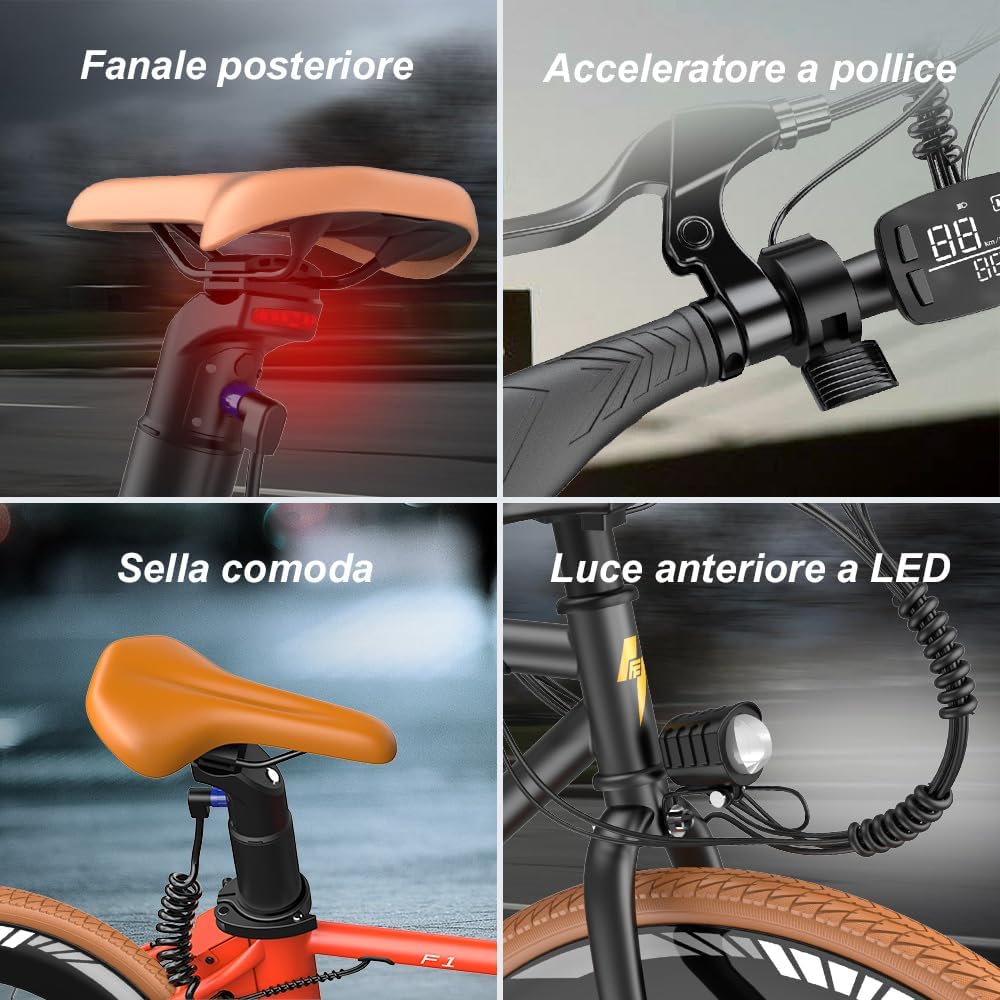
Image 11.1: Key features of the Fafrees F1, including integrated lighting and controls.


