
Introduction
This user manual provides comprehensive instructions for the assembly, operation, and maintenance of your SANODESK Electric Height Adjustable Standing Desk. Please read this manual thoroughly before use to ensure safe and efficient operation.
Safety Information
Caution: This desk has a maximum weight capacity of 110 lbs. Exceeding this limit may cause damage or instability. Ensure that the desk is fully assembled and stable before use. For electric height adjustment, always use the provided controls and never exceed the stated height range. When using the USB ports, be aware that charging may pause during height adjustment. Always follow the assembly instructions and consult the manufacturer if you have any questions or concerns.
Setup and Installation
The SANODESK Standing Desk is designed for quick and easy assembly. The desktop and frame come largely pre-assembled, simplifying the setup process.
Assembly Steps:
- Unpack Components: Carefully remove all parts from the packaging. Verify all components are present according to the packing list.
- Install Tabletop and Lifting Columns: The main frame with lifting columns is pre-attached to the tabletop. Ensure all connections are secure.
- Attach Desk Feet: Securely attach the desk feet to the bottom of the lifting columns using the provided hardware.
- Connect Motor and Power Cords: Connect the motor cable to the control box and then plug the power cord into a suitable electrical outlet.

Figure 1: Simplified assembly process with pre-assembled desktop and frame.
Installation Video:
Video 1: EW8 Installation Guide by SanoDesk. This video demonstrates the three-step assembly process, including attaching the legs and connecting the power cords.
For a detailed step-by-step guide, please refer to the official Installation Manual (PDF) available on the product page or via the provided link: Installation Manual (PDF).
Operating Instructions
Electric Height Adjustment:
The desk features an electric motor for smooth height transitions. Use the Up/Down buttons on the integrated control panel to adjust the desk height from 28.3 inches to 47.6 inches (including the 2.6-inch tabletop thickness).
Integrated Control Panel:
The control panel is conveniently located on the desktop and includes:
- LED Display: Shows the current desk height.
- Up/Down Buttons: For manual height adjustment.
- Four Memory Presets (1, 2, 3, 4): Save your preferred sitting and standing heights for quick transitions. To save a height, adjust the desk to the desired position, then press and hold the desired preset number until the display confirms.
- Child Lock Button: Helps prevent accidental adjustments. Activate or deactivate by pressing the lock button.
- Integrated USB Ports: Charge up to three devices (Type-C output: 5V2.4A/9V2A/12V1.5A; 2 Type-A output: 3.6-6.5V2.4A/6.5-9V2A/12V1.5A). Note: USB ports may pause charging while adjusting desk height. Laptop charging is not supported.
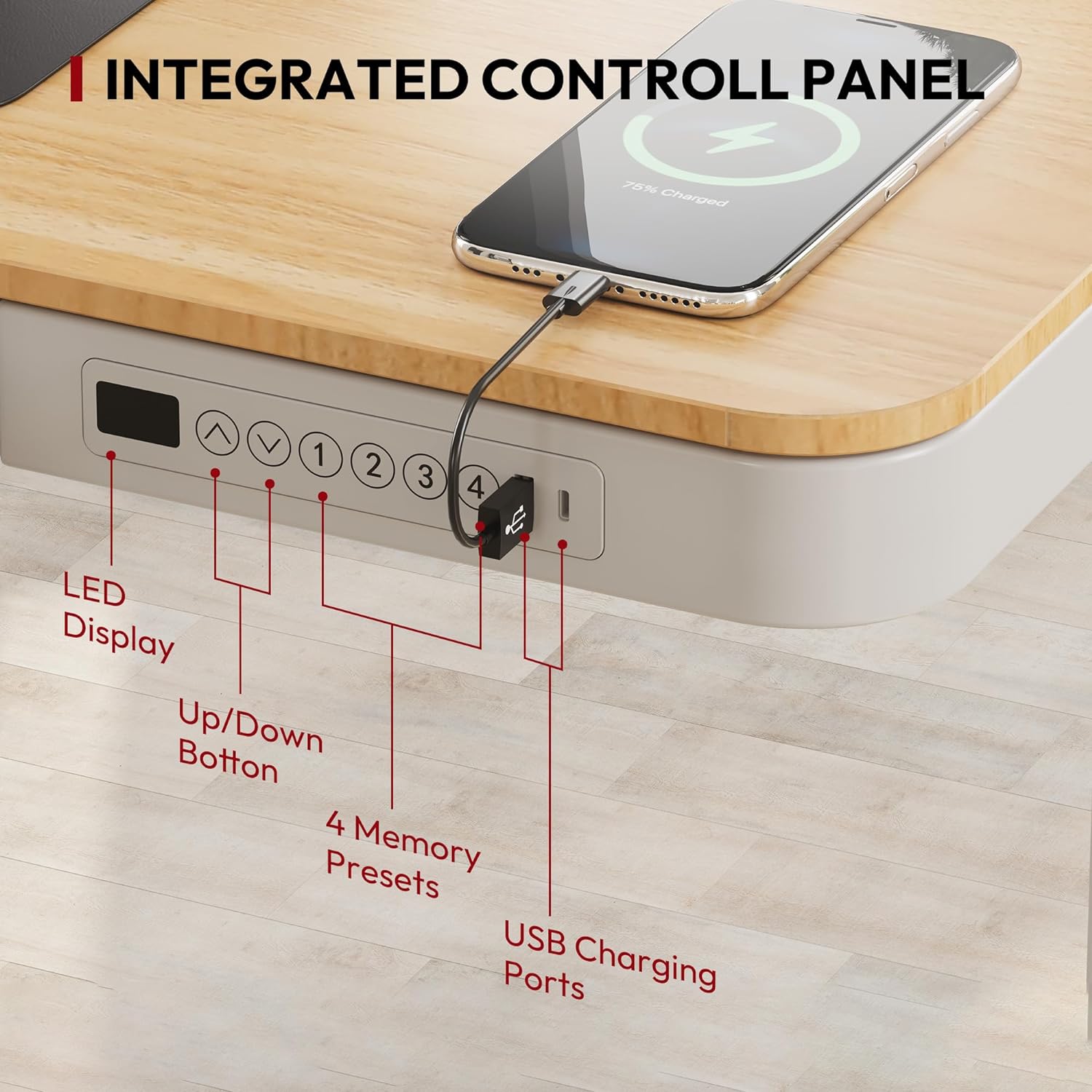
Figure 2: Integrated Control Panel with height adjustment and charging features.
Anti-Collision Function:
The desk is equipped with an anti-collision feature to prevent damage. If the desk encounters an obstacle during adjustment, it will automatically stop and slightly reverse direction.

Figure 3: Anti-collision mechanism for enhanced safety.
Storage Drawer:
A convenient pull-out drawer is integrated into the desktop, providing seamless storage for home office supplies. This keeps your workspace tidy and organized.
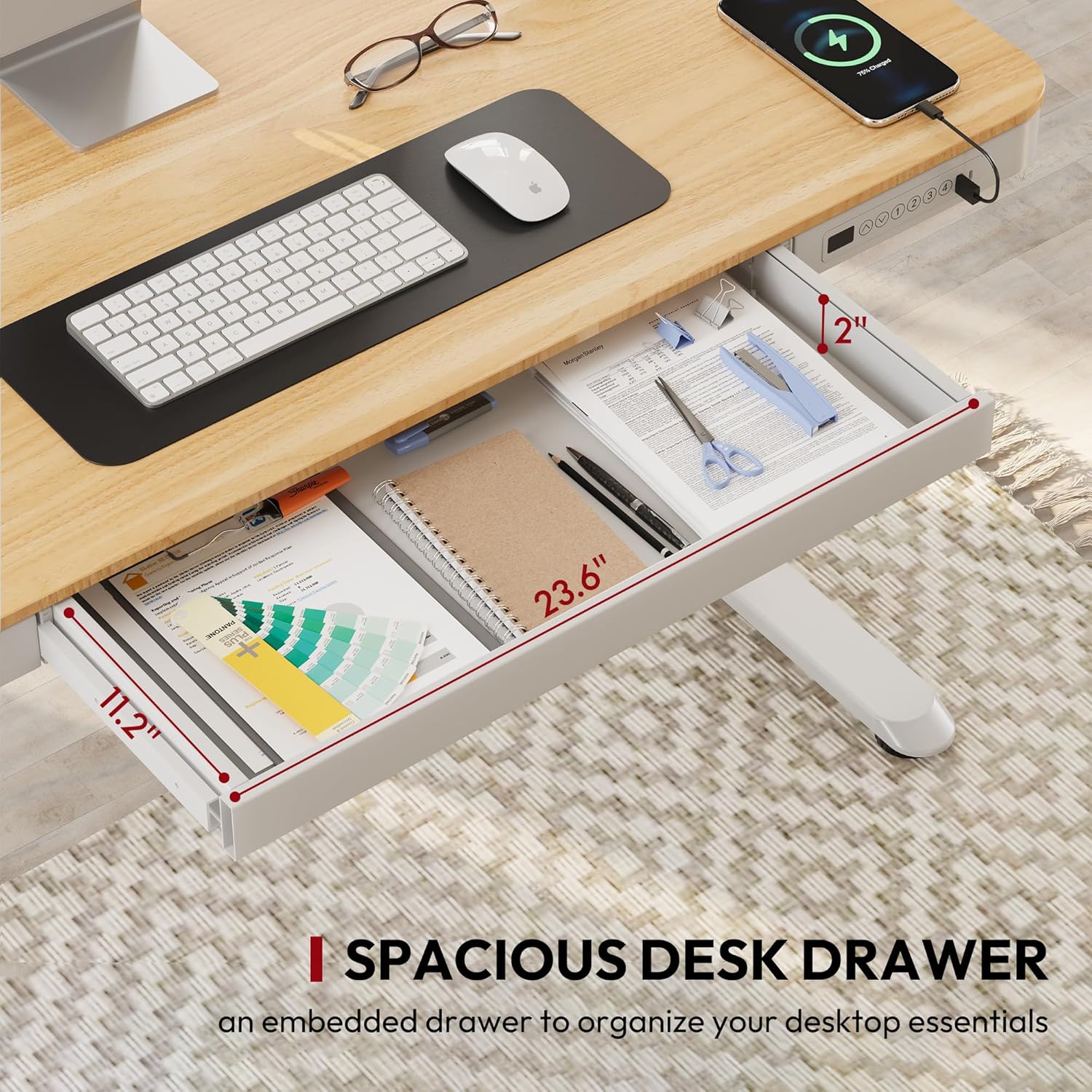
Figure 4: Spacious desk drawer for organizing essentials.
Maintenance
To ensure the longevity and optimal performance of your SANODESK Standing Desk, follow these simple maintenance guidelines:
- Cleaning: Wipe the desktop and frame with a soft, damp cloth. Avoid abrasive cleaners or harsh chemicals that could damage the finish.
- Cable Management: Periodically check and organize cables to prevent tangling and ensure smooth operation during height adjustments.
- Weight Capacity: Do not exceed the maximum weight capacity of 110 lbs to prevent damage to the motor and frame.
Troubleshooting
If you encounter any issues with your SANODESK Standing Desk, please refer to the following common troubleshooting tips:
- Desk Not Moving:
- Check if the power cord is securely plugged into both the desk and the wall outlet.
- Ensure the child lock function is not activated.
- Verify there are no obstructions preventing movement.
- Uneven Movement:
- Ensure the desk is placed on a flat, level surface.
- Check that the weight on the desktop is evenly distributed and does not exceed the maximum capacity.
- USB Ports Not Charging:
- Confirm the desk is powered on.
- Note that charging may temporarily pause during height adjustments.
- Ensure the device being charged is compatible with the USB port specifications.
If the issue persists after attempting these steps, please contact SANODESK customer support for further assistance.
Specifications
| Feature | Detail |
|---|---|
| Brand | SANODESK |
| Product Dimensions (D x W x H) | 24"D x 48"W x 47.6"H |
| Color | Maple (Tabletop), White (Frame) |
| Style | Modern |
| Base Material | Alloy Steel |
| Finish Type | Varnished |
| Special Feature | Electric Height Adjustment, USB Ports, Pull-out Drawer |
| Maximum Weight Recommendation | 110 lbs |
| Height Adjustment Range | 28.3" to 47.6" |
| Tabletop Thickness | 2.6 Inches |
| Number of Drawers | 1 |
| UPC | 810072838056 |
Warranty and Support
Your SANODESK Standing Desk comes with a Limited Warranty. For specific warranty terms and conditions, please refer to the product documentation or contact SANODESK customer support.
For any inquiries, technical support, or warranty claims, please contact the seller, SanoDesk, directly through the Amazon platform or refer to the contact information provided with your purchase.
You can also visit the official SANODESK store on Amazon for more information and support: SANODESK Store.
