
iPormis B0C9977HD3
iPormis Queen Bed Frame User Manual
Model: B0C9977HD3
1. Product Overview
The iPormis Queen Bed Frame is a modern upholstered platform bed designed for comfort and convenience. It features a 16-inch comfort wingback headboard with button tufting, an integrated charging station, and a storage shelf. The sturdy construction includes solid wood slats and heavy-duty legs, providing reliable support without the need for a box spring. Its design prioritizes ease of assembly and a quiet sleeping experience.

Figure 1.1: Fully assembled iPormis Queen Bed Frame with its wingback headboard and integrated charging station.
2. Safety Information
- Do not load more than 900 pounds onto the bed frame.
- Exercise caution around sharp edges during assembly and use.
- Always follow assembly instructions carefully to prevent instability or collapse.
- Ensure all connections are securely tightened before use.
- Keep small parts away from children during assembly.
3. Package Contents
Before beginning assembly, verify that all components listed below are present and undamaged. All parts and tools are typically packaged within the headboard or a single box.
| Part | Description | Quantity |
|---|---|---|
| Headboard (A) | Upholstered headboard with wingbacks and charging station. | 1 |
| Side Rails (B, C) | Left and Right upholstered side rails. | 2 |
| Footboard (D) | Upholstered footboard. | 1 |
| Center Support Beam (E) | Metal beam for central support. | 1 |
| Support Legs (F) | Adjustable legs for the center beam. | 3-5 (approx.) |
| Wood Slats (G) | Individual wooden slats for mattress support. | 12 (approx.) |
| Hardware Pack (H) | Bolts, washers, nuts, Allen wrench. | 1 set |

Figure 3.1: Detail of the wood slats with velcro for quick setup and EVA foam for noise reduction.
4. Assembly Instructions
Assembly is designed to be straightforward and can typically be completed within 30 minutes with two people. Ensure you have ample space and refer to the labeled parts.
Step 1: Unpack and Identify Parts
Carefully unpack all components from the packaging. Lay them out on a clean, soft surface to prevent scratches. Identify each part using the provided labels and compare them with the package contents list.
Step 2: Attach Side Rails to Headboard
Align the side rails (B, C) with the pre-drilled holes on the headboard (A). Secure them using the appropriate bolts and washers from the hardware pack (H). Do not fully tighten bolts until all major components are connected.

Figure 4.1: The wingback headboard design, highlighting the storage shelf and upholstered finish.
Step 3: Attach Footboard
Connect the footboard (D) to the open ends of the side rails (B, C). Use the designated bolts and washers, ensuring a snug fit. Once all four main frame pieces are connected, you may now fully tighten all bolts.
Step 4: Install Center Support Beam and Legs
Attach the center support beam (E) to the designated brackets on the headboard and footboard. Screw in the adjustable support legs (F) to the center beam. Adjust the leg height to ensure the beam is level and provides firm support to the frame.
Step 5: Place Wood Slats
Unroll or place the wood slats (G) across the bed frame. The slats are designed with velcro strips to prevent shifting and reduce noise. Ensure each slat is properly seated and secured to the side rails.
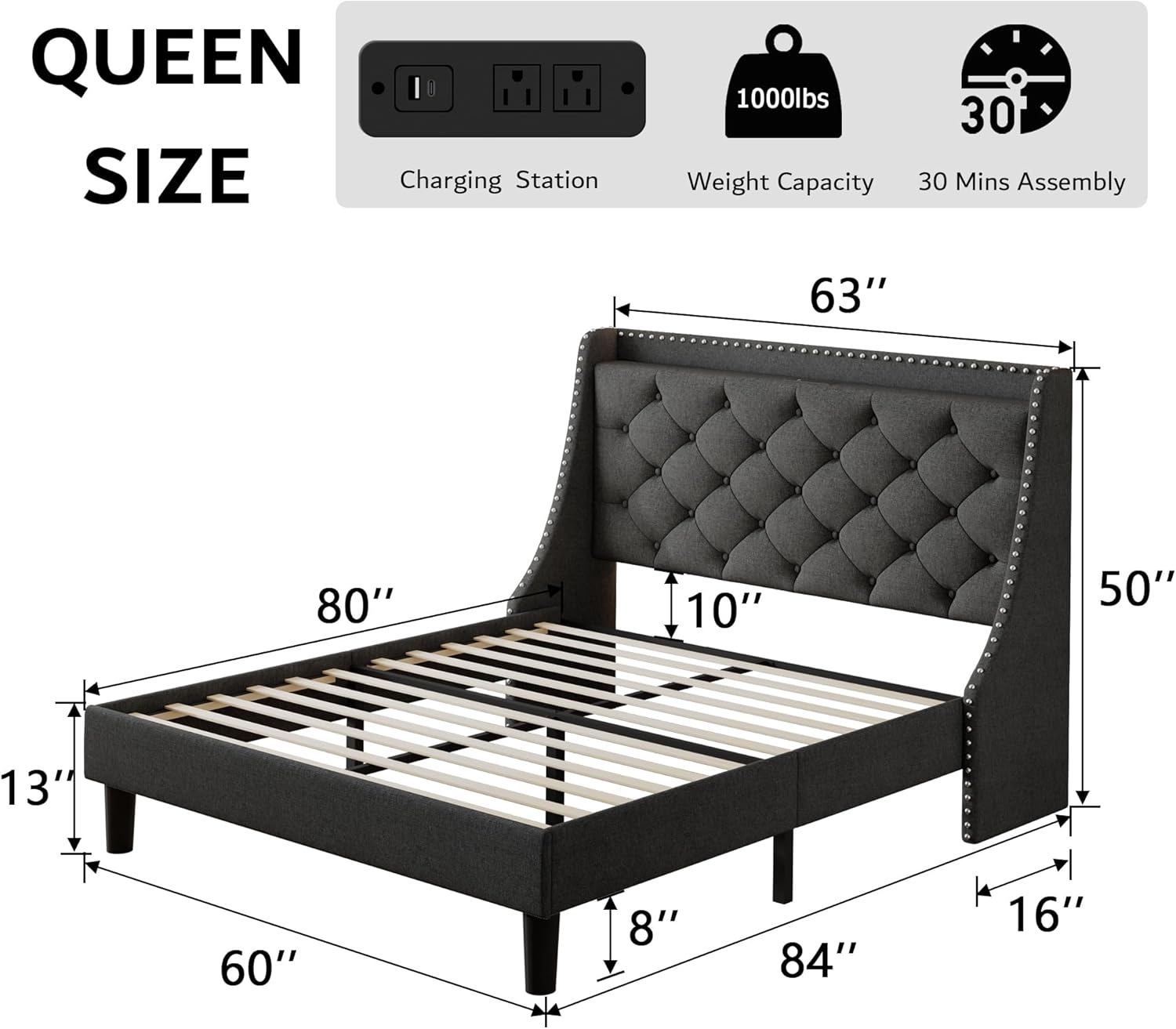
Figure 4.2: Overall dimensions of the Queen bed frame, illustrating the structure that supports the slats.
Step 6: Connect Charging Station Power
Locate the power cord for the integrated charging station. Plug it into a standard wall outlet. Test the USB and AC outlets to ensure they are functioning correctly.
5. Operating Instructions
5.1. Using the Charging Station
The headboard features a built-in charging station with 2 AC outlets, 1 Type-C port, and 1 USB port. Simply plug your devices into the appropriate ports on the headboard's top shelf for convenient charging.

Figure 5.1: Detailed view of the charging station, showing the power outlets and USB ports.
5.2. Utilizing the Storage Shelf
The 4-inch wide top storage ledge on the headboard provides a convenient space for small items such as phones, glasses, or books. The 8-inch under-bed clearance offers additional storage space for boxes or allows for easy cleaning.

Figure 5.2: Illustration of the 8-inch under-bed clearance, suitable for storage or cleaning.
6. Maintenance
- Cleaning: For general cleaning, wipe the upholstered surfaces with a damp cloth. For tougher spots, use a mild fabric cleaner and blot dry. Avoid harsh chemicals.
- Dusting: Regularly dust the headboard and frame with a dry cloth to prevent dust buildup.
- Tightening: Periodically check all bolts and connections to ensure they remain tight. Re-tighten if any looseness or squeaking is detected.
- Slats: Ensure the wood slats remain properly aligned and secured by the velcro.
7. Troubleshooting
| Problem | Possible Cause | Solution |
|---|---|---|
| Bed frame is squeaking or wobbly. | Loose bolts or connections. Slats not properly seated. | Check and tighten all bolts. Ensure all wood slats are correctly positioned and secured by the velcro. Verify center support legs are firm. |
| Charging station is not working. | Power cord not plugged in. Outlet issue. Device issue. | Ensure the power cord is securely plugged into a working wall outlet. Test the outlet with another device. Try a different charging cable or device. |
| Parts do not align during assembly. | Incorrect orientation of parts. Manufacturing defect. | Double-check the instruction manual for correct part orientation. Do not force parts. If a defect is suspected, contact customer support. |
| Missing parts. | Packaging error. | Carefully check all packaging materials. If parts are genuinely missing, contact customer support with your purchase details. |
8. Specifications
- Model: B0C9977HD3
- Size: Queen
- Product Dimensions: 84"L x 63"W x 50"H
- Color: Dark Grey
- Material: Upholstered fabric, solid wood slats, metal frame
- Special Features: 4''W Top Storage Ledge with Charging Ports (2 AC outlets, 1 Type-C, 1 USB), 8" Under-Bed Space, Button Tufted Headboard with 16''W Wingback, Heavy-Duty Frame, Wood Slats, Squeak Resistant, Noise-Free
- Weight Capacity: Up to 900 lbs (approximate, inferred from reviews/common bed frames)
- Assembly Required: Yes
- Manufacturer: iPormis

Figure 8.1: Key structural features including the high-quality frame and heavy-duty support feet.
9. Warranty and Support
For warranty information, product support, or to order replacement parts, please contact iPormis customer service. Keep your purchase receipt and model number (B0C9977HD3) handy for faster service.
- Customer Service: Refer to your purchase documentation or the seller's contact information on the platform where the product was purchased.
- Online Resources: Visit the official iPormis store on Amazon for FAQs and additional product information: iPormis Amazon Store
Ask a question about this manual
Ask about setup, troubleshooting, compatibility, parts, safety, or missing instructions. Manuals+ will review the question and use this page’s manual context to help answer it.