
LIGE BW0382
LIGE Smart Watch User Manual
Model: BW0382
Introduction
Welcome to the user manual for your new LIGE Smart Watch. This device is designed to enhance your daily life with advanced features such as ECG+PPG health monitoring, Bluetooth calling, message notifications, and comprehensive sport activity tracking. It is compatible with both iOS and Android devices and comes with two interchangeable bands (steel and silicon) for versatile styling. Please read this manual carefully to ensure proper use and maintenance of your smartwatch.
1. Setup
1.1 Unboxing and Components
Upon opening the package, ensure all components are present:
- LIGE Smart Watch unit
- Steel Watch Band
- Silicon Watch Band
- Charging Cable
- User Manual (this document)

Figure 1.1: LIGE Smart Watch with both steel and silicon bands.
This image displays the LIGE Smart Watch featuring a black steel band, with an additional black silicon band shown separately. The watch face displays various metrics including time, date, temperature, and activity data.
1.2 Charging the Smart Watch
Before first use, fully charge your smartwatch.
- Connect the magnetic charging cable to the charging points on the back of the watch.
- Plug the USB end of the cable into a standard USB power adapter (5V/1A recommended) or a computer USB port.
- The watch screen will display a charging indicator. A full charge typically takes 2-3 hours.
1.3 App Installation and Pairing
To unlock the full functionality of your LIGE Smart Watch, you need to install the companion application on your smartphone.
- Download the App: Scan the QR code provided in the watch's initial setup screen or search for the official LIGE Smart Watch app in the Apple App Store (for iOS) or Google Play Store (for Android).
- Register/Log In: Open the app and follow the on-screen instructions to create an account or log in.
- Enable Bluetooth: Ensure Bluetooth is enabled on your smartphone.
- Pair the Device: In the app, navigate to the "Device" or "Add Device" section. Select your LIGE Smart Watch from the list of available devices. Confirm the pairing request on both your watch and smartphone.
- Grant Permissions: Allow necessary permissions (e.g., notifications, location, contacts) for the app to function correctly.
2. Operating Your Smart Watch
2.1 Basic Navigation
The LIGE Smart Watch features a 1.28-inch IPS full touch screen with a resolution of 240x240 pixels for clear and vivid display.

Figure 2.1: Detailed view of the smartwatch display.
This image highlights the 1.28-inch IPS display of the LIGE Smart Watch, emphasizing its 240x240px resolution and clear visual experience with vibrant colors.
- Touch Screen: Swipe left/right to navigate between main functions, swipe up/down for quick settings or notifications. Tap to select.
- Side Button(s): Typically, one button serves as a power on/off, back, or home button. Refer to the watch's specific button layout for exact functions.
2.2 Bluetooth Call and Message Notifications
Once paired with your smartphone, your LIGE Smart Watch can handle calls and display notifications.
- Bluetooth Call: Answer, reject, or make calls directly from your watch. Ensure your watch is connected to your phone's Bluetooth for this feature.
- Message Reminder: Receive notifications for incoming calls, SMS, and app messages (e.g., WhatsApp, Facebook) directly on your watch. Configure app notifications in the companion app.
2.3 Health Monitoring
The watch is equipped with advanced sensors for comprehensive health tracking.

Figure 2.2: Rear view of the smartwatch with heart rate sensor.
This image shows the back of the LIGE Smart Watch, highlighting the optical heart rate sensor (green light) and charging contacts. The text "SMART WATCH" and "WITH HEART RATE" are visible.
- Heart Rate Monitoring: The watch uses an AI heart rate algorithm for 24-hour intelligent monitoring. Wear the watch snugly on your wrist for accurate readings.
- ECG+PPG: Advanced electrocardiogram and photoplethysmography sensors provide detailed heart health data. Follow in-app instructions for performing ECG measurements.
- Blood Pressure Monitoring: Provides estimated blood pressure readings. Note that this is for reference only and not a substitute for medical equipment.
- Sleep Monitor: Automatically tracks your sleep patterns, including deep sleep, light sleep, and awake times. View detailed reports in the app.
2.4 Sport Activity Tracking
The watch supports multiple exercise modes to help you track your fitness goals.
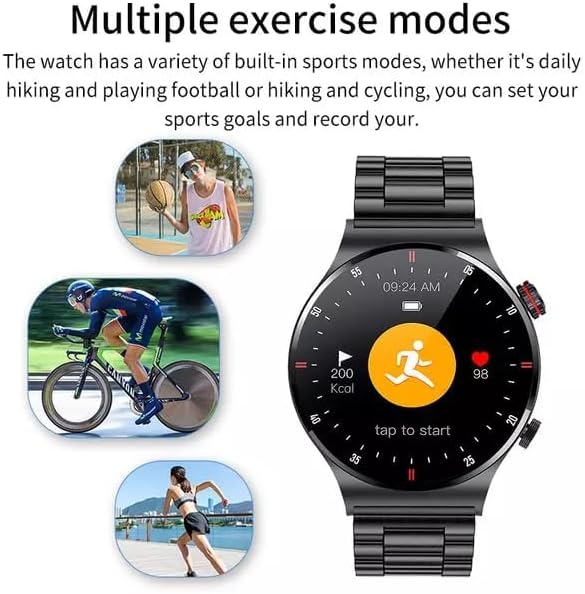
Figure 2.3: Smartwatch interface showing various sport modes.
This image illustrates the LIGE Smart Watch's capability to track multiple exercise modes, with icons representing activities like running, cycling, and basketball. The watch screen shows activity metrics such as calories burned and heart rate.
Select your desired sport mode from the watch menu (e.g., running, cycling, hiking) to record duration, distance, calories burned, and heart rate during your workout.
2.5 NFC Function (Note)
The product description indicates NFC functionality. Please refer to the companion app or the latest product specifications for details on how to utilize NFC features, such as access control or payment. Note that NFC functionality can vary by region and specific watch firmware.
2.6 Other Features
- MP3 Playback: The watch supports MP3 playback. You may need to transfer music files to the watch's internal storage via the companion app or a direct connection, if supported.
- Language Settings: The watch supports 25 languages. You can change the language setting through the watch's settings menu or the companion app.
3. Maintenance
3.1 Cleaning Your Smart Watch
Regular cleaning helps maintain the watch's appearance and functionality.
- Wipe the screen and body with a soft, lint-free cloth.
- For stubborn smudges, slightly dampen the cloth with water. Avoid using harsh chemicals or abrasive materials.
- Clean the charging contacts periodically to ensure good connection.
3.2 Water Resistance (IP68)
Your LIGE Smart Watch is IP68 waterproof, meaning it is resistant to dust and can withstand immersion in water up to 1.5 meters for 30 minutes.
- It is suitable for daily use, hand washing, and light rain.
- Avoid hot water, steam, or prolonged immersion in water (e.g., swimming, diving) as this can compromise the seal.
- Do not operate buttons underwater.
- Dry the watch thoroughly after exposure to water.
3.3 Battery Care
To prolong battery life:
- Avoid extreme temperatures.
- Charge the watch before the battery is completely depleted.
- If storing the watch for an extended period, charge it to about 50% and recharge every few months.
4. Troubleshooting
| Problem | Possible Cause | Solution |
|---|---|---|
| Watch does not turn on | Low battery | Charge the watch for at least 30 minutes. |
| Cannot pair with phone | Bluetooth off, app issue, watch not discoverable | Ensure phone Bluetooth is on. Restart watch and phone. Reinstall app. Check app for pairing instructions. |
| No notifications | App permissions, notification settings | Check app notification permissions on your phone. Ensure notifications are enabled in the watch app. |
| Inaccurate health data | Improper fit, sensor obstruction | Ensure watch is worn snugly on the wrist. Clean the sensor area on the back of the watch. |
| Charging issues | Dirty contacts, faulty cable/adapter | Clean charging contacts. Try a different USB port or power adapter. Ensure cable is securely connected. |
5. Specifications
| Feature | Detail |
|---|---|
| Model Number | BW0382 |
| Product Dimensions | 20 x 15 x 5 cm; 180 g |
| Manufacturer | LIGE |
| Operating System | Android Wear (compatible with iOS and Android) |
| Special Features | Sleep Monitor, Notifications, Heart Rate Monitor, ECG, Blood Pressure Monitoring, MP3 Playback |
| Connectivity Technology | Bluetooth |
| Wireless Communication Standard | Bluetooth |
| Battery Cell Composition | Lithium Polymer |
| Water Resistance | IP68 |
| Screen Resolution | 240x240 pixels |
| Screen Size | 1.28 inches |
6. Warranty and Support
For warranty information and customer support, please refer to the warranty card included with your product or contact LIGE customer service directly.
Manufacturer: LIGE
For further assistance, please visit the official LIGE website or contact their support channels.
Related documentsBW0382


Ask a question about this manual
Ask about setup, troubleshooting, compatibility, parts, safety, or missing instructions. Manuals+ will review the question and use this page’s manual context to help answer it.