
1. Introduction
This manual provides detailed instructions for the safe and effective operation of your DANOPLUS KIB0381 Professional Fuel Injector Tester Kit. This tool is designed to assist in diagnosing various fuel injector issues in gasoline vehicles, including stuck, leaking, or burnt-out conditions. Please read this manual thoroughly before use to ensure proper functionality and safety.
2. Safety Information
Always observe the following safety precautions to prevent personal injury or damage to the vehicle and equipment:
- To avoid electric shock and vehicle damage, ensure the engine is turned off before connecting or using the tester.
- Prevent fuel from spilling onto hot engine parts.
- Operate the vehicle in a well-ventilated area. Do not inhale exhaust gases or fuel vapors.
- Do not short-circuit the vehicle battery's positive and negative terminals.
- Avoid touching any conductor that may carry high voltage.
- Always adhere to the vehicle manufacturer's warnings, cautions, and service procedures.
- Wear approved eye protection during all testing procedures.
- Carefully reconnect all disconnected components after testing.
- This product is specifically designed for gasoline cars and is not suitable for diesel engines.

3. Product Overview
3.1 Package Contents
The DANOPLUS KIB0381 Professional Fuel Injector Tester Kit includes the following items:
- 1 x Fuel Injector Tester Unit
- 1 x English Instruction Manual
- Standard Factory Packaging

3.2 Components and Features
The injector tester features a compact design with a digital display and intuitive controls. Key components and features include:
- Digital Display: Provides clear, easy-to-read information during testing.
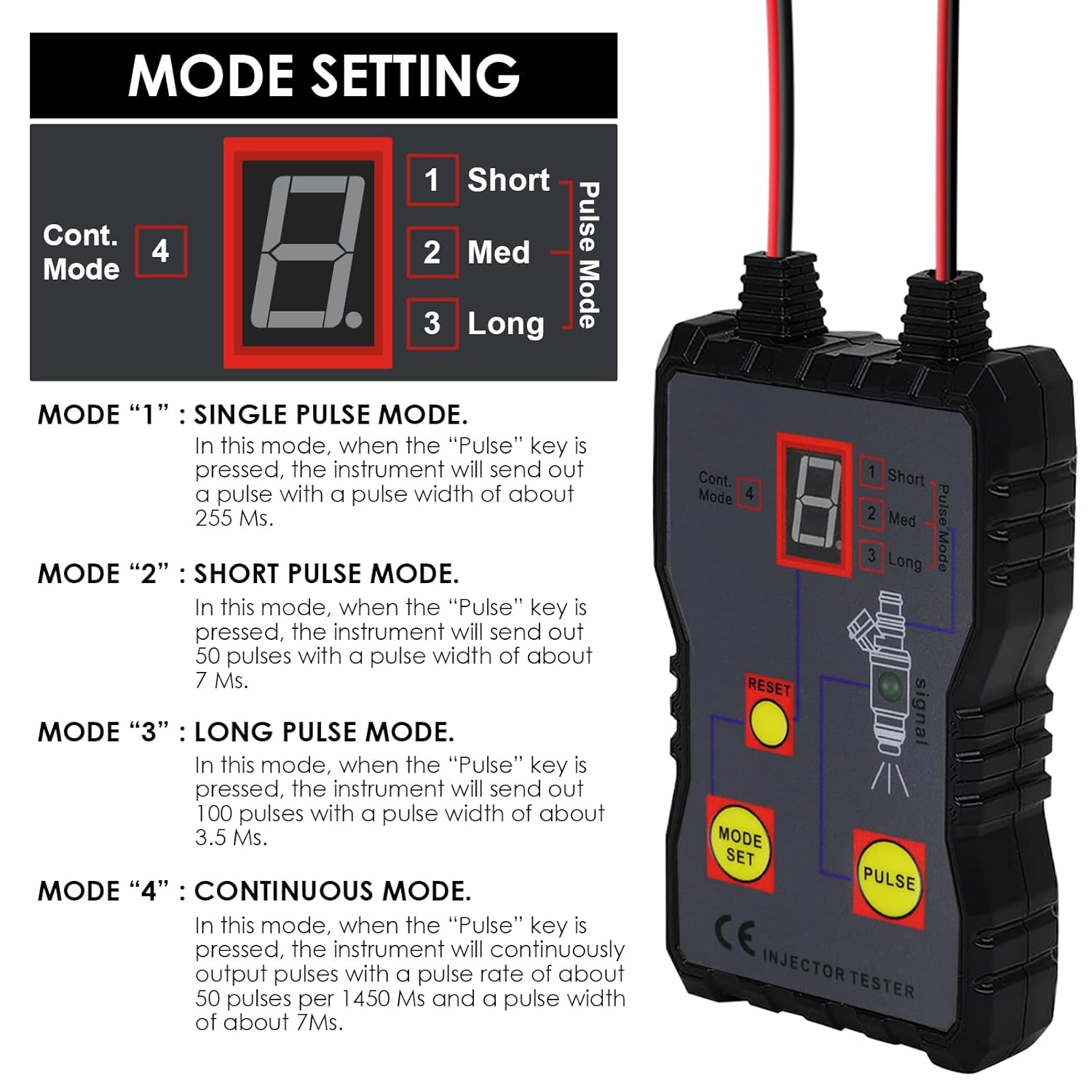
- Mode Selection Key (MODE SET): Used to cycle through the four pulse modes.
- Reset Key (RESET): Resets the tester.
- Test Key (PULSE): Initiates the pulse output for testing.
- Alligator Clips: For connecting to a 12V vehicle battery power supply.
- Pulse Output Terminals: For connecting to the fuel injector.
- Four Pulse Modes: Single, Short, Long, and Continuous for precise testing.
- 12V Powered: Operates directly from a vehicle's 12V battery.
- Compatibility: Can be used with any fuel pressure tester (sold separately).

4. Setup
Before operating the fuel injector tester, ensure the vehicle's engine is off and all safety precautions are observed.
4.1 Power Connection
- Locate the vehicle's 12V battery.
- Connect the RED alligator clip to the positive (+) terminal of the vehicle battery.
- Connect the BLACK alligator clip to the negative (-) terminal of the vehicle battery.
- Ensure connections are secure to prevent accidental disconnection during testing.

4.2 Injector Connection
- Identify the fuel injector to be tested.
- Connect the RED wire from the pulse output terminal to the positive (+) terminal of the fuel injector.
- Connect the BLACK wire from the pulse output terminal to the negative (-) terminal of the fuel injector.
- Ensure connections are firm.


5. Operating Instructions
The DANOPLUS KIB0381 offers four distinct pulse modes to diagnose various injector conditions.
5.1 Mode Selection
Press the MODE SET button to cycle through the available pulse modes. The digital display will indicate the currently selected mode (1, 2, 3, or 4).
- Mode 1: Single Pulse Mode
When the PULSE key is pressed, the instrument will send out a single pulse with a pulse width of approximately 255 milliseconds (Ms).
- Mode 2: Short Pulse Mode
When the PULSE key is pressed, the instrument will send out 50 pulses with a pulse width of approximately 7 Ms each.
- Mode 3: Long Pulse Mode
When the PULSE key is pressed, the instrument will send out 100 pulses with a pulse width of approximately 3.5 Ms each.
- Mode 4: Continuous Pulse Mode
In this mode, the instrument will continuously output pulses at a rate of about 50 pulses per 1450 Ms, with a pulse width of approximately 7 Ms each. This mode continues until the PULSE key is pressed again to stop.
5.2 Performing a Test
- Ensure the tester is correctly connected to the vehicle battery and the fuel injector as described in Section 4.
- Select the desired pulse mode using the MODE SET button.
- Press the PULSE button to initiate the test. Observe the injector's operation.
- For continuous mode (Mode 4), press PULSE again to stop the test.
- Press the RESET button to clear the current test state if needed.
Note: This tool is designed to test the electrical functionality of the injector. For comprehensive diagnosis of fuel flow and spray patterns, it is recommended to use this tester in conjunction with a fuel pressure tester and appropriate collection equipment (not included).
6. Maintenance
To ensure the longevity and accurate performance of your DANOPLUS KIB0381 Fuel Injector Tester, follow these maintenance guidelines:
- Cleaning: Wipe the unit with a soft, dry cloth after each use. Do not use abrasive cleaners or solvents.
- Storage: Store the tester in a cool, dry place, away from direct sunlight and extreme temperatures. Keep it in its original packaging or a protective case when not in use.
- Cable Inspection: Regularly inspect the cables and connectors for any signs of wear, cuts, or damage. Replace if necessary.
- Avoid Moisture: Do not expose the unit to water or excessive moisture.
7. Troubleshooting
If you encounter issues while using the DANOPLUS KIB0381 Fuel Injector Tester, refer to the following common problems and solutions:
| Problem | Possible Cause | Solution |
|---|---|---|
| Tester does not power on. | Incorrect or loose power connection to the 12V battery. | Ensure the red alligator clip is connected to the positive terminal and the black clip to the negative terminal of a 12V vehicle battery. Check for secure connections. |
| No pulse output to injector. | Incorrect injector connection; faulty injector; incorrect mode selected. | Verify the red and black pulse output wires are correctly connected to the injector terminals. Ensure the injector is functional. Select a pulse mode (1-4) before pressing PULSE. |
| Digital display is blank or erratic. | Low battery voltage; internal fault. | Check the vehicle battery voltage (must be 12V). If the problem persists, contact customer support. |
| Tester is not suitable for my vehicle. | Attempting to use on a diesel engine. | This product is designed exclusively for gasoline cars. It is not compatible with diesel engines. |
8. Specifications
Technical specifications for the DANOPLUS KIB0381 Fuel Injector Tester:
- Model Number: KIB0381
- Power Supply: 12V DC (Vehicle Battery)
- Min. Operating Voltage: 12 Volts (DC)
- Working Conditions: 0~40°C; Relative humidity ≤80%
- Storage Conditions: -20~50°C; Relative humidity ≤85%
- Dimensions (Main Part): Approximately 125 x 72 x 25 mm (5 x 3 x 1 inches)
- Item Weight: Approximately 162 grams (5.71 ounces)
- Manufacturer: DANOPLUS
- Date First Available: June 23, 2023

9. Warranty and Support
For warranty information, technical support, or service inquiries, please refer to the official DANOPLUS website or contact their customer service directly. Details can typically be found on the product packaging or the manufacturer's official online resources.