
QWORK QS15015
QWORK Electric Door Strike Lock (Model QS15015) Instruction Manual
Brand: QWORK | Model: QS15015
1. Introduction
This manual provides detailed instructions for the installation, operation, and maintenance of the QWORK Electric Door Strike Lock, Model QS15015. This device is designed to integrate with access control systems, offering enhanced security and convenience for various door types. Please read this manual thoroughly before installation and use to ensure proper function and safety.
2. Product Features
- Durable Construction: Features a stainless steel brushed panel and a zinc alloy one-piece lock body, ensuring longevity and resistance to wear.
- High Impact Strength: Capable of withstanding up to 882 lbs (400 kg) of impact force.
- Efficient Coil: Equipped with an all-copper coil for low power consumption and minimal heat generation.
- Dual Operating Modes: Easily switch between Fail-Safe (NC - Normally Closed) and Fail-Secure (NO - Normally Open) modes by adjusting a screw.
- Fail-Safe (NC): The door unlocks when power is lost.
- Fail-Secure (NO): The door remains locked when power is lost.
- Easy Installation: Includes complete mounting hardware and is designed for compatibility with most metal or wood doors, suitable for both right and left-handed door configurations.
- Versatile Application: Ideal for converting standard cylindrical locks into electronic access control systems, suitable for various access control setups.
3. Package Contents
Verify that all items listed below are present in your package:
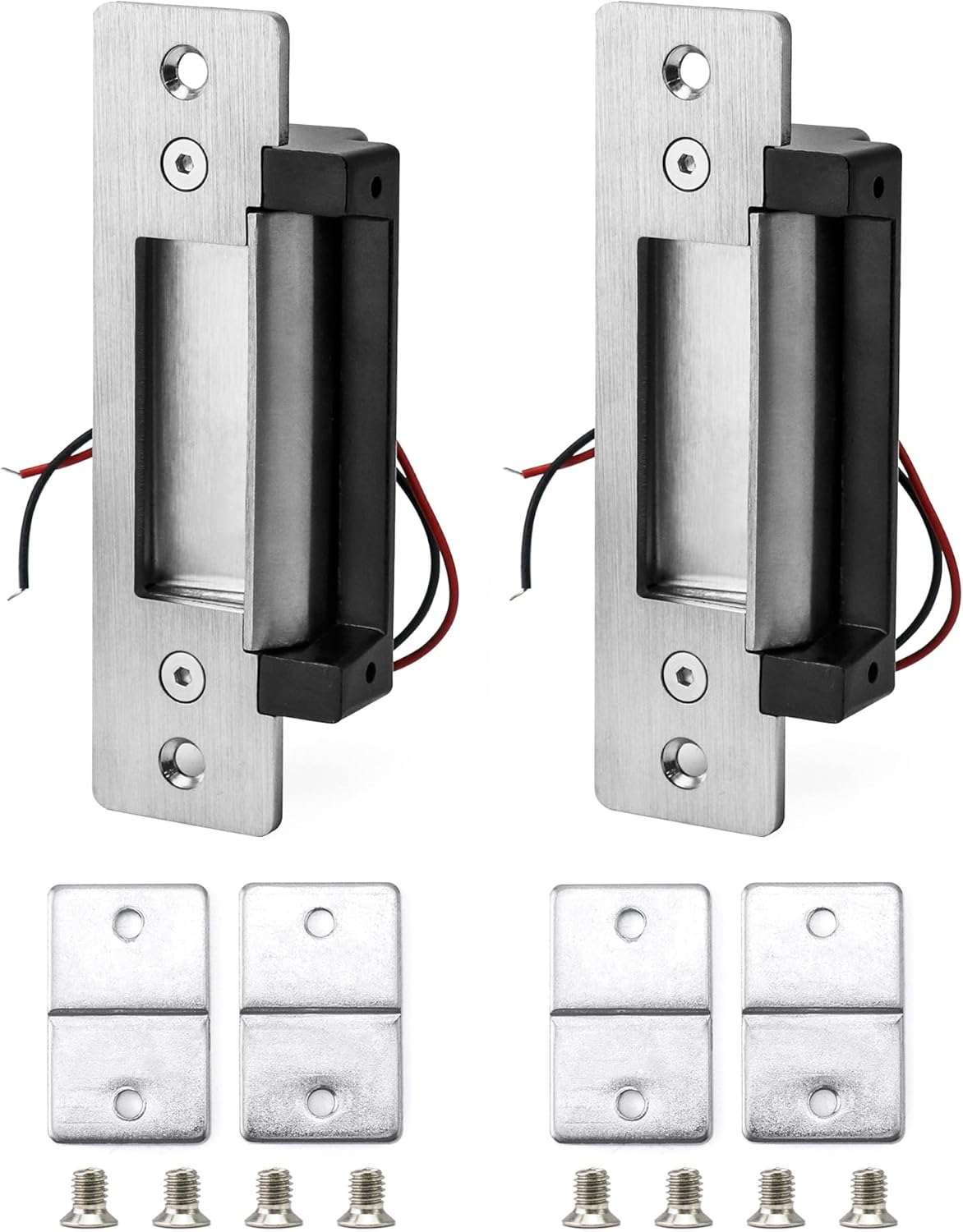
- 2 x QWORK Electric Door Strike Locks
- Mounting Hardware (screws, mounting plates)

4. Safety Information
Please observe the following safety precautions to prevent injury or damage to the product:
- Electrical Safety: Ensure power is disconnected before performing any wiring or installation. Incorrect wiring can cause electric shock or damage to the device.
- Professional Installation: For optimal performance and safety, professional installation by a qualified technician is recommended, especially for complex access control systems.
- Voltage Compatibility: Only use the specified 12VDC power supply. Using incorrect voltage can damage the lock.
- Avoid Tampering: Do not attempt to disassemble or modify the lock beyond the instructions provided in this manual. This may void the warranty and create safety hazards.
- Environmental Conditions: Install the lock in a dry environment, away from direct moisture or extreme temperatures, unless specifically rated for such conditions.
5. Specifications
| Feature | Specification |
|---|---|
| Brand | QWORK |
| Model Name | QS15015 |
| Lock Type | Electric Strike |
| Material | Stainless Steel, Zinc Alloy |
| Operating Voltage | 12VDC (Adjustable for 24VDC via internal switch) |
| Impact Strength | Max 882 lbs (400 kg) |
| Operating Modes | Fail-Safe (NC) / Fail-Secure (NO) - Switchable |
| Finish Type | Brushed |
| Color | Silver |
| Item Weight | 0.79 Kilograms (1.74 pounds) |
| Package Dimensions | 7.6 x 6.22 x 1.65 inches |
| UPC | 795973611567 |
6. Installation Guide
6.1 Pre-Installation Checklist
- Ensure you have all necessary tools (drills, screwdrivers, wire strippers, multimeter).
- Confirm the door frame material is suitable for mounting the strike.
- Verify the power supply (12VDC) is available and accessible.
- Determine the desired operating mode (Fail-Safe or Fail-Secure).
6.2 Selecting Operating Mode (Fail-Safe / Fail-Secure)
The QWORK Electric Door Strike Lock supports both Fail-Safe (NC) and Fail-Secure (NO) modes. You can switch between these modes by adjusting a small screw located on the back of the lock body. Refer to the diagram below for the screw position and corresponding mode indicators.
- Fail-Safe (NC): The door unlocks when power is removed. This is typically used for emergency exits where the door must open during a power failure.
- Fail-Secure (NO): The door remains locked when power is removed. This is common for security applications where the door should stay closed even without power.

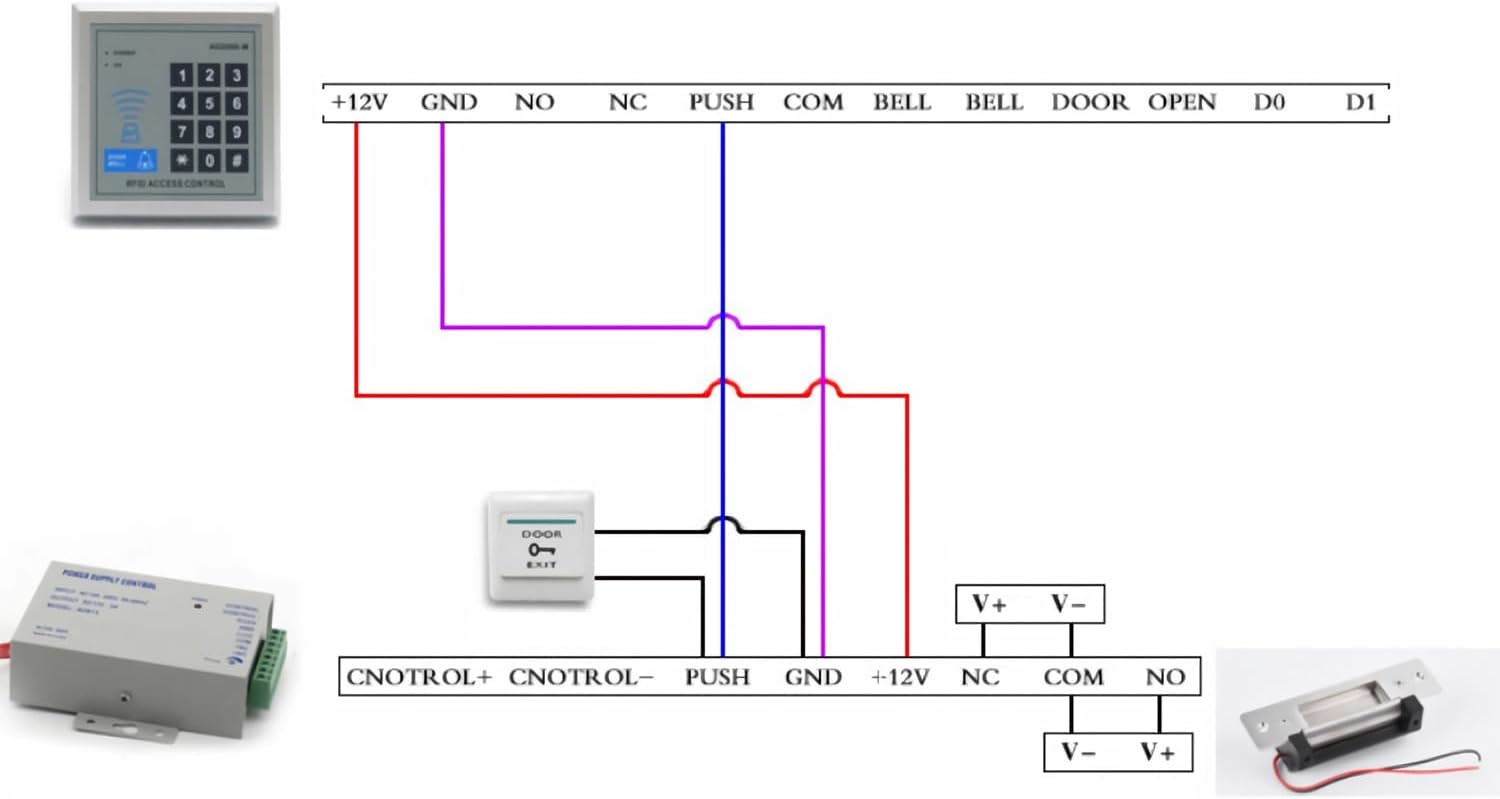
6.3 Wiring Diagram
Connect the electric strike to your access control system according to the following diagram. Ensure all connections are secure and insulated.
6.4 Physical Installation Steps
- Prepare the Door Frame: Carefully measure and mark the area on the door frame where the electric strike will be installed. Ensure it aligns perfectly with the existing door latch.
- Cut the Mortise: Using appropriate tools, cut a mortise (recess) into the door frame to accommodate the body of the electric strike. Refer to the dimensional drawing (Image 5.1) for precise measurements.
- Drill Mounting Holes: Drill pilot holes for the mounting screws as indicated by the strike's faceplate.
- Route Wiring: Route the power wires from your access control system through the door frame to the strike's location.
- Connect Wires: Connect the strike's wires to the power supply/access control system as shown in the wiring diagram (Image 6.2). Pay close attention to polarity.
- Mount the Strike: Insert the electric strike into the prepared mortise and secure it with the provided mounting screws. Ensure the faceplate is flush with the door frame.
- Test Functionality: Before fully securing, test the lock's operation with your access control system. Ensure the door latches correctly and the strike releases/locks as expected in your chosen mode.
- Final Adjustments: Make any necessary adjustments to ensure smooth operation and proper alignment with the door latch.

7. Operation
The QWORK Electric Door Strike Lock operates in conjunction with an external access control system (e.g., keypad, card reader, biometric scanner) and a power supply.
- Unlocking (Fail-Secure Mode): When a valid signal is received from the access control system, power is applied to the electric strike. This retracts the strike's keeper, allowing the door's latch bolt to pass through, and the door to open. Once the signal is removed, the strike returns to its locked state.
- Unlocking (Fail-Safe Mode): In Fail-Safe mode, the strike is powered to remain locked. When a valid signal is received from the access control system, power to the strike is momentarily interrupted, causing the keeper to retract and the door to open. The strike will relock once power is restored.
- Manual Override: This electric strike typically works with existing mechanical door hardware. The door can still be opened from the inside using the door handle or by key if the mechanical lock supports it, independent of the electric strike's state.
8. Maintenance
Regular maintenance ensures the longevity and reliable operation of your electric door strike.
- Cleaning: Periodically wipe the faceplate and keeper with a soft, dry cloth to remove dust and grime. Avoid using abrasive cleaners or solvents.
- Lubrication: Lightly lubricate moving parts of the keeper mechanism with a silicone-based lubricant once a year to ensure smooth operation. Do not over-lubricate.
- Check Connections: Annually inspect all electrical connections for tightness and signs of corrosion. Ensure wires are not frayed or damaged.
- Alignment Check: Verify that the strike's keeper remains properly aligned with the door's latch bolt. Misalignment can cause excessive wear or prevent proper locking/unlocking.
- Functionality Test: Regularly test the electric strike with your access control system to confirm it is operating correctly in both locked and unlocked states.
9. Troubleshooting
If you encounter issues with your QWORK Electric Door Strike Lock, refer to the following common problems and solutions:
| Problem | Possible Cause | Solution |
|---|---|---|
| Strike does not lock/unlock | No power to the strike; Incorrect wiring; Faulty access control signal; Misalignment with door latch. | Check power supply and connections; Verify wiring against diagram; Test access control system output; Adjust strike alignment. |
| Strike makes a buzzing noise | Incorrect voltage; AC power being used instead of DC; Mechanical obstruction. | Ensure 12VDC power supply is used; Verify power source is DC; Check for debris or misalignment causing friction. |
| Door is difficult to open/close | Misalignment between strike and door latch; Door frame warping. | Adjust the strike's position; Inspect door and frame for structural issues. |
| Strike remains unlocked (Fail-Secure mode) or locked (Fail-Safe mode) | Incorrect mode selection; Continuous power supply (Fail-Secure) or continuous power interruption (Fail-Safe). | Verify the mode selection screw setting; Check access control system for constant signal output. |
If the problem persists after attempting these solutions, please contact QWORK customer support for further assistance.
10. Warranty and Support
QWORK products are manufactured to high-quality standards and are backed by a manufacturer's warranty. For specific warranty terms and conditions, please refer to the documentation included with your purchase or visit the official QWORK website.
For technical support, troubleshooting assistance, or warranty claims, please contact QWORK customer service through their official channels. When contacting support, please have your product model number (QS15015) and purchase information readily available.
QWORK Official Website: Visit QWORK Store on Amazon
Ask a question about this manual
Ask about setup, troubleshooting, compatibility, parts, safety, or missing instructions. Manuals+ will review the question and use this page’s manual context to help answer it.