
1. Introduction
The Raddy SH-905 is a versatile emergency radio designed for outdoor enthusiasts and emergency preparedness. This device integrates multiple functions into a compact and robust design, ensuring ease of use and reliable power in various situations. It features AM/FM/SW/NOAA reception, multiple charging options, and essential emergency tools.
2. Product Overview
The Raddy SH-905 emergency radio is equipped with a 10,000mAh battery, offering extended operation and the ability to charge external devices. Key features include:
- Multi-band Reception: FM/AM/SW/NOAA with automatic weather alerts.
- Digital Display & Tuning: LCD screen and large buttons for precise tuning and quick station saving.
- Multiple Charging Methods: Solar panel, hand crank, USB-C, and optional AAA batteries.
- High-Capacity Power Bank: 10,000mAh internal battery for charging smartphones and other USB devices.
- Emergency Lighting: Integrated flashlight and reading lamp with multiple modes.
- SOS Alarm: Audible alarm and flashing red light for emergency signaling.

Image 2.1: The Raddy SH-905 Emergency Radio, demonstrating its capability to charge a smartphone with its 10,000mAh power bank.
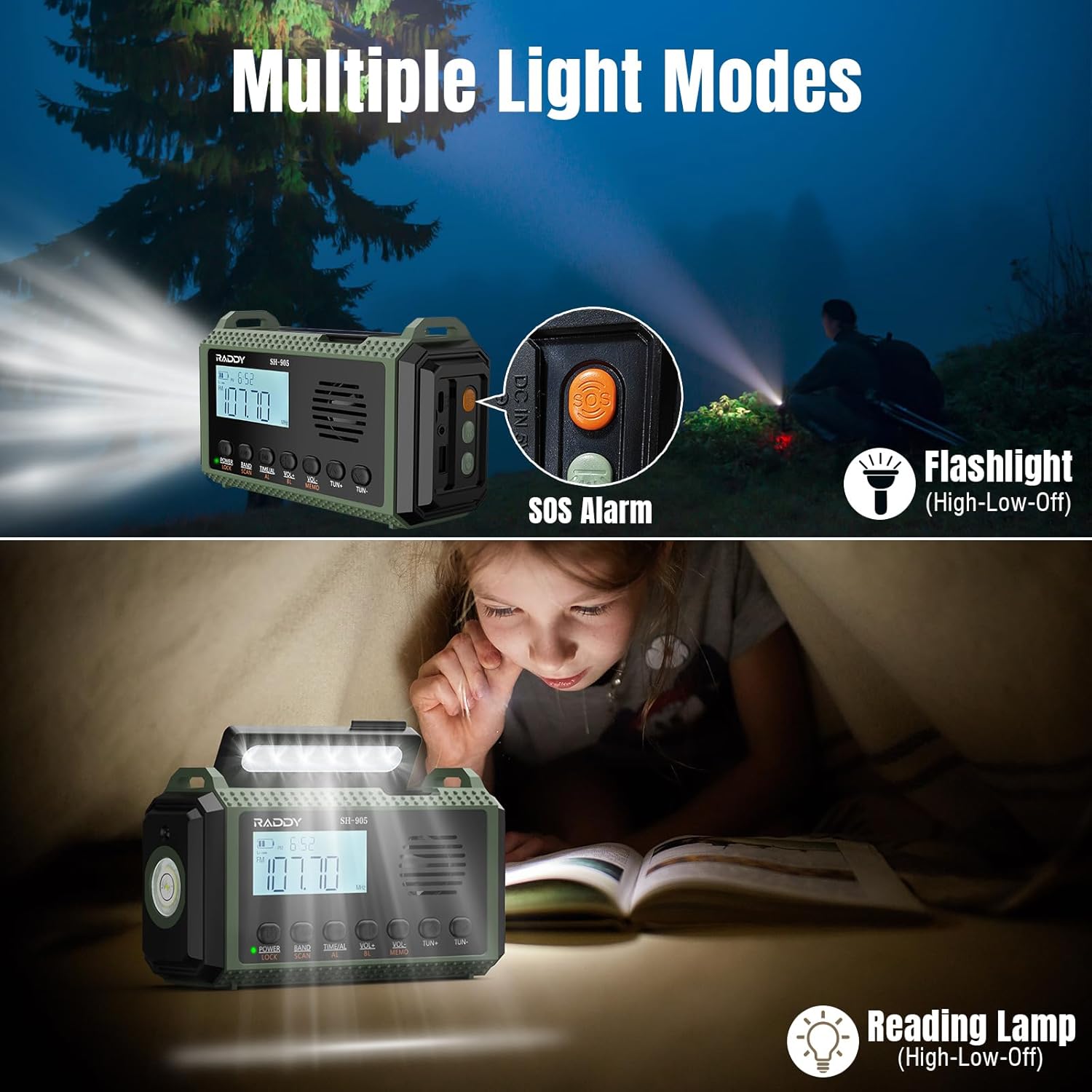
Image 2.2: The Raddy SH-905 featuring its flashlight, reading lamp, and SOS alarm button for various lighting and emergency signaling needs.
3. Setup
3.1 Initial Charging
Before first use, fully charge the internal 10,000mAh lithium-polymer battery using the USB-C input port. Connect the radio to a standard USB power adapter (not included) or a computer USB port using the provided USB-C cable.
3.2 Optional AAA Battery Installation
For extended power or as an alternative power source, you can install 3 AAA batteries (not included) into the designated compartment. This can add approximately 1000mAh to the total capacity.

Image 3.1: Illustration of the four available charging methods for the Raddy SH-905: solar, hand crank, AAA batteries, and USB-C.
4. Operating Instructions
4.1 Power On/Off
Press and hold the POWER button to turn the radio on or off. The LCD screen will illuminate.
4.2 Radio Reception (AM/FM/SW/NOAA)
- Band Selection: Press the BAND button to cycle through FM, AM, and SW bands.
- Tuning: Use the TUN+ and TUN- buttons for manual tuning. For precise tuning, the digital display provides clear frequency information.
- Scanning & Saving: Press the SCAN button to automatically scan for available stations. Press and hold MEMO to save a station to memory.
- NOAA Weather Alert: The radio automatically monitors NOAA weather alerts. In case of severe weather, an alert will sound.

Image 4.1: The Raddy SH-905's digital display for precise tuning and quick scan/save functionality, highlighting its user-friendly interface.
4.3 Charging External Devices (Power Bank)
Connect your smartphone or other USB-powered device to the USB output port using your device's charging cable. The radio's 10,000mAh battery will begin charging your device.

Image 4.2: The Raddy SH-905 functioning as a 10,000mAh power bank, illustrating its Type-C input, USB output, and 3.5mm earphone jack.
4.4 Lighting Functions
- Flashlight: Press the flashlight button on the side to activate. Cycle through high, low, and off modes.
- Reading Lamp: Lift the solar panel to reveal the reading lamp. Press the reading lamp button to cycle through high, low, and off modes.
4.5 SOS Alarm
Press the SOS button to activate a loud siren and a flashing red light for emergency signaling. Press it again to deactivate.
5. Maintenance
- Keep the radio dry and clean. Avoid exposure to extreme temperatures or direct sunlight for prolonged periods.
- Clean the exterior with a soft, damp cloth. Do not use harsh chemicals or abrasive cleaners.
- If using AAA batteries, remove them if the radio will not be used for an extended period to prevent leakage.
6. Troubleshooting
| Problem | Possible Cause | Solution |
|---|---|---|
| Radio does not power on. | Low battery. | Charge the internal battery using USB-C, solar, or hand crank. Check AAA batteries if installed. |
| Poor radio reception. | Antenna not extended, weak signal, or interference. | Fully extend the telescopic antenna. Reposition the radio for better signal. Try scanning again. |
| Cannot charge external device. | Radio battery is low, or cable is faulty. | Ensure the radio's internal battery is sufficiently charged. Try a different USB cable. |
| Solar charging is slow. | Insufficient sunlight. | Place the solar panel in direct, strong sunlight. Solar charging is primarily for maintaining charge or slow charging. |
7. Specifications
| Feature | Detail |
|---|---|
| Brand | Raddy |
| Model Number | SH905 |
| Color | Green |
| Connectivity Technology | USB |
| Special Features | Portable, Rechargeable |
| Compatible Devices | Headphones, MP3 Player, Smartphone, Tablet |
| Battery Composition | Lithium-polymer |
| Rechargeable Battery | Yes (10,000mAh included) |
| Product Dimensions | 9L x 7W x 16H centimeters (approx. 3.5L x 2.8W x 6.3H inches) |
| Tuning Technology | AM, FM, SW |
| Power Source | Battery, Solar, Hand Crank |
| Supported Radio Bands | AM, FM, SW, NOAA |
| Components Included | User Manual, USB-C Charging Cable, Wrist Strap |

Image 7.1: Physical dimensions of the Raddy SH-905 Emergency Radio.
8. Warranty and Support
8.1 Manufacturer's Warranty
The Raddy SH-905 Emergency Radio comes with an 18-month manufacturer's warranty. Please retain your proof of purchase for warranty claims.
8.2 Customer Support
For technical assistance, troubleshooting beyond this manual, or warranty inquiries, please contact Raddy customer support through their official website or the retailer where the product was purchased. Refer to the packaging or product documentation for specific contact details.


