
Introduction
This manual provides detailed instructions for the assembly, operation, maintenance, and troubleshooting of your SMUG Electric Standing Desk. Please read this manual thoroughly before assembly and use to ensure proper function and safety. This desk is designed to provide an ergonomic workstation, allowing seamless transitions between sitting and standing positions to promote a healthier work environment.

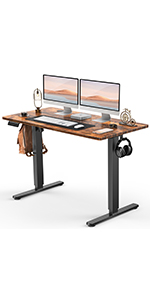
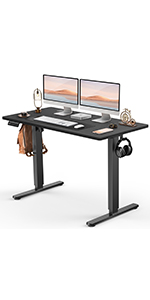
Image: The SMUG Standing Desk, white in color, set up with a laptop, external monitor, keyboard, mouse, and other office accessories. A bag hangs from a hook on the left, and headphones from a hook on the right.
Safety Information
For your safety and to prevent damage to the product, observe the following precautions:
- This desk includes safety features such as an overload reminder that stops the motor when the load weight exceeds the maximum limit.
- A safety lock function prevents the desktop from sliding down when the power supply fails.
- Automatic anti-collision technology detects obstacles and prevents collisions during movement.
- Ensure all connections are secure before operating the desk.
- Do not allow children to operate the desk unsupervised.
- Keep hands and loose clothing clear of moving parts during height adjustment.
- Do not exceed the maximum weight capacity of 176 lbs (80 kg).
Assembly Instructions
The SMUG Standing Desk is designed for straightforward assembly. It is recommended that two people assemble the desk. All necessary tools are included in the package.
Before You Begin:
- Unpack all components and verify against the parts list provided in the separate Installation Manual.
- Clear a spacious area for assembly to prevent damage to components.
- Keep small parts away from children.
Assembly Steps Overview:
- Attach the lifting columns to the desktop.
- Secure the foot pads to the lifting columns.
- Install the control box and motor.
- Connect all cables according to the wiring diagram.
- Mount the control panel.
- Perform initial setup and calibration.
For detailed, step-by-step instructions with diagrams, please refer to the Installation Manual (PDF).

Image: An exploded diagram showing the various components of the SMUG Standing Desk, including the desktop sections, legs, motor, control box, and hardware, laid out for assembly.

Image: A visual guide illustrating key assembly steps for the SMUG Standing Desk, including attaching the legs and connecting the motor.
An installation video is also available to guide you through the assembly process. (Note: Specific video URL not provided in data. Please refer to the product page for the official installation video.)
Operating Instructions
Your SMUG Electric Standing Desk features an intuitive control panel for easy height adjustment and memory presets.
Control Panel Functions:

Image: A detailed view of the desk's digital control panel, showing the LED display, up/down arrows, three memory preset buttons (1, 2, 3), and a 'S' (Save/Set) button.
- LED Display: Shows the current desk height in inches.
- Up/Down Arrows (▲ / ▼): Press and hold to adjust the desk height continuously. Release to stop at the desired height. The desk can be adjusted between 28.7 inches and 46.5 inches.
- Memory Presets (1, 2, 3): These buttons allow you to save and recall up to three preferred height settings.
- To Save a Height: Adjust the desk to the desired height. Press the 'S' button, then immediately press the desired memory button (1, 2, or 3) until the display flashes or beeps, indicating the height is saved.
- To Recall a Height: Simply press the corresponding memory button (1, 2, or 3). The desk will automatically move to the saved height.
- 'S' Button (Save/Set): Used in conjunction with memory preset buttons to save heights.
Quiet Operation:
The desk's motor operates quietly, with noise levels below 55dB, ensuring minimal disturbance in any environment.

Image: A graphic comparing the sound level of the SMUG Standing Desk (55dB) to other common sounds like a quiet bedroom (35dB), talking (65dB), and a truck (80dB), highlighting its quiet operation.
Cable Management and Accessories:
The desk is equipped with two wire collecting holes on the desktop for organized cable routing and two hooks on either side for hanging headphones or bags.
Cable Management Hole
Headphone Hook
Maintenance
To ensure the longevity and optimal performance of your SMUG Standing Desk, follow these simple maintenance guidelines:
- Cleaning: Wipe the desktop and frame with a dry, soft cloth. Avoid using abrasive cleaners or harsh chemicals, which can damage the finish.
- Inspections: Periodically check all screws and connections to ensure they are tight. Retighten if necessary.
- Cable Management: Ensure cables are neatly managed and do not interfere with the desk's movement.
- Weight Distribution: Distribute weight evenly across the desktop to prevent strain on the motor and frame.
Troubleshooting
If you encounter any issues with your SMUG Standing Desk, refer to the following common problems and solutions:
| Problem | Possible Cause | Solution |
|---|---|---|
| Desk does not move or respond to controls. | Power cable disconnected; Overload protection activated; Motor error. | Check power connection. Reduce weight on desk. Unplug and replug the desk after 30 seconds to reset the system. |
| Desk moves unevenly or makes unusual noises. | Loose connections; Obstruction; Uneven weight distribution. | Check all assembly connections. Remove any obstructions. Redistribute weight evenly. |
| Height memory presets are not working. | Presets not saved correctly. | Re-save the desired height settings by pressing 'S' then the memory button (1, 2, or 3). |
| Anti-collision feature frequently activates. | Obstacles in the desk's path; Sensor sensitivity. | Ensure clear path for desk movement. Refer to the full user manual for sensor sensitivity adjustment if available. |
If the problem persists after attempting these solutions, please contact SMUG customer support for further assistance.
Specifications
| Feature | Detail |
|---|---|
| Brand | SMUG |
| Model Number | WT48-EL3 |
| Product Dimensions (D x W x H) | 23.62"D x 48"W x 46.5"H |
| Color | White |
| Style | Modern |
| Base Material | Wood (Desktop), Alloy Steel (Legs) |
| Top Material Type | Wood |
| Special Features | Adjustable Height, Cable management, Electric, Ergonomic, Memory presets |
| Recommended Uses | Drafting, Gaming, Office Desk, Working, Writing |
| Included Components | Assembly Tools, Instruction Manual, Standing Desk |
| Item Weight | 41.89 Pounds |
| Maximum Height | 46.5 Inches |
| Minimum Height | 28.7 Inches |
| Maximum Weight Recommendation | 176 Pounds |
| Required Assembly | Yes |

Image: A visual representation of the SMUG Standing Desk's dimensions (48" W x 23.62" D) and height range (28.35" to 46.46"), along with its weight capacity of 176 lbs, illustrated with dumbbells on the desktop.
Warranty Information
The SMUG Standing Desk comes with a Limited Warranty. For specific terms and conditions of the warranty, please refer to the documentation included with your product or contact SMUG customer support. This warranty typically covers manufacturing defects and material flaws under normal use.
Additional protection plans may be available for purchase separately to extend coverage beyond the standard warranty period. Please check with your retailer for details on available protection plans.
Customer Support
For any questions, technical assistance, or warranty claims, please contact SMUG customer support. Have your model number (WT48-EL3) and purchase information ready when contacting support.
You can also refer to the full User Manual (PDF) for more detailed information.


