
Introduction
Thank you for choosing the Tribesigns 78.74-Inch Conference Table Set. This manual provides detailed instructions for the safe assembly, operation, and maintenance of your new conference table. Please read this manual thoroughly before beginning assembly and retain it for future reference.
This set is designed for versatility, allowing various configurations to suit your meeting and workspace needs. Each table unit measures 78.74 inches in length, 27.55 inches in depth, and 29.52 inches in height, and is constructed from high-quality engineered wood with sturdy metal legs.
Safety Information
- Always assemble the table according to the provided instructions.
- Ensure that all parts are securely fastened before use.
- Do not place heavy objects on the table's edges to prevent tip-over risks.
- Keep the table away from heat sources and do not expose it to direct sunlight for extended periods to maintain its stability and longevity.
- Use caution when moving the assembled table to prevent injury or damage.
Package Contents
Before assembly, please verify that all parts and hardware listed below are present and undamaged. If any items are missing or damaged, please contact customer support.

This image displays all the components and hardware included in the package, organized for easy identification during assembly. It includes tabletop sections, metal frames, and various screws.
Parts List (per table unit):
- Tabletop Sections (Part 3): 2 pcs
- Long Side Frames (Parts 7 & 8): 2 pcs each
- Short Side Frames (Parts 1 & 2): 2 pcs each
- Middle Support Bars (Parts 4 & 5): 2 pcs each
- Corner Brackets (Part 6): 2 pcs
Hardware List:
| Item | Description | Quantity |
|---|---|---|
| A | 8x40mm Screws | x16 |
| B | 6x60mm Screws | x12 |
| C | Adjustable Foot Pads | x4 |
| D | Corner Connectors | x4 |
| E | 8x20mm Screws | x36 |
| F | Frame Connectors | x2 |
| G | Allen Wrench | x1 |
| H | Screwdriver | x1 |
Assembly Instructions
Follow these steps to assemble each table unit. It is recommended to have two people for assembly.
This video provides a comprehensive guide for assembling the Tribesigns conference table, demonstrating each step from unboxing to final setup.
- Assemble the Frame: Connect the long side frames (Parts 7 and 8) using the frame connectors (F) and 8x20mm screws (E). Ensure all screws are tightened securely.
- Attach Middle Support Bars: Insert the middle support bars (Parts 4 and 5) between the long side frames. Secure them using 8x40mm screws (A).
- Install Short Side Frames: Attach the short side frames (Parts 1 and 2) to the ends of the assembled long frame. Use 8x40mm screws (A) to secure them.
- Secure Corner Brackets: Place the corner brackets (Part 6) at the four corners where the long and short side frames meet. Fasten them with 8x20mm screws (E).
- Attach Tabletop: Carefully place the tabletop sections (Part 3) onto the assembled metal frame. Align the pre-drilled holes. Use 6x60mm screws (B) to attach the tabletop to the frame. Ensure all screws are tightened evenly to prevent warping.
- Install Adjustable Foot Pads: Screw the adjustable foot pads (C) into the bottom of each table leg. These can be adjusted to level the table on uneven surfaces.
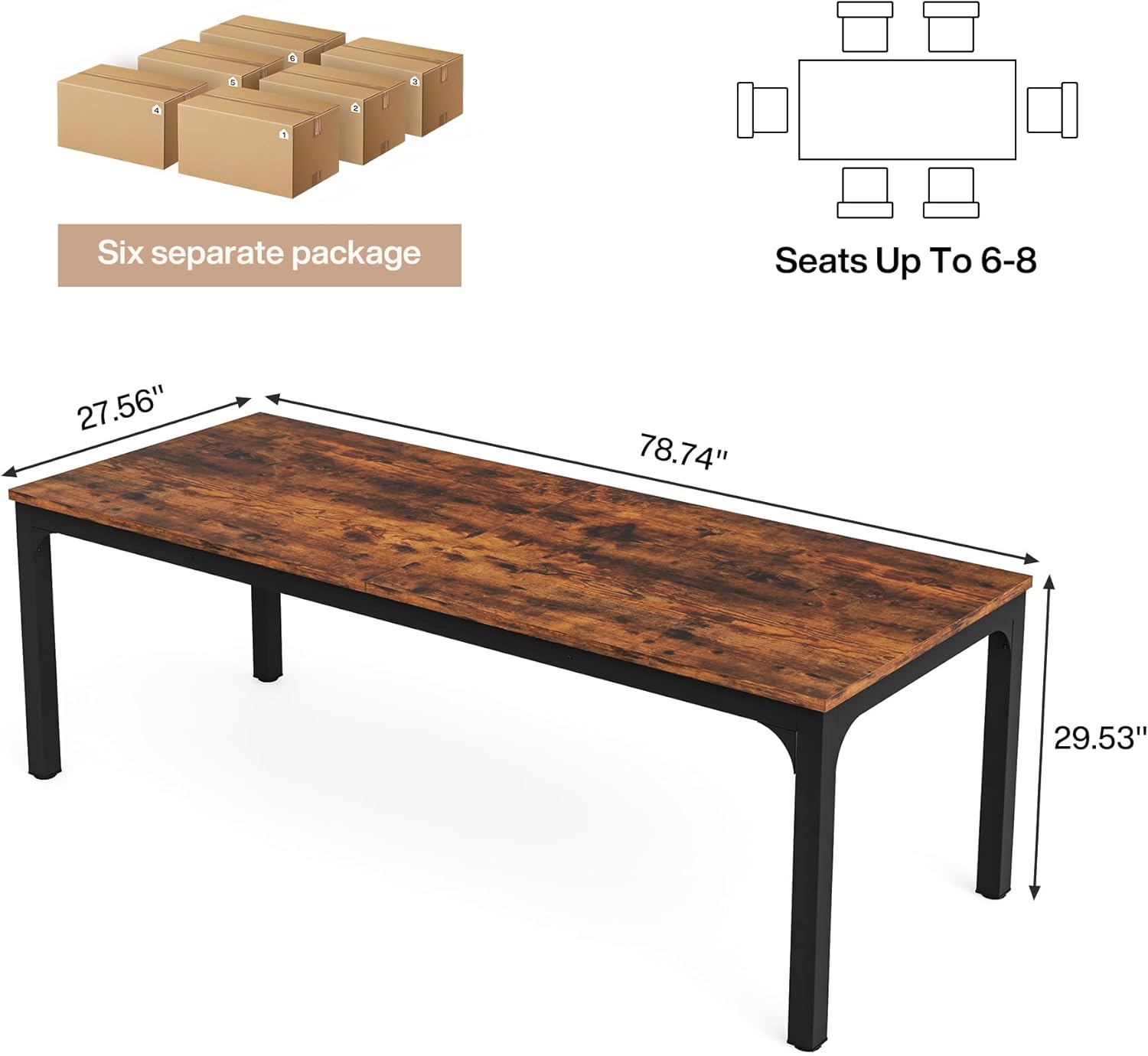
A diagram detailing the length, width, and height of one individual table unit, which measures 78.74 inches long, 27.56 inches deep, and 29.53 inches high. It also notes that the set comes in six separate packages and can seat 6-8 people per unit.
Operating Instructions
The Tribesigns Conference Table Set is designed for flexible use in various office and meeting environments. Here’s how to maximize its functionality:
This video highlights key features of the Tribesigns conference table, including its durable surface, sturdy metal legs, adjustable foot pads, and various arrangement possibilities.
Arranging Table Configurations:
The individual table units can be combined in multiple ways to create different layouts:
- Long Rectangular Table: Connect multiple units end-to-end to form an extended table suitable for large seminars or collaborative workspaces.
- U-Shape Configuration: Arrange units to form a U-shape, ideal for presentations, board meetings, or training sessions where a central focus is desired.
- Hollow Rectangle: Create a hollow rectangular setup for interactive discussions or group activities.
- Individual Workstations: Each unit can also function as a standalone desk or small meeting table.

This composite image demonstrates four different ways the individual table units can be combined: a large U-shape, a long rectangular setup, a hollow rectangular arrangement, and a smaller U-shape, highlighting the versatility of the set.
Adjusting Foot Pads:
Each table leg is equipped with an adjustable foot pad. To level the table or protect your floor:
- Gently lift the table corner slightly.
- Rotate the foot pad clockwise to raise the corner or counter-clockwise to lower it.
- Adjust all foot pads as needed until the table is stable and level.
Maintenance
Proper care will ensure the longevity and appearance of your Tribesigns Conference Table Set:
- Cleaning: Wipe the table surface with a dry cloth to remove dust and spills. For stubborn marks, use a slightly damp cloth with a mild, non-abrasive cleaner, then dry immediately.
- Avoid Harsh Chemicals: Do not use harsh chemicals, abrasive cleaners, or polishes that may damage the finish.
- Protect from Heat and Moisture: Use coasters for drinks and heat pads for hot items to prevent damage to the tabletop.
- Regular Inspection: Periodically check all screws and connections to ensure they remain tight. Re-tighten if necessary.
Troubleshooting
If you encounter any issues with your conference table, please refer to the following common solutions:
- Table is Wobbly:
- Ensure all assembly screws are fully tightened.
- Adjust the foot pads on each leg to level the table on uneven flooring.
- Missing Parts:
- Double-check the package contents against the parts list. Sometimes small parts can be overlooked.
- Contact Tribesigns customer support with details of the missing parts.
- Damaged Parts:
- Do not attempt to assemble with damaged parts.
- Contact Tribesigns customer support immediately for replacement parts.
Product Specifications
| Feature | Detail |
|---|---|
| Brand | Tribesigns |
| Model Number | DU0060CFSET |
| Material | Engineered Wood |
| Color | Brown+black |
| Product Dimensions (per unit) | 78.74 x 27.55 x 29.52 inches (L x D x H) |
| Item Weight (per unit) | 67 pounds |
| Special Feature | Portable, Adjustable Foot Pads |
| Assembly Instructions | Included |
| Product Care Instructions | Wipe with Dry Cloth |

A visual guide illustrating different rectangular table sizes that can be created with the set, including dimensions like 157.48 inches by 55.11 inches, and 157.48 inches by 82.67 inches, along with suggested seating capacities for each.
Warranty and Support
Tribesigns is committed to providing high-quality products and customer satisfaction. For any warranty claims, technical support, or assistance with missing/damaged parts, please contact Tribesigns customer service directly. Please have your model number (DU0060CFSET) and purchase information ready when contacting support.
You can typically find contact information on the product packaging or the official Tribesigns website.


