
Introduction
This manual provides detailed instructions for the safe and effective use of your BORUIT V3 and V7 EDC flashlights. Please read this manual thoroughly before operation to ensure proper functionality and longevity of your devices.
Setup
Charging the Flashlights
Both BORUIT V3 and V7 flashlights are equipped with a Type-C charging port. Before first use, or when the battery is low, charge the flashlight using a standard USB-C cable and a compatible power source.
- Connect the Type-C cable to the flashlight's charging port.
- Connect the other end of the cable to a USB power adapter or a computer's USB port.
- For the V7 flashlight, a red light will flash during charging, and a green light will indicate a full charge.
- The V3 flashlight has a battery indicator display that shows charging status.
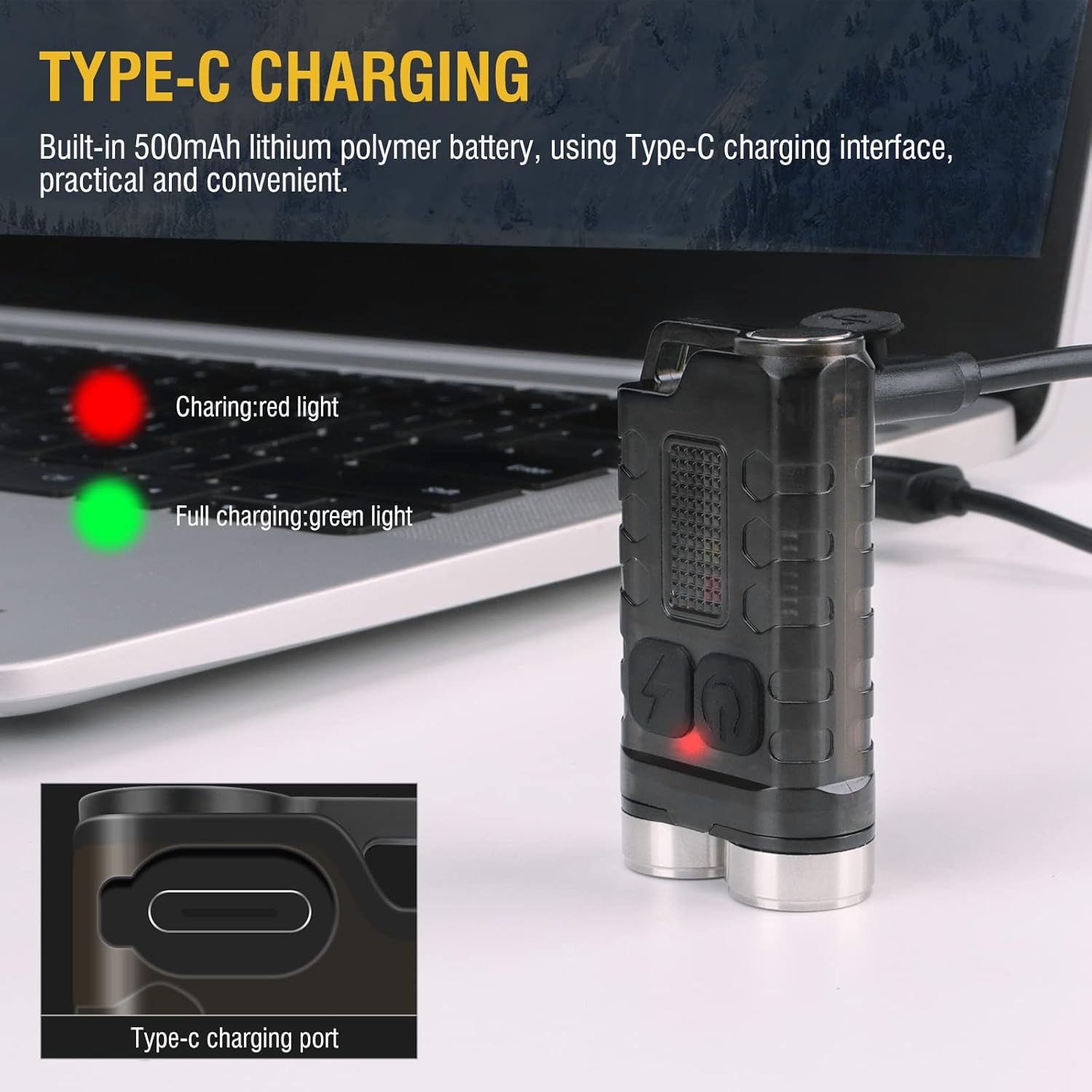
Image: BORUIT V3 flashlight charging via Type-C cable, with a red indicator light visible.

Image: BORUIT V7 flashlight and its Type-C charging cable.
Operating Instructions
BORUIT V3 Flashlight Operation
The BORUIT V3 flashlight features 12 lighting modes, including 5 main light modes and 7 side light modes.
Main Light Modes:
- Super Bright
- High Light
- Medium Bright
- Low Light
- Economic
Side Light Modes:
- White Light
- UV Light
- Red Light
- Red Light Flash
- Red Blue Light Flash
Operating the V3 Main Light:
- Turn On/Off: Press the main light switch button to turn on. Release to turn off.
- Change Modes: Double-click the main light switch button to cycle through modes.
- Turn Off from Mode: Press and hold the main light switch button to turn off.
Operating the V3 Side Light:
- White Light: Long press the side light switch to turn on the white light. Long press again to turn it off.
- Red-Blue Flash: Click the side light switch three times to activate the red-blue flash.
- Change Modes: Double-click the side light switch to cycle through other side light modes.
- Turn Off from Mode: Press and hold the side light switch to turn off.

Image: BORUIT V3 flashlight lighting modes and operation guide.
BORUIT V7 Flashlight Operation
The BORUIT V7 flashlight features 3 powerful LED lights and multi-color side lights. Specific mode cycling instructions are similar to the V3 model, typically involving single clicks, double clicks, and long presses of the power button to cycle through brightness levels and special modes.
Magnetic Tail and Clip:
The V7 flashlight includes a magnetic tail, allowing it to be attached to metallic surfaces for hands-free operation. A clip on the back enables secure attachment to pockets, straps, or hats.

Image: BORUIT V7 flashlight demonstrating its ultra-light and portable design with clip and keychain.

Image: BORUIT V7 flashlight utilizing its magnetic adsorption feature.
Maintenance
To ensure optimal performance and extend the lifespan of your BORUIT flashlights, follow these maintenance guidelines:
- Cleaning: Wipe the flashlight body with a soft, damp cloth. Do not use abrasive cleaners or solvents.
- Water Resistance: The V3 is IP65 waterproof, and the V7 is IPX5 waterproof. While resistant to splashes and rain, avoid submerging the flashlights in water for extended periods. Ensure the charging port cover is securely closed to maintain water resistance.
- Storage: Store the flashlights in a cool, dry place away from direct sunlight and extreme temperatures. If storing for a long period, ensure the battery is partially charged (around 50%) to prevent deep discharge.
- Battery Care: Recharge the battery regularly, even if not in frequent use, to maintain battery health.

Image: BORUIT V3 flashlight demonstrating IP65 outdoor waterproof capability.
Troubleshooting
If you encounter issues with your BORUIT flashlight, refer to the following common troubleshooting steps:
- Flashlight Not Turning On:
- Ensure the battery is charged. Connect to a charger and check the indicator light.
- Verify that the power button is being pressed correctly according to the operating instructions (e.g., single press, double-click, long press).
- Dim Light Output:
- The battery may be low. Recharge the flashlight.
- Ensure the flashlight is not in an economic or low-power mode. Cycle through the modes to a brighter setting.
- Charging Issues:
- Check the charging cable and adapter for damage. Try a different cable or power source.
- Ensure the Type-C cable is fully inserted into the charging port.
Specifications
BORUIT V3 Flashlight
| Parameter | Detail |
|---|---|
| Material | PC + 304 Stainless Steel |
| Lumens | 900 LM |
| Light Source | LED |
| Lighting Modes | 12 (5 Main, 7 Side) |
| Light Color | UV, White, Red, Blue Light |
| Charging Type | TYPE-C |
| Waterproof Grade | IP65 |
| Irradiation Distance | 100 meters |
| Product Size | 15mm * 31mm * 56mm |
BORUIT V7 Flashlight
| Parameter | Detail |
|---|---|
| Lighting Source | 3*LED |
| Lamp Luminous (lm) | 1100lm |
| Beam Distance | 100 Meters (328 feet) |
| Battery Capacity | 800mAh Polymer Lithium Battery |
| Input | 5V |
| Charging Time | 3 Hours |
| Charging Indicator | Red light flash (charging), Green light (full) |
| Shell Material | Aluminium Alloy |
| Waterproof Grade | IPX5 |
| Charging Mode | USB-C |
| Net Weight | 52g |
| Product Size | 64mm * 37.5mm * 21mm |
Warranty and Support
Your BORUIT V3 and V7 flashlights come with a limited warranty. For specific warranty details, claims, or technical support, please refer to the warranty information provided at the time of purchase or contact BORUIT customer service directly through their official website or authorized retailers.
For further assistance, please visit the BORUIT Store on Amazon.


