
1. Introduction
Thank you for choosing the BabyBond Infant Swing. This manual provides essential information for the safe and proper use, assembly, operation, and maintenance of your infant swing. Please read it thoroughly before use and retain it for future reference.
Important Safety Information
- Always use the 5-point harness system to secure your child.
- Never leave your child unattended in the swing.
- Do not use this product if any components are damaged or missing.
- Maximum weight capacity: 20 pounds (9 kg).
- Suitable for infants up to 12 months of age.
- Ensure the swing is placed on a flat, stable surface.
- Keep children away from moving parts.
2. Package Contents
Please check that all components are present before assembly:
- Infant Swing Frame
- Seat Unit with 5-point Harness
- Soft Baby Cushion (Head support and body insert)
- Remote Control
- AC Power Adapter
- Mosquito Net
- Toy Bar with 2 Plush Toys
- User Manual
3. Product Overview
Familiarize yourself with the main parts of your BabyBond Infant Swing.

Image 3.1: The BabyBond Infant Swing, showcasing its sleek design, integrated control panel, and included remote control. The packaging box is also visible, indicating the model number BB009M.

Image 3.2: Detailed view of the swing's features, including the IMD touch control panel, remote control, the 5-point harness system for child safety, and the detachable toy bar with plush toys and mosquito net.
4. Setup and Assembly
Follow these steps to assemble your infant swing:
- Unpack Components: Carefully remove all parts from the packaging.
- Assemble the Base: Connect the two base sections firmly until they click into place.
- Attach the Seat Frame: Insert the seat frame into the base connector. Ensure it is securely locked.
- Install the Seat Cushion: Place the soft baby cushion into the seat unit. Ensure the harness straps pass through the designated slots in the cushion.
- Attach Toy Bar and Mosquito Net: If desired, attach the toy bar to the designated slots on the seat frame. The mosquito net can be draped over the seat and secured.
- Power Connection:
- AC Power: Connect the AC power adapter to the swing's power port and then to a wall outlet.
- Battery Power (for outdoor/portable use): Insert the required batteries (not included) into the battery compartment located on the underside of the base.

Image 4.1: Illustrates the power adapter connection point on the swing's base, highlighting how to provide power for indoor use.
5. Operating Instructions
The BabyBond Infant Swing offers various features for your child's comfort and entertainment. Control these features using the IMD touch panel on the swing's base or the included remote control.
5.1 Power On/Off
- Press the Power button on the control panel or remote to turn the swing on or off.
5.2 Swing Speed Adjustment
The swing features 5 natural sway motions.
- Press the Speed buttons (usually indicated by '+' and '-' or numbered buttons) on the control panel or remote to increase or decrease the swing speed.
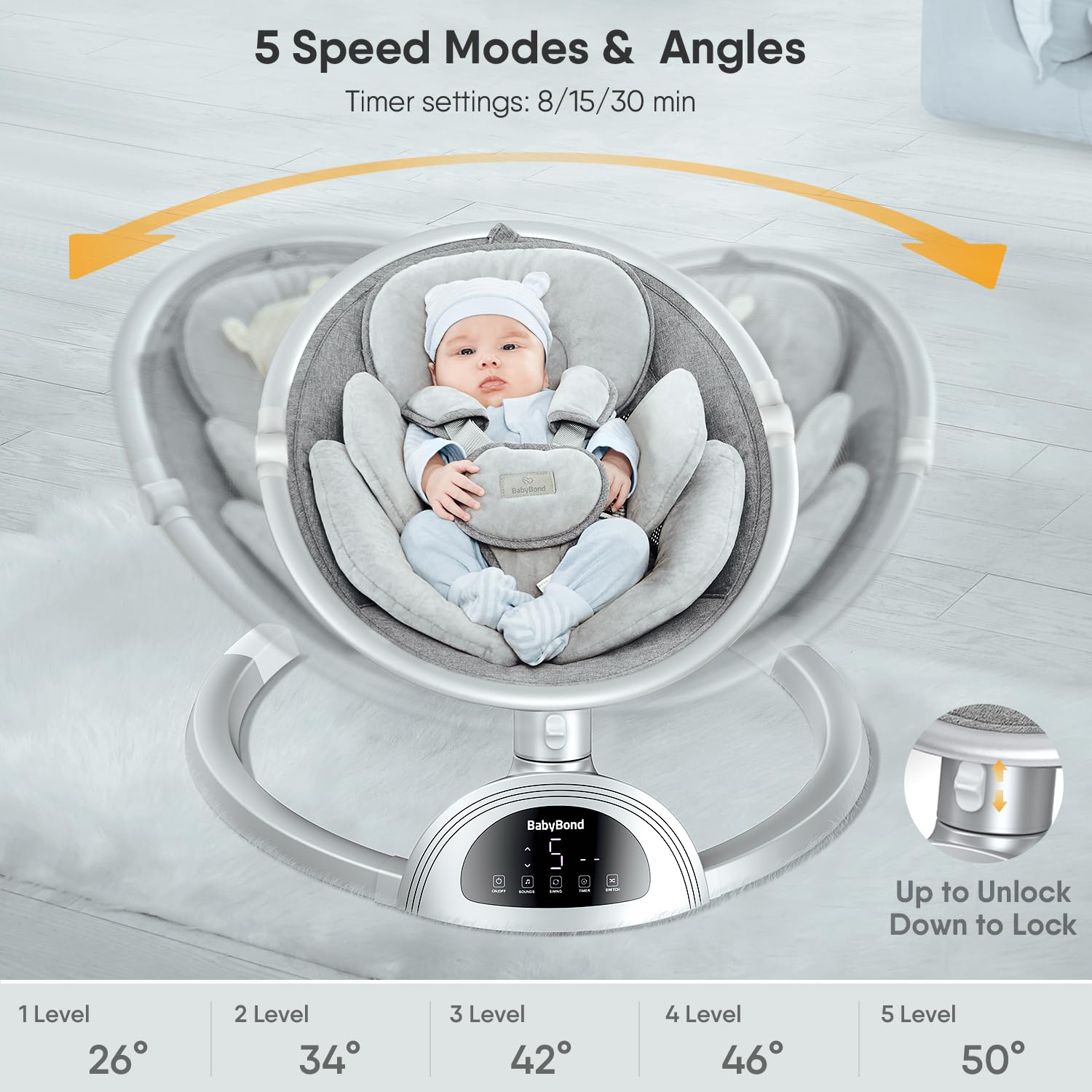
Image 5.1: Visual representation of the 5 adjustable swing speeds and corresponding angles (26° to 50°), along with the lock/unlock mechanism for the swing function.
5.3 Seat Position Adjustment
The swing offers 3 adjustable seat positions for relaxing, playing, and feeding.
- Locate the seat adjustment buttons or lever, typically on the side or back of the seat unit.
- Adjust the seat to the desired position: 15° for relaxing, 30° for playing, or 60° for feeding.

Image 5.2: Shows the three distinct seat positions: 15° for relaxing, 30° for playing, and 60° for feeding, illustrating how to adjust the seat angle.
5.4 Timer Function
Set the swing to operate for a specific duration.
- Press the Timer button on the control panel or remote to cycle through the available options: 8, 15, or 30 minutes.
5.5 Music and Bluetooth Speaker
The swing includes 10 preset songs and a Bluetooth speaker for custom music playback.
- Preset Songs: Press the Music button on the control panel or remote to play the built-in melodies. Use the volume controls to adjust the sound level.
- Bluetooth Connection:
- Ensure the swing is powered on.
- Activate Bluetooth on your mobile device.
- Search for 'BabyBond' in your device's Bluetooth settings and pair.
- Once connected, you can play music from your device through the swing's speaker.

Image 5.3: Demonstrates the Bluetooth connectivity feature, allowing users to play their own music through the swing's speaker, in addition to the 10 preset songs.
5.6 Remote Control Usage
The remote control provides convenient access to all swing functions from a distance.
- Ensure the remote has working batteries.
- Point the remote towards the swing's control panel to operate functions such as power, speed, timer, and music.

Image 5.4: A close-up view of the remote control, showing its various buttons for power, speed adjustment, timer settings, and music control.
5.7 Securing Your Child
Always use the 5-point harness system to ensure your child's safety.
- Place your child in the seat.
- Fasten the shoulder straps, waist straps, and crotch strap.
- Adjust the straps to fit snugly but comfortably around your child.

Image 5.5: An overhead perspective showing a baby securely fastened in the swing using the 5-point harness system, emphasizing proper safety.
6. Maintenance
Regular cleaning and care will prolong the life of your BabyBond Infant Swing.
6.1 Cleaning the Fabric
The soft baby cushion is removable and washable.
- Remove the cushion from the seat unit.
- Machine wash on a gentle cycle with cold water, or hand wash.
- Do not bleach. Hang to dry.
- Ensure the cushion is completely dry before reattaching it to the swing.

Image 6.1: Highlights the premium, ultra-soft, breathable, and washable fabric used for the swing's cushion, demonstrating its ease of maintenance.

Image 6.2: Shows a hand removing the soft cushion from a washing machine, illustrating the ease of cleaning the fabric components.
6.2 Cleaning the Frame
- Wipe the frame and plastic parts with a damp cloth and mild soap.
- Do not use abrasive cleaners or solvents.
- Dry thoroughly before use.
6.3 Storage
The swing is foldable for easy storage and portability.
- To fold, follow the instructions in reverse order of assembly or consult the quick-fold mechanism if available.
- Store in a cool, dry place away from direct sunlight.

Image 6.3: The BabyBond Infant Swing shown in its folded, compact state, demonstrating its portability and ease of storage.
7. Troubleshooting
If you encounter issues with your BabyBond Infant Swing, refer to the following common problems and solutions:
| Problem | Possible Cause | Solution |
|---|---|---|
| Swing does not turn on. | No power, batteries depleted, or power adapter not connected. | Check power adapter connection or replace batteries. Ensure the power button is pressed. |
| Swing does not move. | Swing lock engaged, speed setting too low, or obstruction. | Disengage the swing lock (refer to Image 5.1). Increase speed setting. Check for any obstructions. |
| No sound from speaker. | Volume too low, Bluetooth not connected, or no music playing. | Increase volume. Ensure Bluetooth is correctly paired or select a preset song. |
| Remote control not working. | Dead batteries, remote out of range, or obstruction. | Replace remote batteries. Ensure clear line of sight to the swing's sensor. Move closer to the swing. |
8. Specifications
| Feature | Detail |
|---|---|
| Model Number | BB009M-G |
| Product Dimensions | 30.3 x 25 x 22.85 inches |
| Item Weight | 9.26 pounds |
| Maximum Weight Recommendation | 20 Pounds (9 kg) |
| Material Type | Aluminum frame, Ultra-soft fabric |
| Power Source | AC Adapter or Battery Powered (Batteries not included) |
| Swing Speeds | 5 |
| Seat Positions | 3 (15°, 30°, 60°) |
| Timer Options | 8, 15, 30 minutes |
| Music Features | 10 Preset Songs, Bluetooth Speaker |
| Safety Harness | 5-point harness belt |
| Portability | Foldable design |
9. Warranty and Support
For warranty information, product support, or to purchase replacement parts, please contact BabyBond customer service through the retailer where you purchased the product or visit the official BabyBond website. Please have your model number (BB009M-G) and proof of purchase ready when contacting support.