1. Introduction
The FACEIL AOJ-20A is a versatile 2-in-1 digital infrared thermometer designed for accurate and instant temperature readings. It offers both forehead and ear measurement modes, making it suitable for all ages, including infants, children, and adults. Additionally, it can measure the temperature of objects and ambient environments. Its user-friendly design includes a large LED display with color-coded fever indicators and a memory function to track previous readings.
2. Product Features
- Dual Measurement Modes: Easily switch between forehead and ear temperature measurement.
- Object Mode: Measure temperatures of surfaces, liquids (e.g., milk), or room temperature.
- Instant Readings: Provides accurate results in just 1 second.
- Color-Coded Fever Indicator: Large LED display changes color (Green, Orange, Red) to indicate temperature status.
- Memory Function: Stores up to 40 sets of temperature readings for easy tracking.
- Mute Function: Allows for silent operation, ideal for measuring sleeping individuals.
- Unit Conversion: Easily switch between Celsius (°C) and Fahrenheit (°F).
- Ergonomic Design: Simple two-button operation for ease of use.
3. Setup: Battery Installation
The thermometer requires 2 AAA batteries (included). To install or replace batteries:
- Locate the battery compartment cover on the back of the device.
- Gently slide the cover open.
- Insert two AAA batteries, ensuring correct polarity (+/-).
- Close the battery compartment cover until it clicks securely into place.
Note: Always use new batteries and dispose of old batteries responsibly.

Image: The thermometer with its battery compartment open, revealing two AAA batteries. This illustrates the ease of battery installation.
4. Operating Instructions
Power On/Off
- Press the Power/Measure button (large button with thermometer icon) to turn on the device.
- The device will automatically turn off after approximately 30 seconds of inactivity to conserve battery life.
Switching Between Fahrenheit (°F) and Celsius (°C)
- With the device powered on, locate the small switch on the side of the thermometer.
- Slide the switch to select your preferred temperature unit (°F or °C).
Forehead Mode (Adult/Child)
- Ensure the magnetic probe cover is attached to the thermometer.
- Press the Power/Measure button to turn on the device.
- Touch the Mode button (M button) to select the desired forehead mode (Adult or Child icon will appear on the display).
- Gently place the probe at the center of the forehead (between the eyebrows) with a distance of 0-3 cm (0-1.18 inches).
- Press the Power/Measure button. The temperature will be displayed on the screen in 1 second.
Ear Mode
- Remove the magnetic probe cover from the thermometer. The device will automatically switch to ear temperature mode.
- Gently insert the probe into the ear canal. For children under one year old, pull the ear straight backwards. For children above one year old, pull the ear up and straight backwards.
- Press the Power/Measure button. The temperature will be displayed on the screen in 1 second.
Object Mode
- Ensure the magnetic probe cover is attached.
- Press the Power/Measure button to turn on the device.
- Touch the Mode button (M button) until the house icon appears on the display, indicating object mode.
- Point the temperature probe at the object you wish to measure (e.g., milk bottle, room surface) with a distance of 0-3 cm (0-1.18 inches).
- Press the Power/Measure button. The temperature will be displayed on the screen in 1 second.
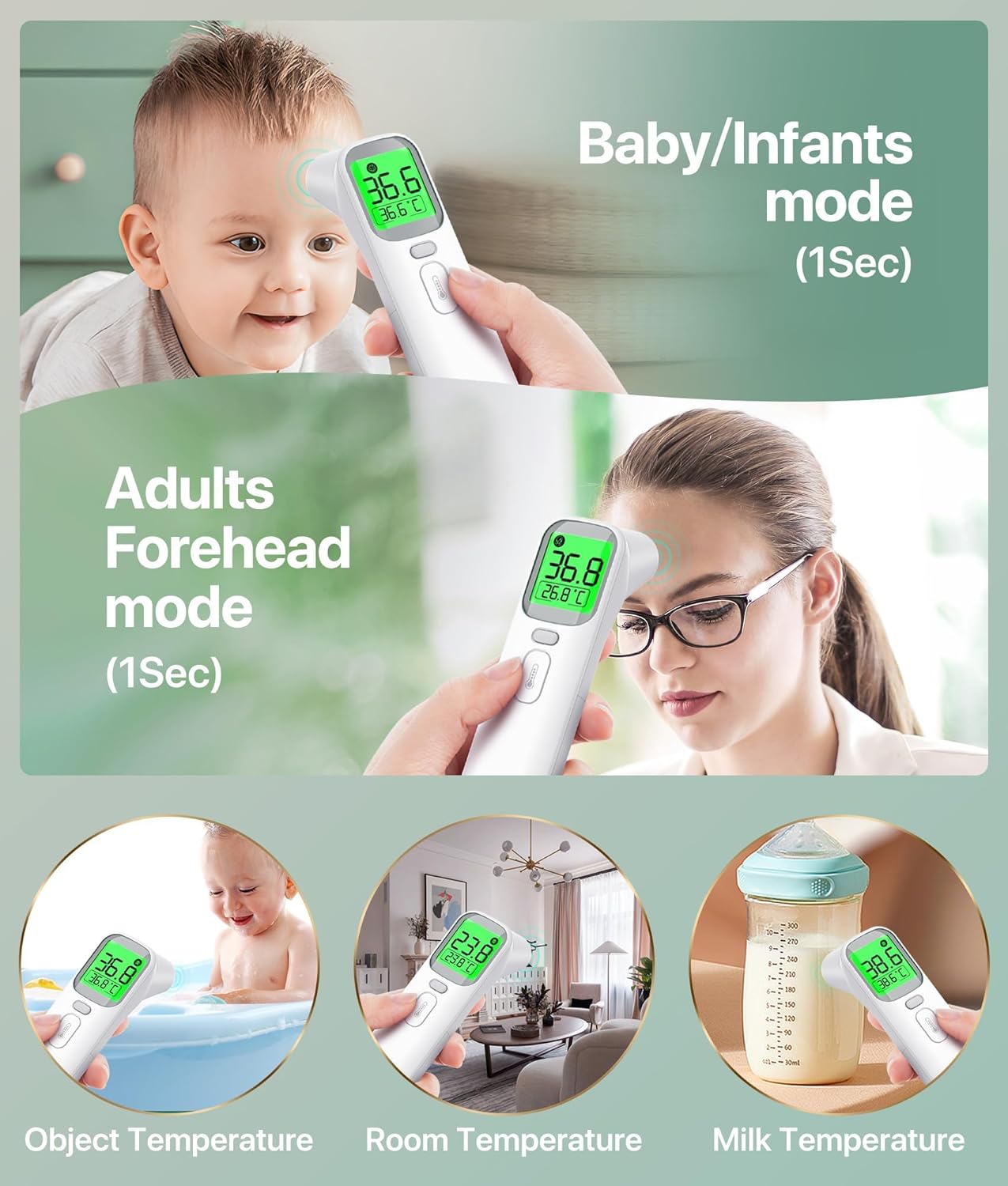
Image: The thermometer in use for various measurements, including baby forehead, adult forehead, object temperature, room temperature, and milk temperature, highlighting its versatility.
Memory Function
- With the device powered on, long-press the Mode button (M button) for 5 seconds to access the memory function.
- Short-press the Mode button to cycle through the last 40 stored temperature readings.
Mute Function
- With the device powered on, long-press the Mute button (speaker icon) for 5 seconds to toggle the sound on or off.
5. Display Indicators
The large LED display provides clear readings and uses a color-coded system to indicate temperature status:
- Green Light: Indicates a normal temperature (e.g., 35.0°C-37.5°C / 89.6°F-99.5°F).
- Orange Light: Indicates a low-grade fever (e.g., 37.6°C-38.0°C / 99.6°F-100.4°F).
- Red Light: Indicates a high fever (e.g., 38.1°C-42.9°C / 100.5°F-109.2°F).
- 'HI' or 'LO' Indicator: Appears if the measured temperature is outside the device's measurement range.

Image: The thermometer's intelligent indicator display, illustrating how different temperature ranges are represented by distinct colors (green for normal, orange for low fever, red for high fever).
6. Maintenance and Care
- Cleaning: Wipe the thermometer clean with a soft, dry cloth after each use. For disinfection, use an alcohol swab. Do not immerse the device in water or any cleaning solutions.
- Storage: Store the thermometer in its provided storage pouch in a cool, dry place, away from direct sunlight and extreme temperatures.
- Battery Replacement: Replace batteries when the low battery indicator appears on the display.
7. Troubleshooting
- Inaccurate Readings: Ensure the probe is clean and correctly positioned. Avoid taking measurements immediately after strenuous activity or bathing. Allow the thermometer to acclimate to room temperature for at least 30 minutes if it has been in a significantly different environment.
- 'HI' or 'LO' Display: This indicates the temperature is outside the measurable range. For body temperature, this may suggest a very high fever or very low body temperature, requiring immediate medical attention. For object mode, it means the object's temperature is beyond the device's capabilities.
- No Display/Device Not Turning On: Check battery installation and ensure batteries are not depleted. Replace with new AAA batteries if necessary.
8. Specifications
| Model Number | AOJ-20A |
| Measurement Range (Forehead/Ear) | 32.0°C - 42.9°C (89.6°F - 109.2°F) |
| Measurement Range (Object) | 0°C - 100°C (32°F - 199°F) |
| Accuracy | High Accuracy (CE, FCC, FDA certified) |
| Measurement Time | 1 Second |
| Memory Storage | 40 Sets |
| Display | Large LED LCD with Backlight |
| Power Source | 2 x AAA Batteries |
| Automatic Shut-off | Approx. 30 seconds |
| Dimensions | 15.3 x 4.7 x 4.5 cm |
| Weight | 120 g |
| Material | Plastic |
| Included Components | Thermometer, 2 AAA Batteries, Storage Pouch, User Manual, Quick Guide |
9. Warranty and Support
Your FACEIL AOJ-20A Digital Infrared Thermometer comes with comprehensive support:
- 12-Month Worry-Free Replacement: Enjoy a 12-month replacement period for any manufacturing defects.
- 24-Hour Customer Service: Our dedicated customer service team is available 24/7 to assist you with any inquiries or issues.
- Lifetime Technical Support: Receive lifetime technical support for your product.
For assistance, please refer to the contact information provided in your Quick Guide or User Manual.


