
Important Safety Information
Please read all instructions carefully before using the TOPUTURE Walking Pad. Retain this manual for future reference.
- Ensure the walking pad is placed on a flat, stable surface.
- Keep children and pets away from the walking pad during operation.
- Do not operate the walking pad if it has a damaged cord or plug, or if it is not working properly.
- Wear appropriate athletic footwear when using the walking pad.
- Do not use the walking pad outdoors or in damp environments.
- Always ensure the emergency stop function is accessible and understood before beginning your workout.
- The maximum user weight capacity for this device is 300 lbs. Do not exceed this limit.
Package Contents
Verify that all components are present in the package:
- TOPUTURE Walking Pad Main Unit
- Power Cord
- Remote Control
- Silicone Oil (for lubrication)
- User Manual (this document)
Setup Guide
- Unpacking: Carefully remove the walking pad and all accessories from the packaging.
- Placement: Place the walking pad on a firm, level surface. Ensure there is adequate clear space around the unit for safe operation (at least 2 feet behind and 1 foot on each side).
- Power Connection: Connect the power cord to the walking pad's power input port, then plug the other end into a grounded electrical outlet.
- Initial Inspection: Before first use, inspect the running belt for any signs of damage or misalignment.

Figure 1: The TOPUTURE Walking Pad is designed for versatile use, allowing for both walking under a desk and jogging in an open area. Its compact design makes it suitable for home or office environments.
Operating Instructions
Powering On/Off
To power on the walking pad, plug it into an electrical outlet. The LED display will illuminate. To power off, unplug the unit from the outlet.
Using the Remote Control
The remote control is the primary interface for operating the walking pad. Ensure the remote has working batteries.
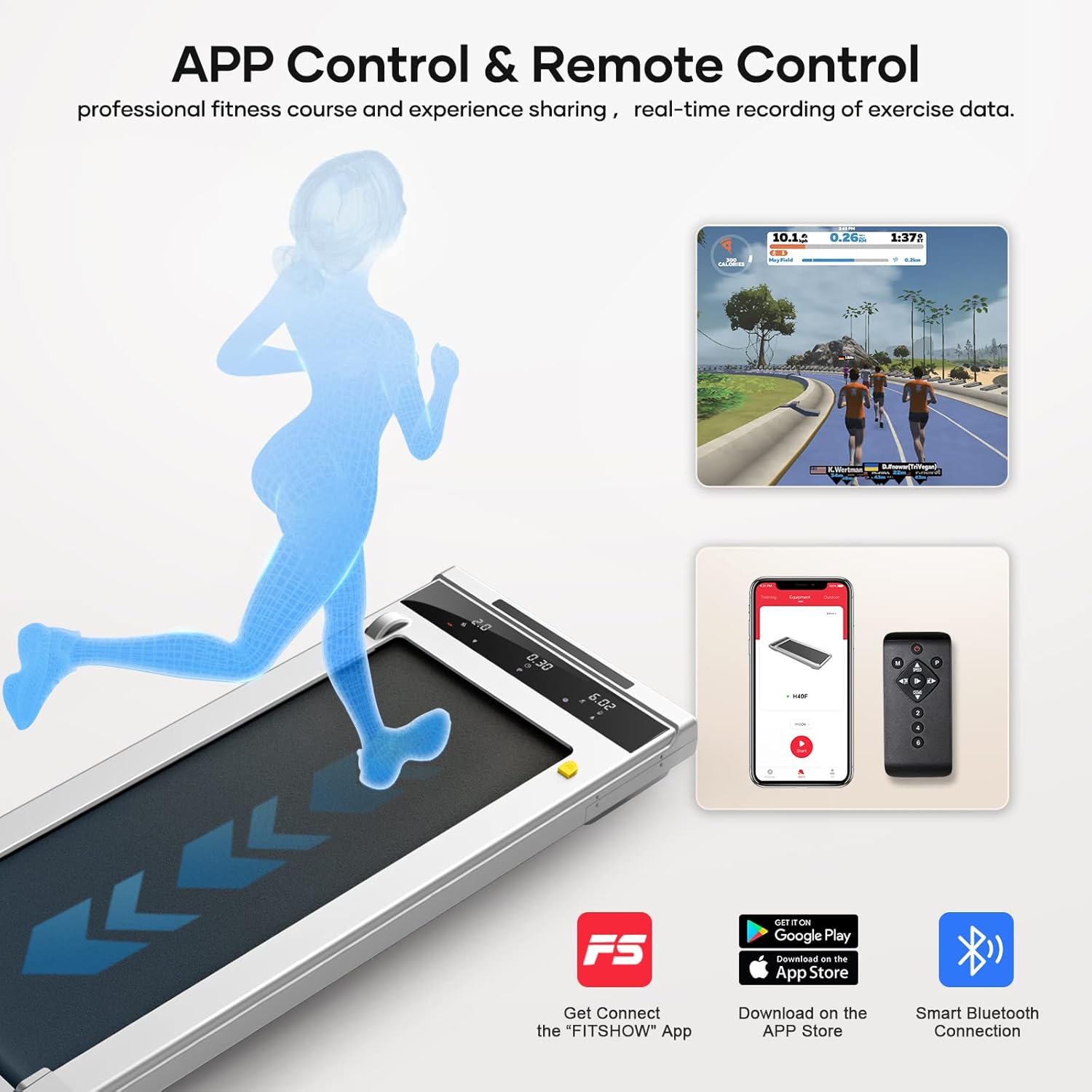
Figure 2: The walking pad can be controlled via the included remote control or through the dedicated "FITSHOW" mobile application, offering flexible operation options.
- Power Button (●): Press to start or stop the walking pad.
- Speed Up (▲): Increases the belt speed.
- Speed Down (▼): Decreases the belt speed.
- Mode (M): Cycles through different display modes (Time, Distance, Calories).
- Program (P): Selects pre-set workout programs (P01-P12).
- Speed Presets (1, 2, 3, 4): Directly sets the speed to common levels.
LED Display Functions
The integrated LED display provides real-time workout data.

Figure 3: The multifunction LED display shows key workout metrics including speed, time, distance, and calories burned, allowing users to monitor their progress effectively.
- Speed: Displays current belt speed (MPH).
- Time: Shows elapsed workout time.
- Distance: Indicates distance covered.
- Calories: Estimates calories burned.
- Program (P01-P12): Shows the currently selected workout program.
- Mode (H1-H3): Indicates the current operating mode (e.g., manual, program).
Operating Modes
The walking pad supports two primary modes of operation:

Figure 4: The treadmill offers two distinct modes: Walking Mode (0.6-2mph) for light activity, and Jogging Mode (3-6.2mph) for more intense cardiovascular exercise.
- Walking Mode: Speed range from 0.6 MPH to 2 MPH. Ideal for light exercise or use under a standing desk.
- Jogging Mode: Speed range from 3 MPH to 6.2 MPH. Suitable for more vigorous exercise.
App Connectivity (FITSHOW App)
For enhanced control and tracking, download the "FITSHOW" App from your device's app store. Connect via Bluetooth to access professional fitness courses and real-time exercise data recording.
Maintenance
Regular maintenance ensures the longevity and optimal performance of your walking pad.
Lubrication
The running belt requires periodic lubrication to reduce friction and wear. Use the provided silicone oil.

Figure 5: The walking pad features a dedicated oil filling hole for convenient lubrication of the running belt, ensuring smooth operation. Integrated wheels allow for easy movement and storage.
- Turn off and unplug the walking pad.
- Locate the lubrication hole on the side of the unit.
- Apply a small amount of silicone oil into the hole.
- Run the walking pad at a low speed (e.g., 1 MPH) for 2-3 minutes to distribute the oil evenly.
- Lubricate every 3-6 months depending on usage frequency.
Cleaning
- Wipe down the walking pad's surface with a damp cloth after each use.
- Do not use abrasive cleaners or solvents.
- Periodically vacuum under the walking pad to remove dust and debris.
Belt Adjustment
If the running belt feels loose or is slipping, it may need adjustment. Refer to the detailed instructions in the full manual or contact customer support for assistance.
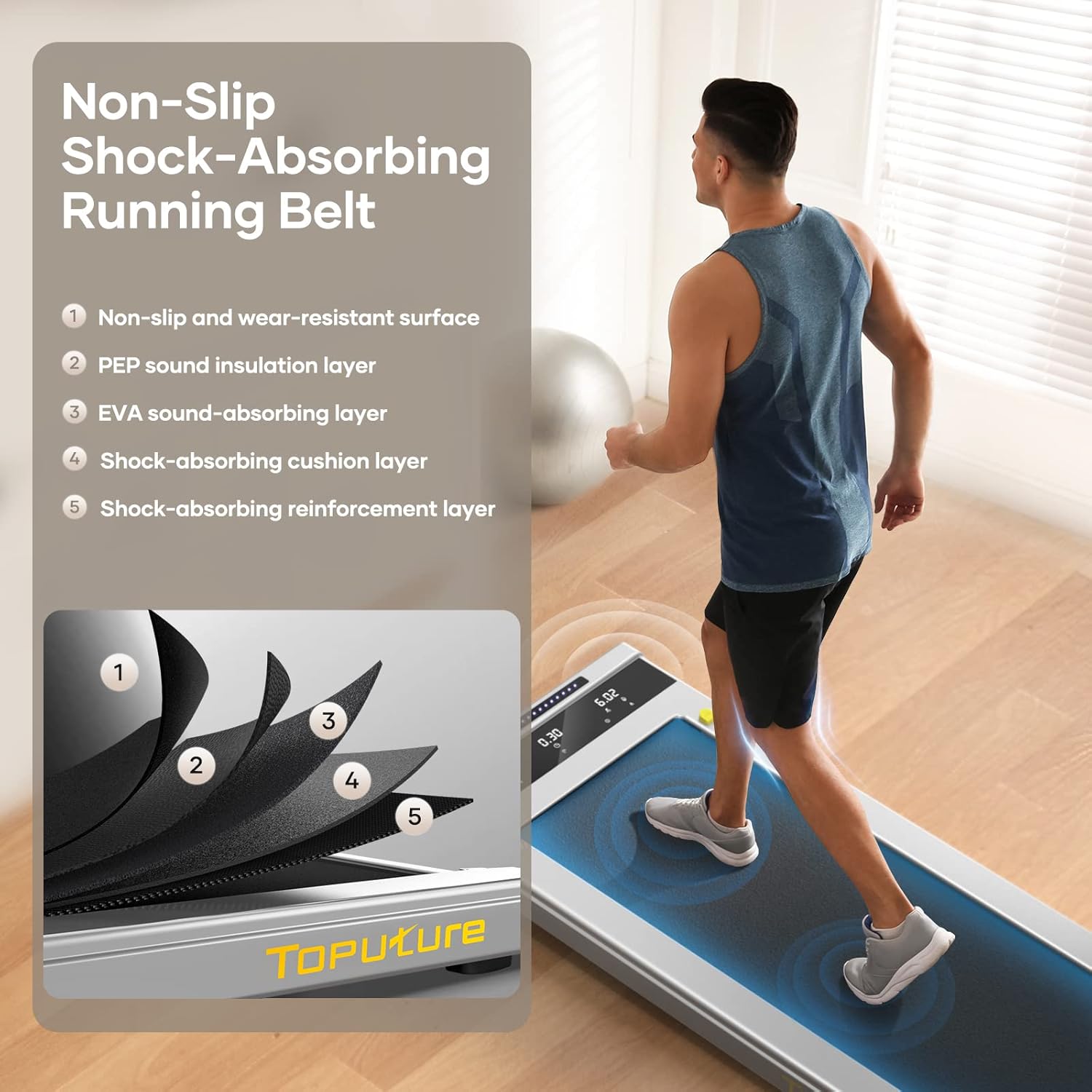
Figure 6: The running belt is constructed with multiple layers, including a non-slip surface, sound insulation, EVA shock absorption, and reinforcement, designed for comfort and durability.
Troubleshooting
Refer to the following table for common issues and their solutions:
| Problem | Possible Cause | Solution |
|---|---|---|
| Walking pad does not start. | Not plugged in; power switch off; remote control battery low. | Check power connection; ensure power switch is on; replace remote control batteries. |
| Running belt slips. | Belt too loose; insufficient lubrication. | Adjust belt tension (refer to full manual); lubricate the belt. |
| Unusual noise during operation. | Loose components; lack of lubrication; debris under belt. | Check for loose screws; lubricate belt; clean under the belt. |
| Display not working correctly. | Loose connection; internal fault. | Unplug and replug the unit; contact customer support if issue persists. |
Specifications
- Brand: TOPUTURE
- Model: Under Desk Treadmill
- Motor Horsepower: 2.25 HP
- Speed Range: 0.6 - 6.2 MPH
- Weight Capacity: 300 lbs
- Deck Length: 40 Inches
- Deck Width: 16 Inches
- Frame Material: Alloy Steel
- Noise Level: <45db (as per product information)
- Control: LED Touchscreen, App, Remote Control
- Features: Lubricating Hole, Portable Design

Figure 7: The walking pad features a running belt with dimensions of 40 inches in length and 16 inches in width, providing ample space for comfortable walking or jogging.

Figure 8: Equipped with a powerful yet quiet 2.25 HP motor, the walking pad operates at less than 45 decibels and supports a maximum user weight of 300 pounds.
Warranty and Support
For warranty information, technical support, or any inquiries regarding your TOPUTURE Walking Pad, please refer to the warranty card included in your package or contact TOPUTURE customer service directly. Contact details can typically be found on the manufacturer's official website or on your purchase receipt.


