Download PDFFree PDF. The Save button below keeps a bookmark and private notes in your account.
ANCEL AD530 OBD2 Scanner and BM200 Pro Battery Monitor Instruction Manual
Comprehensive guide for the setup, operation, and maintenance of your ANCEL AD530 OBD2 Scanner and ANCEL BM200 Pro Battery Monitor.
Introduction
This manual provides detailed instructions for using your ANCEL AD530 OBD2 Scanner and ANCEL BM200 Pro Battery Monitor. This package includes one (1) ANCEL AD530 Code Reader and one (1) ANCEL BM200 Pro Battery Monitor. Please read this manual thoroughly before operation to ensure proper use and to maximize the benefits of these diagnostic tools.
ANCEL AD530 OBD2 Scanner
1. Product Overview
The ANCEL AD530 is a full-function OBD2 diagnostic tool designed for all vehicles. It provides comprehensive diagnostic capabilities to help identify and resolve vehicle issues efficiently.
Figure 1: ANCEL AD530 displaying its full range of OBD2 functions, including reading and erasing DTCs, I/M readiness, live data stream, O2 sensor test, on-board monitor, EVAP system test, freeze frame, DTC lookup, vehicle information, battery test, and VIN information.
Key functions include:
Read & Erase DTCs: Retrieve and clear Diagnostic Trouble Codes.
On-Board Monitor Test: Access results of on-board diagnostic monitoring tests.
EVAP System Test: Initiate a test of the evaporative emission system.
Freeze Frame Data: View vehicle parameters recorded when an emission-related fault occurs.
DTC Lookup: Built-in library for code definitions.
Vehicle Information: Retrieve VIN, CIN, and CVN.
Battery Test: Basic battery voltage check.
2. Setup and Connection
To begin using the ANCEL AD530, connect it to your vehicle's OBD2 port. The port is typically located under the dashboard on the driver's side.
Locate the 16-pin OBD2 Data Link Connector (DLC) in your vehicle.
Plug the AD530's OBD2 cable into the vehicle's DLC.
The device will power on automatically.
3. Operating the ANCEL AD530
Navigate the AD530 using the directional buttons and the "OK" button. The "ESC" button returns to the previous menu, and the "I/M" button provides quick access to I/M Readiness status.
3.1. Emission Test Readiness (I/M Readiness)
Figure 2: The ANCEL AD530 showing the I/M Readiness screen, indicating the status of various emission monitors (e.g., IGN, MIS, FUEL, CCM, CAT, EVAP, O2S, AIR, HTR, EGR) with checkmarks for 'Ready' and crosses for 'Not Ready'.
This function checks if your vehicle's emission systems are ready for an inspection. A green checkmark indicates the monitor has completed its diagnostic cycle, while a red 'X' means it has not. This helps ensure your vehicle passes exhaust emission tests.
3.2. Reading and Clearing Trouble Codes
From the main menu, select "OBDII" and press "OK".
Choose "Read Codes" to view current, pending, and permanent Diagnostic Trouble Codes (DTCs).
To clear codes, select "Erase Codes". Note: Clearing codes will also clear freeze frame data and reset I/M readiness monitors. Ensure you have addressed the underlying issue before clearing codes.
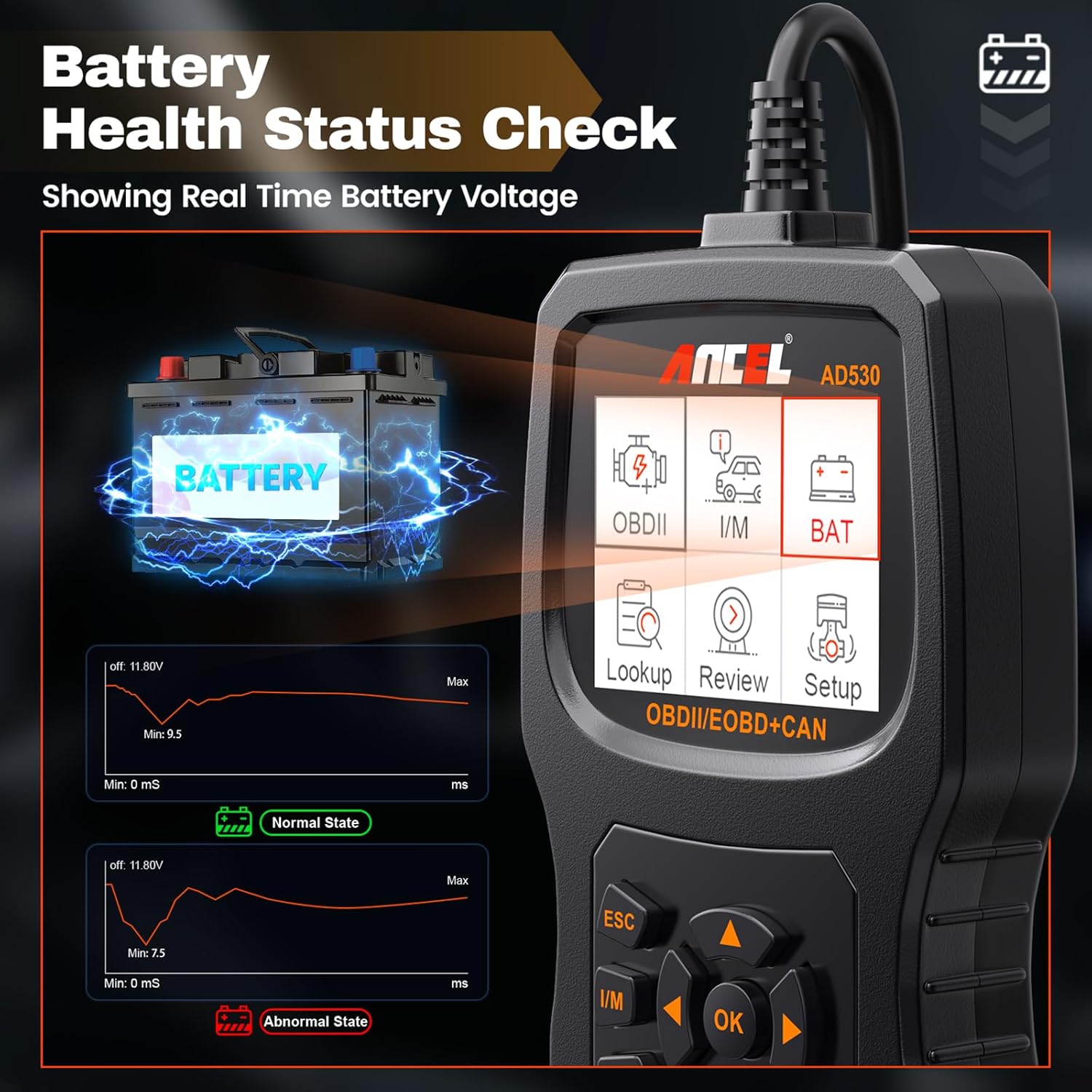
3.3. Battery Health Status Check
Figure 3: The ANCEL AD530 showing a real-time graph of battery voltage, indicating normal and abnormal states with corresponding voltage ranges. This helps in monitoring the vehicle's battery health.
The AD530 can display real-time battery voltage, providing a quick assessment of your vehicle's battery health. This feature helps in identifying potential battery issues early.
ANCEL BM200 Pro Battery Monitor
1. Product Overview
The ANCEL BM200 Pro is a wireless battery monitor designed to provide continuous, real-time monitoring of your vehicle's 12-volt lead-acid battery. It offers multiple test functions and features for comprehensive battery health management.
Figure 4: The ANCEL BM200 Pro display unit illustrating its multi-test functions, including Battery Test, Cranking Test, Charging Test, Voltage Test, State of Health (SoH), State of Charging (SoC), and Temperature Display.
Key features and functions include:
Battery Test: Assesses overall battery health.
Cranking Test: Evaluates the starting system performance.
Charging Test: Monitors the alternator's charging output.
Voltage Test: Real-time voltage monitoring.
State of Health (SoH) & State of Charging (SoC): Provides detailed battery status.
Temperature Display: Monitors battery temperature.
433MHz Wireless Transmission: Stable and convenient data transmission up to 70 feet.
Built-in Alarm Function: Alerts for abnormal battery conditions.
Two Charging Modes: Solar and Type-C for the display unit.
IP67 Waterproof Design: Ensures durability in various conditions.
Flame Retardant Material: Enhanced safety.
Low Power Consumption: Efficient operation with automatic connection.
Security Protection: Reverse connection, overheat, short circuit protection, and built-in fuse.
Built-in Shock Sensor: Automatic sleep mode to save power.
2. Installation
Proper installation of the BM200 Pro monitor unit is crucial for accurate data collection and reliable wireless transmission.
Figure 5: Visual guide for the four installation steps of the ANCEL BM200 Pro: 1. Connect black clip to negative terminal. 2. Connect red clip to positive terminal. 3. Stick the monitor unit onto the battery surface. 4. Place the display unit in front of the windshield.
Connect Negative: Firmly connect the black clip of the monitor unit to the negative (-) pole of the vehicle battery.
Connect Positive: Firmly connect the red clip of the monitor unit to the positive (+) pole of the vehicle battery.
Mount Monitor Unit: Stick the monitor unit onto the battery surface using the provided double-sided tape.
Position Display Unit: Place the display unit in a suitable location on your dashboard, typically in front of the windshield, ensuring clear visibility and optimal wireless reception.
Important Tips:
Ensure the device is securely installed for the first time. Loose installation may cause abnormal data capture and display.
Verify the RF signal icon in the upper right corner of the display. A visible RF symbol indicates the display is successfully connected to the monitor unit and is receiving real-time data. If the RF symbol does not appear, try restarting the display unit.
3. Operating the ANCEL BM200 Pro
The BM200 Pro continuously monitors your battery and transmits data wirelessly to the display unit. The display provides real-time information and alerts.
3.1. Battery Test Functions
The display unit shows various battery parameters:
Battery Test: Provides an overall assessment of battery health, often displayed as a percentage (SoH).
Cranking Test: When the engine starts, the device automatically tests the cranking system, displays the cranking voltage, and determines if the starting process is abnormal.
Charging Test: After the car starts, it monitors the charging system, displays the charging percentage in real-time, and assesses the alternator's working condition.
Voltage Test: Continuously monitors battery voltage, helping to predict potential battery maintenance issues.
3.2. Wireless Transmission
Figure 6: The ANCEL BM200 Pro demonstrating its 433MHz wireless transmission capability, allowing stable data transfer between the battery monitor and the display unit over a distance of 30-70 feet.
The BM200 Pro utilizes 433MHz wireless transmission technology, offering a stable connection and convenient monitoring from a distance of 30 to 70 feet. This allows for effective battery monitoring even when outside the vehicle.
3.3. Built-in Alarm Function
Figure 7: The ANCEL BM200 Pro's built-in alarm function, highlighting alerts for low voltage, low battery, high temperature, abnormal cranking, and abnormal charging, providing timely warnings for proactive maintenance.
The device provides timely automatic alerts for abnormal data, including:
Low voltage
Low battery
High temperature
Abnormal cranking
Abnormal charging
These alerts help ensure proactive maintenance and prevent unexpected battery failures.
3.4. Charging the Display Unit
Figure 8: The ANCEL BM200 Pro display unit illustrating its two charging modes: solar charging via the integrated panel and Type-C charging (5V charger) for simultaneous power replenishment.
The BM200 Pro display unit supports two charging methods:
Solar Charging: The integrated solar panel allows for continuous charging when exposed to sunlight.
Type-C Charging: Connect a 5V Type-C charger for faster or indoor charging.
Maintenance
To ensure the longevity and optimal performance of your ANCEL AD530 and BM200 Pro, follow these maintenance guidelines:
Cleaning: Use a soft, damp cloth to clean the devices. Do not use abrasive cleaners or solvents.
Storage: Store the devices in a dry, cool environment away from direct sunlight and extreme temperatures.
Cable Care: Avoid bending or crimping the OBD2 cable excessively.
BM200 Pro Monitor Unit: Ensure the battery clips are clean and free of corrosion for a good connection. The unit is IP67 waterproof, but avoid prolonged submersion.
BM200 Pro Display Unit: Keep the solar panel clean for efficient charging.
Troubleshooting
If you encounter issues with your ANCEL AD530 or BM200 Pro, refer to the following common troubleshooting steps:
Device Not Powering On (AD530):
Ensure the OBD2 cable is securely connected to the vehicle's DLC.
Check the vehicle's battery voltage; the AD530 draws power from the vehicle.
No RF Signal on BM200 Pro Display:
Verify that the BM200 Pro monitor unit is correctly connected to the battery terminals.
Ensure the monitor unit is securely mounted and not obstructed.
Try restarting the display unit.
Confirm the display unit is within the 30-70 feet wireless transmission range of the monitor unit.
Inaccurate Readings (BM200 Pro):
Check for loose connections at the battery terminals.
Ensure the battery clips are clean and free of corrosion.
Verify the monitor unit is firmly attached to the battery.
Alarms Triggering Frequently (BM200 Pro):
If alarms for low voltage, low battery, high temperature, abnormal cranking, or charging are frequent, it indicates a potential issue with your vehicle's battery or charging system. It is recommended to have your vehicle's battery and charging system professionally inspected.
Specifications
ANCEL AD530 OBD2 Scanner
Display: Color LCD
Operating Voltage: 9-18V DC (from vehicle OBD2 port)
Figure 9: The ANCEL BM200 Pro is compatible with a wide range of vehicles equipped with 12-volt lead-acid batteries, including cars, SUVs, light trucks, RVs, travel trailers, pickups, motorcycles, forklifts, boats, and mowers.
Warranty and Support
ANCEL is committed to providing high-quality products and customer service. For any inquiries or support needs, please contact our professional online team.
Customer Service: 24-hour reply within.
Returns & Exchange: 30-day return and exchange policy.
Technical Guidance: Access to updated technical guidance.
Software Updates: Free software upgrades.
For further assistance, please visit the official ANCEL website or contact their customer support directly.
Ask about setup, troubleshooting, compatibility, parts, safety, or missing instructions. Manuals+ will review the question and use this page’s manual context to help answer it.