
1. Introduction
The LeTkingok EBC-A20 is a versatile battery capacity tester designed for lithium and lead-acid batteries. It functions as an electronic load, providing precise measurements for battery charge and discharge cycles. This manual provides detailed instructions for the safe and effective operation, setup, and maintenance of your EBC-A20 device.
2. Safety Information
- Always operate the device in a well-ventilated area.
- Ensure correct polarity when connecting batteries to prevent damage to the device or battery.
- Do not exceed the specified voltage and current limits of the device (Charge: 0-18V 0.1-5A; Discharge: 0-30V 0.1-20A 85W).
- Keep the device away from water, moisture, and extreme temperatures.
- Do not attempt to disassemble or modify the device. Refer all servicing to qualified personnel.
- Use only the provided power adapter and cables.
3. Package Contents
Verify that all items listed below are present in your package:
- EBC-A20 Battery Capacity Tester Unit
- Power Adapter
- Power Cable
- USB to TTL Communication Cable
- 4-Wire Test Leads (Red and Black)

Figure 3.1: EBC-A20 unit and its accessories, including the power adapter, power cable, USB to TTL cable, and the red and black 4-wire test leads.
4. Product Overview
The EBC-A20 features a compact design with an intuitive interface for battery testing.

Figure 4.1: Front panel of the EBC-A20, highlighting the LCD display and control buttons for operation.
4.1 Key Features
- High Accuracy: Capacity test accuracy of 10Ah/0.001Ah, current test accuracy up to 0.01A.
- 4-Wire Connection: Separate voltage and current test wires ensure high measurement accuracy.
- LCD Display: Real-time display of Voltage, Current, Capacity, Time, and Power consumption.
- PC Connectivity: Connects to a computer via USB to TTL cable for advanced control and data logging.
- Wide Current Range: Current test range from 0.1A to 20A.

Figure 4.2: Side panel of the EBC-A20, illustrating the power input jack, USB communication port, and the main power switch.
5. Setup
5.1 Power Connection
- Connect the provided power adapter to the DC input jack on the side of the EBC-A20 unit.
- Plug the power cable into a suitable power outlet.
- Ensure the power switch on the side of the unit is in the OFF position before connecting batteries.
5.2 Battery Connection (4-Wire Method)
The EBC-A20 uses a 4-wire connection method for accurate measurements, separating current and voltage sensing lines.
- Identify the two main current terminals (+ and -) and the two voltage sensing terminals (V+ and V-) on the EBC-A20.
- Connect the red (positive) current lead to the positive terminal of the battery and the corresponding current input on the EBC-A20.
- Connect the black (negative) current lead to the negative terminal of the battery and the corresponding current input on the EBC-A20.
- Connect the red (positive) voltage sensing lead to the positive terminal of the battery (or as close as possible to it) and the V+ input on the EBC-A20.
- Connect the black (negative) voltage sensing lead to the negative terminal of the battery (or as close as possible to it) and the V- input on the EBC-A20.
- Double-check all connections for correct polarity and secure fit.

Figure 5.1: Proper 4-wire connection of a battery to the EBC-A20 for accurate testing.
5.3 PC Software Connection
For advanced control, data logging, and graphing, connect the EBC-A20 to a computer using the provided USB to TTL cable.
- Connect the USB end of the cable to an available USB port on your computer.
- Connect the TTL end of the cable to the mini-USB port on the side of the EBC-A20 unit.
- Install the necessary drivers and software (typically provided on a CD or available for download from the manufacturer's website).
6. Operating Instructions
6.1 Basic Operation
- After connecting the battery and power, turn on the EBC-A20 using the power switch.
- The LCD display will illuminate, showing current parameters.
- Use the SET button to cycle through different test modes or parameters.
- Use the INC (Increment) and DEC (Decrement) buttons to adjust values (e.g., charge current, discharge current, voltage limits).
- Press the ON button to start or stop a test cycle.
6.2 Charge Test Mode
In charge mode, the EBC-A20 can charge batteries up to 18V with a current range of 0.1A to 5A.
- Select the charge test mode using the SET button.
- Adjust the desired charge current and voltage cut-off using INC and DEC.
- Press ON to begin charging. The display will show real-time charging data.
6.3 Discharge Test Mode
In discharge mode, the EBC-A20 acts as an electronic load, discharging batteries up to 30V with a current range of 0.1A to 20A (max 85W).
- Select the discharge test mode using the SET button.
- Set the desired discharge current and voltage cut-off (minimum voltage) using INC and DEC.
- Press ON to begin discharging. The display will show real-time discharge data, including accumulated capacity.
- The test will automatically stop when the voltage reaches the set cut-off or the capacity limit is reached.
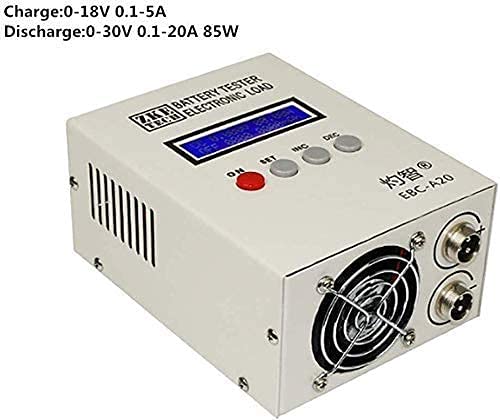
Figure 6.1: Overview of the EBC-A20's charging and discharging capabilities.
6.4 Using PC Software
The PC software provides a more comprehensive interface for controlling the EBC-A20, setting complex test profiles, and analyzing data.
- Launch the EBC-A20 software on your computer.
- Select the correct COM port for the connected device.
- Follow the software's on-screen instructions to configure and run tests, view real-time graphs, and export data.
7. Maintenance
- Keep the device clean and free from dust. Use a soft, dry cloth for cleaning.
- Ensure the cooling fan is not obstructed to prevent overheating.
- Store the device in a cool, dry place when not in use.
- Regularly check test leads for wear and tear. Replace if damaged.
8. Troubleshooting
| Problem | Possible Cause | Solution |
|---|---|---|
| Device does not power on. | No power, faulty adapter, power switch off. | Check power outlet, ensure adapter is connected, turn power switch ON. |
| Inaccurate readings. | Loose connections, incorrect 4-wire setup, faulty leads. | Ensure all leads are securely connected with correct polarity. Check leads for damage. |
| PC software not connecting. | Incorrect COM port, missing drivers, faulty USB cable. | Verify COM port in device manager, install/reinstall drivers, try a different USB port or cable. |
| Test stops unexpectedly. | Battery voltage reached cut-off, overheating, internal error. | Check set voltage limits. Ensure proper ventilation. If persistent, contact support. |
9. Specifications
| Feature | Detail |
|---|---|
| Model Number | EBC-A20 |
| Brand | LeTkingok |
| Charge Voltage Range | 0-18V |
| Charge Current Range | 0.1-5A |
| Discharge Voltage Range | 0-30V |
| Discharge Current Range | 0.1-20A |
| Max Discharge Power | 85W |
| Capacity Test Accuracy | 10Ah/0.001Ah, 10A-100A/0.01A, 100A above/0.1A |
| Current Test Precision | Up to 0.01A |
| Connection Method | 4-Wire Test |
| Display | LCD (Voltage/Current/Capacity/Time/Power) |
| PC Connection | USB to TTL Cable |
| Dimensions | 10.51 x 9.8 x 5.83 inches |
| Weight | 3.84 Pounds |
| Color | Black, Gray |
10. Warranty and Support
For warranty information and technical support, please contact LeTkingok customer service or refer to the official LeTkingok website. Keep your purchase receipt for warranty claims.
Manufacturer: LeTkingok
Date First Available: November 1, 2019