
DT NO.1 DT Ultra Mate
DT NO.1 DT Ultra Mate Smart Watch User Manual
Model: DT Ultra Mate
Product Overview
The DT NO.1 DT Ultra Mate Smart Watch combines elegant design with advanced functionality. It features a circular design with a metal frame and a 1.5-inch IPS full-view color screen, offering a premium look and clear display. Equipped with a rotatable button for navigation and another for sports modes, it provides intuitive control. This smartwatch is designed to enhance your daily life with comprehensive health monitoring, communication features, and fitness tracking capabilities.
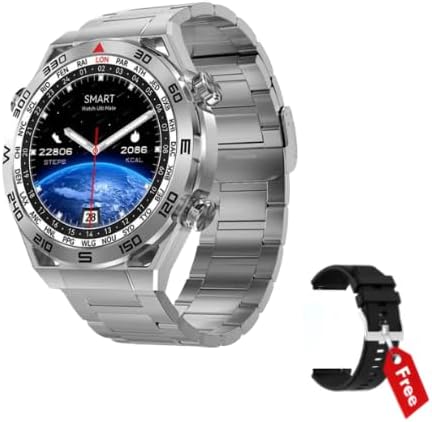
The DT NO.1 DT Ultra Mate Smart Watch in silver with its metal strap, accompanied by a free extra black silicone strap.
Key Features
- 1.5-inch IPS full-view color screen with 454*454 resolution
- Bluetooth calling & Voice Assistant
- IP68 Waterproof rating
- Wireless Charging
- Built-in Speaker And Microphone
- Multi-Sport Modes for diverse activities
- Heart Rate and Blood Pressure Monitor
- Customize Watch Faces and 6 Menu Styles
- NFC Connectivity
- Comes with a FREE Extra Silicone Black Strap

Visual representation of the DT NO.1 DT Ultra Mate smartwatch in two color variants, emphasizing its HD screen, sports modes, Bluetooth calling, and health monitoring capabilities.
Getting Started (Setup)
Package Contents
- DT NO.1 DT Ultra Mate Smart Watch
- Wireless Charging Cable
- Extra Silicone Strap (Black)
- User Manual (this document)
Initial Charging
Before first use, fully charge your smartwatch. Place the watch on the wireless charging pad. The screen will indicate charging status. A full charge typically takes less than 5 hours.
App Installation and Pairing
- Download the WearPro app from your smartphone's app store (available for Android & iOS).
- Ensure Bluetooth is enabled on your smartphone.
- Open the WearPro app and follow the on-screen instructions to search for and connect to your DT Ultra Mate smartwatch.
- Confirm the pairing request on both your phone and the watch.

The smartwatch screen showing various application icons, indicating the range of functions accessible through the WearPro app.
Operating Your Smartwatch
Basic Navigation
- Rotatable Button: Use the rotatable button on the side to scroll through menus, change watch faces, and zoom in/out.
- Function Button: The second button below the rotatable button is typically used to access sports modes or other quick functions.
- Touch Screen: Swipe left, right, up, or down to navigate between screens, access quick settings, and view notifications. Tap to select items.
Customizing Watch Faces
The DT Ultra Mate offers a wide variety of pre-installed watch faces. You can change them by rotating the main button on the watch face screen or through the WearPro app. The app also allows you to upload your own photos to create personalized watch faces.

A collection of diverse watch faces available for the DT NO.1 DT Ultra Mate, showcasing customization options.
Bluetooth Calling and Voice Assistant
Once paired with your smartphone, you can make and receive calls directly from your watch using the built-in speaker and microphone. Activate the voice assistant feature to control your phone hands-free.
Fitness Tracking and Health Monitoring
- Multi-Sport Modes: Select from over 100 sports modes to accurately track your workouts, including steps, calories burned, and distance.
- Heart Rate & Blood Pressure: Monitor your heart rate and blood pressure in real-time.
- Sleep Monitoring: Track your sleep patterns to understand your sleep quality.
- GPS Route Tracking: When activated through the app, the watch can track your GPS movement trajectory and record mileage and calorie consumption data for outdoor activities.
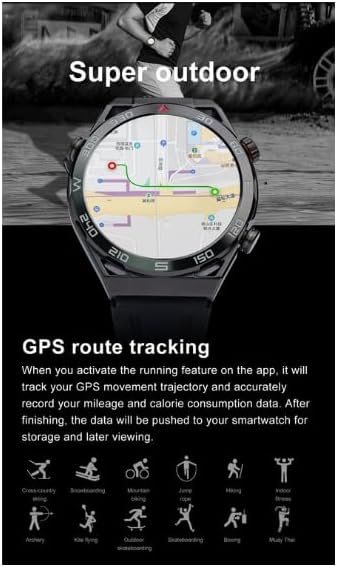
The smartwatch displaying GPS route tracking on a map, useful for outdoor activities.
NFC Functionality
The watch supports NFC for various functions, such as offline payments (where supported) or access control. Refer to the WearPro app for specific NFC setup and usage instructions.
Compass Feature
The integrated compass function provides directional guidance, which can be particularly useful during outdoor activities or navigation.

The smartwatch displaying its built-in digital compass, indicating direction and degrees.
Care and Maintenance
Cleaning
Wipe the watch and straps regularly with a soft, dry cloth. For stubborn dirt, dampen the cloth slightly with water. Avoid using harsh chemicals or abrasive materials.
Water Resistance (IP68)
The DT Ultra Mate is IP68 waterproof, meaning it is resistant to dust and can withstand immersion in water up to 1.5 meters for up to 30 minutes. It is suitable for daily use, hand washing, and light rain. Avoid hot water, saunas, or diving, as steam and high pressure can compromise the seal.
Battery Life
The 360mAh battery provides approximately 5 days of daily use and up to 20 days in power-saving mode. Battery life may vary based on usage patterns and features enabled.
Troubleshooting
- Watch not turning on: Ensure the watch is fully charged. Connect it to the wireless charger and wait a few minutes before attempting to power it on.
- Unable to pair with phone:
- Ensure Bluetooth is enabled on both devices.
- Make sure the watch is within the Bluetooth range of your phone.
- Restart both the watch and your phone.
- Clear the Bluetooth cache on your phone (if applicable) and try pairing again.
- Inaccurate health data: Ensure the watch is worn snugly on your wrist, not too tight or too loose. Clean the sensor on the back of the watch. Environmental factors and individual physiology can affect readings.
- Notifications not appearing: Check notification settings in the WearPro app and on your phone's system settings to ensure permissions are granted for the app to display notifications.
- Short battery life: Reduce screen brightness, disable unnecessary features (e.g., always-on display), and limit background app refresh.
Product Specifications
| Feature | Specification |
|---|---|
| Model Number | DT Ultra Mate |
| Chip | RTK8762DK |
| Dimensions | 47.6 x 11.8 mm (Watch Body); 3.81 x 1.27 x 3.81 cm (Product) |
| Weight | 49g (Watch Body); 227g (Product) |
| Body Material | Alloy |
| Waterproof Rating | IP68 |
| Screen Type | 1.5-inch IPS full-view color screen |
| Screen Resolution | 454*454 pixels |
| Battery Capacity | 360mAh |
| Charging Method | Wireless charging |
| Charging Time | Less than 5 hours |
| Daily Use Battery Life | Approx. 5 days |
| Power Saving Mode Battery Life | Approx. 20 days |
| Strap Material | Silicone / Steel |
| Strap Width | 22mm |
| Operating System | watchOS (as per product data, note: typically refers to Apple Watch OS, may be a generic term here) |
| Connectivity Technology | Bluetooth, NFC |
| Manufacturer | Shenzhen Xinkeying Digital Co., Ltd |
| Date First Available | 31 January 2023 |
Warranty and Support
For warranty information, please refer to the documentation included with your purchase or visit the official DT NO.1 website. Support for the WearPro application and smartwatch functionalities can often be found within the app's help section or on the manufacturer's support pages.
If you encounter issues not covered in this manual, please contact the retailer or manufacturer's customer service for assistance.
Related documentsDT Ultra Mate

Ask a question about this manual
Ask about setup, troubleshooting, compatibility, parts, safety, or missing instructions. Manuals+ will review the question and use this page’s manual context to help answer it.