
1. Safety Warnings
Always use appropriate safety precautions when assembling the desk. Ensure the work area is clear and well-lit. Protect yourself from potential dust particles that may arise when handling MDF panels by wearing a mask and eye protection. Keep small parts away from children.
Do not overload the desk or shelves beyond their stated weight capacity. Ensure all screws and fasteners are securely tightened before use to prevent instability. Avoid placing hot items directly on the desk surface without protection.
2. Product Overview
The ODK Computer Desk is designed for versatility and ergonomic comfort in your home or office. It features a spacious desktop, integrated storage solutions, and a thoughtful design to enhance your workspace.
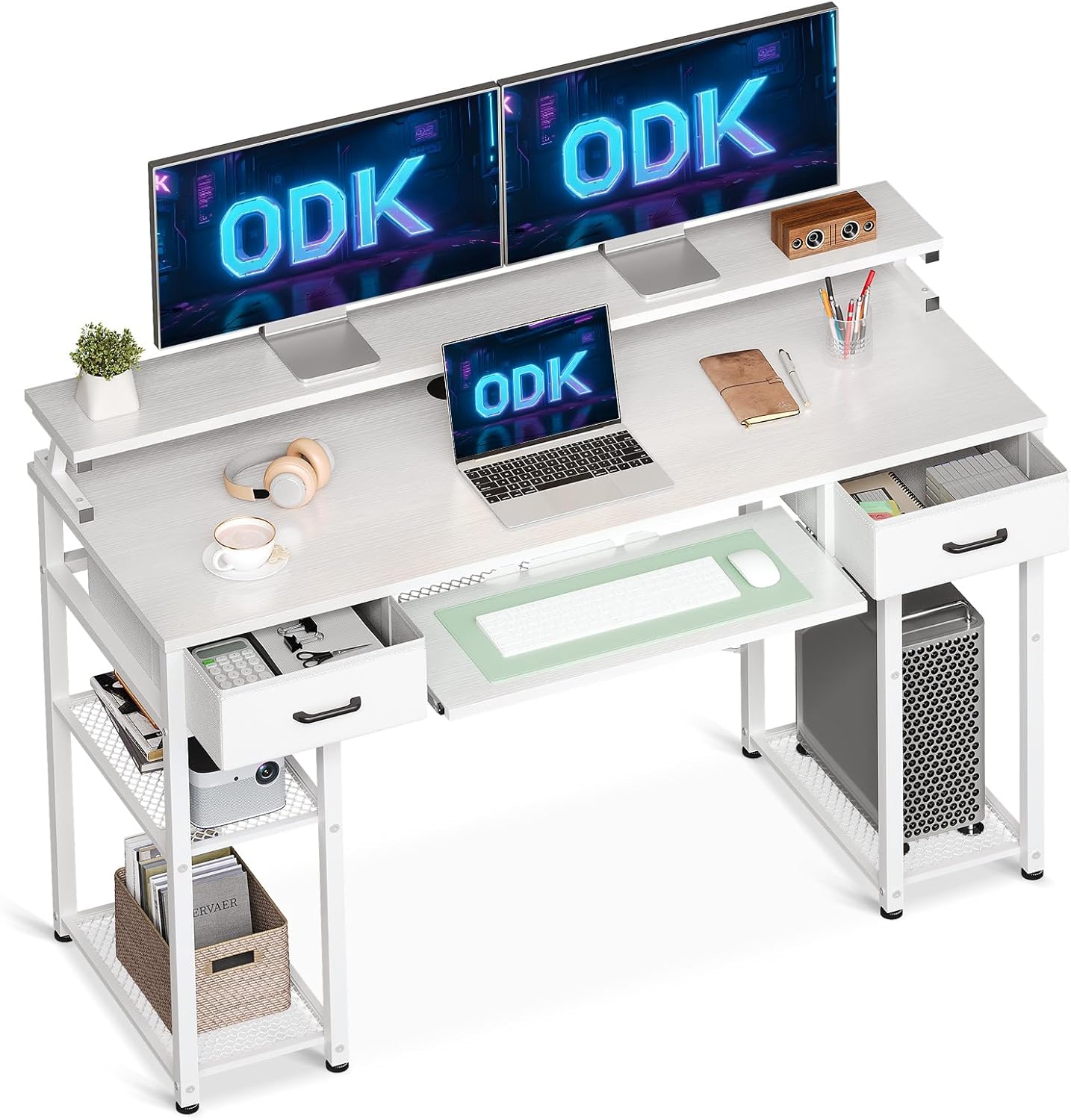
Figure 2.1: The ODK Computer Desk, showcasing its spacious design with dual monitor setup, laptop, keyboard, and integrated storage.
This desk includes a raised monitor stand, a pull-out keyboard tray, and two fabric drawers, providing ample space for your computer, peripherals, and office supplies. The robust metal frame and MDF construction ensure stability and durability for daily use.

Figure 2.2: The ODK Computer Desk integrated into a home office environment, highlighting its aesthetic appeal and functional layout.
3. Key Features
3.1 Ergonomic Monitor Stand
The integrated raised monitor stand provides an optimal viewing angle, helping to prevent neck and back strain during long hours of use. Its extended design can comfortably accommodate two monitors and other accessories, while the space underneath offers additional storage for books, pens, or other small items.

Figure 3.1: Comparison of ergonomic posture with the raised monitor stand versus incorrect posture without it, demonstrating improved comfort.
3.2 Keyboard Tray and Fabric Drawers
The desk features a 60 cm wide pull-out keyboard tray, suitable for full-size 108-key or 87-key keyboards with a mouse. This tray helps protect your keyboard from dust and can also serve as a convenient storage compartment. Additionally, two fabric drawers provide extra storage space for office supplies, documents, or personal items. These drawers are designed for easy setup, requiring no complex assembly.

Figure 3.2: Detailed view of the sliding keyboard tray and the spacious fabric drawers, highlighting their functionality and ease of use.
3.3 Versatile Storage Shelves
The desk incorporates 2-tier storage shelves, offering flexible storage options. One of the shelves is removable, allowing it to function as a CPU stand or a two-tier bookshelf, depending on your needs. This design maximizes storage efficiency and helps keep your workspace organized.

Figure 3.3: Illustration of the versatile storage shelves, demonstrating the removable section for CPU placement or additional shelving.
4. Dimensions
The ODK Computer Desk is designed with specific dimensions to fit various spaces while providing ample working area. Refer to the diagram below for detailed measurements.

Figure 4.1: Comprehensive dimensions of the ODK Computer Desk, including overall height, width, depth, and specific measurements for shelves, keyboard tray, and drawers.
- Overall Dimensions (L x W x H): 120 cm x 50 cm x 90 cm
- Desktop Surface: 120 cm x 48 cm
- Keyboard Tray Width: 60 cm
5. Setup and Assembly
The ODK Computer Desk is designed for quick and easy assembly, typically taking around 15 minutes. All necessary accessories and tools are included and well-organized for your convenience. Follow these general steps for assembly:
- Unpack Components: Carefully unbox all parts and verify against the included parts list.
- Assemble Frame: Connect the metal frame components according to the instructions, ensuring all screws are finger-tightened initially.
- Attach Desktop: Secure the main desktop surface to the assembled frame.
- Install Keyboard Tray: Slide and secure the keyboard tray into its designated runners.
- Insert Fabric Drawers: Unfold the fabric drawers and place the hard bottom panel inside, then insert them into the desk's drawer compartments.
- Place Monitor Stand: Position the raised monitor stand on the desktop.
- Final Tightening: Once all parts are in place, fully tighten all screws with the provided tool.
For a visual guide, an installation video may be available. Please refer to the product page or manufacturer's website for access.
6. Operating Instructions
Your ODK Computer Desk is ready for use once assembled. Here are some tips for optimal operation:
- Workspace Organization: Utilize the monitor stand to elevate your screens for better ergonomics. Place frequently used items on the monitor stand or within easy reach on the desktop.
- Keyboard Tray Use: Extend the keyboard tray for comfortable typing and mouse use. When not in use, slide it back in to save space and protect your keyboard from dust.
- Drawer Utilization: Use the fabric drawers for storing documents, stationery, or small personal items to keep your desktop clutter-free.
- Shelf Customization: Adjust the removable shelf in the side storage area to accommodate a CPU tower or to create two levels of shelving for books or storage boxes.
- Cable Management: Use cable ties or clips (not included) to manage power cords and peripheral cables, keeping your workspace tidy and safe.
7. Maintenance
To ensure the longevity and appearance of your ODK Computer Desk, follow these maintenance guidelines:
- Cleaning: Wipe the desk surfaces with a soft, damp cloth. For stubborn marks, use a mild, non-abrasive cleaner. Avoid harsh chemicals or abrasive materials that could damage the finish.
- Dusting: Regularly dust all surfaces to prevent buildup.
- Spills: Clean up spills immediately to prevent staining or damage to the MDF.
- Hardware Check: Periodically check all screws and fasteners to ensure they remain tight. Re-tighten if necessary to maintain stability.
- Avoid Direct Sunlight: Prolonged exposure to direct sunlight can cause fading or discoloration of the desk surface.
8. Troubleshooting
If you encounter any issues with your ODK Computer Desk, refer to the following common problems and their solutions:
| Problem | Possible Cause | Solution |
|---|---|---|
| Desk wobbles or is unstable | Loose screws; Uneven floor; Incorrect assembly | Ensure all screws are fully tightened. Adjust the leveling feet on the bottom of the desk legs. Review assembly instructions to confirm correct setup. |
| Keyboard tray does not slide smoothly | Obstruction in runners; Misalignment | Check for any debris or objects blocking the runners. Ensure the tray is correctly aligned on its tracks. |
| Fabric drawers do not fit or are misshapen | Bottom panel not inserted correctly; Drawer not fully unfolded | Ensure the hard bottom panel is fully inserted and flat inside the fabric drawer. Fully unfold the drawer before inserting. |
| Monitor stand feels unstable | Not placed correctly; Overloaded | Ensure the monitor stand is placed firmly and evenly on the desktop. Do not exceed the weight capacity of the stand. |
If the problem persists after attempting these solutions, please contact customer support.
9. Specifications
| Attribute | Detail |
|---|---|
| Brand | ODK |
| Model Number | SBJPCTFZ-01 |
| Color | White |
| Dimensions (L x W x H) | 120 x 80 x 90 cm (Product); 120 x 50 x 90 cm (Design) |
| Material | Fabric, Wood, Metal, Engineered Wood (MDF) |
| Item Weight | 15.5 Kilograms |
| Special Features | Integrated Monitor Stand, Included Keyboard Tray |
| Desk Design | Computer Desk |
| Shape | Rectangular |
| Finish Type | Lacquered |
| Country of Origin | China |
10. Warranty and Support
For warranty information or technical support, please refer to the documentation included with your purchase or visit the official ODK website. If you have any questions or require assistance with assembly or product functionality, do not hesitate to contact ODK customer service. Please have your model number (SBJPCTFZ-01) and purchase details ready when contacting support.


