
1. Introduction
The BIGBIG WON Rainbow 2 Pro is a versatile wireless gaming controller designed for multi-platform compatibility, including Switch, Windows 10 & 11, Android 7.0+, and iOS 14.0+. It features advanced components and customizable options to enhance your gaming experience across various systems.
2. Package Contents
The following items are included in your BIGBIG WON Rainbow 2 Pro package:
- 1 x BIGBIG WON Rainbow 2 Pro Wireless Controller
- 1 x 2.4G USB Dongle
- 1 x Type-C Cable
- 1 x User Manual

Image: The BIGBIG WON Rainbow 2 Pro controller, 2.4G USB dongle, and Type-C cable included in the package.
3. Features Overview
The Rainbow 2 Pro controller is equipped with a range of features for optimal performance:
- Multi-platform Compatibility: Works with Switch, Windows 10 & 11, Android 7.0+, and iOS 14.0+.
- Advanced Connectivity: Supports 2.4G wireless dongle, Bluetooth, and wired USB connections.
- High Polling Rates: 200Hz for 2.4G wireless and 1000Hz for wired connections, ensuring minimal latency.
- Motion Control: Features GYROCON+ technology for motion aiming on PC. Switch supports native motion control.
- ALPS Joystick: Provides 0 deadzone and 12-bit resolution for precise control, with adaptive calibration to prevent drift.
- Hall-effect Triggers: Linear triggers offer precise control for racing games and quick fire for shooting games.
- Customizable Buttons: Two custom back buttons and two top additional buttons support Macro, Turbo, and remapping functions.
- Dual Motor Vibration: Four adjustable levels of vibration intensity for immersive gaming.
- 3.5mm Audio Jack: Supports audio function when connected via 2.4G.
- RGB Lighting: Customizable RGB effects via the ELITE App.
- BIGBIG WON ELITE App: Allows real-time customization of RGB, motion control, joystick, trigger, buttons, and MACRO settings. Available on Apple App Store / Google Play.
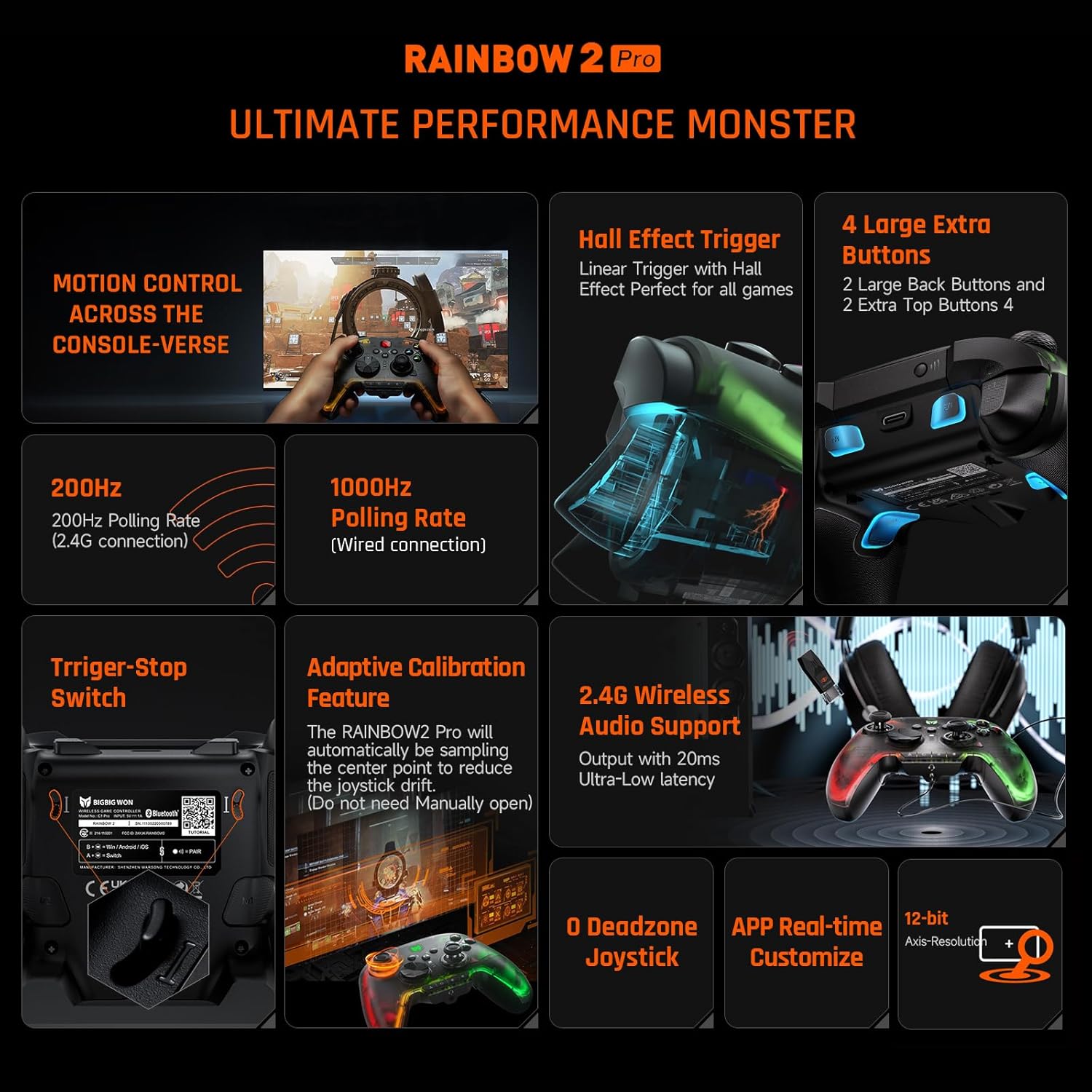
Image: A visual representation of the controller's key features, including polling rates, Hall Effect Triggers, and customizable buttons.
4. Setup and Connection
4.1 General Connection Methods
The Rainbow 2 Pro offers multiple ways to connect to your devices:
- 2.4G Wireless: Use the included 2.4G USB dongle for a stable wireless connection.
- Bluetooth: Connect wirelessly via Bluetooth to compatible devices.
- Wired: Connect directly using the Type-C cable for a 1000Hz polling rate.
4.2 Specific Platform Instructions
- Nintendo Switch (Wired Connection): Enable the option "System Settings" > "Controllers and Sensors" > "Pro Controller Wired Communication" on your Switch console.
- Steam: Tick "Xbox Configuration Support" in the "Settings-Controller-General Controller Settings" of Steam.
4.3 Connecting to BIGBIG WON ELITE App
The ELITE App allows for extensive customization of your controller. Follow these steps to connect:
Video: Tutorial on how to connect the Rainbow 2 Pro to the BIGBIG WON ELITE App on Android devices.
Video: Tutorial on how to connect the Rainbow 2 Pro to the BIGBIG WON ELITE App on iPhone devices.
5. Operation and Usage
5.1 Motion Control
The controller supports motion control for enhanced gameplay, especially on PC with GYROCON+ technology.
Video: Learn how to enable global motion control for the Rainbow 2 Pro controller.
You can also set up simulated motion control parameters directly within the BIGBIG WON ELITE App for fine-tuning your experience.

Image: The controller being used for motion control in a PC game, demonstrating the GYROCON+ technology.
5.2 Turbo Function
The Turbo function allows for rapid, continuous input of a button press. This can be set directly on the controller or via the app.
Video: Instructions on how to set up the Turbo function for the Rainbow 2 Pro wireless game controller.
5.3 On-board Profiles
The controller supports 4 on-board profiles, allowing you to save and switch between different settings configurations for various games or preferences.
5.4 RGB Lighting
Customize the RGB lighting effects of your controller using the BIGBIG WON ELITE App to match your gaming setup or mood.

Image: The BIGBIG WON ELITE App interface on a smartphone, showing options for real-time customization of the controller's settings and RGB lighting.
6. Maintenance
6.1 Joystick & Trigger Calibration
If joysticks drift seriously, or cannot be pushed to the maximum, or if triggers automatically send a key value or cannot reach the maximum linear value, calibration is required.
Video: Step-by-step guide on how to calibrate the joysticks and triggers of your Rainbow 2 Pro controller.
6.2 Resetting the Controller
To reset the controller, long press the “HOME” button for 10 seconds.
7. Troubleshooting
For common issues such as joystick drift or unresponsive triggers, perform the calibration steps outlined in Section 6.1. A full reset (Section 6.2) can also resolve various connectivity or performance issues.
8. Specifications
| Attribute | Value |
|---|---|
| Model Number | BBW-Rainbow2Pro |
| Product Dimensions | 5.91 x 3.94 x 1.57 inches |
| Item Weight | 7.1 ounces |
| Batteries | 1 Lithium Polymer batteries required (included) |
| Date First Available | August 8, 2023 |
9. Warranty and Support
For detailed product usage information and support, please refer to the official User Manual (PDF) available at https://manuals.plus/m/92b1fbdf210e64fdc6aa2c363f3fd2e8dc1518161251903a818738b14afa3b8d.
For warranty information, please consult the official BIGBIG WON website or contact their customer support directly.


