
EF ECOFLOW SP
EF ECOFLOW 60W Portable Solar Panel User Manual
Model: SP
Brand: EF ECOFLOW
1. Introduction
Thank you for choosing the EF ECOFLOW 60W Portable Solar Panel. This manual provides essential information for the safe and efficient operation, setup, and maintenance of your solar panel. Please read this manual thoroughly before using the product to ensure optimal performance and longevity.
This portable solar panel is designed to provide a reliable and efficient power source for your portable power stations, making it ideal for camping, outdoor activities, and emergency backup power. Its foldable and lightweight design ensures maximum portability and ease of use.
2. Safety Information
Always observe the following safety precautions to prevent injury or damage to the product:
- Do not attempt to disassemble, repair, or modify the solar panel. Unauthorized modifications can lead to electric shock, fire, or product damage.
- Keep the solar panel away from open flames, heat sources, and corrosive substances.
- Ensure proper ventilation when operating the solar panel, especially in enclosed spaces.
- Avoid dropping or subjecting the solar panel to strong impacts.
- Do not immerse the solar panel in water, despite its IP68 rating. While it is water-resistant, prolonged submersion can cause damage.
- Handle the solar panel with care. The solar cells are delicate and can be damaged by sharp objects or excessive pressure.
- Keep out of reach of children and pets.
3. What's in the Box
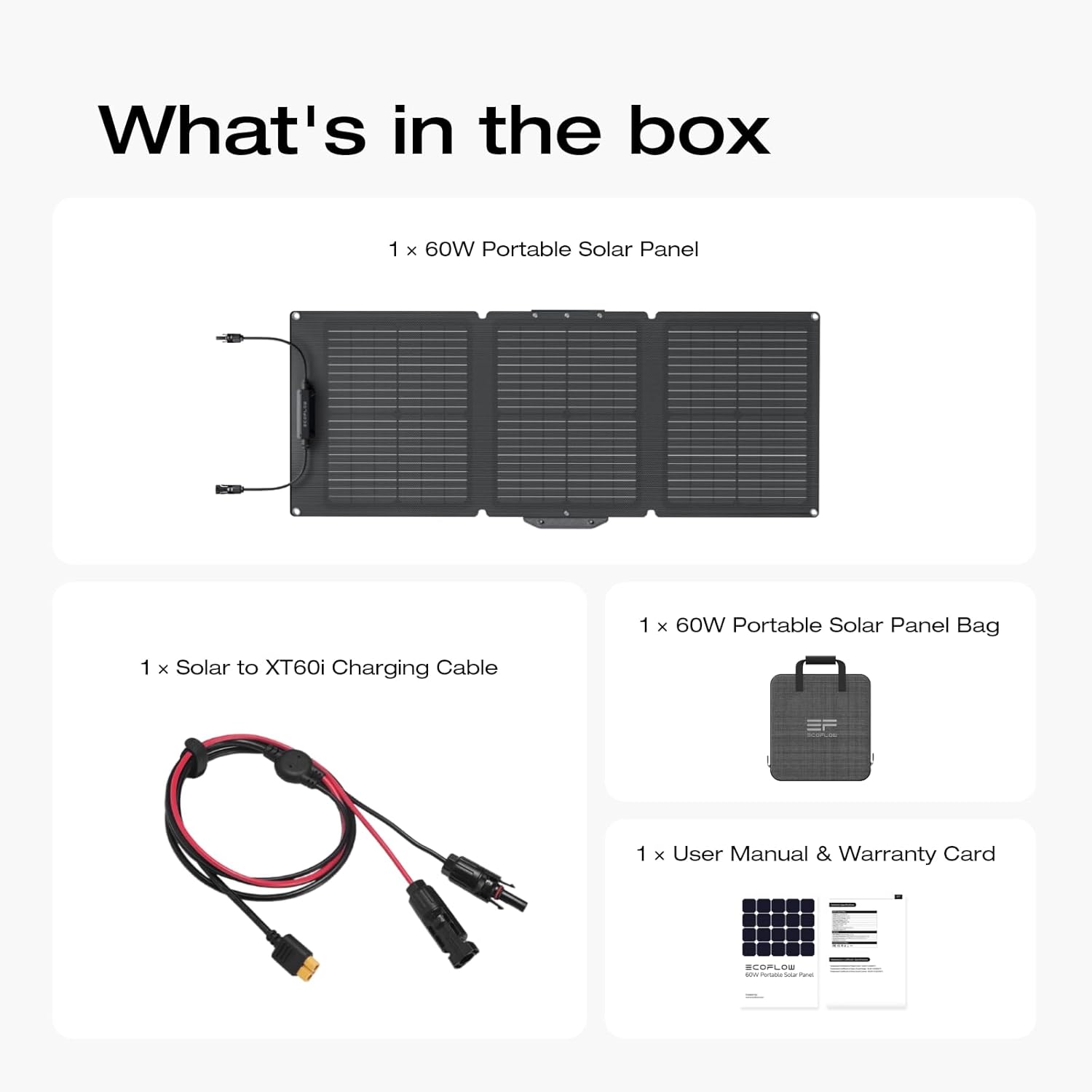
Image: Contents of the EF ECOFLOW 60W Portable Solar Panel package.
- 1 x EF ECOFLOW 60W Portable Solar Panel
- 1 x Solar to XT60i Charging Cable
- 1 x 60W Portable Solar Panel Bag
- 1 x User Manual & Warranty Card
4. Setup
4.1 Unfolding the Solar Panel
Carefully unfold the solar panel from its compact, folded state. Ensure all sections are fully extended.

Image: The EF ECOFLOW 60W Portable Solar Panel fully unfolded, showing its three panels and integrated stand.
4.2 Positioning for Optimal Sunlight
The solar panel features a flexible built-in support stand, allowing you to adjust its angle from 30° to 60°. For maximum efficiency, position the panel directly facing the sun. Adjust the angle throughout the day as the sun's position changes.

Image: Demonstrating the adjustable stand of the solar panel for optimizing sun exposure.
4.3 Connecting to a Power Station
Use the provided Solar to XT60i Charging Cable to connect the solar panel to your compatible EF ECOFLOW power station or other third-party batteries. Ensure the connection is secure.

Image: A user connecting the solar panel to a portable power station, illustrating compatibility and ease of use.
5. Operating the Solar Panel
5.1 Solar Charging Process
Once connected and positioned correctly, the solar panel will automatically begin converting sunlight into electricity. The advanced monocrystalline cells achieve a high conversion rate of up to 23.4%, ensuring fast and efficient charging.

Image: Visual representation of the solar panel's high conversion efficiency.
5.2 Monitoring Charging Status
Refer to your connected power station's display or app for real-time charging status, input wattage, and battery level.
6. Maintenance
6.1 Cleaning the Solar Panel
Regularly clean the surface of the solar panel to ensure optimal performance. Dust, dirt, and debris can reduce efficiency. Use a soft, damp cloth to wipe the surface. Avoid abrasive materials or harsh chemicals.
6.2 Storage
When not in use, fold the solar panel and store it in its protective bag. Store in a cool, dry place away from direct sunlight and extreme temperatures. The panel's IP68 waterproof rating and ETFE film provide durability against various environmental conditions, but proper storage extends its lifespan.

Image: The solar panel's IP68 waterproof design, capable of withstanding rain and dust.

Image: Internal structure of the solar panel, highlighting the durable ETFE film and monocrystalline silicon cells.
7. Troubleshooting
| Problem | Possible Cause | Solution |
|---|---|---|
| No power output | Insufficient sunlight; Panel not properly connected; Damaged cable or panel. | Ensure direct sunlight and optimal angle. Check all cable connections. Inspect cables and panel for visible damage. |
| Low power output | Partial shading; Dirty panel surface; Suboptimal angle; Overcast weather. | Relocate panel to full sun. Clean the panel surface. Adjust angle for direct sun. Output will naturally be lower in cloudy conditions. |
| Panel not folding correctly | Obstruction in hinges; Material stiffness due to cold. | Check for debris in hinges. Allow panel to warm up in the sun if stiff from cold. |
8. Specifications
| Feature | Detail |
|---|---|
| Brand | EF ECOFLOW |
| Model | SP |
| Maximum Power | 60 Watts |
| Cell Type | Monocrystalline Silicon |
| Conversion Efficiency | Up to 23.4% |
| Waterproof Rating | IP68 |
| Product Dimensions (Unfolded) | 40.6"L x 15.8"W x 1"H |
| Product Dimensions (Folded) | 15"L x 15.8"W x 0.98"H |
| Item Weight | 7.1 Pounds |
| Connector Type | MC4 |
| Output Voltage | 21.6 Volts |
| Upper Temperature Rating | 185 Degrees Fahrenheit |

Image: Dimensions of the solar panel in both folded and unfolded states.
9. Warranty and Support
Your EF ECOFLOW 60W Portable Solar Panel comes with a standard warranty. Please refer to the included Warranty Card for detailed terms and conditions, including warranty period and coverage.
For technical support, troubleshooting assistance, or warranty claims, please contact EF ECOFLOW customer service through their official website or the contact information provided on your warranty card.
Please retain your proof of purchase for warranty purposes.
Related documentsSP


Ask a question about this manual
Ask about setup, troubleshooting, compatibility, parts, safety, or missing instructions. Manuals+ will review the question and use this page’s manual context to help answer it.