
PocBuds T60
PocBuds T60 Bluetooth Wireless Earbuds User Manual
Model: T60 | Brand: PocBuds
Introduction
This manual provides comprehensive instructions for the use and maintenance of your PocBuds T60 Bluetooth Wireless Earbuds. Please read thoroughly before operation to ensure optimal performance and longevity of your device.
What's in the Box

Image: All components included in the PocBuds T60 package.
- Wireless Earbuds (1 pair)
- Wireless Charging Case (1)
- Type-C Cable (1)
- Eartips (3 sizes: S, M, L)
- User Manual (1)
Note: A power adapter is not included.
Product Overview
The PocBuds T60 earbuds are designed for comfort and high-quality audio, featuring a secure over-ear hook design and advanced Bluetooth 5.3 connectivity. The charging case includes a digital display for battery status.
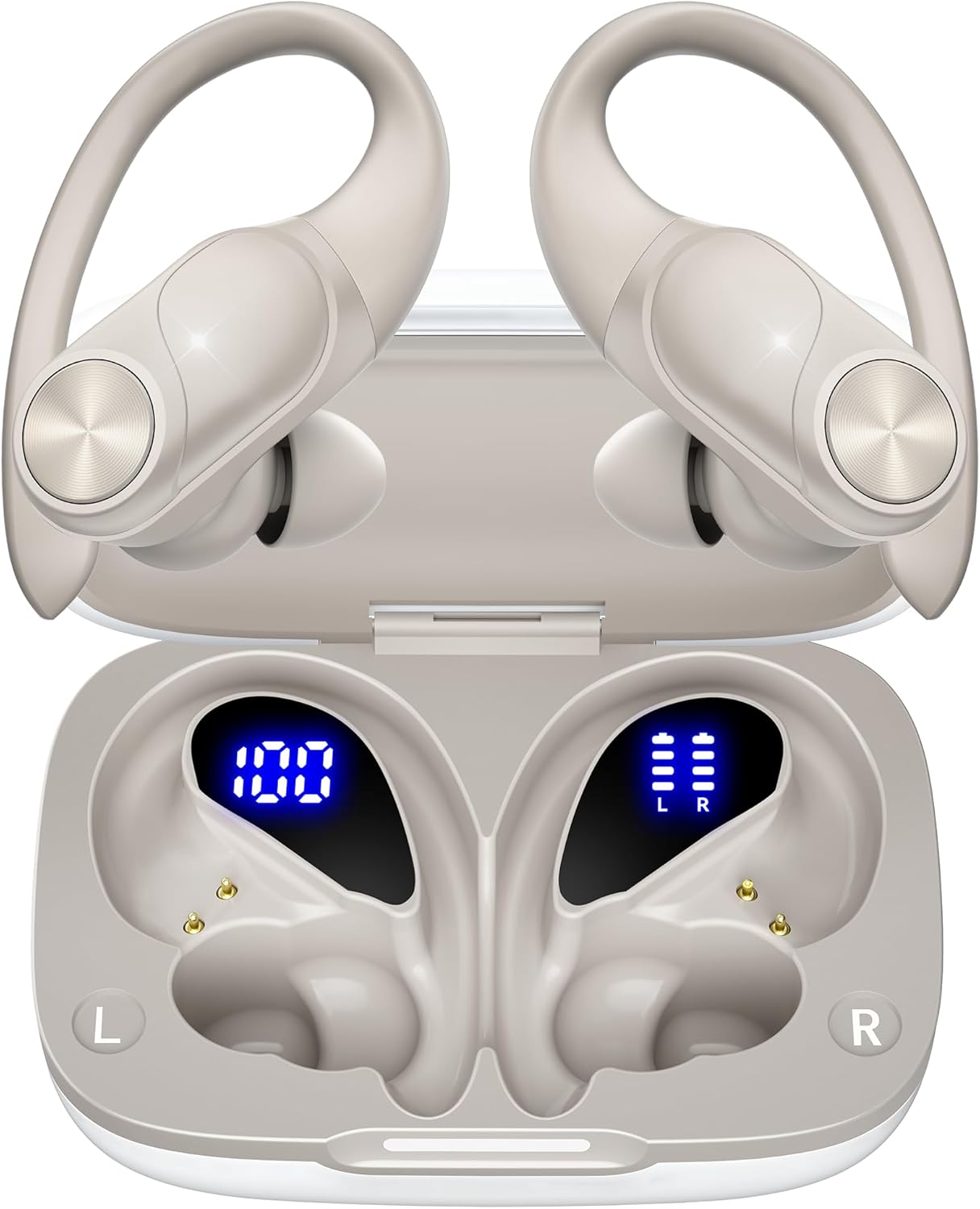
Image: PocBuds T60 earbuds and charging case.
Key Features:
- Extended Playtime: Up to 8 hours of listening time on a single charge, with a total of 80 hours using the charging case.
- Digital Battery Display: Dual LED display on the charging case shows real-time battery status for both earbuds and the case.
- Secure Fit: Flexible ear hooks ensure stability during physical activity.
- High-Fidelity Audio: 13mm double-layer diaphragm drivers deliver strong bass, clear mids, and bright treble.
- Clear Calls: Built-in microphones with noise isolation for superior call clarity.
- IPX7 Waterproof: Resistant to sweat and splashes, suitable for workouts and outdoor use.
- Bluetooth 5.3: Provides a stable connection up to 30ft with low latency.
- Versatile Charging: Supports both wired Type-C and wireless (Qi-certified pad not included) charging.
Setup and Pairing
Follow these steps to pair your PocBuds T60 earbuds with your device:
- Ensure your device's Bluetooth is enabled.
- Open the charging case and remove both earbuds. They will automatically power on and enter pairing mode.
- On your device, search for Bluetooth devices and select "T60" from the list to connect.
- Once connected, a voice prompt will confirm successful pairing.

Image: One-step pairing process for the PocBuds T60 earbuds.
Video: A visual guide demonstrating how to pair the PocBuds T60 earbuds with a smartphone.
Operating Instructions
The PocBuds T60 earbuds feature intuitive one-button controls for managing audio and calls.

Image: Touch control functions for the earbuds.
Control Functions:
- Play/Pause Music: Press once (Left or Right earbud).
- Next Track: Press twice (Right earbud).
- Previous Track: Press twice (Left earbud).
- Volume Up: Long press (Right earbud).
- Volume Down: Long press (Left earbud).
- Answer/End Call: Press once (Left or Right earbud).
- Reject Call: Press and hold for 2 seconds (Left or Right earbud).
- Activate Voice Assistant: Press thrice (Left or Right earbud).
Multi-Using Mode:
- Binaural Mode: Use both earbuds for stereo surround sound.
- Mono Mode: Use either the left or right earbud independently for music or calls.
Wearing Instructions
Achieve a comfortable and secure fit with your PocBuds T60 earbuds:
- Place the ear hook over the back of your ear.
- Insert the ear tip snugly into your ear canal.
- Adjust the earbud and hook for optimal comfort and stability.

Image: Step-by-step guide for achieving a perfect fit.
Important Notes:
- Do not insert earbuds forcefully to protect your ear. Adjust ear hooks gently to avoid over-pressing ear skin.
- If you experience any discomfort (e.g., ear canal pain, skin itch, or foreign body feeling), stop using the earbuds, check them, and seek medical help if needed.
- For sports, ensure ear hook positions are correct and stable before exercise to prevent shaking or friction.
Charging
The PocBuds T60 charging case and earbuds offer versatile charging options and clear battery indicators.

Image: Battery life illustration for PocBuds T60.

Image: Dual LED battery display on the charging case.
Battery Life:
- Up to 8 hours of listening time on a single earbud charge.
- Total of 80 hours of music playback with the fully charged case.
Charging the Case:
- Wired Charging: Connect the provided Type-C cable to the charging port on the case and a power source.
- Wireless Charging: Place the charging case on a Qi-certified wireless charging pad (not included).
- The dual LED digital display will show the charging progress.

Image: Wireless and USB-C charging options for the case.
Charging the Earbuds:
- Place the earbuds into the charging case. They will automatically begin charging.
- The LED display on the case will show the individual charge status of each earbud.
Maintenance and Care
Proper maintenance ensures the longevity and performance of your earbuds.

Image: Instructions for cleaning your earbuds.
Cleaning Your Earbuds:
- Remove the earbuds from the charging case.
- Unplug any charging cables from the case and device.
- For earbud contacts, clean with a slightly wet cotton swab. For case pins, use a damp lint-free cloth.
- Wipe other parts of the earbuds and case with a soft, dry, lint-free cloth.
Recommendations:
- Clean earbuds at least once a week. In sweaty, dusty, or allergenic conditions, clean more often.
- If exposed to pollen, dust, or cosmetics, wipe the earbuds with a damp cloth before use to cut allergens. Allergic users should clean them right after use.
Specifications
| Model Name | T60 |
| Brand | PocBuds |
| Connectivity Technology | Wireless (Bluetooth 5.3) |
| Bluetooth Range | 10 Meters (30 feet) |
| Battery Life (Earbuds) | 8 hours (single charge) |
| Total Playtime (with Case) | 80 hours |
| Charging Time | 1 Hour |
| Audio Driver Size | 13 Millimeters |
| Frequency Response | 20 KHz |
| Impedance | 32 Ohm |
| Noise Control | Sound Isolation |
| Water Resistance Level | IPX7 (Water Resistant) |
| Control Method | Touch |
| Ear Placement | Over Ear |
| Material | Acrylonitrile Butadiene Styrene (ABS) |
| Item Weight | 1.41 ounces |
| Product Dimensions | 3.54 x 2.36 x 1.5 inches |
| Compatible Devices | Cellphones, Desktops, Laptops, Television, Tablets, Music Production Equipment, Gaming Consoles, Car Audio Systems, Smart Watches, Smart Speaker, Various Bluetooth enabled devices |
Troubleshooting
If you encounter any issues with your PocBuds T60 earbuds, please refer to the following common solutions:
- Earbuds not pairing:
- Ensure both earbuds are fully charged.
- Turn off and on your device's Bluetooth.
- Remove "T60" from your device's paired list and attempt to re-pair.
- Place earbuds back in the case, close it, then open and remove them again to re-enter pairing mode.
- No sound or low volume:
- Check the volume levels on both your device and the earbuds.
- Ensure earbuds are properly seated in your ears.
- Clean the earbud mesh and contacts for any debris.
- Confirm the earbuds are connected to the correct device.
- Intermittent connection:
- Ensure your device is within the 10-meter Bluetooth range.
- Avoid physical obstructions between your device and the earbuds.
- Minimize interference from other wireless devices.
- Charging issues:
- Verify the Type-C cable is securely connected to both the case and the power source.
- If using wireless charging, ensure the case is correctly positioned on the Qi-certified pad.
- Clean the charging contacts on both the earbuds and inside the case.
Warranty and Support
PocBuds is committed to providing high-quality products and customer satisfaction.
- Lifetime Warranty: The product comes with a lifetime warranty. Please refer to the included warranty card or manufacturer's website for activation details.
- Free Replacement for Lost Earbuds: Contact customer support for details on replacement options for lost earbuds.
- 24-Hour Support: For any inquiries or assistance, please reach out to PocBuds customer support.
For further assistance, please visit the official PocBuds website or contact their customer service team.
Related Documents - T60
 |
PocBuds T60 True Wireless Earbuds User Manual Comprehensive user manual for PocBuds T60 True Wireless Earbuds, detailing setup, features, controls, maintenance, troubleshooting, and safety guidelines. |
 |
Pocbuds T60 Earbuds Troubleshooting Guide Comprehensive troubleshooting guide for Pocbuds T60 earbuds, covering common issues like unstable fit, Bluetooth connectivity, charging problems, sound quality, and call issues. Find solutions and support for your T60 wireless headphones. |
 |
PocBuds T60 True Wireless Earbuds User Manual Comprehensive user manual for PocBuds T60 True Wireless Earbuds, covering setup, pairing, usage, maintenance, and troubleshooting. |
 |
pocbuds T60 True Wireless Earbuds User Manual Comprehensive user manual for pocbuds T60 True Wireless Earbuds, covering setup, pairing, charging, controls, troubleshooting, and maintenance for optimal audio experience. |
 |
pocbuds T60 True Wireless Earbuds User Manual Discover the pocbuds T60 True Wireless Earbuds User Manual. This comprehensive guide provides detailed instructions on setup, pairing, usage, maintenance, and troubleshooting for your T60 Wireless Sport Earbuds. Learn about important safety information, product specifications, and how to optimize your listening experience with these durable and comfortable earbuds. |
 |
PocBuds X1 Troubleshooting Guide A comprehensive guide to troubleshooting common issues with PocBuds X1 wireless earbuds, covering Bluetooth connectivity, sound quality, charging, and call performance. |