Introduction
This manual provides comprehensive instructions for the ALLIMITY RMT-DSLR2 Wireless Remote Commander. This infrared remote control is designed to operate various Sony Alpha and NEX digital cameras, enabling remote shutter release, video recording control, and menu navigation. Please read this manual thoroughly before use to ensure proper operation and to maximize the functionality of your device.
Package Contents
- 1 x ALLIMITY RMT-DSLR2 Wireless Remote Commander
Note: Battery is not included and must be purchased separately.
Setup
1. Battery Installation
The remote control requires one CR2025 or CR2032 lithium coin cell battery (not included). To install the battery:
- Locate the battery compartment on the back of the remote control.
- Gently slide the battery tray out.
- Insert the CR2025 or CR2032 battery with the positive (+) side facing up.
- Slide the battery tray back into the compartment until it clicks securely.

Image: Rear view of the RMT-DSLR2 remote control, highlighting the battery compartment cover. The text "SEE INSTRUCTION MANUAL FOR TYPE OF BATTERY TO BE USED" is visible on the cover.
2. Camera Preparation
Before using the remote, ensure your Sony camera is configured to receive infrared signals:
- Verify your camera model has an infrared (IR) sensor. This is typically a small, dark window on the front of the camera body.
- Access your camera's menu settings.
- Navigate to the "Remote Ctrl" or "Remote Commander" option and ensure it is set to On. Refer to your camera's specific instruction manual for exact menu locations.
Operating Instructions
To operate the remote control, point it directly at the IR sensor on your camera. Ensure there are no obstructions between the remote and the camera's sensor.
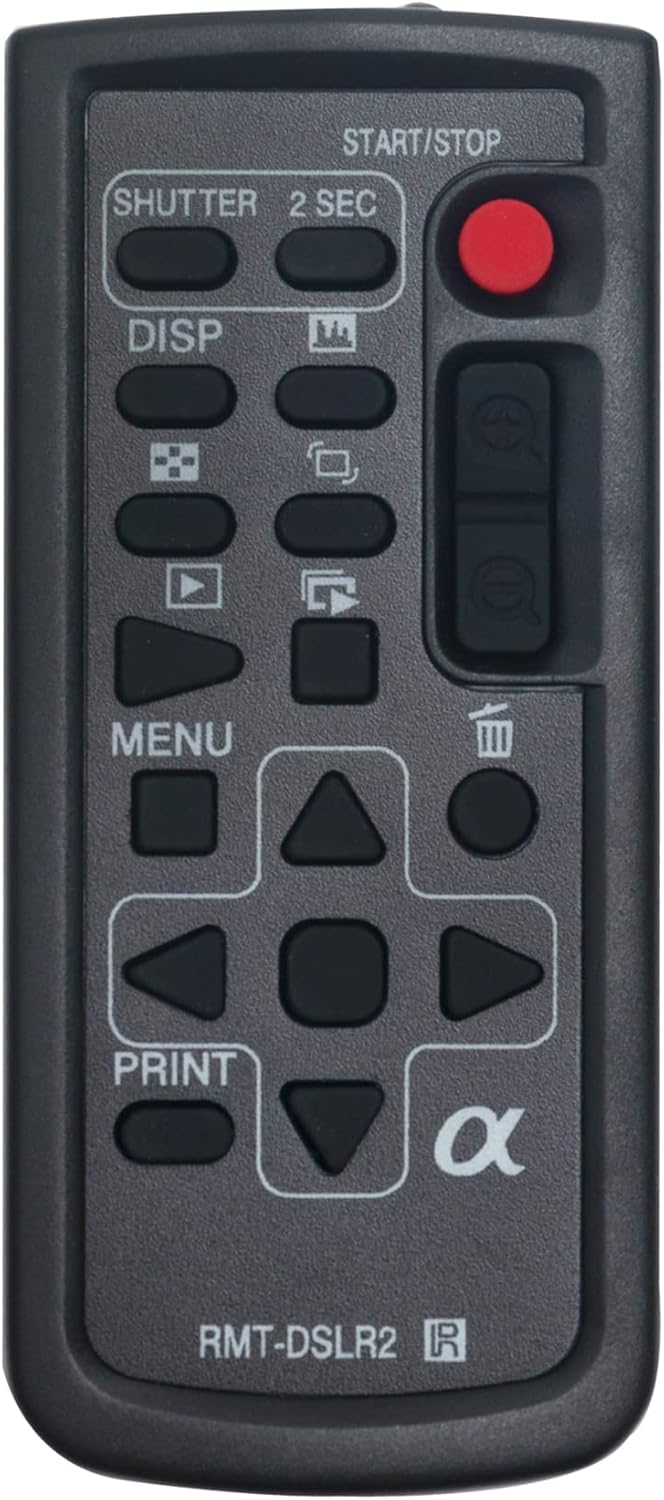
Image: Front view of the ALLIMITY RMT-DSLR2 Wireless Remote Commander, displaying its various buttons and their labels.
Button Functions:
- SHUTTER: Press to take a still photograph.
- 2 SEC: Activates a 2-second self-timer before taking a photograph.
- START/STOP (Red Button): Initiates and terminates video recording.
- DISP: Cycles through display information on the camera screen.
- Playback Controls (Left/Right Arrows, Play/Pause, Stop): Used for navigating and controlling playback of photos and videos on the camera.
- MENU: Opens and closes the camera's menu system.
- Navigation Buttons (Up, Down, Left, Right, Center): Used to navigate through camera menus and settings. The center button typically confirms selections.
- Zoom In/Out: Controls the optical zoom on compatible power zoom lenses. (Note: May not function with manual lenses).
- DELETE (Trash Can Icon): Deletes selected photos or videos during playback.
- PRINT: Initiates printing on compatible direct-print devices.
Note: Not all buttons may be functional with every camera model. Functionality depends on the camera's features and firmware.
Maintenance
Battery Replacement
If the remote control becomes unresponsive or its range decreases, the battery may need replacement. Follow the battery installation steps in the "Setup" section to replace the CR2025 or CR2032 battery.
Cleaning
Wipe the remote control with a soft, dry cloth. Do not use liquid cleaners or abrasive materials, as they may damage the surface or internal components.
Troubleshooting
- Remote is not working:
- Ensure the remote is pointed directly at the camera's IR sensor.
- Check that there are no objects blocking the path between the remote and the camera.
- Verify that the battery is correctly inserted and has sufficient charge. Replace with a new CR2025 or CR2032 battery if necessary.
- Confirm that the "Remote Ctrl" option is enabled in your camera's menu settings.
- Zoom function does not work:
- The zoom function only works with compatible power zoom lenses. It will not operate with manual lenses.
Specifications
- Model: RMT-DSLR2 (ZCM-RMT-DSLR2)
- Dimensions: 3.51 x 0.6 x 2 inches
- Weight: 0.704 ounces
- Power Source: 1 x CR2025 or CR2032 Lithium Coin Cell Battery (not included)
- Compatibility: Sony Alpha and NEX Digital Cameras with IR sensor
Compatible Camera Models
The ALLIMITY RMT-DSLR2 Wireless Remote Commander is compatible with a wide range of Sony Alpha and NEX digital cameras equipped with an infrared (IR) sensor. Below is a list of known compatible models. If your camera model is not listed, please check your camera's manual for IR remote compatibility.
- Sony A6400
- Sony A9
- Sony A7RIII
- Sony A7III
- Sony A7RII
- Sony A7SII
- Sony A7II
- Sony A7RM3
- Sony A7M3
- Sony A7RM2
- Sony A7SM2
- Sony A7M2
- Sony A7R
- Sony A7S
- Sony A7
- Sony A6500
- Sony A6300
- Sony A6000
- Sony NEX-7
- Sony NEX-6
- Sony NEX-5
- Sony A99
- Sony A99M2
- Sony A77M2
- Sony A7R3
- Sony ILCE-7M3
- Sony ILCE-7M3K
- Sony ILCE-7RM3
- Sony ILCE-9
- Sony ILCE-6500
- Sony ILCE-6500M
- Sony ILCE-6300
- Sony ILCE-6300L
- Sony ILCE-6300M
- Sony ILCE-7SM2
- Sony ILCE-7RM2
- Sony ILCE-7M2
- Sony ILCE-7M2K
- Sony ILCE-7S
- Sony ILCE-6000
- Sony ILCE-6000L
- Sony ILCE-6000Y
- Sony ILCE-7
- Sony ILCE-7K
- Sony ILCE-7R
- Sony NEX-5T
- Sony NEX-5TL
- Sony NEX-5R
- Sony NEX-6
- Sony NEX-5N
- Sony NEX-5NK
- Sony NEX-7K
- Sony NEX-5A
- Sony ILCA-99M2
- Sony ILCA-77M2
- Sony ILCA-77M2M
- Sony ILCA-77M2Q
- Sony SLT-A99
- Sony SLT-A99V
- Sony SLT-A57
- Sony SLT-A57K
- Sony SLT-A65V
- Sony SLT-A65VK
- Sony SLT-A65VL
- Sony SLT-A77V
- Sony DSLR-A560
- Sony DSLR-A560L
- Sony DSLR-A580
- Sony SLT-A33
- Sony SLT-A33L
- Sony SLT-A55V
- Sony DSLR-A290L
- Sony DSLR-A390L
- Sony DSLR-A500
- Sony DSLR-A500L
- Sony DSLR-A550
- Sony DSLR-A850
- Sony DSLR-A230L
- Sony DSLR-A330L
- Sony DSLR-A380L
- Sony DSLR-A900
- Sony DSLR-A700
- Sony ILCE-6400
- Sony ILCE-6400L
- Sony ILCE-6400M
Customer Support
For any questions or issues regarding your ALLIMITY RMT-DSLR2 Wireless Remote Commander, please contact ALLIMITY customer support. We aim to respond to all inquiries within 24 hours.
(Specific contact information is not provided in the product data.)


