
1. Product Overview
The Energizer 960W MAX Portable Power Station is a versatile and reliable power source designed for various applications, including outdoor activities, home emergencies, and off-grid living. It features a high-capacity LiFePO4 battery, multiple output ports, and advanced safety features to provide stable and efficient power.

Front view of the Energizer 960W MAX Portable Power Station, showing the display, AC outlets, USB ports, and DC ports.
Key Features:
- 960Wh LiFePO4 Battery: Offers extended lifespan with over 2,000 recharge cycles and maintains charge for up to 2 years.
- 700W Pure Sine Wave AC Output: Three 120V AC outlets (1400W Peak) provide clean power for sensitive electronics.
- 100W USB-C Power Delivery: Fast charging for laptops and other high-draw devices without bulky adapters.
- Multiple Output Ports: Includes 2x USB-A QC 3.0, 1x USB-C PD 18W, 1x USB-C PD 100W, 3x 120V AC, 1x 12V DC Car Outlet, and 2x 12V 5521 DC Jacks.
- Integrated LED Light: 6W LED with High, Low, SOS, and Flash modes for illumination and emergencies.
- Solar Ready: Built-in MPPT controller for efficient solar charging.
- Durable Design: Operates in extreme temperatures (-4°F to 140°F) and includes a protective carrying case.
2. Package Contents
Verify that all items listed below are included in your package:
- (1) Energizer 960W LiFePO4 (LFP) Portable Power Station (V2)
- (1) 120V AC Adapter
- (1) 12V Car Outlet Charging Adapter
- (1) DC5521 to DC6530 Solar Panel Extension Adapter
- (1) Carrying Case with Shoulder Strap & 6 Storage Compartments
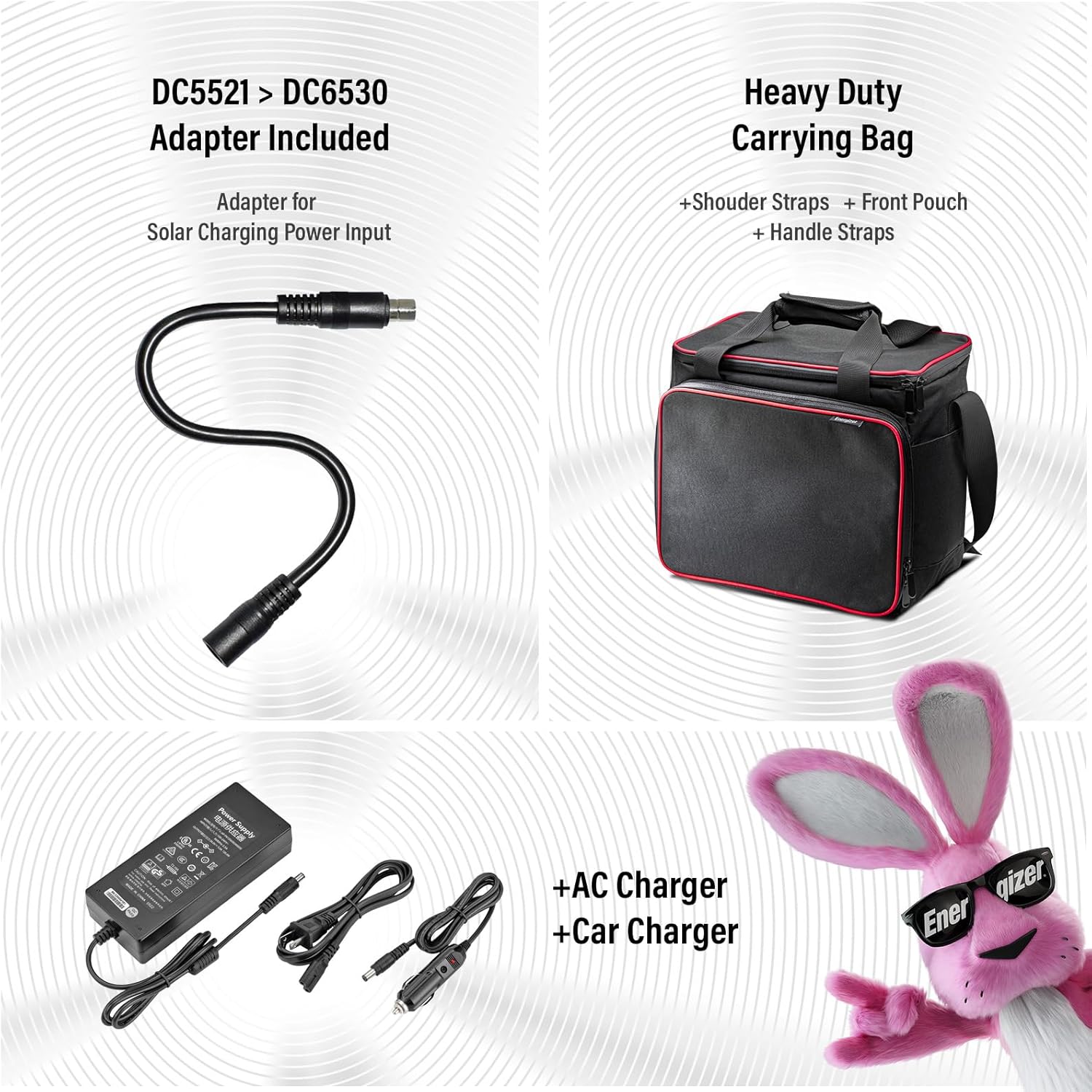
Image showing the included DC5521 to DC6530 adapter, heavy-duty carrying bag, AC charger, and car charger.
3. Setup and Charging
Before first use, fully charge the power station. The unit can be charged via AC wall outlet, 12V car outlet, or compatible solar panels.
Initial Charging:
- Connect the provided AC power adapter to the DC input port on the power station.
- Plug the AC adapter into a standard 120V wall outlet.
- The LCD display will show the charging status. Charge until the battery indicator shows 100%.
Solar Charging:
The power station is compatible with most major portable solar panels (12-24V). It features a built-in MPPT controller for efficient charging.
- Connect your solar panel to the DC input port using the appropriate adapter (DC5521 to DC6530 adapter included for compatibility).
- Position the solar panel in direct sunlight for optimal charging.
- The LCD display will indicate solar input wattage and charging status.

Illustration of various charging methods: wall outlet, car outlet, and solar panels, with approximate charging times.

The power station connected to a solar panel, demonstrating its compatibility and efficient charging capabilities.
Official product video demonstrating the features and use cases of the Energizer 960W Portable Power Station, including setup and various applications.
4. Operating Instructions
The Energizer 960W MAX Portable Power Station is designed for intuitive operation. Familiarize yourself with the control panel and output ports.
Control Panel Overview:
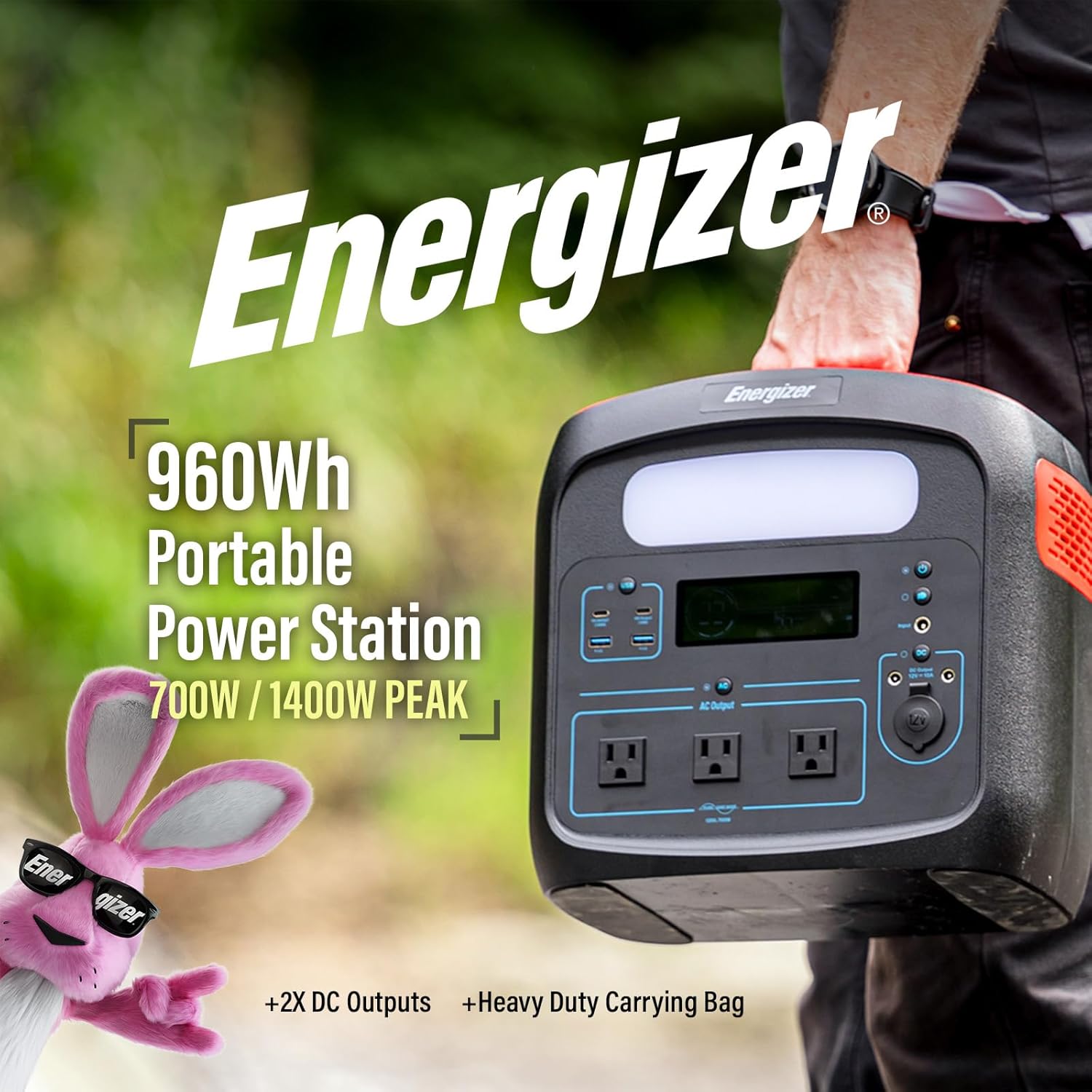
Detailed view of the power station's control panel, highlighting the LCD screen, LED light, and various output ports including USB-C, USB-A, AC, and DC.
- Power Button: Press and hold to turn the unit on or off.
- LCD Display: Shows battery level, input/output wattage, and active port indicators.
- AC Output Button: Activates/deactivates the three 120V AC outlets.
- DC Output Button: Activates/deactivates the 12V DC car outlet and 5521 DC jacks.
- USB Output Button: Activates/deactivates the USB-A and USB-C ports.
- LED Light Button: Cycles through High, Low, SOS, and Flash modes.
Connecting Devices:
Connect your devices to the appropriate ports. The power station can charge and power up to 10 devices simultaneously.
- For standard household appliances, use the AC Outlets. Ensure the total wattage does not exceed 700W (1400W peak).
- For smartphones, tablets, and laptops, use the USB-A or USB-C PD ports. The 100W USB-C PD port is ideal for fast-charging compatible laptops.
- For 12V devices like car refrigerators or portable air pumps, use the 12V DC Car Outlet or the 12V 5521 DC Jacks.

The power station simultaneously powering various devices, including a coffee maker, fan, and mini-fridge, demonstrating its multi-device capability.

A chart illustrating the estimated runtime for common devices such as TVs, laptops, and CPAP machines when powered by the 960Wh power station.
5. Maintenance and Storage
Proper maintenance ensures the longevity and optimal performance of your Energizer Portable Power Station.
Battery Care (LiFePO4):
The power station uses a Lithium Iron Phosphate (LiFePO4) battery, which offers significant advantages over traditional lithium-ion batteries:
- Extended Lifespan: Provides over 2,000 recharge cycles, double that of traditional lithium-ion batteries.
- Temperature Tolerance: Operates reliably in extreme temperatures ranging from -4°F to 140°F (-20°C to 65°C).
- Longer Charge Retention: Can hold a charge for up to 2 years when stored, losing only about 60mAh per month.

Visual representation of the LiFePO4 battery's benefits, including 2000+ recharge cycles, wide temperature tolerance, and 2-year charge retention.
Storage:
- Store the power station in a cool, dry place away from direct sunlight and extreme temperatures.
- For long-term storage, it is recommended to charge the unit to approximately 50-80% every 3-6 months to maintain battery health.
- Use the included carrying case for protection during transport and storage.
6. Troubleshooting
If you encounter issues with your power station, refer to the following common troubleshooting steps:
- Unit Not Turning On:
- Ensure the power button is pressed and held for a few seconds.
- Check the battery level on the LCD display. If critically low, connect to a power source.
- No Output from Ports:
- Verify that the specific output (AC, DC, USB) is activated by pressing its respective button.
- Check if the connected device's power consumption exceeds the port's or unit's maximum output.
- Ensure cables are securely connected.
- Slow Charging:
- Charging speed can vary based on the power source. Wall charging is generally faster than car or solar charging.
- For solar charging, ensure panels are in direct sunlight and free from obstructions. The MPPT controller optimizes input, but panel output depends on conditions.
- Using both AC adapter and USB-C PD input simultaneously can increase charging speed.
- Overload Protection Activated:
- If the unit shuts down or an overload indicator appears, disconnect some devices.
- Reduce the total power draw to below the rated output (700W continuous, 1400W peak).
7. Specifications
| Feature | Detail |
|---|---|
| Brand | Energizer |
| Model Name | Energizer 960W LiFePO4 (LFP) Portable Power Station (V2) w/ Carry Case |
| Model Number | PPS960W2 |
| Battery Type | Lithium Iron Phosphate (LiFePO4) |
| Capacity | 960 Watt-hours (Wh) |
| AC Output | 3x 120V Pure Sine Wave AC Outlets, 700W Continuous, 1400W Peak |
| USB-C PD Output | 1x 100W, 1x 18W |
| USB-A Output | 2x QC 3.0 Ports |
| DC Output | 1x 12V Car Outlet, 2x 12V 5521 DC Jacks |
| Charging Input | AC Adapter, 12V Car Charger, Solar Panel (MPPT compatible) |
| Operating Temperature | -4°F to 140°F (-20°C to 65°C) |
| Dimensions (L x W x H) | 11.81" x 7.68" x 11.42" |
| Item Weight | 21.6 Pounds |
| Special Features | Overload Protection, Short Circuit Protection, Automatic Voltage Regulation, Low Battery Shutdown |
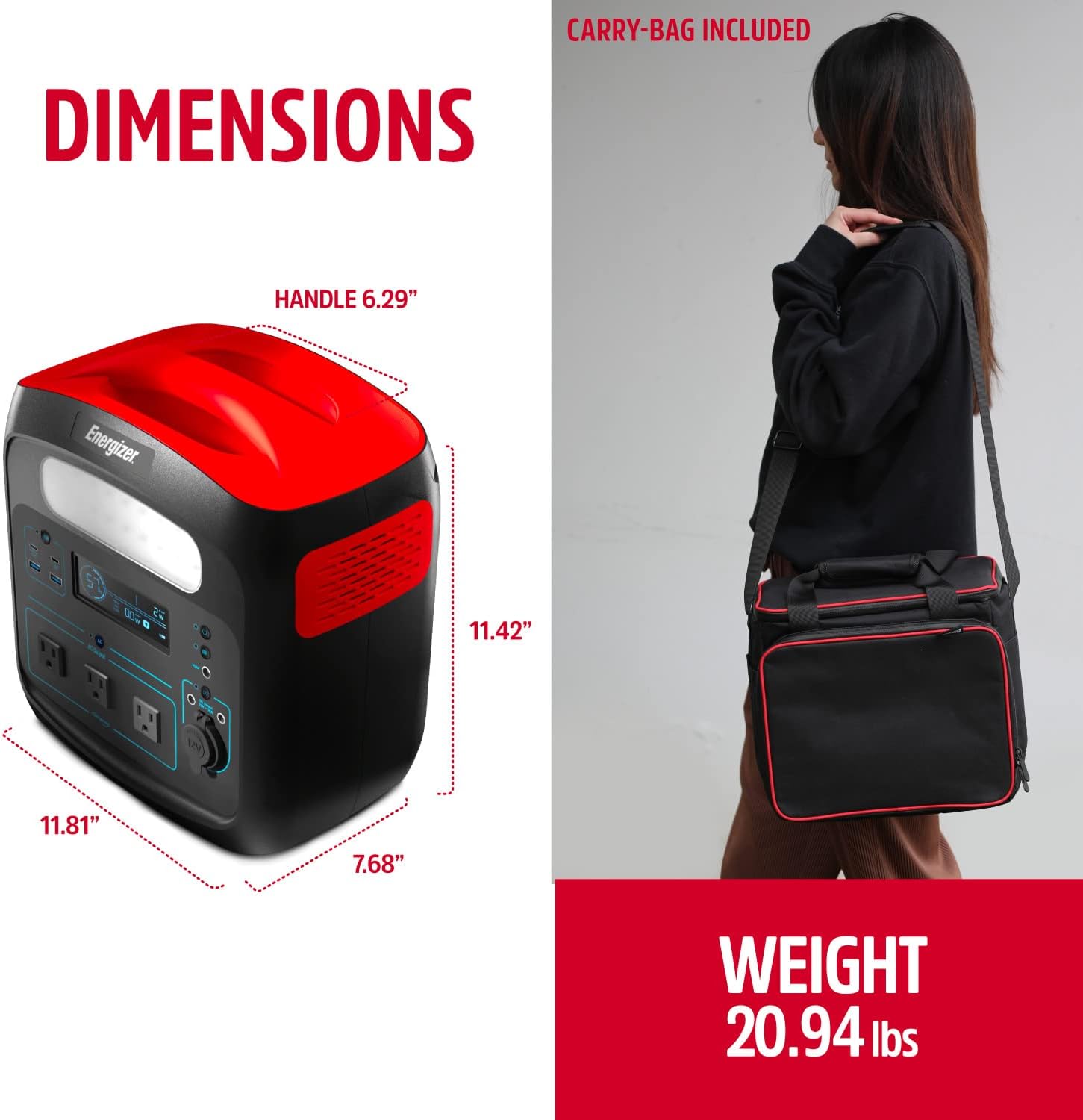
Diagram showing the dimensions (length, width, height) and weight of the power station.
8. Warranty and Support
Warranty Information:
The Energizer 960W MAX Portable Power Station comes with a 2-Year Warranty. Please retain your proof of purchase for warranty claims.
Customer Support:
For further assistance, technical support, or warranty inquiries, please refer to the official Energizer website or contact their customer service. You can also find additional resources and FAQs on the product's Amazon listing page.
A detailed User Manual in PDF format is available for download: Download User Manual (PDF)


