
Apple MRTL3ZM/A
Apple Watch Sport Band Pride Edition (41mm, S/M) - Instruction Manual
Introduction
This manual provides essential information for the proper use and care of your Apple Watch Sport Band Pride Edition. Made from a custom high-performance fluoroelastomer, this band is designed for durability, strength, and comfort. It features an innovative pin-and-tuck closure for a secure fit.
Setup: Attaching the Band
To attach your Apple Watch Sport Band, follow these steps:
- Remove Existing Band (if applicable): Press the band release button on the back of your Apple Watch. Slide the existing band horizontally to remove it.
- Identify Band Orientation: The Sport Band has two pieces. Ensure the piece with the pin is oriented correctly to slide into the top slot of your Apple Watch, and the other piece into the bottom slot. The text "Designed with pride in California" on the band should face outwards when worn.
- Slide the Band: Hold the band piece with the pin and slide it into one of the slots on your Apple Watch until you feel and hear a click. Repeat for the other band piece.
- Verify Attachment: Gently tug on the band to ensure it is securely locked into place. If it slides out, reinsert it until it clicks.

Image 1: Apple Watch with the Pride Edition Sport Band securely attached, showcasing the vibrant design.
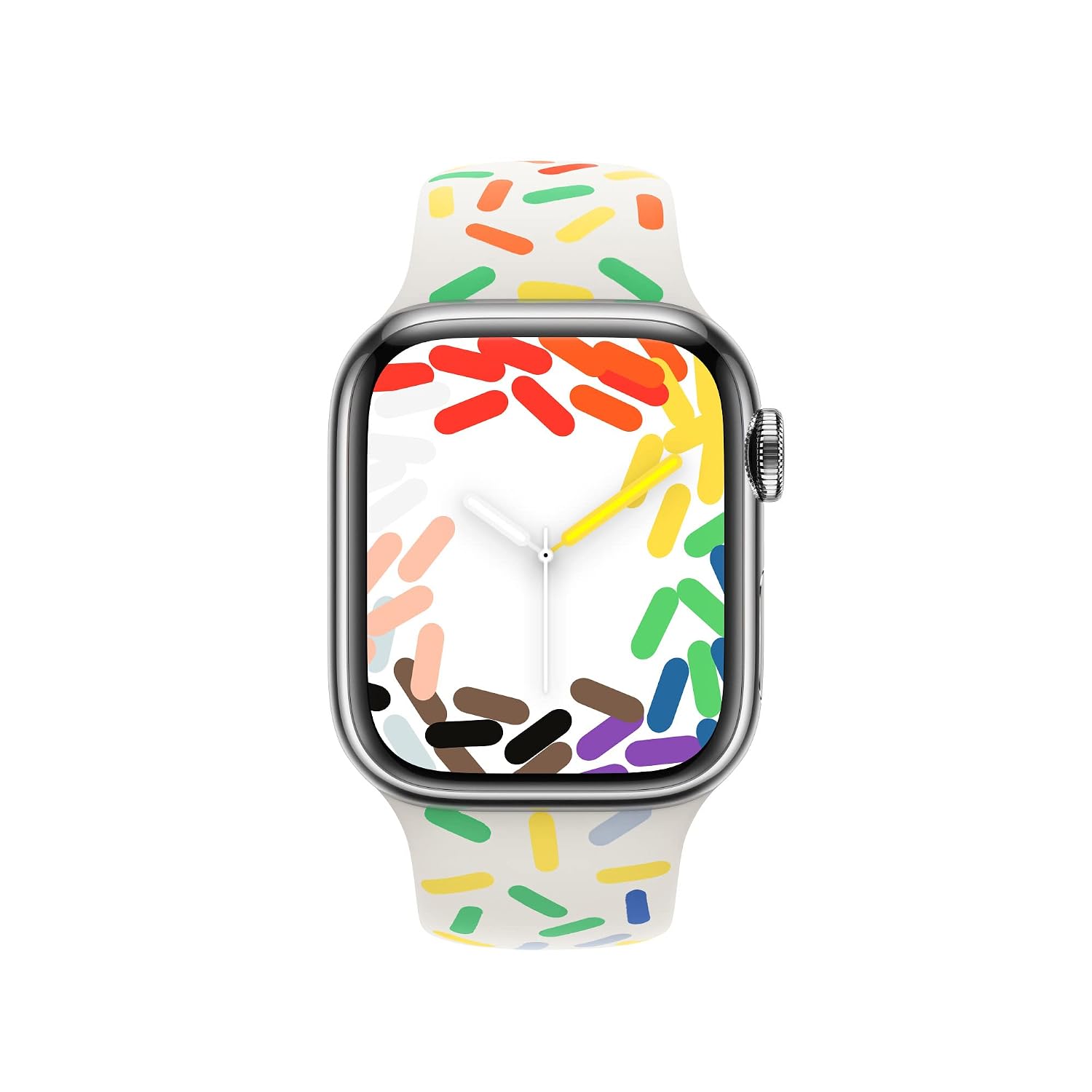
Image 2: Front view of the Apple Watch displaying the Pride Edition Sport Band and its matching watch face.
Operating: Wearing and Adjusting
For optimal performance of your Apple Watch, including heart rate monitoring and Taptic Engine feedback, ensure the band is worn correctly.
- Proper Fit: The band should be snug but comfortable. It should not feel too tight or too loose. If the band is too loose, the sensors may not function accurately. If it is too tight, it may cause discomfort or restrict circulation.
- Adjusting the Pin-and-Tuck Closure: Wrap the band around your wrist. Insert the pin through one of the holes in the other band piece to secure it. Tuck the end of the band underneath the main strap for a clean, secure fit.
- Wrist Placement: Wear your Apple Watch on the top of your wrist, just above the wrist bone.
Maintenance: Cleaning and Care
To maintain the appearance and longevity of your Sport Band, follow these cleaning guidelines:
- Regular Cleaning: Wipe the band regularly with a soft, lint-free cloth. If necessary, dampen the cloth with fresh water.
- Stubborn Stains: For more stubborn dirt, you can use a mild, non-abrasive soap with water. Ensure to rinse the band thoroughly with fresh water afterwards.
- Drying: Always dry the band completely before reattaching it to your Apple Watch or wearing it.
- Avoid Harsh Chemicals: Do not use abrasive cleaners, solvents, or harsh chemicals, as these can damage the fluoroelastomer material.
- Storage: Store the band in a clean, dry place away from direct sunlight and extreme temperatures when not in use.
Troubleshooting
- Band Not Clicking into Place: Ensure the band is inserted straight into the slot. If it still doesn't click, check for any obstructions in the slot or on the band connector. Make sure you are pressing the band release button if trying to remove a band, and releasing it when inserting a new one.
- Skin Irritation: If you experience skin irritation, ensure the band is clean and dry. Avoid wearing the band too tightly. If irritation persists, discontinue use and consult a medical professional.
- Loose Fit / Inaccurate Readings: If your Apple Watch feels loose or provides inconsistent heart rate readings, adjust the band to a snugger fit. Ensure the watch is positioned correctly on your wrist, just above the wrist bone.
Specifications
| Feature | Detail |
|---|---|
| Brand | Apple |
| Model Number | MRTL3ZM/A |
| Generic Name | Apple Watch Bands |
| Material | High-performance Fluoroelastomer |
| Color | Pride Edition (Multi-color) |
| Size | 41mm, S/M |
| Included Components | Apple Watch Sport Band |
| Item Weight | 95 g |
| Package Dimensions | 29 x 7.4 x 1.2 cm |
Warranty Information
Your Apple Watch Sport Band is covered by Apple's standard limited warranty. For detailed information regarding warranty terms, conditions, and coverage, please refer to the official Apple warranty documentation provided with your Apple Watch or visit the Apple support website. Proof of purchase may be required for warranty claims.
Customer Support
For further assistance, technical support, or to inquire about service, please contact Apple Customer Support through their official website or visit an authorized Apple service provider. You can find contact information and support resources at support.apple.com.
Related documentsMRTL3ZM/A


Ask a question about this manual
Ask about setup, troubleshooting, compatibility, parts, safety, or missing instructions. Manuals+ will review the question and use this page’s manual context to help answer it.