
Introduction
The EJEAS MS8 Mesh Motorcycle Helmet Bluetooth Intercom is an advanced communication system designed for motorcyclists. It features Mesh technology for group communication, Bluetooth 5.1 for stable connections, and a durable, waterproof design. This manual provides essential information for setting up, operating, maintaining, and troubleshooting your MS8 intercom system to ensure a safe and enjoyable riding experience.
Product Features
- Mesh Intercom Technology: Supports up to 8 riders simultaneously with a group intercom distance of 3.5km-7km and 1.8km between two individual units. Automatic reconnection when re-entering range.
- Bluetooth 5.1 Connectivity: Ensures stable and strong signal penetration for seamless device connection, including smartphones for music and calls.
- Long Battery Life: Equipped with a 1200mAh battery for extended usage and standby time. Supports simultaneous charging and intercom use via a Type-C interface.
- IP67 Waterproof Rating: Designed to withstand various weather conditions, allowing for use in rainy environments.
- Microphone Mute Function: Provides the ability to mute the microphone while listening to music or during intercom conversations.
- CVC Noise Reduction: Advanced noise cancellation for clear audio quality during intercom and music playback.

Image: Four EJEAS MS8 Mesh Motorcycle Helmet Bluetooth Intercom units, showcasing the sleek design and button layout.

Image: Visual representation of the MS8's impressive intercom range, showing 1.8km between two riders and up to 7km for a group of 8, ideal for various riding scenarios.

Image: Depiction of the MS8's strong signal penetration, ensuring clear communication even in challenging environments such as tunnels, dense forests, crowded urban areas, remote mountain villages, and winding highways.

Image: Diagrams showcasing the flexibility of the 8-rider Mesh technology, allowing for automatic reconnection and free group formation, adapting to dynamic riding groups.

Image: A motorcyclist demonstrating the microphone mute function, allowing users to enjoy music and intercom simultaneously with the option to mute their microphone for privacy or convenience.

Image: Illustrates the CVC Noise Reduction feature, ensuring clear audio by minimizing background noise, and the ability to share voice for an unlimited listening experience.

Image: An optional EUC Handle accessory mounted on a motorcycle, providing convenient control over FM music, phone calls, intercom, and volume without needing to reach for the main unit.
Setup and Installation
Before using your EJEAS MS8 intercom, ensure all components are present and follow these steps for proper installation.
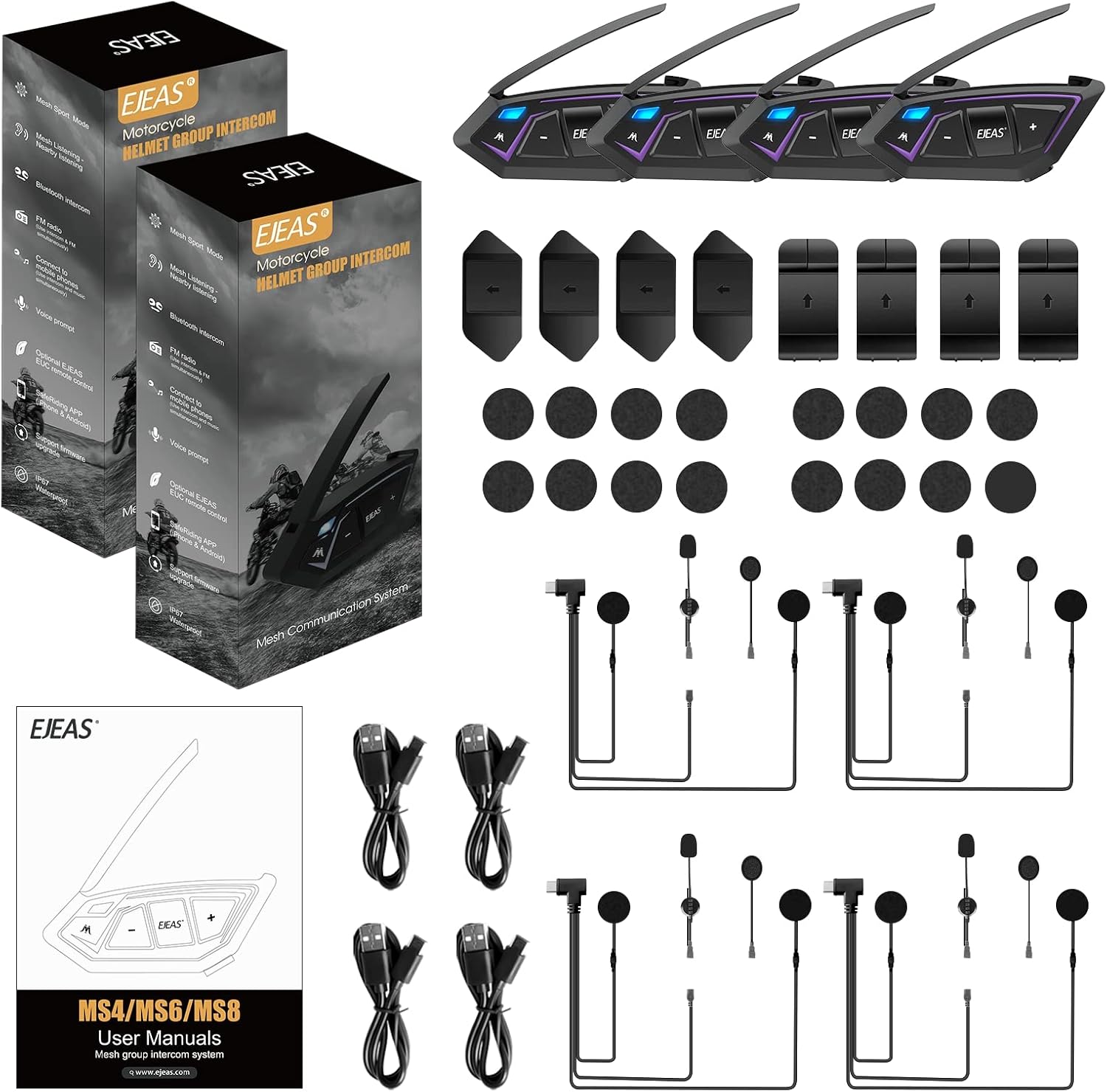
Image: The complete package contents of the EJEAS MS8, showing multiple intercom units, various mounting accessories, speakers, microphones, and charging cables, ready for installation.
- Unpack and Inspect: Carefully unpack all items and verify that all components listed in the package contents are present and undamaged.
- Mounting the Intercom Unit: Choose a suitable location on your helmet, typically on the side, ensuring it does not obstruct your vision or movement. Use the provided clamp or adhesive mount to securely attach the MS8 unit.
- Installing Speakers: Place the speakers inside the helmet's ear pockets. Ensure they are positioned directly over your ears for optimal sound quality. Use the hook-and-loop fasteners provided.
- Attaching Microphone: Connect the microphone to the MS8 unit. Position the microphone close to your mouth, ideally within 1-2 cm, to ensure clear voice pickup. Choose between the boom microphone for open-face helmets or the soft wire microphone for full-face helmets.
- Cable Management: Route all cables neatly inside the helmet lining to prevent tangling and ensure comfort.
- Initial Charge: Before first use, fully charge the MS8 unit using the provided Type-C USB cable. The charging indicator will change once fully charged.
Operating Instructions
Familiarize yourself with the controls and functions of your EJEAS MS8 intercom for effective communication and entertainment.
- Power On/Off: Press and hold the Power button (usually the 'M' button) for a few seconds until you hear a voice prompt or see the indicator light.
- Bluetooth Pairing (with Phone/GPS):
- With the unit off, press and hold the Power button until the indicator light flashes rapidly, indicating pairing mode.
- On your phone/GPS, search for Bluetooth devices and select "EJEAS MS8".
- Once paired, the indicator light will change, and you will hear a confirmation.
- Mesh Intercom Activation:
- Ensure all MS8 units are powered on.
- Press the Mesh button (often the 'M' button or a dedicated Mesh button) on one unit to initiate Mesh group formation.
- Other MS8 units within range will automatically join the group.
- To leave the Mesh group, press the Mesh button again.
- Volume Adjustment: Use the '+' and '-' buttons to increase or decrease the volume for music, intercom, or phone calls.
- Music Playback: After pairing with your phone, music will play automatically. Use the control buttons on the MS8 to play/pause, skip tracks (if supported).
- Phone Calls:
- Answer Call: Short press the Power button.
- End Call: Short press the Power button.
- Reject Call: Press and hold the Power button.
- Redial Last Number: Double-press the Power button.
- Microphone Mute: Refer to your specific unit's button layout for the microphone mute function. Typically, a short press of a designated button will toggle mute on/off.
Maintenance and Care
Proper maintenance ensures the longevity and optimal performance of your EJEAS MS8 intercom.
- Cleaning: Use a soft, damp cloth to wipe the exterior of the unit. Do not use harsh chemicals, solvents, or abrasive cleaners.
- Water Resistance: The MS8 is IP67 waterproof. While it can withstand rain, avoid submerging it in water for extended periods. Ensure the Type-C port cover is securely closed when not charging.
- Storage: When not in use for extended periods, store the unit in a cool, dry place. It is recommended to fully charge the battery every 3-6 months to maintain battery health.
- Battery Care: Avoid extreme temperatures, as they can affect battery life. Do not attempt to replace the battery yourself.
Troubleshooting
If you encounter issues with your EJEAS MS8, refer to the following common problems and solutions.
| Problem | Possible Cause | Solution |
|---|---|---|
| Unit does not power on. | Low battery. | Charge the unit fully. |
| Cannot pair with phone/GPS. | Unit not in pairing mode; device too far; interference. | Ensure unit is in pairing mode (flashing light). Bring devices closer. Restart both devices. |
| Intercom connection unstable or drops. | Out of range; obstacles; too many users. | Move closer to other units. Reduce obstacles. Ensure group size is within limits (max 8 for Mesh). |
| Poor audio quality (static, low volume). | Microphone not positioned correctly; speakers misaligned; CVC not active. | Adjust microphone closer to mouth. Reposition speakers over ears. Ensure CVC is enabled (automatic). |
| Unit not charging. | Faulty cable/charger; dirty port. | Try a different Type-C cable and charger. Clean the charging port gently. |
Technical Specifications
Detailed specifications for the EJEAS MS8 Mesh Motorcycle Helmet Bluetooth Intercom.

Image: A visual representation of the EJEAS MS8 unit's dimensions and a comprehensive table detailing its technical specifications, including battery life, intercom range, and connectivity.
| Feature | Detail |
|---|---|
| Model | MS8 |
| Intercom Mode | 8 people Mesh intercom, Unlimited listening |
| Bluetooth Version | Bluetooth 5.1 |
| Intercom Distance (2 people) | 1.8 km (1800 meters) |
| Intercom Distance (8 people Mesh Group) | Up to 7 km (7000 meters) |
| Bluetooth Intercom Distance (2 people) | 200 meters |
| Waterproof Rating | IP67 |
| Battery Capacity | 1200mAh (3.7V) |
| Mesh Intercom Time | 8 hours |
| Bluetooth Intercom Time | 17 hours |
| Music Time | 32 hours (Maximum Volume) |
| Standby Time | 320 hours |
| Charging Time | 2 hours |
| Charging Interface | Type-C USB |
| Operating Temperature Range | -10°C to 50°C |
| Support Features | CVC noise reduction, 3D sound |
Warranty and Customer Support
EJEAS stands behind the quality of its products.
- Warranty: The EJEAS MS8 Mesh Bluetooth headset intercom communication system comes with a 12-month warranty from the date of purchase. This warranty covers manufacturing defects and ensures reliable performance.
- Customer Support: If you have any questions, concerns, or require assistance with your MS8 Bluetooth intercom headset, please do not hesitate to contact EJEAS customer support. We are committed to providing a satisfactory answer within 24 hours.
- Online Resources: For additional information, FAQs, and product updates, please visit the official EJEAS store: EJEAS Official Store.


