
BOSS SDE-3000EVH
BOSS SDE-3000EVH Dual Digital Delay Pedal User Manual
Model: SDE-3000EVH | Brand: BOSS
Introduction
The BOSS SDE-3000EVH Dual Digital Delay Pedal is a specialized effects unit designed to replicate the iconic stereo delay sounds of Eddie Van Halen's live rig. This pedal integrates two complete SDE-3000 delay units into a single floor-based enclosure, offering extensive connectivity and a range of features for guitarists seeking classic delay tones and versatile routing options.
Setup
Proper setup of your SDE-3000EVH pedal is crucial for optimal performance and to achieve the desired sound. This pedal offers flexible input and output options to accommodate various amplifier setups, including wet/dry/wet configurations.
Power Connection
Connect a compatible 9V DC power supply (not included) to the DC IN jack on the rear of the unit. Ensure the power supply meets the pedal's specifications to prevent damage.
Audio Connections
The SDE-3000EVH features multiple input and output jacks for versatile routing:
- INPUT L/MONO, INPUT R: Connect your instrument or preceding effects to these inputs. Use L/MONO for mono signals.
- EXT LOOP (SEND/RETURN): Allows integration of external effects into the delay's feedback loop.
- OUTPUT L/MONO, OUTPUT R: Connect these to your amplifier(s) or subsequent effects. Use L/MONO for mono output.
- DIRECT OUT: Provides a dry signal output, useful for wet/dry/wet setups.
Refer to the image below for a visual guide to the rear panel connections.

Figure 1: Rear panel connections of the SDE-3000EVH pedal.
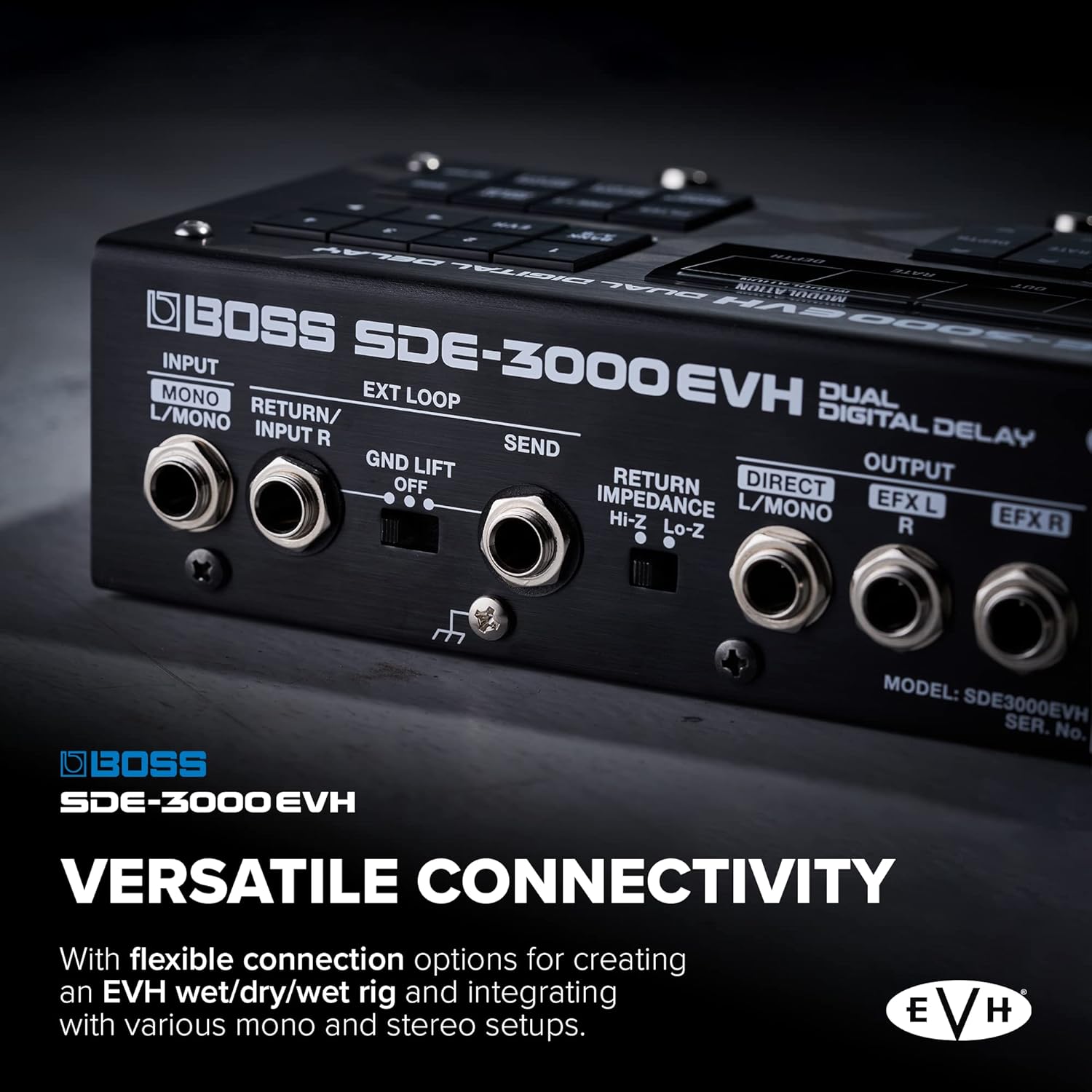
Figure 2: Close-up of the SDE-3000EVH's versatile input and output options.
Footswitch Connections
The pedal includes three onboard footswitches (DDL 1, DDL 2, TAP/CTL 1) for direct control. Additional external footswitches can be connected to the CTL 1/2, CTL 3/4, and EXP jacks for expanded control over various parameters and functions.

Figure 3: Front view showing the main footswitches.
Operating the SDE-3000EVH
The SDE-3000EVH provides comprehensive control over its dual delay engines, allowing for precise shaping of your sound. The front panel features a retro-style display and dedicated controls for each delay unit.

Figure 4: Top view of the SDE-3000EVH control panel.
Controls and Display
The pedal features two independent delay sections, each with controls for Time, Feedback, Out (output level), Rate, and Depth (for modulation). The digital display provides clear visual feedback on current settings and selected presets.

Figure 5: Close-up of the SDE-3000EVH's digital display and control buttons.
EVH Presets
The SDE-3000EVH includes eight factory presets meticulously curated by EVH, replicating the exact settings from his original delay units. These presets can be accessed and recalled easily, providing instant access to his signature expansive spatial delay tone.
Video Demonstration
For a comprehensive overview of the SDE-3000EVH's features and sound capabilities, please watch the official product video below.
Official product video demonstrating the features and sound capabilities of the BOSS SDE-3000EVH and SDE-3000D Digital Delay pedals.
Maintenance
To ensure the longevity and optimal performance of your BOSS SDE-3000EVH pedal, follow these maintenance guidelines:
- Cleaning: Use a soft, dry cloth to wipe down the pedal's exterior. Avoid abrasive cleaners, solvents, or waxes.
- Storage: Store the pedal in a cool, dry place away from direct sunlight, extreme temperatures, and high humidity.
- Connections: Periodically check all cable connections for secure fit and signs of wear.
- Footswitches: Keep the footswitches free of debris.
Troubleshooting
If you encounter issues with your SDE-3000EVH, consider the following common troubleshooting steps:
- No Sound: Verify all audio cables are correctly connected and functional. Check the power supply connection and ensure the pedal is receiving power.
- Distorted Sound: Ensure input levels are not too high, causing clipping. Check cable integrity.
- Unexpected Behavior: If the pedal behaves erratically, try disconnecting and reconnecting the power. Consult the official BOSS support resources for factory reset procedures if necessary.
- External Control Issues: Confirm external footswitches or expression pedals are correctly configured and compatible with the SDE-3000EVH.
For persistent issues, contact BOSS customer support or refer to the comprehensive online manual available on the official BOSS website.
Specifications
| Feature | Specification |
|---|---|
| Item Weight | 3.5 pounds |
| Product Dimensions | 12.7 x 7.6 x 4.5 inches |
| Item Model Number | SDE-3000EVH |
| Hardware Interface | 1/4-inch Audio |
| Signal Format | Analog |
| Power Source | Battery Powered (Note: Typically uses external DC adapter, check product for details) |
| Voltage | 9 Volts |
| Amperage | 100 Milliamps |
| Audio Output Effects | Delay |
Warranty and Support
The BOSS SDE-3000EVH Dual Digital Delay Pedal is covered by a manufacturer's warranty. For detailed information regarding warranty terms, service, and technical support, please visit the official BOSS website or contact their customer service department. Keep your proof of purchase for warranty claims.
For further assistance, you may visit the BOSS Store on Amazon.
Related documentsSDE-3000EVH


Ask a question about this manual
Ask about setup, troubleshooting, compatibility, parts, safety, or missing instructions. Manuals+ will review the question and use this page’s manual context to help answer it.