
Guide Sensmart Guide Sensmart-TD410
Guide Sensmart TD410 Thermal Imaging Monocular User Manual
Model: TD410 | Brand: Guide Sensmart
1. Introduction
Thank you for choosing the Guide Sensmart TD410 Thermal Imaging Monocular. This device is designed for outdoor night vision, offering advanced thermal imaging capabilities for various applications including hunting, outdoor sports, search and rescue, law enforcement, and personal security. Its compact design and robust features ensure reliable performance in diverse environments.
This manual provides detailed instructions for the proper use, maintenance, and troubleshooting of your thermal monocular. Please read it thoroughly before operating the device.
2. What's in the Box
Upon unboxing, please verify that all the following components are included:
- Thermal Monocular x1
- Battery Charger x1
- Single Battery x1
- Micro USB Cable x1
- Video Cable x1
- Lens Cap x1
- Wrist Strap x1
- Carry Bag x1
- Quick Start Guide x1

Image: All components included in the TD410 package.
3. Key Features
- 400x300 Thermal Camera: Equipped with a 400x300 thermal imaging camera sensor and a 12µm infrared detector, offering a recognition distance up to 800 yards and a detection range up to 2000 yards.
- Rapid Boot-up: Powers on in approximately 2 seconds, allowing for immediate use.
- High-Resolution Display: Features a 0.4-inch 1280x960 FLCOS display for clear thermal imagery.
- Multiple Display Modes: Offers 5 color palettes (white hot, black hot, red hot, iron red, blue heat) and PIP (Picture-in-Picture) mode for enhanced target identification and detail highlighting.
- Long Battery Life: Utilizes a replaceable battery providing over 7 hours of continuous operation.
- Durable and Weather-Resistant: IP66 waterproof-rated for protection against heavy rainfall, dust, and impact. Operates in temperatures from -86°F to 140°F.
- WiFi Connectivity: Connects to a mobile application via WiFi for real-time thermal image viewing and sharing.
- Built-in Laser Indicator: For quick target pinpointing and sharing target locations with partners.
- Digital Zoom: Features 1x, 2x, and 4x digital zoom options.
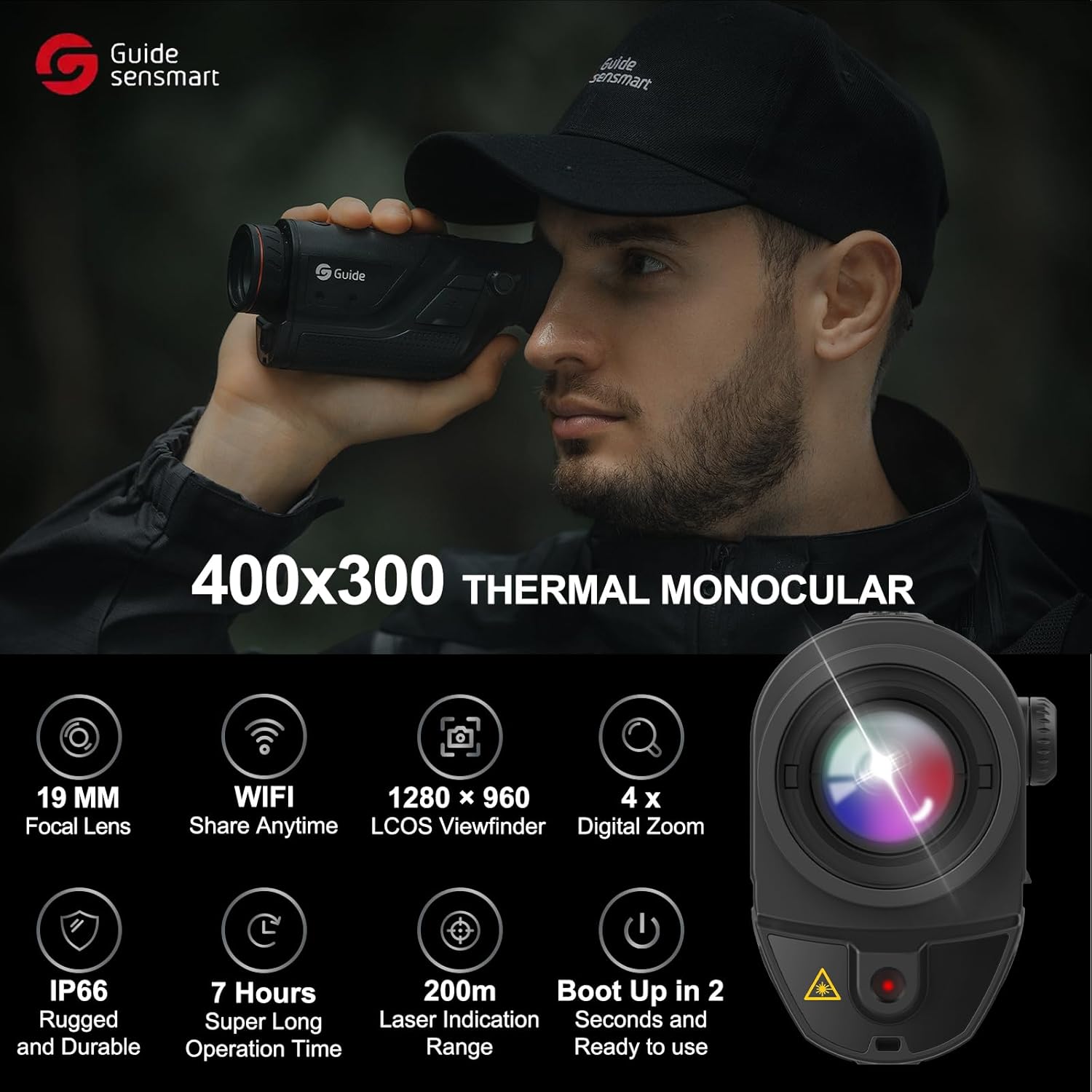
Image: Overview of key features and specifications.
4. Setup
4.1. Battery Installation
- Locate the battery compartment on the device.
- Insert the provided battery, ensuring correct polarity.
- Close the battery compartment securely.
4.2. Charging the Device
Before first use, fully charge the battery using the provided battery charger and Micro USB cable.
- Connect the Micro USB cable to the charging port on the monocular.
- Connect the other end of the cable to a compatible USB power source (e.g., wall adapter, computer USB port).
- The charging indicator will show the charging status.
4.3. Attaching the Wrist Strap
Attach the wrist strap to the designated loop on the monocular to prevent accidental drops.
5. Operating Instructions
5.1. Powering On/Off
Press and hold the Power Button for approximately 2 seconds to turn the device on. Repeat the action to turn it off.
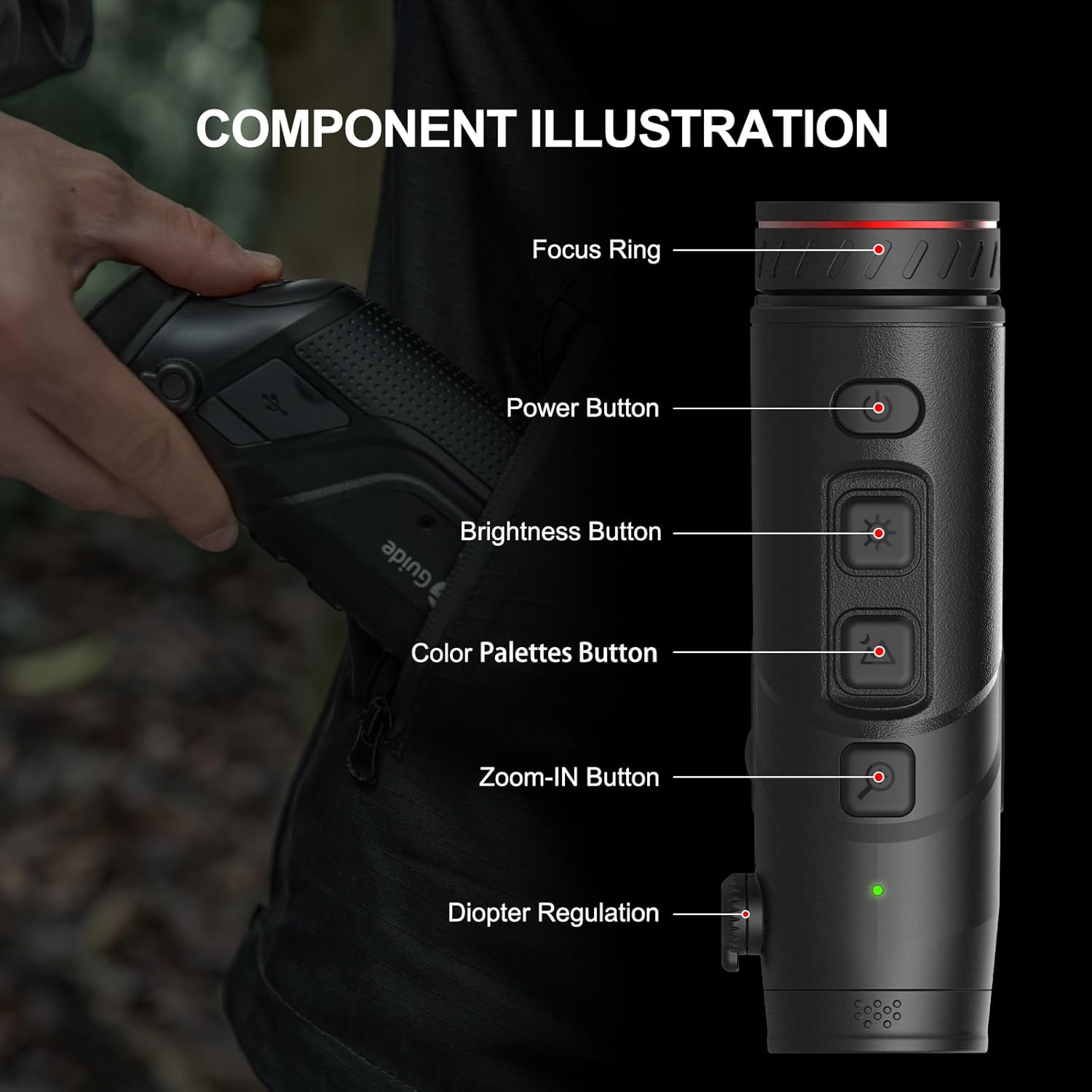
Image: Labeled components of the TD410 monocular.
5.2. Adjusting Focus and Diopter
Rotate the Focus Ring on the objective lens to achieve a clear image of your target. Adjust the Diopter Regulation near the eyepiece to match your eyesight for optimal viewing clarity.
5.3. Changing Display Modes (Color Palettes)
Press the Color Palettes Button to cycle through the available thermal display modes: White Hot, Black Hot, Red Hot, Iron Red, and Blue Heat. Choose the mode that best suits your environment and target identification needs.

Image: Examples of different thermal color palettes and scene modes.
5.4. Using Digital Zoom
Press the Zoom-IN Button to cycle through 1x, 2x, and 4x digital zoom levels. This allows for closer inspection of distant objects.
5.5. Activating PIP Mode
The Picture-in-Picture (PIP) mode provides a magnified view of the central area of the main image, displayed in a smaller window. This helps in highlighting target details within complex scenes.
5.6. WiFi Connectivity and App Usage
The monocular features standard WiFi functionality. Download the companion application (e.g., TargetIR) to your smartphone or tablet. Connect your device to the monocular's WiFi network to view and share thermal images in real-time.

Image: Example of the mobile application interface for real-time thermal image sharing.
5.7. Using the Laser Indicator
Activate the built-in laser indicator to quickly pinpoint and mark targets. The indication range is up to 200 meters, useful for communicating target locations to partners.
6. Maintenance
- Cleaning: Use a soft, lint-free cloth to clean the lens and body of the monocular. For stubborn dirt, a small amount of lens cleaning solution can be applied to the cloth, not directly to the lens.
- Storage: Store the device in its carry bag in a cool, dry place when not in use. Avoid extreme temperatures and high humidity.
- Battery Care: Remove the battery if the device will not be used for an extended period. Recharge the battery periodically to maintain its health.
- Water Resistance: While IP66 rated, avoid submerging the device in water. Ensure all port covers are securely closed when operating in wet conditions.
7. Troubleshooting
| Problem | Possible Cause | Solution |
|---|---|---|
| Device does not power on. | Low or depleted battery. Incorrect battery installation. | Charge the battery. Reinstall the battery correctly. |
| Image is blurry. | Focus or diopter not adjusted. Dirty lens. | Adjust the focus ring and diopter. Clean the lens. |
| Cannot connect to WiFi. | WiFi not enabled on monocular. Incorrect app settings. | Ensure WiFi is active on the device. Check app connection settings. |
| Short battery life. | Frequent use of power-intensive features. Old battery. | Reduce use of high brightness/WiFi. Consider replacing battery if old. |
8. Specifications
| Feature | Detail |
|---|---|
| Model Name | Guide Sensmart-TD410 |
| Thermal Camera Resolution | 400x300 (50Hz) |
| Infrared Detector | 12µm |
| Recognition Distance | Up to 800 yards |
| Detection Range | Up to 2000 yards |
| Display | 0.4-inch 1280x960 FLCOS |
| Digital Zoom | 1x, 2x, 4x |
| Battery Life | >7 hours continuous operation |
| Waterproof Rating | IP66 |
| Operating Temperature | -86°F to 140°F (-30°C to 60°C) |
| Connectivity | WiFi |
| Laser Indicator Range | Up to 200m |
| Item Weight | 0.77 Pounds (approx. 350g) |
| Dimensions (LxWxH) | 5.9 x 1.57 x 2.76 inches |
9. Warranty and Support
The Guide Sensmart TD410 Thermal Imaging Monocular comes with a 3-year warranty for the entire device.
Lifetime firmware updates and technical support are included to ensure your device continues to perform optimally.
For further assistance or technical inquiries, please refer to the official Guide Sensmart website or contact their customer support.
10. Product Videos
GuideSensmart TD410 Unboxing video
Video: An official unboxing video for the Guide Sensmart TD410 thermal monocular, demonstrating the contents of the package and initial setup.
Related documentsGuide Sensmart-TD410


Ask a question about this manual
Ask about setup, troubleshooting, compatibility, parts, safety, or missing instructions. Manuals+ will review the question and use this page’s manual context to help answer it.