
1. Introduction
Thank you for choosing the CAMECHO Portable Wireless Motorcycle Navigator. This device is designed to enhance your riding experience by providing seamless access to Wireless CarPlay and Android Auto functionalities directly on your motorcycle. Featuring a 5-inch IPS touch screen, IPX7 waterproofing, and dual Bluetooth connectivity, it offers navigation, communication, and entertainment while on the road. This manual provides essential information for the proper installation, operation, and maintenance of your navigator.
2. Safety Information
- Always prioritize road safety. Do not operate the device in a way that distracts you from driving.
- Ensure the device is securely mounted before riding to prevent it from falling and causing injury or damage.
- Do not attempt to disassemble or modify the device. This may void the warranty and pose safety risks.
- Keep the device away from extreme temperatures and direct sunlight for prolonged periods to prevent damage.
- While the device is IPX7 waterproof, avoid intentionally submerging it in water.
3. Package Contents
Please check the package for the following items:
- 1x Motorcycle Special Navigator
- 1x Motorcycle Special Bracket
- 2x Bracket Accessories
- 1x Waterproof Power Adapter
- 1x USB Cable
- 1x OTG Cable
- 1x Bracket Back Clip
- 1x User Manual
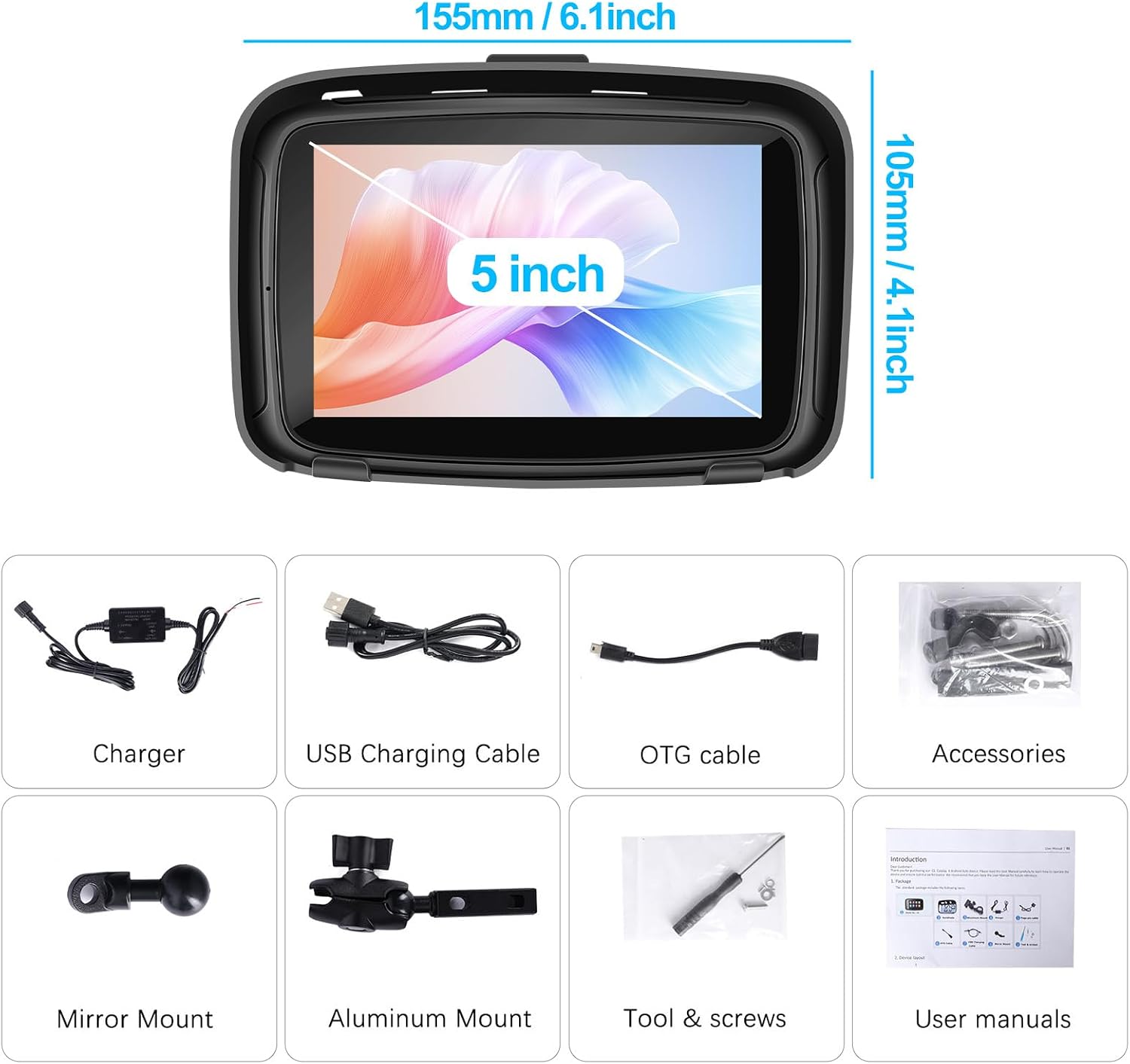
Figure 3.1: Overview of included accessories, including the navigator unit, various cables, and mounting hardware.
4. Setup and Installation
4.1 Device Assembly
- Step 1: Insert the navigator unit into its protective shell. Ensure the bottom of the machine is inserted first for a secure fit.
- Step 2: Confirm the unit is properly seated within the shell.

Figure 4.1: Visual guide for attaching the navigator to its shell and then to the mounting bracket.
4.2 Bracket Installation
- Step 3: Attach the bracket back clip to the navigator unit. Tighten clockwise to secure, then relax counter-clockwise slightly for adjustment if needed.
- Step 4: Install the complete bracket assembly onto your motorcycle handlebars. Tighten clockwise to secure the bracket firmly.
Use the provided bracket kits and tools for secure mounting. The design is suitable for most motorcycle handlebars.
4.3 Power Connection
Connect the waterproof power adapter to your motorcycle's 12V power supply. Ensure all connections are secure and protected from the elements. The device operates within a 12-24V power range.
5. Operating Instructions
5.1 Wireless CarPlay / Android Auto Connection
To use Wireless CarPlay or Android Auto, first pair your smartphone with the navigator via Bluetooth.
- Step 1: On the navigator, navigate to the Bluetooth settings.
- Step 2: On your smartphone, enable Bluetooth and search for available devices. Select the navigator's Bluetooth name (e.g., "Car****").
- Step 3: Once paired, the navigator will automatically switch to Wi-Fi for data transmission to enable CarPlay or Android Auto.
Note for CarPlay: Compatible with iPhone 6 and above, running iOS 10 and above.
Note for Android Auto: Wireless Android Auto requires Android 11 and above. Android 11 and below can only use wired Android Auto. Huawei mobile phones are not compatible.

Figure 5.1: Connection process for Wireless CarPlay and Android Auto, illustrating Bluetooth pairing and Wi-Fi activation.

Figure 5.2: The navigator screen showing active Wireless CarPlay and Wireless Android Auto interfaces.
5.2 Dual Bluetooth Connectivity
The navigator features dual Bluetooth, allowing connection to both your smartphone and a Bluetooth helmet or earphone simultaneously.
- Pair your phone to the navigator for CarPlay/Android Auto and hands-free calls.
- Pair your Bluetooth helmet or earphone to the navigator to receive audio (navigation prompts, music, calls) directly.

Figure 5.3: Bluetooth interface on the navigator, demonstrating phone call and music playback options.
5.3 Voice Control
Utilize your smartphone's voice assistant (Siri or Google Assistant) through the navigator for hands-free control.
- Activate your voice assistant (e.g., "Hey Siri" or "Hey Google").
- Issue commands for navigation, making calls, playing music, and more.

Figure 5.4: Examples of voice commands for navigation and device control.
5.4 Navigation and Media Playback
Once connected to CarPlay or Android Auto, you can access your preferred navigation apps (e.g., Google Maps, Apple Maps) and media streaming services.
- Use the touch screen to interact with applications.
- Audio will be routed through your connected Bluetooth helmet/earphone or the built-in speaker.
6. Maintenance
- Cleaning: Use a soft, damp cloth to clean the screen and exterior. Avoid abrasive cleaners or solvents.
- Water Resistance: The device is IPX7 waterproof, meaning it can withstand rain and splashes. Ensure all ports are properly sealed when exposed to water.
- Storage: When not in use for extended periods, store the device in a cool, dry place.
- Anti-Theft Design: The detachable design allows you to easily remove the unit from its bracket for security when leaving your motorcycle unattended.

Figure 6.1: The navigator's IPX7 waterproof feature and high-brightness display.
7. Troubleshooting
| Problem | Possible Cause | Solution |
|---|---|---|
| Device does not power on. | No power, loose connection, or incorrect voltage. | Check power adapter connection to motorcycle and navigator. Ensure motorcycle power is on. Verify power supply is within 12-24V. |
| Cannot connect to Wireless CarPlay/Android Auto. | Bluetooth not paired, Wi-Fi disabled, incompatible phone OS, or Huawei phone. |
|
| Cannot connect to phone and Bluetooth helmet simultaneously. | Incorrect pairing sequence or device conflict. |
|
| Voice control (Siri/Google Assistant) not responding. | Microphone issue, phone not connected, or voice assistant not enabled. | Ensure your phone is properly connected via CarPlay/Android Auto. Check phone settings to confirm voice assistant is enabled and responsive. Speak clearly towards the device's microphone. |
8. Specifications
| Feature | Detail |
|---|---|
| Item Name | Portable Vehicle Smart Screen |
| CPU | 64-bit Quad-core Cortex-A53 architecture |
| Screen Size | 5 inches High Definition |
| Resolution | 800*480 wide viewing angle |
| Screen Brightness | 1000nits |
| Touch | High-precision capacitive touch |
| Interface | MINI USB 2.0, TF Card, Avin, Audio |
| Working Power Supply | 12V Waterproof power adapter |
| Working Power Range | 12-24V |
| Working Current | Max 2A |
| Speaker | Built-in 3W horn |
| CarPlay Support | Wireless / Wired (iPhone 6+, iOS 10+) |
| Android Auto Support | Wireless (Android 11+), Wired (Android 11-). Not compatible with Huawei. |
| Bluetooth | Dual BT connection support |
| GPS & Beidou | Supported |
| Waterproof Rating | IPX7 |
| Supported Formats | USB/MP3/MP4/AVI/DIVX/WMA/RMVB/MKVPMP/FLV/M2TS/MPG/JPEG/GIF/PNG/FLAC APE/AAC |
| Model Number | W8125 |
9. Warranty and Support
CAMECHO products undergo quality testing before shipment. This product comes with a 12-month warranty and lifetime technical support.
If you have any questions or require assistance with your Portable Motorcycle Navigator, please contact us via Amazon. We aim to respond to inquiries within 24 hours.
