
Introduction
The AC Infinity IONFRAME EVO6 is a high-efficiency LED grow light designed for indoor plant cultivation. It features advanced Samsung LM301H EVO LEDs, providing a full-spectrum light output optimized for all stages of plant growth. This manual provides essential information for the proper setup, operation, and maintenance of your IONFRAME EVO6 grow light.
Package Contents
Verify that all components are present before proceeding with installation.
- IONFRAME EVO6 LED Grow Light Fixture
- LED Driver
- Controller
- Hanging Kit (Rope Hangers, Carabiners)
- Power Cord
Setup
Follow these steps to properly set up your AC Infinity IONFRAME EVO6 LED Grow Light.
1. Unpacking and Inspection
Carefully remove all components from the packaging. Inspect the grow light and all accessories for any signs of damage. If any components are damaged or missing, contact customer support.
2. Mounting the Grow Light
The IONFRAME EVO6 is designed for hanging installation. Use the provided hanging kit to suspend the light securely above your plants. Ensure the mounting surface can support the weight of the fixture (approximately 26.8 pounds).
- Attach the carabiners to the designated mounting points on the grow light fixture.
- Connect the rope hangers to the carabiners.
- Securely attach the other end of the rope hangers to a sturdy support structure in your grow area.
- Adjust the height of the light using the rope hangers to achieve the desired distance from your plant canopy.

Figure 1: The AC Infinity IONFRAME EVO6 LED Grow Light, fully assembled and ready for installation.
3. Connecting the LED Driver and Controller
The LED driver can be mounted remotely to help manage heat within the grow space. Connect the driver to the light fixture and then connect the controller to the driver.
- Connect the cable from the LED driver to the input port on the grow light fixture.
- Connect the controller cable to the designated port on the LED driver. The controller features a magnetic mount for convenient placement.
- Plug the power cord into the LED driver, and then into a standard electrical outlet.

Figure 2: Illustration of the schedule controller and remotely mountable LED driver.
Operating Instructions
Understand the various functions and controls of your IONFRAME EVO6 grow light.
1. Powering On and Off
Press the power button on the controller to turn the light on or off. The controller will display the current status.
2. Light Spectrum and Efficiency
The IONFRAME EVO6 utilizes Samsung LM301H EVO LEDs, known for their high efficiency and optimized full-spectrum output. This ensures plants receive the necessary light wavelengths for robust growth.

Figure 3: Spectrum test report and performance comparison highlighting the efficiency of Samsung LM301H EVO LEDs.
3. Brightness Control
The light intensity can be adjusted from 0% to 100% using 10 PWM-controlled dimming levels. Use the up and down arrows on the controller to cycle through brightness settings. This allows for precise light intensity management throughout different plant growth stages.

Figure 4: The controller display indicating adjustable brightness levels from 0% to 100%.
4. Schedule Controls (Daily and Sunrise/Sunset)
The integrated controller allows for advanced scheduling to mimic natural light cycles.
- Daily Scheduling: Set specific ON/OFF times for the grow light to operate automatically on a 24-hour cycle.
- Sunrise/Sunset Dimming: Utilize the customizable sunrise and sunset functions to gradually brighten and dim the light. This feature helps reduce plant stress and simulates natural outdoor conditions.

Figure 5: Diagram illustrating the customizable sunrise and sunset dimming cycle for simulating natural light conditions.
5. UIS Platform and App Control
The IONFRAME EVO6 is compatible with the UIS platform, allowing for WiFi app control. This enables remote monitoring and adjustment of your grow light settings.
- Download the AC Infinity app from your device's app store.
- Follow the in-app instructions to connect your controller and grow light to the UIS platform.
- Manage schedules, brightness, and monitor environmental data directly from your smartphone.

Figure 6: The AC Infinity app interface, demonstrating remote control and monitoring capabilities.
6. Daisy-Chaining Multiple Lights
The IONFRAME EVO6 supports daisy-chaining with up to 80 grow lights using UIS splitters (sold separately). This allows multiple lights to operate under the same programming from a single controller.

Figure 7: Diagram illustrating the daisy-chaining capability for connecting multiple grow lights to a single controller.
Maintenance
Proper maintenance ensures the longevity and optimal performance of your grow light.
- Cleaning: Regularly wipe down the light fixture with a soft, dry cloth to remove dust and debris. Ensure the light is unplugged before cleaning. Avoid using harsh chemicals or abrasive materials.
- Heat Management: The passive cooling LED driver is designed to dissipate heat efficiently. Ensure adequate airflow around the driver, especially if mounted within the grow space.
- Water Resistance: The fixture has an IP65 rating, indicating protection against dust and low-pressure water jets. While resistant, avoid direct exposure to high-pressure water or submersion.
Troubleshooting
If you encounter issues with your IONFRAME EVO6 grow light, refer to the following common troubleshooting steps.
- Light Not Turning On:
- Check if the power cord is securely plugged into both the LED driver and the electrical outlet.
- Verify that the LED driver is correctly connected to the light fixture and the controller.
- Ensure the electrical outlet is functional by testing it with another device.
- Controller Not Responding:
- Confirm the controller cable is firmly connected to the LED driver.
- If using the app, ensure your device has a stable internet connection and the light is properly paired.
- Uneven Light Distribution:
- Verify the light is hung level and centered over your grow area.
- Adjust the hanging height to optimize light spread for your specific coverage area. Refer to the specifications for recommended coverage.
For further assistance, please contact AC Infinity customer support.
Specifications
Detailed technical specifications for the AC Infinity IONFRAME EVO6 LED Grow Light.
| Model Name | IONFRAME EVO6 |
| Item Model Number | AC-IF6K |
| Coverage (Vegetative) | 5 x 5 ft. |
| Coverage (Flowering) | 4 x 4 ft. |
| LED Chips | Samsung LM301H EVO |
| Number of Diodes | 1680 |
| Diode Efficiency (PPE) | 3.14 µmol/J |
| Wattage | 500W |
| PPFD (at 12" height, 4x4 coverage) | 1991 µmol/m²/s |
| Light Spectrum | Full-spectrum (Blue, Red, etc.) |
| Brightness Levels | 10 (0-100% PWM dimming) |
| Control Method | Remote Controller, App (UIS Platform) |
| Voltage | 277 Volts (AC) |
| Product Dimensions | 32.67 x 16.14 x 3.03 inches |
| Item Weight | 26.8 Pounds |
| Material | Aluminum, Steel |
| Waterproof Rating | IP65 |
| UPC | 819137024069 |

Figure 8: PAR (Photosynthetically Active Radiation) map demonstrating uniform light penetration and coverage for a 4x4 ft area.
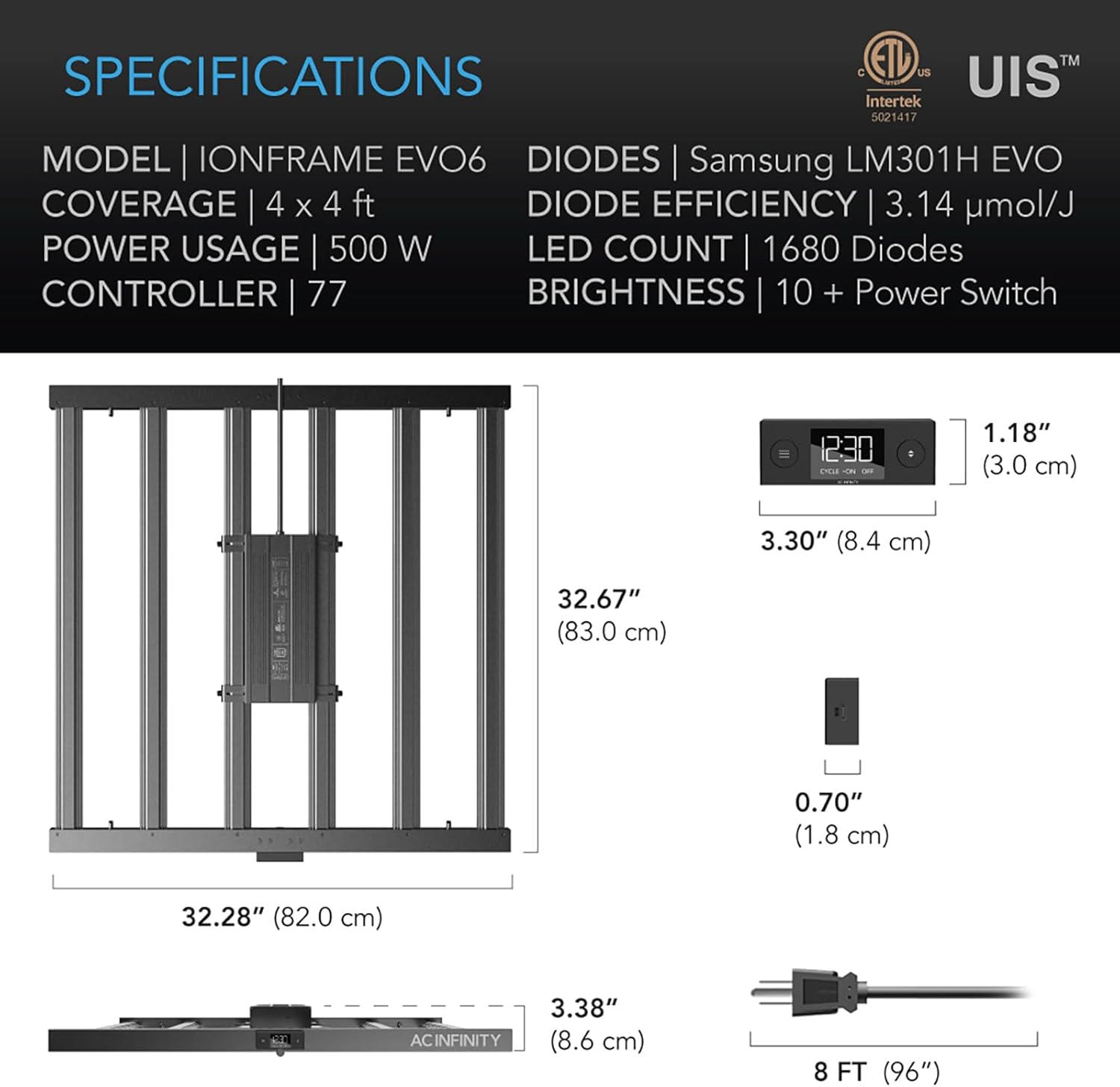
Figure 9: Detailed diagram outlining the physical dimensions and key specifications of the IONFRAME EVO6 grow light.
Warranty and Support
AC Infinity products are designed for quality and durability. For specific warranty information, please refer to the warranty card included with your product or visit the official AC Infinity website.
For technical support, troubleshooting assistance, or to inquire about replacement parts, please contact AC Infinity customer service:
- Website: www.acinfinity.com
- Email: Refer to the AC Infinity website for contact email.
- Phone: Refer to the AC Infinity website for contact phone number.
You can also visit the AC Infinity Store on Amazon for more product information and support resources.


