
BSIDE S7 Smart Rechargeable Digital Multimeter
Model: Rechargeable Multimeter | Brand: BSIDE
Introduction
The BSIDE S7 Smart Rechargeable Digital Multimeter is designed for ease of use and efficiency, offering a range of automatic testing capabilities. This device is suitable for both beginners and experienced professionals, providing accurate measurements for various electrical parameters.
Key features include automatic testing of AC/DC voltage, resistance, continuity, and frequency. It boasts a large LCD screen with a three-line display, featuring green and red backlighting for enhanced readability and safety warnings. The integrated rechargeable lithium-ion battery ensures portability and convenience.

Image: The BSIDE S7 Smart Rechargeable Digital Multimeter, showcasing its compact design, included test leads, USB charging cable, and protective carrying case.
Safety Information
Always observe basic safety precautions when using this multimeter to avoid personal injury or damage to the device. Read all instructions carefully before use.
- Do not exceed the maximum input values specified for each function.
- Exercise extreme caution when working with voltages above 30V AC RMS, 42V peak, or 60V DC. Such voltages pose a shock hazard.
- Before measuring current, ensure the instrument's fuses are intact and the test leads are connected correctly.
- Always disconnect the test leads from the circuit before changing functions.
- Do not use the multimeter if it appears damaged or if the test leads are damaged.
- Separate test leads from the target before charging the lithium battery or opening the case.
Setup
1. Charging the Battery
The multimeter is equipped with a built-in rechargeable lithium-ion battery. Before first use, or when the low battery indicator appears, charge the device using the provided USB charging cable.
- Connect the small end of the charging cable to the multimeter's charging port.
- Connect the standard USB end to a compatible USB power adapter (not included) or a computer's USB port.
- The charging indicator on the multimeter will show the charging status.

Image: The BSIDE S7 Multimeter being charged via a USB cable connected to a laptop, illustrating the rechargeable Li-ion battery feature.
2. Connecting Test Leads
The multimeter features a uniform design where the test leads are integrated or permanently attached, ensuring they are always ready for use. Ensure the leads are securely connected before taking any measurements.
Operating Instructions
1. Power On/Off
Press the power button (U) to turn the multimeter on or off. The device features an automatic shutdown function to conserve battery life, which can be adjusted.
2. Automatic Mode Selection
The BSIDE S7 operates primarily in an intelligent automatic mode. In this mode, the multimeter automatically identifies and measures AC voltage, DC voltage, resistance, continuity, and battery status without requiring manual range selection.

Image: The multimeter's display highlighting the 'AUTO' mode, indicating its capability to automatically select measurement functions like AC/DC voltage, resistance, continuity, frequency, NCV, and Live wire detection.
3. Manual Function Selection (SEL Button)
While the device is largely automatic, the SEL button allows for manual selection of specific functions or modes where applicable, such as switching between NCV sensitivity levels or specific measurement types not covered by auto-ranging.
4. Display and Backlight
The multimeter features a 3.5-inch large LCD with a three-line display, showing test values, an analog bar, and frequency simultaneously. The backlight button (☀) controls the display illumination.
- Green Backlight: Provides a clear and pleasant reading experience under normal conditions.
- Red Backlight: Activates as a warning when the measured voltage exceeds 90V, indicating a potential hazard.

Image: The BSIDE S7 Multimeter's display demonstrating the green backlight for normal readings and the red backlight for high voltage warnings, enhancing safety and readability.

Image: A close-up of the BSIDE S7 Multimeter's display, illustrating its 3-line output which simultaneously shows voltage, frequency, and an analog bar for comprehensive test results.
5. Non-Contact Voltage (NCV) Detection
The NCV function allows for detecting AC voltage without direct contact. It features adjustable sensitivity:
- Low Sensitivity: For precise identification in complex wiring environments.
- High Sensitivity: For easily locating electrical wires within walls.
An audible alarm will sound when voltage is detected.
6. Live Wire Testing
The Live wire testing function helps identify live and neutral wires, and can also be used to find breakpoints in circuits. When a live wire is detected, the display will typically show a 'LIVE' indicator and may change backlight color.

Image: The BSIDE S7 Multimeter in use, with its test leads connected to an electrical panel. The display shows a red backlight, indicating a high voltage reading during operation.
7. Continuity Test
When the resistance is below 30Ω, the continuity buzzer will sound, indicating a continuous circuit.
8. LED Flashlight
The integrated LED flashlight provides illumination in dimly lit work environments. Activate it using the dedicated button (often integrated with the backlight button or a separate one).

Image: The rear view of the BSIDE S7 Multimeter, with its LED flashlight activated, demonstrating its utility for illuminating work areas.
Maintenance
1. Cleaning
Wipe the device with a dry, soft cloth. Do not use abrasives or solvents. Ensure the device is powered off before cleaning.
2. Battery Care
Recharge the battery when the low battery indicator appears. For long-term storage, charge the battery to approximately 50% every three months to maintain its health.
3. Storage
Store the multimeter in a cool, dry place, away from direct sunlight and extreme temperatures. Use the provided carrying case for protection.
Troubleshooting
- Device does not power on: Ensure the battery is charged. Connect the multimeter to a USB power source and try again.
- Inaccurate readings: Check that the test leads are securely connected. Ensure the measurement range is appropriate (if manually selected) or allow the auto-ranging function to stabilize. Clean the test probes if they appear dirty.
- No NCV detection: Verify that the NCV function is active. Adjust sensitivity if necessary. Ensure there are no obstructions between the NCV sensor and the voltage source.
- Display is dim or flickering: The battery might be low. Recharge the device.
Specifications
| Feature | Specification |
|---|---|
| Display | 6000 counts, 3.5-inch LCD |
| Generation | 24th Generation - 2023 Version |
| DC Voltage | 600V (0.01V resolution) ±(0.8% + 3) |
| AC Voltage | 600V (0.01V resolution) ±(1.2% + 5) |
| Resistance | 0-2000Ω (1Ω resolution) ±(1.2%+5); 2000Ω-10MΩ (1Ω resolution) ±(1.2%+3) |
| V-Alert (NCV) | 90V-1000V, 6V-1000V AC voltage |
| Live Wire Test | Yes |
| Continuity | Buzzer sounds when resistance < 30Ω |
| Ambient Temperature | 0-50 ℃ (0.1 ℃ resolution) ±2.0 ℃ |
| Power Supply | 3.7V (Built-in, rechargeable Lithium-ion) |
| Dimensions (L x W x H) | 136 x 67 x 12 mm (5.35 x 2.64 x 0.47 inches) |
| Weight | 160 g (5.64 oz) |
| Safety Compliance | CE, CAT II 600V |
Package Contents
The following items are included in the package:
- BSIDE S7 Pocket Multimeter
- Test Leads
- USB Charging Cable
- Carrying Bag
- User Manual (English)
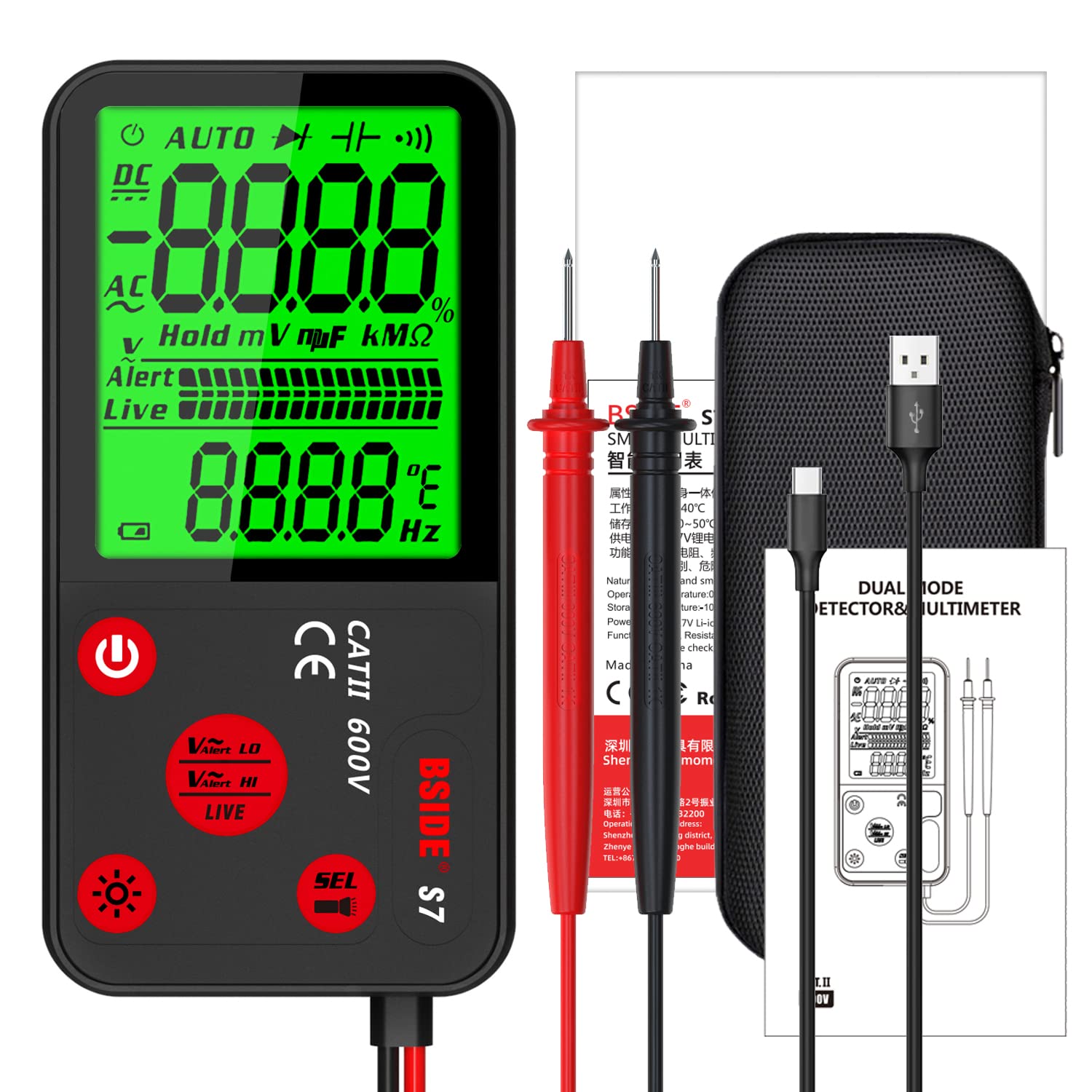
Image: The complete package contents of the BSIDE S7 Multimeter, including the device itself, test leads, USB charging cable, protective carrying case, and the user manual.


