
1. Product Overview
The Cooler Master MasterLiquid 240L Core White ARGB is an advanced All-In-One (AIO) liquid cooler designed to provide efficient thermal management for your CPU. This model features a redesigned Gen S dual chamber pump, an enlarged radiator surface area, and optimized 120mm ARGB fans for superior cooling performance. It includes premium CryoFuze thermal paste for enhanced heat conductivity.

Figure 1.1: MasterLiquid 240L Core White AIO Liquid Cooler with radiator and pump assembly.
Key Features:
- Clean Classic Design: A minimalist pump design with enhanced ARGB lighting dispersion for customizable illumination.
- Gen S Dual Chamber Pump: Features an improved copper base for precise heat spot targeting and increased water flow/pressure for enhanced cooling.
- CryoFuze Thermal Paste: Includes premium thermal paste with 14W/mK conductivity, stable from -50°C to 250°C.
- Optimized Fan Blades: Newly designed 120mm ARGB fans with optimized PWM curve blades for improved airflow, air pressure, and quieter operation.
- Frosted Blade Design: Enhances ARGB lighting dispersion for a vibrant and customizable luminous effect.
2. Product Components
Before beginning installation, please verify that all components listed below are present in your package:
- MasterLiquid 240L Core AIO Unit (Radiator, Pump, Tubing)
- Two (2) 120mm ARGB Fans
- CryoFuze Thermal Paste (Tube)
- Installation Kits (Mounting brackets, screws, backplates for various CPU sockets)
- User Manual (This document)
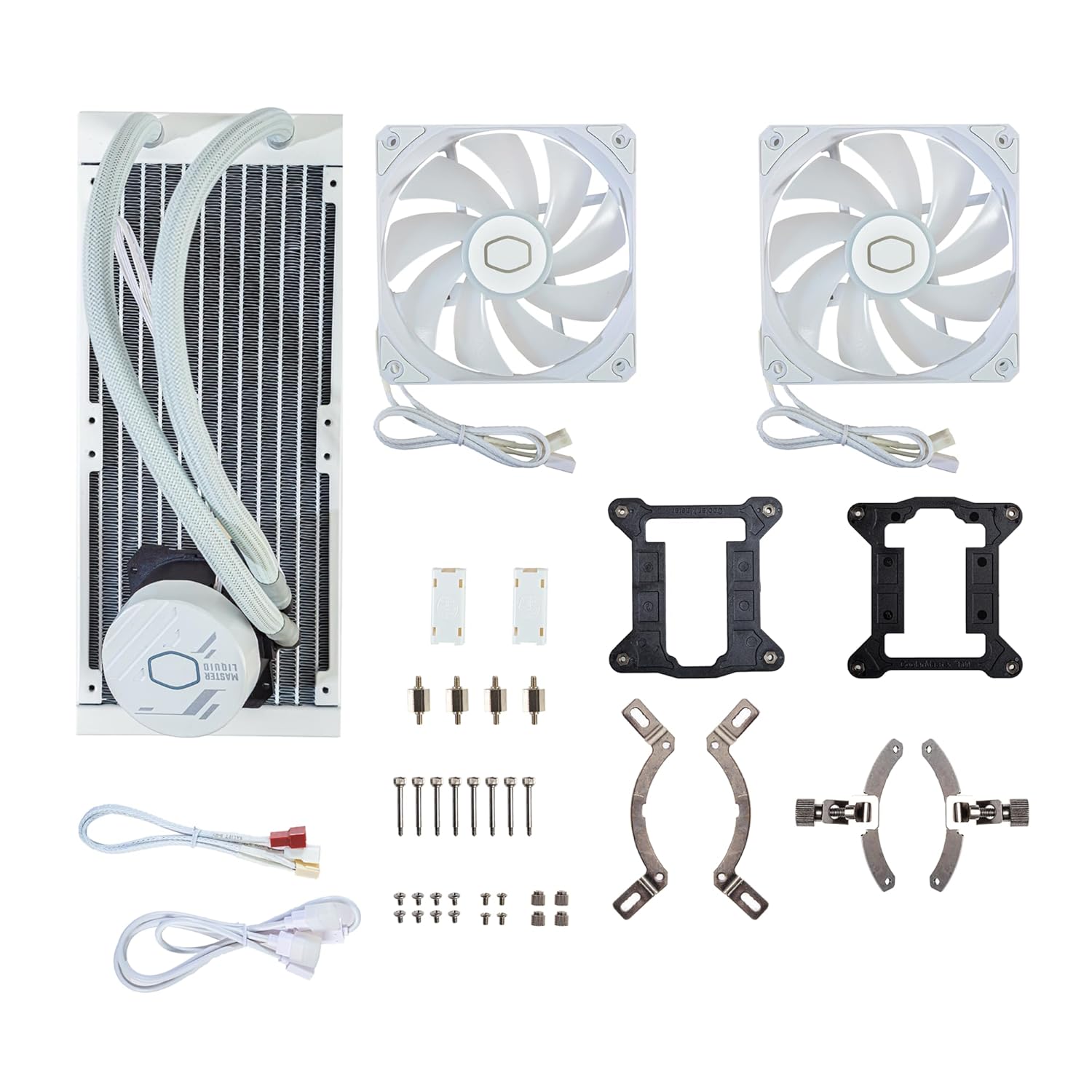
Figure 2.1: Included components of the MasterLiquid 240L Core White AIO Liquid Cooler.
3. Setup and Installation
This section provides general guidelines for installing your MasterLiquid 240L Core White AIO Liquid Cooler. Refer to the detailed instruction booklet included in your package for specific, step-by-step diagrams tailored to your CPU socket type.
3.1 Socket Compatibility
The cooler supports a wide range of CPU sockets, including:
- AMD: Ryzen AM5, AM4
- Intel: LGA1700, LGA1200

Figure 3.1: Mounting brackets for various AMD and Intel CPU sockets.
3.2 General Installation Steps (Consult included manual for details)
- Prepare Motherboard: Install the appropriate backplate for your CPU socket type on the rear of the motherboard.
- Apply Thermal Paste: Apply the included CryoFuze thermal paste to the center of your CPU's Integrated Heat Spreader (IHS). A pea-sized amount is generally sufficient.
- Mount Pump/Coldplate: Secure the pump/coldplate assembly onto the CPU, aligning it with the mounting screws. Tighten screws evenly in a cross pattern until snug.
- Install Radiator and Fans: Mount the radiator to an available fan mount location in your PC case (e.g., top, front, or rear). Attach the two 120mm ARGB fans to the radiator, ensuring proper airflow direction (typically pushing air through the radiator).
- Connect Cables:
- Connect the pump power cable to the designated AIO_PUMP or CPU_FAN header on your motherboard.
- Connect the fan PWM cables to CPU_FAN or other available fan headers on your motherboard.
- Connect the ARGB cables from the fans and pump to a compatible 3-pin ARGB header on your motherboard or an ARGB controller.

Figure 3.2: Applying CryoFuze thermal paste to the CPU.

Figure 3.3: The slim radiator design for efficient heat dissipation.
Note: Some users have found the included instructions to be concise. If you encounter difficulties, refer to the detailed diagrams in the physical manual or search for installation guides specific to your motherboard and case.
4. Operating Instructions
4.1 Fan Speed Control (PWM)
The 120mm fans utilize Pulse Width Modulation (PWM) technology, allowing for dynamic fan speed adjustment based on CPU temperature. This balances cooling performance with noise levels. Fan speeds can range from 650 to 1,750 RPM (±10%).

Figure 4.1: Illustration of dynamic PWM fan speed adjustment.
You can configure fan curves through your motherboard's BIOS/UEFI settings or using compatible motherboard software (e.g., ASUS AI Suite, MSI Dragon Center, Gigabyte SIV, ASRock A-Tuning).
4.2 ARGB Lighting Control
The MasterLiquid 240L Core White features Addressable RGB (ARGB) lighting on both the pump and fans. This allows for extensive customization of lighting effects and colors.

Figure 4.2: Frosted fan blade design for enhanced ARGB light dispersion.
To control the ARGB lighting, connect the ARGB cables to a compatible 3-pin ARGB header on your motherboard. You can then use your motherboard's RGB software (e.g., ASUS Aura Sync, MSI Mystic Light Sync, Gigabyte RGB Fusion, ASRock Polychrome RGB) to synchronize and customize the lighting. If your motherboard lacks an ARGB header, an external ARGB controller (sold separately) may be required.
5. Maintenance
Regular maintenance helps ensure optimal performance and longevity of your AIO liquid cooler.
- Dust Removal: Periodically clean dust from the radiator fins and fan blades using compressed air. Ensure the fans are not spinning rapidly during cleaning to prevent damage.
- Inspect Tubing and Connections: Occasionally check the tubing for any signs of kinks, leaks, or damage. Ensure all connections to the pump and radiator are secure.
- Monitor Performance: Use monitoring software to keep track of CPU temperatures and fan speeds. Significant deviations from normal operating temperatures may indicate an issue.
- No Coolant Refill Needed: This is a closed-loop AIO system and does not require coolant refilling or maintenance.
6. Troubleshooting
This section addresses common issues you might encounter with your liquid cooler.
| Problem | Possible Cause | Solution |
|---|---|---|
| High CPU Temperatures |
|
|
| Excessive Noise |
|
|
| ARGB Lighting Not Working |
|
|
7. Technical Specifications
| Feature | Specification |
|---|---|
| Product Dimensions | 13 x 9.4 x 5.4 inches (330.2 x 238.8 x 137.2 mm) |
| Product Weight | 4.2 Pounds (1.9 kg) |
| Item Model Number | MLW-D24M-A18PZ-RW |
| Power Connector Type | 3-Pin (Pump), 4-Pin PWM (Fans) |
| Voltage | 12 Volts |
| Wattage | 3.96 watts (Pump) |
| Cooling Method | Water |
| Compatible Devices | Desktop PCs (AMD AM5/AM4, Intel LGA1700/1200) |
| Noise Level | 27.2 dB (Fans, Max) |
| Material | Aluminum (Radiator), Copper (Coldplate), Plastic |
| Maximum Rotational Speed | 1800 RPM (Fans) |
| Air Flow Capacity | 71.93 Cubic Feet Per Minute (CFM) |
| Radiator Dimensions | 277 x 119.6 x 27.2 mm (10.9 x 4.7 x 1.1 inches) |
8. Warranty and Support
For detailed warranty information, technical support, and service inquiries, please visit the official Cooler Master website. The website provides resources such as FAQs, driver downloads, and contact information for customer service.
Official Cooler Master Website: www.coolermaster.com


