1. Introduction
Thank you for choosing the Kisonli LP-2S Bluetooth Speaker. This device combines a high-quality audio speaker with an alarm clock, digital display, and RGB lighting, offering versatile functionality for your daily needs. This manual provides detailed instructions for setup, operation, and maintenance to ensure optimal performance and user experience.

Image 1.1: Front view of the Kisonli LP-2S speaker, showcasing the digital time display and RGB lighting.
2. Product Overview
The Kisonli LP-2S features a sleek design with a large mirror display and intuitive controls. Familiarize yourself with the various components and buttons before operation.
2.1. Controls and Ports

Image 2.1: Top and side view of the speaker with labeled controls and ports.
- Clock Display: Shows current time and alarm indicators.
- Alarm 2 Settings: Button for setting the second alarm.
- Alarm 1 Settings: Button for setting the first alarm.
- Power On/Off / Play/Pause: Long press to power on/off. Short press to play or pause music.
- Previous Song / Volume Down: Short click for previous song. Rotate left for volume down.
- Next Song / Volume Up: Short click for next song. Rotate right for volume up.
- Mode Switch: Short press to cycle through Bluetooth, FM Radio, TF Card, and AUX modes.
- RGB Light Control: Button to change or disable RGB lighting effects.

Image 2.2: Side view detailing the Micro USB charging port, TF card slot, and AUX audio input.
3. Setup
3.1. Charging the Speaker
Before first use, fully charge the speaker. Connect the provided Micro USB cable to the charging port on the side of the speaker and the other end to a USB power adapter (not included) or a computer's USB port. The charging indicator will illuminate during charging and turn off when fully charged. A full charge typically takes 2-3 hours.
3.2. Powering On/Off
- To Power On: Long press the Power On/Off button (4) until the display lights up.
- To Power Off: Long press the Power On/Off button (4) again until the display turns off.
4. Operating Instructions
4.1. Bluetooth Pairing
The speaker supports Bluetooth 5.2 for stable wireless connection.
- Ensure the speaker is powered on and in Bluetooth mode (indicated by a Bluetooth icon on the display or voice prompt). If not, short press the Mode Switch button (7) to select Bluetooth mode.
- On your mobile device (smartphone, tablet, laptop), enable Bluetooth and search for available devices.
- Select "LP-2S" from the list of found devices to pair.
- Once paired, the speaker will indicate a successful connection, and you can begin playing audio wirelessly.

Image 4.1: Steps for connecting a mobile device to the speaker via Bluetooth.
4.2. Music Playback
- Play/Pause: Short press the Power On/Off / Play/Pause button (4).
- Next Track: Short click the Next Song button (6).
- Previous Track: Short click the Previous Song button (5).
- Volume Up: Rotate the Next Song / Volume Up button (6) to the right.
- Volume Down: Rotate the Previous Song / Volume Down button (5) to the left.
4.3. Alarm Clock Settings
The speaker features two independent alarms.
- Setting Time: Refer to the specific instructions in the full manual for detailed time setting procedures, typically involving a long press on a dedicated clock button or a combination of buttons.
- Setting Alarm 1: Press the Alarm 1 Settings button (3). Use the volume knob or track buttons to adjust the hour and minute, then press the Alarm 1 Settings button again to confirm.
- Setting Alarm 2: Press the Alarm 2 Settings button (2). Use the volume knob or track buttons to adjust the hour and minute, then press the Alarm 2 Settings button again to confirm.
- Disabling Alarm: Press the corresponding alarm button (2 or 3) to toggle the alarm on or off. An alarm icon on the display indicates it is active.
4.4. FM Radio
- Short press the Mode Switch button (7) until FM Radio mode is selected.
- Long press the Play/Pause button (4) to automatically scan and save available FM stations.
- Short press the Previous Song (5) or Next Song (6) buttons to navigate between saved stations.
4.5. TF Card Playback
- Insert a TF (Micro SD) card with MP3 audio files into the TF card slot on the side of the speaker.
- Short press the Mode Switch button (7) until TF Card mode is selected.
- Music playback will start automatically. Use the Play/Pause (4), Previous Song (5), and Next Song (6) buttons to control playback.
4.6. AUX Input
- Connect one end of a 3.5mm audio cable (not included) to the AUX port on the side of the speaker.
- Connect the other end to the audio output of your external device (e.g., computer, MP3 player).
- Short press the Mode Switch button (7) until AUX mode is selected.
- Audio will play from your connected device. Volume can be controlled via the speaker or the external device.
4.7. RGB Light Control
The speaker features customizable RGB lighting.
- Short press the RGB Light Control button (8) to cycle through different light modes or turn the lights off.
4.8. Hands-free Calls
When connected via Bluetooth to a smartphone, the built-in microphone allows for hands-free calling.
- Answer Call: Short press the Play/Pause button (4) when a call comes in.
- End Call: Short press the Play/Pause button (4) during a call.
- Reject Call: Long press the Play/Pause button (4) when a call comes in.
4.9. TWS (True Wireless Stereo) Function
The Kisonli LP-2S supports TWS tandem technology, allowing two LP-2S speakers to be paired together for a stereo sound experience.

Image 4.2: Overview of speaker features, including TWS tandem technology.
- Ensure both LP-2S speakers are powered on and not connected to any other Bluetooth device.
- On one speaker (this will be the primary speaker), long press the Mode Switch button (7) until you hear a pairing tone, indicating TWS pairing mode.
- The two speakers will automatically connect to each other. A confirmation tone will sound once connected.
- Now, connect your mobile device to the primary speaker via Bluetooth as described in section 4.1. Audio will play in stereo through both speakers.
5. Maintenance
- Cleaning: Use a soft, dry cloth to clean the speaker's surface. Avoid using abrasive cleaners, solvents, or harsh chemicals.
- Storage: Store the speaker in a cool, dry place away from direct sunlight and extreme temperatures.
- Battery Care: To prolong battery life, avoid fully discharging the battery frequently. Charge the speaker regularly, even if not in use for extended periods.
- Water Resistance: This device is not waterproof. Avoid exposure to water or excessive moisture.
6. Troubleshooting
If you encounter issues with your Kisonli LP-2S speaker, refer to the following common problems and solutions:
- No Power:
- Ensure the speaker is fully charged.
- Verify the charging cable and adapter are working correctly.
- Long press the power button to ensure it's not just in standby.
- No Sound:
- Check the volume level on both the speaker and your connected device.
- Ensure the correct input mode (Bluetooth, TF, AUX, FM) is selected.
- If using Bluetooth, ensure the speaker is properly paired and connected to your device.
- Bluetooth Disconnection/Cannot Pair:
- Ensure the speaker is within the 10-meter effective range of your device.
- Turn off Bluetooth on your device and the speaker, then restart both and try pairing again.
- Clear the "LP-2S" entry from your device's Bluetooth list and re-pair.
- Ensure no other devices are currently connected to the speaker.
- FM Radio Reception is Poor:
- Move the speaker to a location with better signal reception.
- Ensure the speaker is not near other electronic devices that may cause interference.
- Alarm Not Working:
- Verify that the alarm is set correctly and is enabled (check for the alarm icon on the display).
- Ensure the speaker is powered on or in standby mode where the alarm function is active.
7. Specifications
Detailed technical specifications for the Kisonli LP-2S speaker:

Image 7.1: Table showing key product parameters.
| Feature | Detail |
|---|---|
| Model Name | LP-2S |
| Brand Name | Kisonli |
| Connectivity Technology | Bluetooth 5.2, Auxiliary |
| Audio Output Mode | Stereo |
| Speaker Type | Bookshelf |
| Special Features | Built-in Microphone, Digital Display, RGB Light, Alarm Clock, FM Radio, TF Card Slot |
| Recommended Uses | Music Playback, Alarm, Hands-free Calls |
| Compatible Devices | Laptop, Smartphone, Tablet |
| Material | Thermoplastic Polyurethane (TPU) |
| Product Dimensions | 16.5 x 7.5 x 6.5 cm |
| Item Weight | 380 g |
| Battery Capacity | 1200 mAh |
| Charging Time | Approx. 2-3 hours |
| Playback Time | Up to 4 hours (continuous music) |
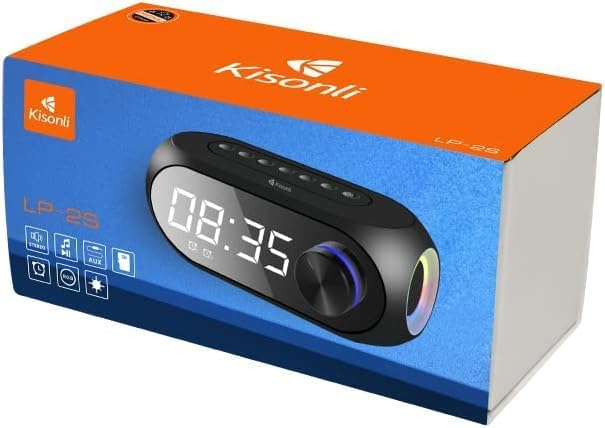
Image 7.2: Physical dimensions of the Kisonli LP-2S speaker.
8. Warranty and Support
8.1. Warranty Information
The Kisonli LP-2S speaker typically comes with a 1-year limited warranty from the date of purchase. This warranty covers manufacturing defects and workmanship under normal use. It does not cover damage caused by misuse, accidents, unauthorized modifications, or normal wear and tear. Please retain your proof of purchase for warranty claims.

Image 8.1: Product packaging indicating a 1-year warranty.
8.2. Customer Support
For further assistance, technical support, or warranty inquiries, please contact your retailer or the Kisonli customer service department through their official website or contact channels provided at the point of purchase. Please have your model number (LP-2S) and proof of purchase ready when contacting support.


