
Introduction
This manual provides essential information for the Dorman 99277ST Keyless Entry Remote. This remote is designed to function as a direct replacement for the original key fob on specific Jeep vehicles. It offers a nearly identical appearance and functionality to the factory-installed unit. Proper setup and understanding of its features are crucial for optimal performance.
The Dorman 99277ST remote is constructed from quality materials to ensure reliable performance and a long service life. It is important to note that this device requires professional programming to be paired with your vehicle.
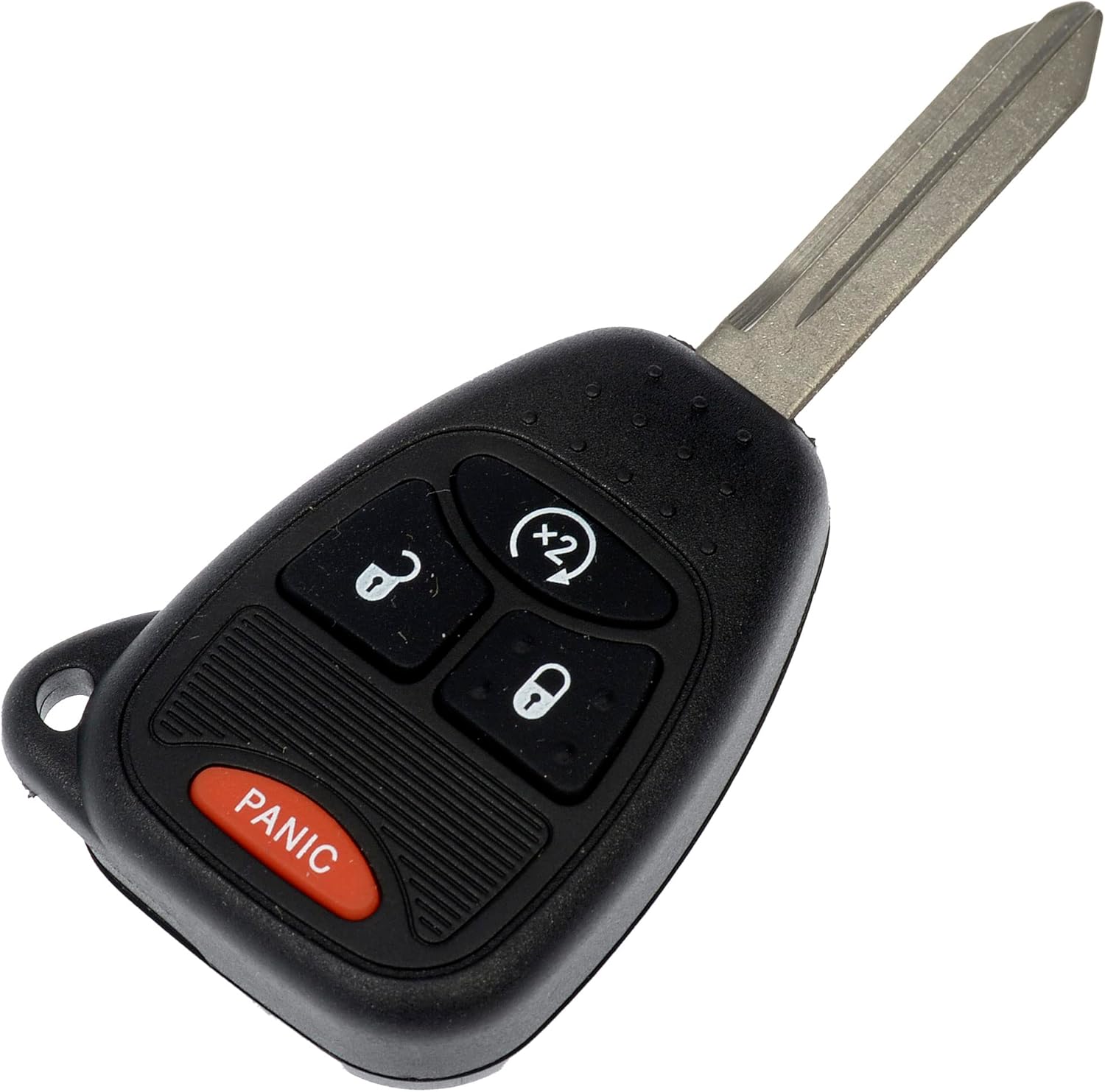
Image: Front view of the Dorman 99277ST Keyless Entry Remote with key blade extended.
Vehicle Compatibility
This keyless entry remote is compatible with the following Jeep models. Always verify fitment for your specific vehicle year and model before attempting installation or programming.
- Jeep Compass: 2010, 2011, 2012, 2013, 2014, 2015, 2016, 2017
- Jeep Patriot: 2010, 2011, 2012, 2013, 2014, 2015, 2016, 2017
- Jeep Wrangler JK: 2018
- Jeep Wrangler: 2008, 2009, 2010, 2011, 2012, 2013, 2014, 2015, 2016, 2017
Setup and Programming
The Dorman 99277ST Keyless Entry Remote requires programming to function with your vehicle. This process typically involves a compatible scan tool and specialized knowledge.
Important Considerations:
- Professional Programming Recommended: Setup by a qualified and properly equipped professional is strongly recommended to ensure correct pairing and functionality.
- Scan Tool Requirement: A compatible scan tool is necessary to properly pair this remote with your vehicle's security system.
- No User Self-Programming: This remote is not designed for user self-programming. Attempting to program it without the correct tools and expertise may result in damage or improper function.
Consult with an automotive locksmith or a dealership for programming services.
Operating Instructions
Once properly programmed, the Dorman 99277ST remote provides convenient access and control over your vehicle's keyless entry system. The remote features four distinct buttons:
- Lock Button (Closed Lock Icon): Press once to lock all vehicle doors. Some vehicles may provide an audible confirmation (horn chirp) or visual confirmation (lights flash).
- Unlock Button (Open Lock Icon): Press once to unlock the driver's door. Press twice within a few seconds to unlock all vehicle doors.
- Remote Start/Auxiliary Button (Circular Arrow with 'x2'): This button typically activates the remote start function (if equipped on your vehicle) or an auxiliary function. Consult your vehicle's owner's manual for specific instructions on its use, as activation sequences (e.g., pressing twice) may vary.
- Panic Button (Red 'PANIC'): Press and hold this button to activate the vehicle's alarm system (horn and lights). Release the button to deactivate the alarm. This feature is useful for locating your vehicle in a crowded parking lot or for emergency situations.

Image: Detailed view of the remote's buttons.
Maintenance
To ensure the longevity and proper function of your Dorman 99277ST Keyless Entry Remote, follow these maintenance guidelines:
- Battery Replacement: The remote uses 1 Lithium Metal battery (included). When the remote's range decreases significantly or it stops responding, the battery may need replacement. Refer to your vehicle's owner's manual or consult a professional for specific battery replacement instructions for your key fob type.
- Keep Dry: Avoid exposing the remote to water or excessive moisture, as this can damage internal electronic components.
- Avoid Extreme Temperatures: Do not leave the remote in direct sunlight or in areas with extreme heat or cold for extended periods.
- Handle with Care: Avoid dropping the remote or subjecting it to strong impacts, which can cause physical damage or internal component failure.
- Cleaning: Clean the remote with a soft, dry cloth. Do not use harsh chemicals or abrasive cleaners.
Troubleshooting
If you experience issues with your Dorman 99277ST Keyless Entry Remote, consider the following troubleshooting steps:
- Remote Not Responding:
- Check the battery. A weak or dead battery is a common cause of remote failure.
- Ensure the remote was properly programmed by a qualified professional. If it was recently programmed and stopped working, it might require re-programming.
- Verify that you are within range of the vehicle.
- Reduced Operating Range:
- This often indicates a low battery. Replace the battery.
- Environmental interference (e.g., strong radio signals, large metal structures) can temporarily reduce range.
- Buttons Not Functioning Correctly:
- Inspect the buttons for physical damage or debris that might be preventing proper contact.
- If individual buttons fail, it may indicate internal damage, requiring professional inspection or replacement.
For persistent issues, it is recommended to contact a qualified automotive technician or Dorman customer support.
Specifications
| Feature | Detail |
|---|---|
| Brand | Dorman |
| Model Name | 99277ST |
| Item Model Number | 99277ST |
| Number of Buttons | 4 |
| Material | Plastic |
| Batteries | 1 Lithium Metal battery (included) |
| Product Dimensions | 11.73 x 7.29 x 5.38 cm |
| Item Weight | 62 g |
| Manufacturer | Dorman Products |
| UPC | 194883447493 |
Warranty Information
Specific warranty details for the Dorman 99277ST Keyless Entry Remote are not provided within the product data. For information regarding the manufacturer's warranty, please refer to the official Dorman Products website or contact Dorman customer support directly. Keep your proof of purchase for any warranty claims.
Support
If you require further assistance with your Dorman 99277ST Keyless Entry Remote, including programming, troubleshooting, or general inquiries, please utilize the following resources:
- Dorman Products Website: Visit the official Dorman Products website for product information, FAQs, and support contact details.
- Qualified Automotive Professional: For programming and complex diagnostic issues, consult an automotive locksmith or a certified mechanic specializing in vehicle electronics.
- Vehicle Owner's Manual: Refer to your vehicle's owner's manual for specific instructions related to your vehicle's keyless entry system.


