
1. Introduction
Thank you for choosing the Vesta Precision OP12 Oil Pump 12-inch Chamber Vacuum Sealer. This manual provides essential information for the safe and efficient operation, maintenance, and troubleshooting of your new appliance. Please read this manual thoroughly before using the vacuum sealer and retain it for future reference.
The Vesta Precision OP12 is designed for heavy-duty use, ideal for preserving wet foods, liquids, powders, and for sous vide preparation. Its industrial-grade construction ensures reliable performance and high vacuum levels.
2. Important Safety Instructions
WARNING: To reduce the risk of fire, electric shock, or injury, always follow basic safety precautions when using electrical appliances.
- Read all instructions before operating the appliance.
- Do not immerse the appliance, power cord, or plug in water or other liquids.
- Keep hands and fingers away from the sealing bar when the appliance is in operation to prevent burns.
- Ensure the power cord is not damaged. Do not operate the appliance with a damaged cord or plug.
- Unplug the appliance from the outlet when not in use and before cleaning.
- Do not use outdoors. This appliance is for indoor use only.
- Do not allow children to operate this appliance. Close supervision is necessary when used near children.
- Use only manufacturer-recommended attachments.
- Do not place on or near a hot gas or electric burner, or in a heated oven.
- Always operate on a stable, level surface.
- This appliance is heavy (approximately 51.6 lbs). Exercise caution when moving.
3. Product Overview
3.1 Components
The Vesta Precision OP12 Chamber Vacuum Sealer features a robust stainless steel construction with a clear pressure gauge and a full-view domed lid. The control panel includes intuitive buttons for various functions.

Figure 3.1: Front view of the Vesta Precision OP12 Chamber Vacuum Sealer, showcasing the control panel, pressure gauge, and domed lid.
3.2 What's in the Box
Upon unpacking, ensure all items are present:

Figure 3.2: Image showing the contents of the product box, including the Chamber Vac OP12 unit, a bottle of vacuum pump oil (280 ml), a refueling pot (100 ml), an L-shaped hexagon socket wrench, a Phillips screwdriver, a user manual, 10 pieces of 6"x10" bags, 10 pieces of 8"x12" bags, 1 spare high-temperature seal tape, and a power cord.
- Vesta Precision OP12 Chamber Vacuum Sealer Unit
- Vacuum Pump Oil (280 ml bottle)
- Refueling Pot (100 ml)
- L-shaped Hexagon Socket Wrench
- Phillips Screwdriver
- User Manual (this document)
- Vacuum Bags (10 pcs 6"x10", 10 pcs 8"x12")
- Spare High-Temperature Seal Tape
- Power Cord
3.3 Key Features
- Powerful Oil Pump: Equipped with a 1/2 HP rotary oil pump (800W) for swift performance and high vacuum levels.
- 12-inch Seal Bar: Provides a strong, dual heat-seal for enhanced preservation.
- SmartVac Function: Automatic vacuuming and sealing based on food volume, optimizing vacuum time.
- Custom Vacuum Mode: Adjustable vacuum and seal time for various foods and bags.
- Marinate Mode: Pre-set marination cycle to infuse foods with desired flavors.
- Vacuum Gauge: Accurately monitors pressure within the chamber.
- Transparent Lid: Allows monitoring of the vacuum and sealing process.
- Durable Construction: Stainless steel body for longevity and easy cleaning.

Figure 3.3: Visual representation of key features including Custom Vacuum, Vacuum Gauge, Marinate mode, and Transparent lid.
4. Setup
4.1 Unpacking and Placement
- Carefully remove the vacuum sealer and all accessories from the packaging. Due to its weight (approx. 51.6 lbs), it is recommended to have assistance.
- Place the unit on a stable, level, and dry surface. Ensure adequate ventilation around the machine.
- Inspect the unit for any shipping damage. If damage is found, do not operate and contact customer support.
4.2 Installing the Seal Bar
The seal bar is typically packaged separately and needs to be placed into position. No tools are required for this step.
- Open the lid of the vacuum sealer.
- Locate the designated slots or supports for the seal bar within the chamber.
- Gently place the seal bar into these supports, ensuring it sits securely and evenly.

Figure 4.1: Close-up view of the vacuum chamber interior, highlighting the seal bar in position.
4.3 Adding Vacuum Pump Oil
The vacuum sealer requires oil for its pump. It is crucial to add the provided oil before first use.
- Locate the oil fill port on the back of the unit. It is usually marked with an oil can symbol.
- Unscrew the cap from the oil fill port.
- Carefully pour the entire bottle of provided vacuum pump oil (280 ml) into the port using the refueling pot if necessary.
- Replace the cap securely.

Figure 4.2: Rear view of the vacuum sealer, illustrating the oil pump access and the provided oil bottle.

Figure 4.3: Detailed view of the oil fill port, indicated by an oil symbol, located on the back panel of the unit.
4.4 Power Connection
Connect the power cord to the appliance and then to a grounded electrical outlet. Avoid using extension cords or ungrounded outlets.
5. Operation
5.1 Preparing Food and Bags
- Use only chamber vacuum bags designed for this type of sealer.
- Ensure the bag is clean and dry inside the sealing area.
- Leave at least 2-3 inches of space between the food and the top of the bag for proper sealing.
- For wet or liquid foods, ensure the bag opening is clean and free of moisture to achieve a strong seal.

Figure 5.1: The Vesta Precision OP12 can vacuum seal a variety of food types, including dry, wet, oily, liquid, and powdered items.
5.2 Basic Vacuum Sealing
- Place the filled vacuum bag inside the chamber, ensuring the open end of the bag lies flat across the sealing bar.
- Use the bag clip to hold the bag in place if needed.
- Close the lid firmly. The machine will typically start the vacuum cycle automatically or require a button press.
- The vacuum gauge will show the pressure decreasing.
- Once the desired vacuum level is reached (either automatically or manually set), the machine will proceed to seal the bag.
- After sealing, the chamber will repressurize, and the lid can be opened.
- Remove the sealed bag and inspect the seal for completeness.

Figure 5.2: Proper placement of a vacuum bag across the sealing bar within the chamber.
5.3 SmartVac Function
The SmartVac function automatically adjusts the vacuum time based on the food volume, ensuring an optimal vacuum effect without manual time settings.
- Place the bag in the chamber as described in 5.2.
- Close the lid.
- Press the "Smart Vac" button on the control panel. The machine will detect the food volume and initiate the appropriate vacuum and seal cycle.
- Wait for the cycle to complete, then open the lid and remove the sealed bag.

Figure 5.3: The Smart Vacuum functionality automatically determines optimal vacuum time based on food weight, as shown with examples of 370g, 647g, and 1296g food items.
5.4 Custom Vacuum Mode
For specific needs, you can manually set the vacuum and seal times.
- Place the bag in the chamber.
- Close the lid.
- Use the control panel to adjust the vacuum time and sealing time according to your requirements. Refer to the control panel diagram for specific button functions.
- Press the "Custom Vac" or equivalent button to start the cycle.
- Wait for the cycle to complete, then open the lid and remove the sealed bag.
5.5 Marinate Mode
The marinate mode uses a pulsed vacuum cycle to quickly infuse flavors into food.
- Place food and marinade in a suitable container or bag inside the chamber. Ensure the container fits within the chamber dimensions (12" W x 14" L x 3.15" H max depth).
- Close the lid.
- Press the "Marinate" button on the control panel. The machine will begin a pre-set marination cycle.
- Once the cycle is complete, open the lid and remove the marinated food.
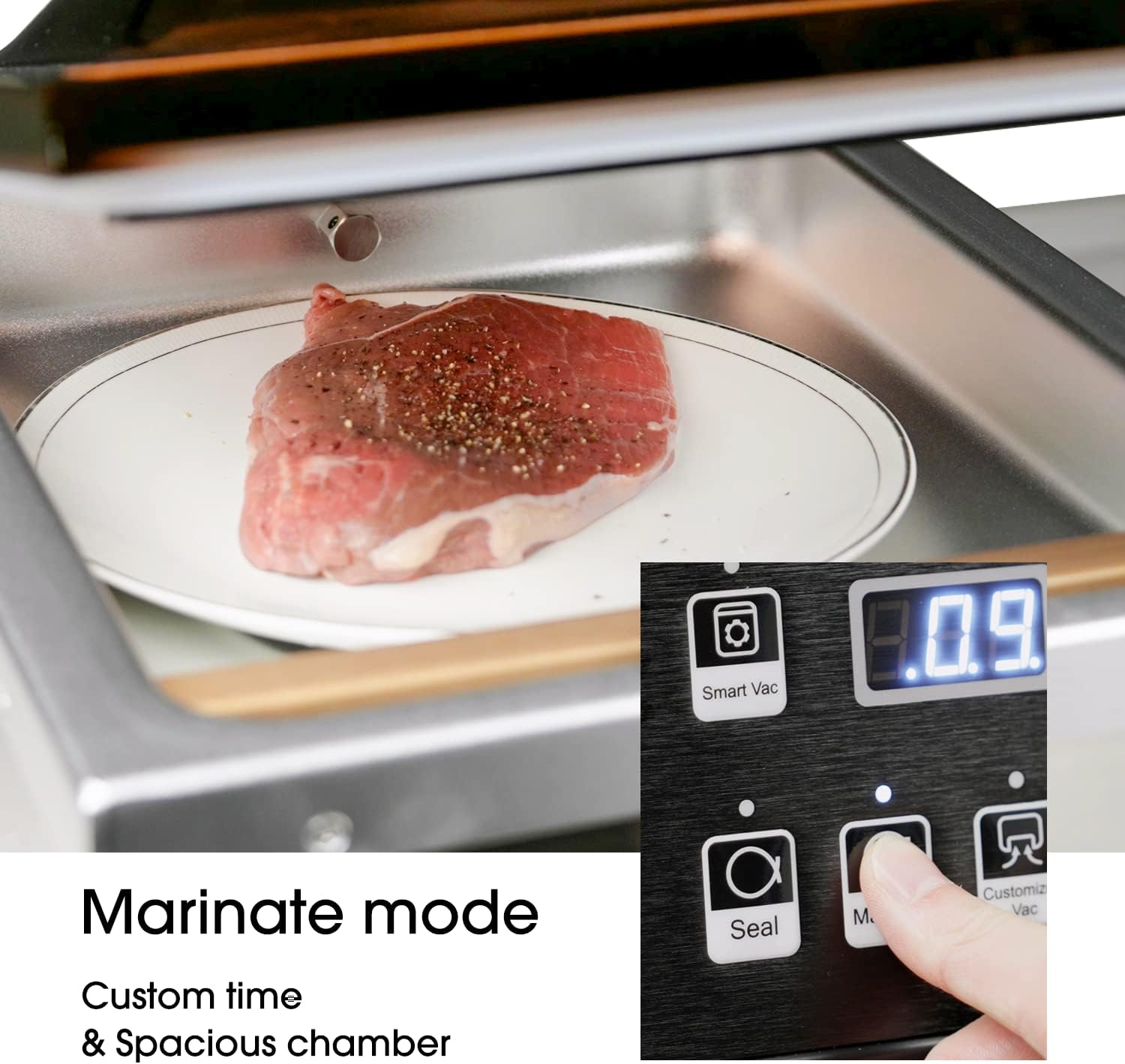
Figure 5.4: The Marinate mode allows for custom time settings and utilizes the spacious chamber for infusing flavors into food, as demonstrated with a piece of meat.
6. Maintenance
6.1 Cleaning
- Always unplug the appliance before cleaning.
- Wipe the exterior of the unit with a damp cloth and mild detergent. Do not use abrasive cleaners.
- Clean the vacuum chamber with a damp cloth. For spills, wipe immediately to prevent residue buildup.
- Ensure the sealing bar and gasket are clean and free of food particles for optimal sealing performance.
- Dry all surfaces thoroughly before storing or next use.
6.2 Oil Pump Maintenance
Regularly check the oil level in the vacuum pump. The oil should be clear and at the recommended level. Refer to the oil sight glass, usually located near the oil fill port, to check the level.
- Oil Change: The vacuum pump oil should be changed periodically, depending on usage. Consult the oil sight glass for discoloration or low levels.
- To change the oil, locate the oil drain plug (typically at the bottom or side of the unit). Place a container underneath and carefully remove the plug to drain the old oil.
- Replace the drain plug, then refill with new vacuum pump oil through the fill port as described in Section 4.3.
- Dispose of used oil responsibly according to local regulations.
7. Troubleshooting
| Problem | Possible Cause | Solution |
|---|---|---|
| No Power | Appliance not plugged in; power outlet not working; power cord damaged. | Ensure the power cord is securely plugged into a grounded outlet. Test the outlet with another appliance. Check the power cord for visible damage. |
| Poor Vacuum / No Vacuum | Lid not closed properly; bag not positioned correctly; seal bar or gasket dirty/damaged; oil level low or dirty. | Ensure the lid is firmly closed. Reposition the bag flat across the seal bar. Clean the seal bar and gasket. Check the oil level and condition; add or change oil if necessary. |
| Bag Not Sealing Properly | Seal bar dirty or damaged; bag material incompatible; moisture or food particles in the sealing area. | Clean the seal bar. Ensure the bag is dry and clean in the sealing area. Use only chamber vacuum bags. Replace the seal tape if damaged. |
| Machine is Noisy | Normal operation sound for an oil pump; low oil level. | Some noise is normal for oil pump vacuum sealers. Check oil level and add if low. If noise is excessive or unusual, contact support. |
If you encounter issues not listed here or if solutions do not resolve the problem, please contact Vesta Precision customer support.
8. Specifications
| Feature | Detail |
|---|---|
| Brand | V Vesta Precision |
| Model | OP12 |
| Material | Stainless Steel |
| Item Weight | 51.6 Pounds (23.4 kg) |
| Power Source | AC |
| Operation Mode | Automatic |
| Wattage | 800 watts |
| Seal Bar Length | 12 inches (300mm) |
| Chamber Dimensions (Internal) | 12" W x 14" L x 3.15" H (max depth 5.3") |
| UPC | 852916008980 |
| Package Dimensions | 21.6 x 18.82 x 18.77 inches |

Figure 8.1: Detailed dimensions of the Vesta Precision OP12, including overall size and internal chamber measurements.
9. Warranty and Customer Support
Vesta Precision is committed to providing dependable quality and assistance. This product is designed and serviced in the USA.
For warranty information, technical support, or to inquire about spare parts, please visit the official Vesta Precision website or contact their customer service department. While spare parts availability was noted as a concern in some reviews, Vesta Precision aims to provide support for their products.
Contact Information: Please refer to the Vesta Precision official website or the contact details provided with your purchase documentation for the most current support information.
Protection Plans: Extended protection plans may be available for purchase. Refer to your retailer for details on 3-Year or 4-Year protection plans.


