
1. Introduction
The SHIDU M500 is a compact and portable wired voice amplifier designed to project your voice clearly and powerfully. It is an ideal tool for teachers, presenters, tour guides, and anyone who needs to amplify their voice in various settings. This device also supports music playback from multiple sources.

Image 1.1: SHIDU M500 Wired Voice Amplifier. This image shows the front view of the compact, black and white voice amplifier.
2. Product Overview
2.1. Components and Controls
Familiarize yourself with the various parts and controls of your SHIDU M500 amplifier:

Image 2.1: SHIDU M500 Controls and Ports Diagram. This diagram illustrates the top panel controls including Play/Pause, Recording, Previous, Next, Mode Switch, LED Screen, and the Switch/Volume knob. It also shows the side ports: USB, TF card socket, DC 5V charging port, AUX-IN, and MIC-IN.
- Switch/Vol Knob: Rotate to power on/off and adjust volume.
- LED Screen: Displays current mode, battery level, and track information.
- Play/Pause Button: Starts or pauses audio playback.
- Recording Button: Initiates or stops audio recording.
- Previous Button: Skips to the previous track or navigates menus.
- Next Button: Skips to the next track or navigates menus.
- Mode Switch Button: Toggles between different input modes (e.g., USB, TF card, AUX).
- USB Port: For connecting USB flash drives for music playback.
- TF Card Socket: For inserting a TF (MicroSD) card for music playback.
- DC 5V Port: Power input for charging the amplifier.
- AUX-IN Port: For connecting external audio devices via a 3.5mm audio cable.
- MIC-IN Port: For connecting the wired microphone.
3. Setup
3.1. Charging the Amplifier
- Connect the provided charging cable to the DC 5V port on the amplifier.
- Connect the other end of the cable to a standard USB power adapter (not included) or a computer's USB port.
- The LED screen will indicate charging status. A full charge typically takes 3-5 hours.
- Ensure the amplifier is fully charged before first use for optimal battery life.
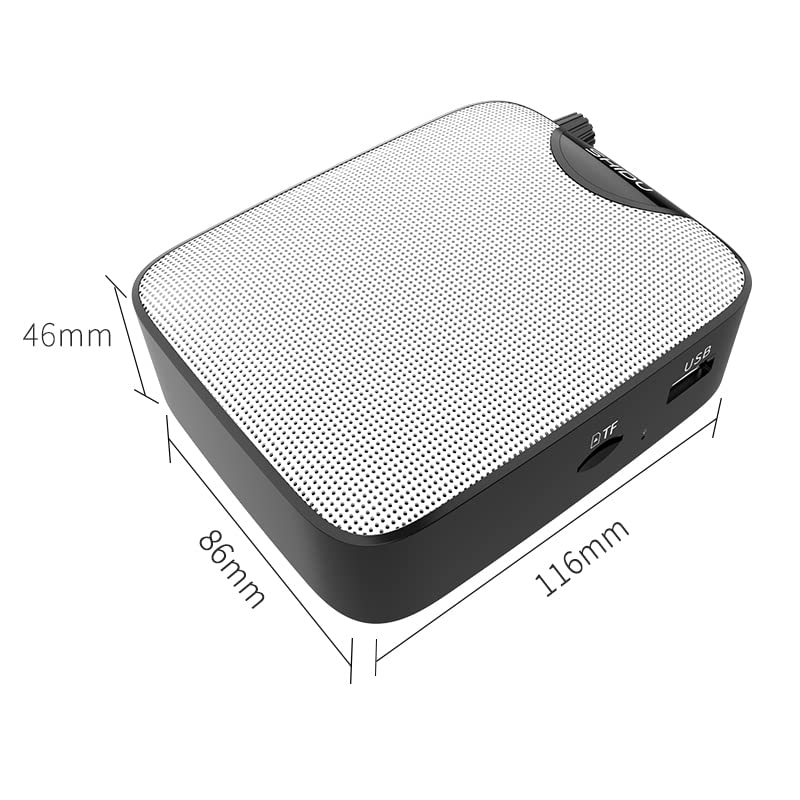
Image 3.1: SHIDU M500 Built-in 1800mAh Battery. This image highlights the amplifier's internal 1800mAh high-quality lithium battery, indicating long standby time and extended battery life.
3.2. Connecting the Microphone
- Insert the 3.5mm plug of the wired microphone into the MIC-IN port on the amplifier.
- Position the microphone headset comfortably on your head, ensuring the microphone is close to your mouth for best voice pickup.
3.3. Powering On/Off and Volume Adjustment
- To power on, rotate the Switch/Vol Knob clockwise until you hear a click and the LED screen illuminates.
- Continue rotating the knob clockwise to increase the volume. Rotate counter-clockwise to decrease the volume.
- To power off, rotate the Switch/Vol Knob counter-clockwise until you hear a click and the LED screen turns off.
4. Operating Instructions
4.1. Voice Amplification
- Ensure the microphone is connected and the amplifier is powered on.
- Adjust the Switch/Vol Knob to your desired amplification level.
- Speak clearly into the microphone. Avoid placing the microphone too close to the amplifier to prevent feedback (a high-pitched squeal).
4.2. Music Playback (USB/TF Card/AUX-IN)
- USB/TF Card: Insert a USB flash drive into the USB Port or a TF card into the TF Card Socket. The amplifier will automatically switch to the corresponding mode and begin playback. If not, press the Mode Switch Button.
- AUX-IN: Connect an external audio device (e.g., smartphone, MP3 player) to the AUX-IN Port using a 3.5mm audio cable. Press the Mode Switch Button until 'AUX' is displayed on the LED screen.
- Use the Play/Pause, Previous, and Next buttons to control music playback.
- Adjust the volume using the Switch/Vol Knob.
4.3. Recording Function
- Ensure a USB flash drive or TF card is inserted to save recordings.
- Press the Recording Button to start recording. The LED screen will indicate recording status.
- Speak into the microphone.
- Press the Recording Button again to stop recording. The recording will be saved to the inserted storage device.
5. Maintenance
5.1. Cleaning
- Wipe the amplifier's exterior with a soft, dry cloth.
- Do not use harsh chemicals, solvents, or abrasive cleaners.
- Keep the ports free from dust and debris.
5.2. Battery Care
- Charge the amplifier regularly, even if not in frequent use, to maintain battery health.
- Avoid completely draining the battery before recharging.
- Do not expose the amplifier to extreme temperatures.
5.3. Storage
- Store the amplifier in a cool, dry place away from direct sunlight and moisture.
- When storing for extended periods, ensure the battery is partially charged (around 50%).
6. Troubleshooting
| Problem | Possible Cause | Solution |
|---|---|---|
| No sound from amplifier | Amplifier is off; Volume is too low; Microphone not connected properly; Incorrect mode selected. | Power on the amplifier and increase volume; Ensure microphone is fully plugged into MIC-IN; Press Mode Switch to select correct input. |
| Distorted sound or feedback | Volume too high; Microphone too close to amplifier; Microphone damaged. | Decrease volume; Increase distance between microphone and amplifier; Try a different microphone if available. |
| Battery not charging | Charging cable not connected properly; Faulty cable or adapter; Amplifier not powered off during charging. | Ensure cable is securely connected to DC 5V port and power source; Try a different USB cable or adapter; Power off the amplifier while charging. |
| Music playback not working | USB/TF card not inserted correctly; Incorrect mode selected; Corrupt audio files. | Reinsert USB/TF card; Press Mode Switch to select USB/TF mode; Ensure audio files are in a compatible format. |
7. Specifications
- Model: SHIDU M500
- Dimensions (L x W x H): 8.6 x 2.8 x 10.4 Centimeters
- Weight: 280 Grams
- Connectivity Technology: Wired
- Power Output: 10W
- Battery: Built-in 1800mAh High Quality Lithium Battery
- Compatible Devices: Laptop, MP3 Player, Smartphone (via AUX-IN)
- Input Ports: MIC-IN (3.5mm), AUX-IN (3.5mm), USB, TF Card Slot, DC 5V (Charging)
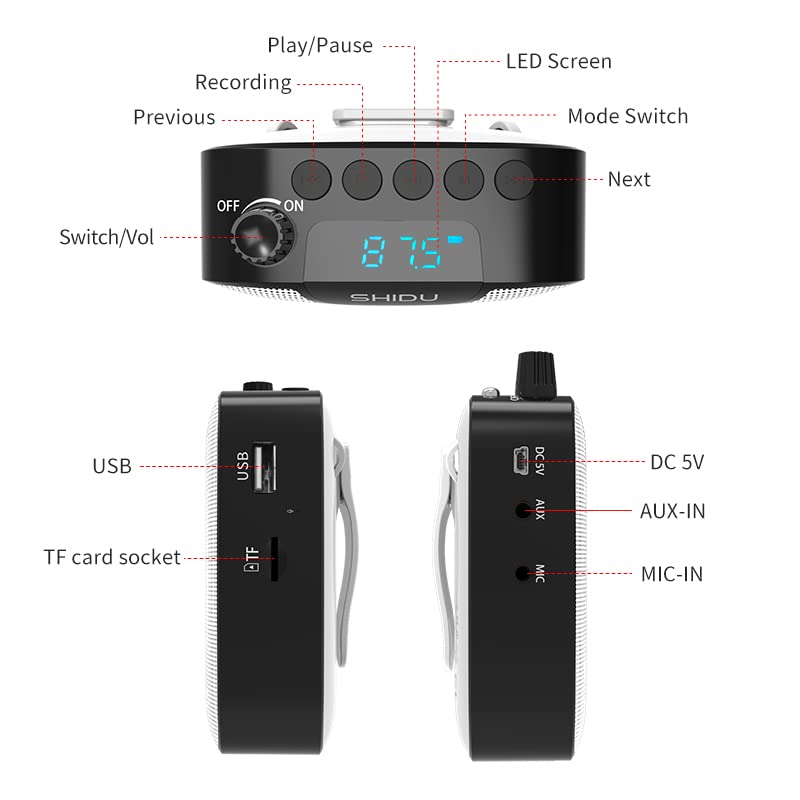
Image 7.1: SHIDU M500 Dimensions Diagram. This image shows the amplifier's dimensions: 116mm length, 86mm width, and 46mm height.

Image 7.2: SHIDU M500 10W High Power Acoustic Amplifier. This image illustrates the amplifier's 10W power output, capable of providing loud and clear sound in a standard 500m² space.

Image 7.3: SHIDU M500 Mini and Portable. This image emphasizes the amplifier's compact size and light weight of only 282g, comparable to the size of a mobile phone.

Image 7.4: SHIDU M500 High-Fidelity Dual Magnetic Speaker. This image highlights the advanced speaker technology for realistic vocal reproduction and powerful bass and treble.
8. Warranty Information
SHIDU warrants its voice amplifier hardware products against defects in materials and workmanship for a period of one year from the date of original purchase, provided the purchase was made from an authorized SHIDU dealer. This warranty is void if the equipment is altered, misused, mishandled, suffers excessive wear, or is serviced by any parties not authorized by SHIDU.
9. Support
For further assistance, technical support, or warranty claims, please refer to the contact information provided with your purchase or visit the official SHIDU website. Ensure you have your product model number (M500) and proof of purchase ready when contacting support.


