
Introduction
This manual provides detailed instructions for the installation, operation, maintenance, and troubleshooting of your Greluma Adjustable PWM DC Motor Speed Controller. Please read this manual thoroughly before using the product to ensure safe and efficient operation.
Safety Information
- Ensure the input voltage is within the specified range of 6-60V DC. Do not connect to 220V AC household electricity.
- The input voltage must match the rated voltage of the motor being controlled (e.g., 12V motor requires 12V input).
- Observe correct polarity when connecting power and motor wires (positive and negative). Incorrect wiring can damage the device and motor.
- Do not exceed the maximum continuous current of 20A or peak current of 30A.
- Always disconnect power before making any wiring changes or performing maintenance.
- Keep the device away from moisture, dust, and extreme temperatures.
Product Overview
The Greluma PWM DC Motor Speed Controller allows for precise speed regulation of DC motors. It features a digital display for speed percentage, a potentiometer for adjustment, and a start/stop switch for convenient operation.

Figure 1: Overview of the Greluma PWM DC Motor Speed Controller, showing the main unit, potentiometer, and start/stop button.

Figure 2: Digital display indicating the motor speed as a percentage of its maximum speed.
Specifications
| Parameter | Value |
|---|---|
| Input Voltage | DC 6-60V |
| Output Voltage | Linear under load |
| Output Current (Peak) | 30A |
| Output Current (Continuous) | 20A |
| Speed Regulation Type | Flow regulation |
| Speed Regulation Mode | Potentiometer |
| Speed Range | 0-100% |
| Control Frequency | 15KHz |
| Digital Speed Display | 0-100% (Percentage of full motor speed) |
| Model Number | ZL636LUM |
| Dimensions | 15.5 x 11.8 x 4 cm (approx. 6.1 x 4.6 x 1.6 inches) |
| Weight | 110 grams (approx. 3.9 ounces) |
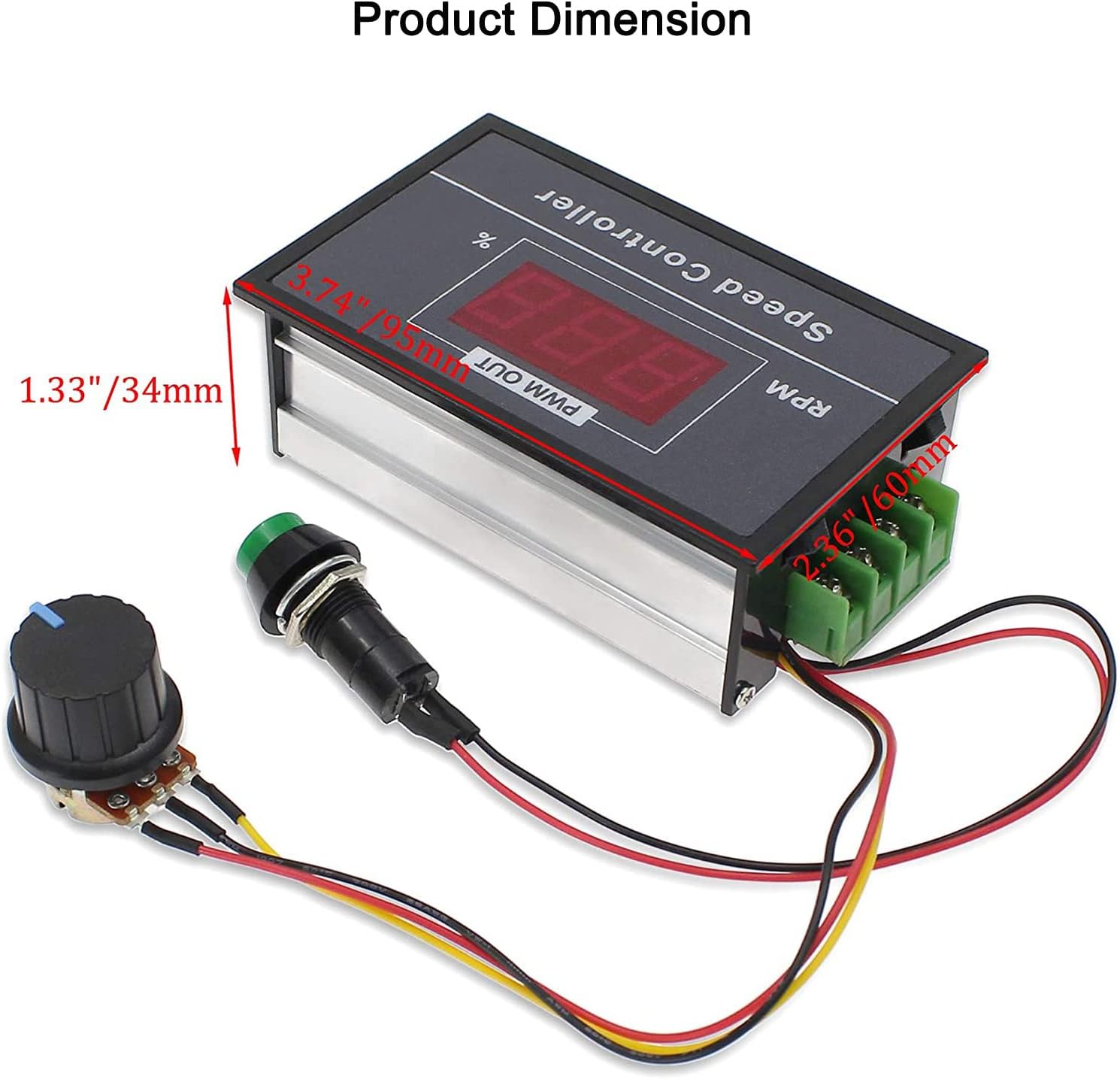
Figure 3: Product dimensions.
Setup and Wiring
Follow these steps for proper installation and wiring:
- Power Source: Connect your DC power supply (6-60V) to the "Power +" and "Power -" terminals. Ensure correct polarity. The input voltage must match the motor's rated voltage.
- Motor Connection: Connect your DC motor to the "Motor +" and "Motor -" terminals. Ensure correct polarity.
- Potentiometer: The speed control potentiometer is pre-wired.
- Start/Stop Switch: The start/stop switch is pre-wired.

Figure 4: Wiring diagram for the speed controller.
Important Note:
- The digital display shows the percentage of the motor's full speed (0-100%), not the actual RPM. For example, if a motor's maximum speed is 500 RPM, a display of "100" means 500 RPM, and "50" means 250 RPM.
- Do not connect the input to AC power (e.g., 220V household current). This device is for DC motors only.
Operating Instructions
- Power On: After completing the wiring, connect the DC power supply. The digital display will illuminate.
- Start/Stop Function: Press the green start/stop button to start or stop the motor.

Figure 5: Start/Stop Button.
- Adjusting Speed: Rotate the potentiometer knob clockwise to increase motor speed and counter-clockwise to decrease it. The digital display will show the speed percentage.

Figure 6: Speed Control Potentiometer.
- Monitoring Speed: The digital display provides a real-time percentage of the motor's current speed relative to its maximum speed.
Maintenance
- Keep the controller clean and free from dust and debris. Use a soft, dry cloth for cleaning.
- Regularly check all wiring connections to ensure they are secure.
- Avoid exposing the device to excessive heat or direct sunlight.
- Do not attempt to open the casing or modify the internal components, as this may void any warranty and could lead to damage or injury.
Troubleshooting
| Problem | Possible Cause | Solution |
|---|---|---|
| Motor does not start. | No power, incorrect wiring, faulty motor, start/stop switch off. | Check power supply, verify wiring polarity, test motor independently, ensure start/stop switch is pressed. |
| Digital display is off. | No power, incorrect power input polarity. | Check power supply connection and polarity. |
| Motor speed cannot be adjusted. | Faulty potentiometer, motor issue. | Ensure potentiometer is connected correctly. If issue persists, contact support. |
| Motor runs erratically or at wrong speed. | Unstable power supply, motor overload, incorrect input voltage for motor. | Verify power supply stability, reduce motor load, ensure input voltage matches motor's rated voltage. |
Warranty and Support
Greluma products are manufactured to high-quality standards. While specific warranty details are not provided in this manual, please retain your proof of purchase for any warranty claims.
For technical support or inquiries, please contact your retailer or visit the official Greluma website for contact information. When contacting support, please provide your product model number (ZL636LUM) and a detailed description of the issue.