ieGeek DQ201

ieGeek DQ201 2K Wireless Outdoor Solar PTZ Security Camera Instruction Manual

Brand: ieGeek | Model: DQ201

1. Introduction

The ieGeek DQ201 is a smart 2K wireless outdoor security camera system designed for comprehensive home surveillance. Featuring 360° pan-tilt-zoom (PTZ) capabilities, solar power, battery operation, night vision, motion detection, spotlight, and AI analysis, this camera provides robust monitoring for your property. This manual provides essential information for setting up, operating, and maintaining your camera.

2. What's in the Box

  • 1 x PTZ Security Camera
  • 1 x 1.5W Solar Panel
  • 1 x Metal Base for Camera
  • 1 x Bracket for Solar Panel
  • 5 x Screws
  • 5 x Caps
  • 1 x User Manual
  • 1 x Type-C Cable

3. Setup

3.1. Unboxing & Initial Setup

Upon receiving your ieGeek DQ201 camera, carefully unbox all components and ensure everything listed in the 'What's in the Box' section is present. Familiarize yourself with the camera's physical features before proceeding with installation.

ieGeek DQ201 camera and solar panel, showing wire-free installation and key features.
Figure 3.1: ieGeek DQ201 camera with solar panel, highlighting its 100% wire-free installation and features like local & cloud storage, 100ft color night vision, AI recognition, sound & light alarms, customizable alert areas, multi-user sharing, two-way talk, and IP66 waterproof rating.

3.2. Physical Installation

The ieGeek DQ201 camera is designed for outdoor use and can be wall-mounted. Use the provided metal base, bracket, screws, and caps for secure installation. Ensure the camera is positioned to capture the desired surveillance area and the solar panel receives adequate sunlight.

Video 3.1: ieGeek DQ201 PTZ Solar Security Camera Installation Guide. This video demonstrates the step-by-step process of physically installing the camera and solar panel, including marking drill holes, securing the mounts, and attaching the devices.

3.3. App Download & Wi-Fi Connection

To operate your ieGeek DQ201 camera, download the 'ieGeek Cam' app from your smartphone's app store (available on Google Play and Apple App Store). Follow the in-app instructions to add your device. This typically involves powering on the camera, resetting it if necessary, and scanning a QR code displayed on your phone with the camera lens to establish a Wi-Fi connection. The camera supports 2.4GHz Wi-Fi networks.

Three steps for easy installation: 1. Download 'ieGeek Cam' App, 2. Connect to 2.4Ghz WiFi, 3. Easy to Install.
Figure 3.2: Visual guide for the initial setup process, showing app download, Wi-Fi connection, and physical installation steps.

4. Operating Your ieGeek DQ201 Camera

4.1. 2K QHD Video Quality

The ieGeek DQ201 captures video in 2K Quad HD resolution, providing clear and detailed images for effective surveillance. This higher resolution offers improved clarity compared to standard 1080P, allowing for better identification of details.

Comparison of 2K and 1080P video quality, showing the superior detail of 2K resolution.
Figure 4.1: A visual comparison demonstrating the enhanced clarity and detail provided by 2K video resolution over 1080P.

4.2. 360° Pan & Tilt with Digital Zoom

Control the camera's viewing angle remotely via the app. The camera offers 355° horizontal pan and 120° vertical tilt, allowing you to monitor a wide area. A 4X digital zoom feature enables closer inspection of specific details within the live feed.

Smartphone app showing remote pan and tilt control of the ieGeek camera, covering a wide outdoor area.
Figure 4.2: Remote control of the camera's pan (355°) and tilt (120°) functions via the mobile application, allowing users to adjust the viewing angle and utilize 4X digital zoom.

4.3. Color Night Vision & Spotlight

The camera features advanced night vision capabilities, including full-color night vision when its integrated spotlight is activated. This provides clear, colorful images even in low-light conditions, enhancing visibility and identification. Infrared night vision is also available for discreet monitoring.
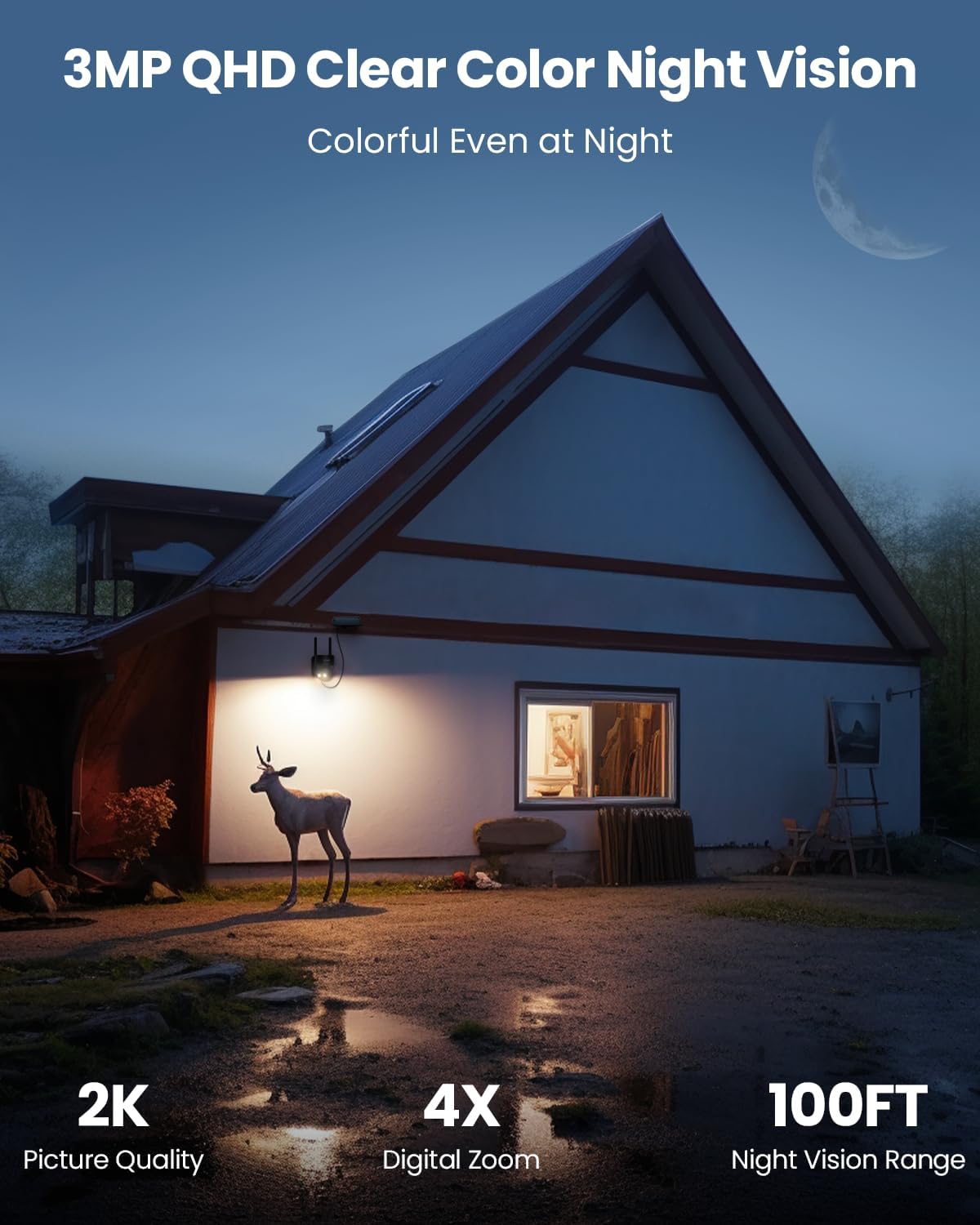
Outdoor scene at night with the ieGeek camera's spotlight illuminating the area for clear color night vision.
Figure 4.3: An outdoor night scene demonstrating the camera's 2K QHD clear color night vision, enabled by its spotlight, providing colorful images up to 100 feet.
Comparison of color night vision (ON) and black and white night vision (OFF) modes.
Figure 4.4: Illustrates the difference between full-color night vision (with spotlight) and standard black-and-white infrared night vision.

4.4. AI Intelligent Motion Detection

The camera utilizes AI-powered motion detection to accurately identify human figures, vehicles, pets, and packages, reducing false alarms triggered by irrelevant movements. When motion is detected, the camera can push instant alerts to your smartphone.

AI intelligent monitoring detecting a person, package, vehicle, and pet in an outdoor setting.
Figure 4.5: The camera's optional AI intelligent monitoring feature, capable of identifying and distinguishing between people, packages, vehicles, and pets.
Man approaching a door, with the camera detecting humanoid motion and showing alert features like 2S alarm push and 10-level sensitivity.
Figure 4.6: Demonstrates the camera's PIR motion detection accuracy, highlighting features like 2-second alarm push, 10-level sensitivity, customizable alert areas, and humanoid motion detection to minimize false alarms.

4.5. Customizable Alert Areas

Define specific areas within the camera's field of view where you want to receive motion alerts. This allows you to focus monitoring on critical zones and ignore activity in non-essential areas, further reducing unwanted notifications.

Outdoor scene with a house and yard, showing three customizable alert zones (Zone 1, Zone 2, Zone 3) for motion detection.
Figure 4.7: Illustration of how to set up customizable alert zones in your surveillance area, allowing you to specify regions for motion detection.

4.6. Two-Way Audio

The integrated microphone and speaker enable two-way communication. You can listen to audio from the camera's location and speak through the camera to communicate with visitors or deter intruders.

Smartphone app showing two-way audio feature, with a person speaking through the camera to a delivery person.
Figure 4.8: The two-way audio feature allows for real-time communication, enabling users to listen and talk smoothly through the camera.

4.7. Local & Cloud Storage

The camera supports both local storage via an SD card (up to 128GB) and cloud storage options. Cloud storage typically offers features like 6-second event recording and a 7-day loop, with options for extended plans.

ieGeek Cloud storage features: 6s recording, 7 days loop, and click to share options.
Figure 4.9: Overview of ieGeek Cloud storage capabilities, including 6-second recording, 7-day loop, and easy sharing options.

4.8. Multi-User Sharing

Share access to your camera's live feed and recordings with family members or trusted individuals. This allows multiple users to monitor the property simultaneously from their own devices.

Illustration of multiple users accessing a single camera's feed from different locations around the world.
Figure 4.10: The multi-user sharing feature allows several individuals to view the camera's feed simultaneously, enhancing collaborative monitoring.

4.9. Works with Alexa

Integrate your ieGeek DQ201 camera with Amazon Alexa for convenient voice control and live viewing on compatible Alexa-enabled devices with screens. Simply use voice commands like "Alexa, show me the Garage" to access your camera feed.

Amazon Echo Show displaying the live feed from the ieGeek camera via Alexa voice command.
Figure 4.11: The camera's compatibility with Alexa allows for flexible remote access and live viewing on smart displays using voice commands.
Video 4.1: How to connect ieGeek security cameras with Alexa. This video provides a detailed guide on linking your ieGeek camera to your Amazon Alexa account and using voice commands for live viewing.

4.10. Privacy Mode

Activate privacy mode through the app to temporarily disable video recording and live viewing, ensuring your privacy when needed. You can schedule privacy periods for specific times of the day.

Smartphone app showing privacy mode settings with options to schedule privacy periods.
Figure 4.12: The privacy mode feature allows users to schedule specific times when the camera will not record or stream, ensuring personal privacy.

5. Maintenance

5.1. Solar Powered & Battery

The ieGeek DQ201 is powered by a rechargeable battery and continuously charged by a 1.5W solar panel. This ensures 100% wire-free operation and reduces the need for manual recharging, provided the solar panel receives sufficient sunlight.

ieGeek DQ201 camera with solar panel, illustrating its wire-free and solar-powered operation.
Figure 5.1: The camera's solar panel connection, ensuring continuous battery charging and wire-free operation.

5.2. IP65 Weatherproof Design

Built to withstand various outdoor conditions, the camera boasts an IP65 weatherproof rating. This ensures reliable operation in rain, snow, and other harsh weather, making it suitable for year-round outdoor surveillance.

ieGeek camera mounted outdoors in the rain, demonstrating its weatherproof design against rainy, hurricane, and snowing conditions.
Figure 5.2: The camera's robust design ensures it can operate effectively in various weather conditions, including rain, hurricanes, and snow.

6. Troubleshooting

6.1. Alexa Connection Issues

If you experience issues connecting your ieGeek camera with Amazon Alexa, ensure the following:

  • Select the correct country for your device during the linking process.
  • Use the camera's correct name in your Alexa commands.
  • Verify that your internet connection is stable and working properly.
Video 6.1: Troubleshooting tips for connecting ieGeek security cameras with Amazon Alexa. This video guides users through common issues and solutions for Alexa integration.

7. Specifications

FeatureDetail
Indoor/Outdoor UsageOutdoor
Compatible DevicesieGeek Cam & CloudEdge APP
Power SourceBattery & Solar Powered
Connectivity ProtocolWi-Fi (2.4GHz)
Controller TypeAndroid
Mounting TypeWall Mount
Video Capture Resolution2K
ColorBlack
Item Weight1.79 pounds
Product Dimensions5.51 x 3.94 x 4.92 inches
Night Vision Range100 Feet
International Protection RatingIP65
Special Feature2k QHD, Color Night Vision, Spotlight & Siren, Intelligent Motion Detection, 2-Way Talk, Multi-User Sharing, IP65 Weatherproof, Compatible with Alexa

8. Quality Assurance & Testing

ieGeek products undergo rigorous testing to ensure durability and performance in various conditions. This includes waterproof tests, extreme temperature tests (from -72°F to 126°F), salt spray tests for corrosion resistance, and button life cycle tests. Charging cables also undergo bend tests to ensure longevity.

Video 8.1: Live from ieGeek lab - Why is product testing important. This video showcases the extensive testing procedures ieGeek cameras undergo, including waterproof, extreme temperature, and salt spray tests, to ensure product quality and durability.

9. Warranty & Support

ieGeek offers a 2-year quality guarantee on its products. For any inquiries or support needs, please contact the professional after-sales team. You can reach them via email at service@iegeek.com. The company is committed to providing high-quality products and customer satisfaction.

ieGeek Center support information: Reply within 24 hours, email service@iegeek.com, 2-year warranty.
Figure 9.1: ieGeek support details, including email contact and warranty period.

10. Privacy & Security

ieGeek prioritizes your privacy and uses Advanced Encryption Standard (AES128) technology, a commercial and government data encryption standard adopted by the US federal government. AES provides a 128-bit key, offering robust protection for your data.

Diagram illustrating ieGeek's privacy commitment with AES128 encryption for security cameras.
Figure 10.1: ieGeek's commitment to privacy, highlighting the use of AES128 encryption technology to protect user data.

Related Documents - DQ201

Preview ieGeek DQ201 PTZ Battery Security Camera User Manual
Comprehensive user manual for the ieGeek DQ201 PTZ Battery Security Camera, covering introduction, app installation, camera setup, charging, installation guides, PIR motion sensor notes, and FAQs.
Preview ieGeek ZY-C2 PTZ Battery Security Camera User Manual
This user manual provides comprehensive instructions for the ieGeek ZY-C2 PTZ Battery Security Camera, covering setup, installation, features, and troubleshooting.
Preview ieGeek PTZ Outdoor Security Camera User Manual
User manual for the ieGeek PTZ Outdoor Security Camera, providing setup instructions, features, and troubleshooting.
Preview ieGeek ZS-GX4S PTZ Battery Security Camera User Manual
User manual for the ieGeek ZS-GX4S PTZ Battery Security Camera, covering camera introduction, app installation, account registration, Wi-Fi connection, battery charging, installation guides, PIR motion sensor notes, and FAQs.
Preview ieGeek 4G LTE Cellular Wireless Security Camera User Manual
Comprehensive user manual for the ieGeek 4G LTE Cellular Wireless Security Camera, covering setup, operation, troubleshooting, and features.
Preview ieGeek PTZ Battery Security Camera User Manual
Comprehensive user manual for the ieGeek PTZ Battery Security Camera, covering setup, Wi-Fi connection, app installation, charging, installation guides, and troubleshooting.