
1. Introduction
The LENCENT Universal Travel Adapter (Model 635DQ) is designed to provide a versatile charging solution for travelers worldwide. This compact adapter features PD20W fast charging, multiple USB and Type-C ports, and interchangeable plugs compatible with over 200 countries, including USA, UK, EU, and AUS standards. It is engineered with GaN III Technology for efficient and safe power delivery to a wide range of electronic devices.
2. Key Features
- PD 20W Fast Charging: Delivers optimized and rapid charging for compatible USB devices, including iPhones, iPads, and other smartphones.
- Updated GaN III Technology: Ensures a smaller form factor without compromising power, offering a better low-temperature fast charging experience. Includes integrated double 10A fuses for overload protection and a safety valve to prevent accidental contact with live parts.
- Universal Compatibility: Supports PD 3.0, QC3.0+, and PPS protocols for flawless charging speeds across various USB-powered devices such as iPhone 14/13 series, iPad Pro/Air, MacBook Pro/Air, Bluetooth earphones, e-readers, and portable speakers.
- AUTO-ID Technology: Intelligently identifies connected devices to detect and deliver the optimum charging current, ensuring fast and safe charging.
- Ideal for Travel: Portable (7.4 x 4.7 x 5.2 cm) and lightweight (139g) design with interchangeable UK / US / EU / AUS plugs. Compatible in over 200 countries, allowing simultaneous charging of multiple devices.
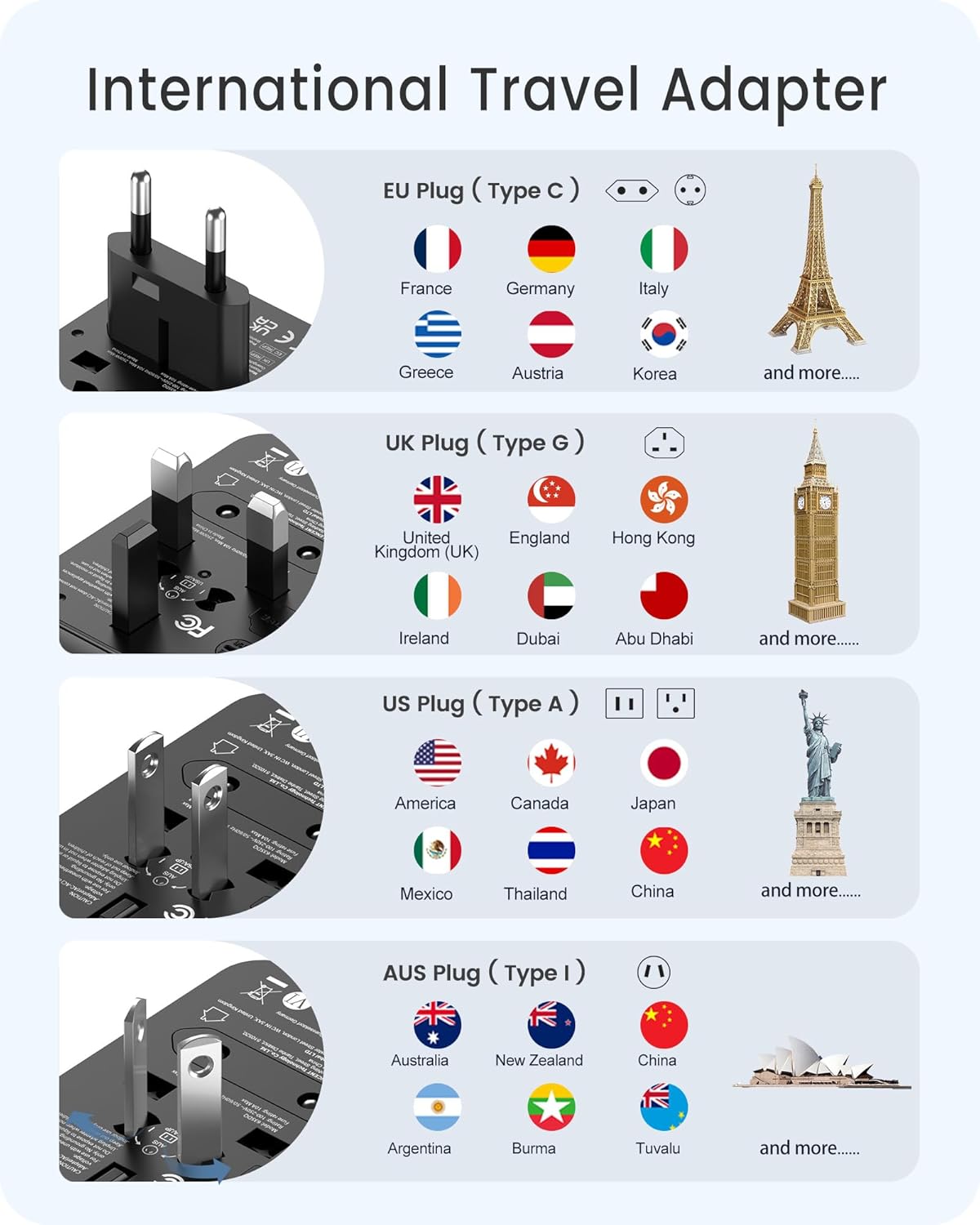
Image: The LENCENT Universal Travel Adapter showcasing its compact design and multiple plug types.
3. Setup and Plug Selection
The LENCENT Universal Travel Adapter features retractable pins for different regional outlets. To select the appropriate plug type:
- Identify the required plug type for your destination (e.g., EU, UK, USA/AUS).
- Locate the corresponding slider on the side of the adapter.
- Slide the lever to extend the correct pins. Ensure the pins are fully extended and locked into place before use.
- To retract the pins, press the release button (if applicable) and slide the lever back.

Image: Illustration of the EU plug (Type C) extended, indicating compatibility with countries like France, Germany, and Italy.

Image: Illustration of the UK plug (Type G) extended, indicating compatibility with countries like the United Kingdom, Singapore, and Hong Kong.

Image: Illustration of the USA/AUS plug (Type A/I) extended, indicating compatibility with countries like America, Canada, and Japan.
Video: An official LENCENT video demonstrating the deployment of various international plug types on the travel adapter.
4. Operating Instructions
The adapter allows you to charge multiple devices simultaneously using its AC socket, USB-A ports, and USB-C port.
4.1. Using the AC Socket
The universal AC socket accepts various plug types (Type A, B, C, O, E/F, G, I, J, L, N). Insert your appliance's plug into the front universal socket. Ensure the adapter's pins are correctly configured for the wall outlet you are using.

Image: The LENCENT Universal Travel Adapter plugged into a wall socket, demonstrating its use for charging a smartphone.
4.2. Using the USB Ports
The adapter includes 2 USB-A ports and 1 Type-C port. Connect your USB charging cables directly to the corresponding ports. The AUTO-ID technology will automatically detect your device and deliver the optimal charging current.
- USB-C1 Port: Provides up to 20W Max output for fast charging compatible devices.
- USB-A Ports: Deliver smart charging for various devices.

Image: A close-up view of the adapter's USB-A and USB-C ports, illustrating how multiple devices can be connected for charging.
4.3. Important Note on Voltage Conversion
This adapter does NOT convert voltage. It is compatible with input voltages from 100-250V. Ensure your devices are compatible with the local voltage before plugging them into the AC socket. Using devices that are not voltage compatible may cause damage to the device or the adapter.
5. Specifications
| Feature | Detail |
|---|---|
| Model Number | 635DQ |
| Product Dimensions | 1.77 x 2.05 x 2.76 inches (7.4 x 4.7 x 5.2 cm) |
| Item Weight | 4.9 ounces (139g) |
| Input Voltage | 100-250 Volts AC, 50/60Hz |
| AC Output | 10A Max, 2500W Max |
| USB-C1 Output | PD 20W Max |
| USB-A Output | Smart 2.4A (per port) |
| Total USB Output | 3.5A Max |
| Plug Types | USA/AUS (Type A/I), UK (Type G), EU (Type C) |
| Safety Features | Double 10A Fuses, Safety Valve, Overload Protection |
6. Maintenance
6.1. Cleaning
To clean the adapter, ensure it is unplugged from all power sources and devices. Use a soft, dry cloth to wipe the exterior. Do not use liquid cleaners or immerse the adapter in water.
6.2. Fuse Replacement
The adapter is equipped with integrated double 10A fuses for overload protection. If the adapter stops functioning, a fuse may have blown. To replace a fuse:
- Ensure the adapter is unplugged from all power sources.
- Locate the fuse compartment (typically on the side or bottom, often marked 'FUSE').
- Carefully open the compartment and replace the blown fuse with a new 10A fuse.
- Close the compartment securely.

Video: A demonstration of how to access and replace the fuse in the LENCENT Universal Travel Adapter.
7. Troubleshooting
- Device not charging: Ensure the adapter is securely plugged into the wall outlet and the correct regional pins are extended. Check that your charging cable is properly connected to both the adapter and your device. Verify that the device is compatible with the adapter's output specifications.
- Slow charging: Ensure your device and cable support fast charging protocols (PD, QC) to utilize the adapter's full capabilities. Charging multiple devices simultaneously may distribute power, potentially reducing individual charging speeds.
- Adapter not powering on: Check the wall outlet with another device to ensure it is functional. If the adapter has a replaceable fuse, check and replace it as described in the Maintenance section.
8. Safety Information
- This adapter is for indoor use only.
- Do not expose to liquids or moisture.
- Keep out of reach of children.
- Do not use with ungrounded appliances.
- This adapter does not convert voltage. Always ensure your device's voltage compatibility with the local power supply.
- Do not exceed the maximum load of 10A (2500W).
- The integrated safety valve protects against direct contact with live parts.

Image: The adapter's safety features, including the dual 10A fuse, are highlighted.
9. Warranty and Support
For warranty information or customer support, please contact LENCENT directly through their official website or the Amazon chat service. Refer to your purchase documentation for specific warranty terms and conditions.

Image: Icons representing various channels for customer support: Email, Amazon Chat, and Official Website.


