
HelloBaby HB30-2
HelloBaby HB30-2 Baby Monitor User Manual
Model: HB30-2
Introduction
Thank you for choosing the HelloBaby HB30-2 Baby Monitor. This device is designed to provide a secure and reliable way to monitor your baby, offering peace of mind with its advanced features and user-friendly operation. This manual will guide you through the setup, operation, and maintenance of your new baby monitor system.

Image: The HelloBaby HB30-2 Baby Monitor system, featuring one parent unit (monitor) and two baby units (cameras).
Product Components
The HelloBaby HB30-2 package includes the following items:
- 1 x Parent Unit (Monitor)
- 2 x Baby Units (Cameras)
- 3 x Power Adapters (one for the monitor, two for the cameras)
- 1 x User Manual (this document)
- Mounting hardware for cameras
Key Features
The HB30-2 Baby Monitor is equipped with several features designed for optimal baby monitoring:
- Dual Camera Support: Monitor up to two rooms simultaneously with the included cameras. The system supports up to four cameras in total.
- Secure 2.4GHz FHSS Transmission: Ensures a private, interference-free connection without Wi-Fi or apps, offering enhanced security and stability.
- VOX Mode (Sound-Activated Screen): The monitor screen automatically activates when sound is detected, conserving battery life while ensuring you are alerted to your baby's cries.
- Infrared Night Vision: Provides clear black and white video in low-light conditions, allowing for continuous monitoring without disturbing your baby.
- 2X Digital Zoom: Zoom in on your baby for a closer view.
- Long Range: Up to 1000ft range for flexible placement within your home.
- Alarm Alert: Built-in alarm function for reminders.

Image: Visual representation of the HB30-2's key features, including adjustable camera angle, extended range, night vision, alarm, VOX mode, and digital zoom.

Image: Illustration of the secure FHSS (Frequency-Hopping Spread Spectrum) wireless technology, ensuring private and encrypted video transmission without reliance on Wi-Fi or external apps.
Setup Guide
Follow these steps for the initial setup of your HelloBaby HB30-2 monitor system:
- Charge the Parent Unit: Connect the parent unit (monitor) to a power outlet using its dedicated power adapter. Charge it fully before first use to ensure optimal battery life. The monitor is rechargeable.
- Position the Baby Units (Cameras): Place each baby unit in a location that provides a clear view of your baby. Ensure the camera is out of reach of children. You can place it on a flat surface or use the included mounting hardware to wall-mount it.
- Connect Baby Units to Power: Plug each baby unit into a power outlet using its respective power adapter. The cameras require continuous power to operate.
- Power On:
- Press and hold the Power button on the parent unit to turn it on.
- Ensure both baby units are also powered on.
- Pairing (if necessary): The units are pre-paired at the factory. If a connection is not established automatically, refer to the "Troubleshooting" section for pairing instructions.
Operating Instructions
VOX Mode (Sound-Activated Screen)
The VOX mode helps conserve battery by turning off the screen when no sound is detected. The monitor continues to listen in the background.
- When the screen is off in VOX mode, it will automatically turn on and display video when your baby makes a sound (e.g., crying).
- You can adjust the VOX sensitivity level in the monitor's settings. A higher sensitivity means the monitor will react to quieter sounds.

Image: Demonstration of the Sound-Activated Screen (VOX Mode), showing the monitor screen turning on automatically when sound is detected from the baby.
Infrared Night Vision
The baby units are equipped with infrared LEDs and a light sensor. In low-light conditions, the camera automatically switches to night vision mode.
- The video feed on the parent unit will appear in clear black and white.
- This feature ensures continuous monitoring even in a dark room without disturbing your baby's sleep.

Image: Illustration of the automatic infrared night vision feature, providing clear black and white video of the baby in dark environments.
Digital Zoom (2X)
To get a closer look at your baby, you can use the 2X digital zoom function.
- Locate the zoom button on the parent unit (often indicated by a magnifying glass icon).
- Press the button to toggle between 1X (normal view) and 2X zoom.
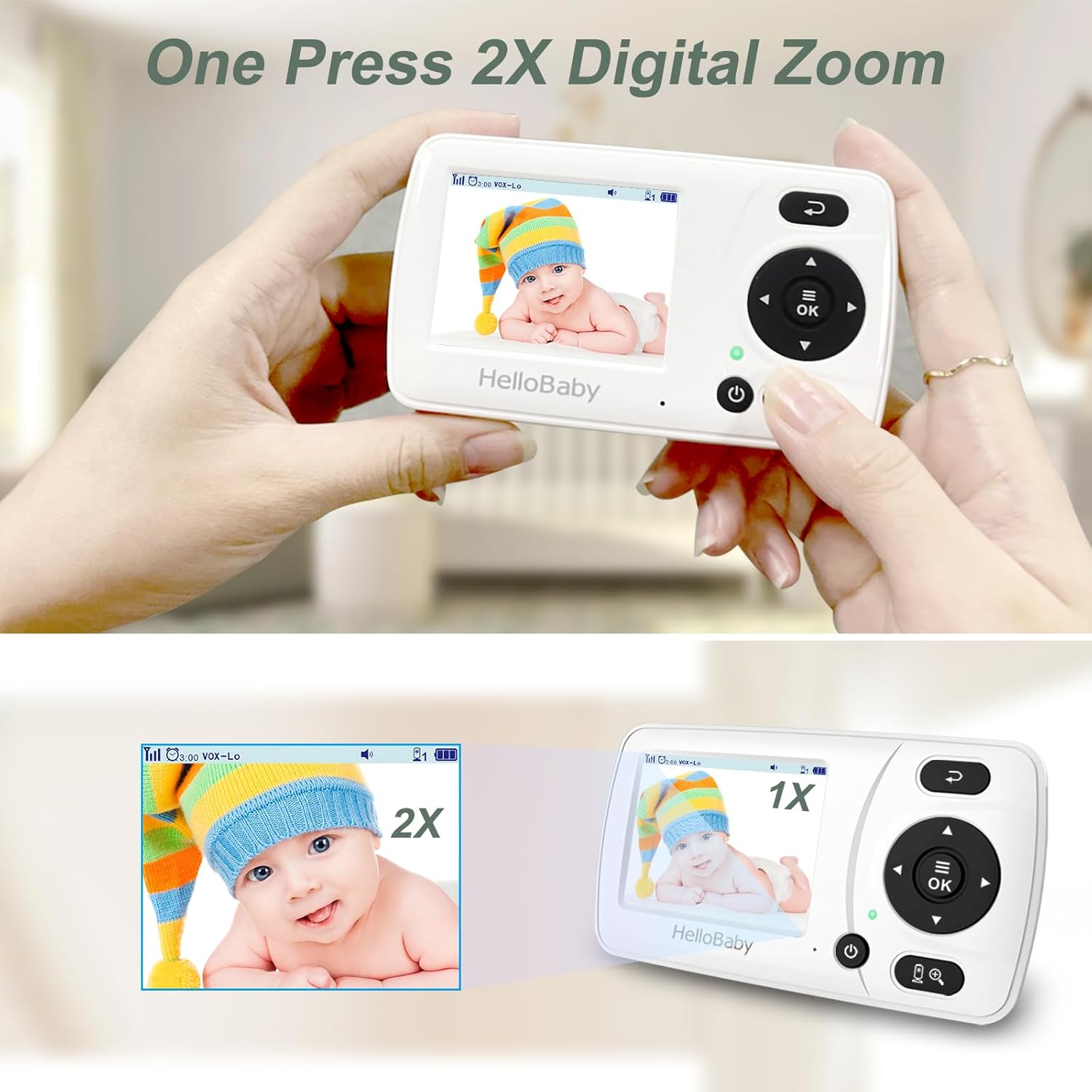
Image: Visual guide to using the one-press 2X digital zoom feature on the parent unit, showing the difference between normal and zoomed views.
Switching Between Cameras
If you are using multiple cameras, you can switch between them or view them in a split-screen mode (if supported by your model).
- Refer to the parent unit's buttons for camera switching (often a dedicated button or menu option).
- The HB30-2 supports viewing images from both cameras on one monitor, and can cycle through them.

Image: Depiction of switching between Camera 1 and Camera 2 views on the parent unit, allowing monitoring of different areas.
Maintenance
To ensure the longevity and optimal performance of your HelloBaby monitor, follow these maintenance guidelines:
- Cleaning: Use a soft, dry cloth to clean the surfaces of the parent unit and baby units. Do not use abrasive cleaners or solvents.
- Avoid Water: Keep the devices away from water and moisture. Do not immerse them in water.
- Temperature: Store and operate the monitor within recommended temperature ranges (typically 0°C to 40°C / 32°F to 104°F).
- Battery Care (Parent Unit): For best battery life, avoid fully discharging the parent unit frequently. Charge it regularly.
- Lens Care: Gently wipe the camera lens with a soft, lint-free cloth if it becomes dirty to ensure clear video quality.
Troubleshooting
If you encounter issues with your HelloBaby HB30-2 monitor, try the following solutions:
| Problem | Possible Solution |
|---|---|
| No picture/sound on parent unit |
|
| Poor picture quality |
|
| Sound interference/static |
|
| Parent unit battery drains quickly |
|
Specifications
- Model: HB30-2
- Brand: HelloBaby
- Connectivity Technology: Wireless (2.4GHz FHSS)
- Video Capture Resolution: 480p
- Screen Size (Parent Unit): 2.4-inch Color LCD
- Range: Up to 1000 feet (line of sight)
- Power Source: Corded Electric (Cameras), Rechargeable Battery (Parent Unit)
- Included Components: HB30 baby monitor with 2 cameras
- Item Dimensions (L x W x H): 24.5 x 8 x 13.8 Centimetres
- Item Weight: 552 g
- Batteries: 1 Lithium Ion battery required (included for parent unit)
Warranty and Support
HelloBaby products are designed for reliability and performance. For warranty information or technical support, please contact HelloBaby customer service.
Please retain your proof of purchase for warranty claims.
For further assistance, visit the official HelloBaby website or contact their customer support channels.
Related documentsHB30-2


Ask a question about this manual
Ask about setup, troubleshooting, compatibility, parts, safety, or missing instructions. Manuals+ will review the question and use this page’s manual context to help answer it.